تعارف
This manual provides detailed instructions for the setup, operation, maintenance, and troubleshooting of your Timex Ironman Triathlon T200 42mm Watch. Please read this guide thoroughly to ensure proper use and to maximize the functionality of your timepiece.

شڪل 1: سامهون view of the Timex Ironman Triathlon T200 watch.
واچ اجزاء
Familiarize yourself with the buttons and display elements of your watch:
- موڊ بٽڻ: مختلف واچ موڊس (وقت، ڪرونوگراف، ٽائمر، الارم) ذريعي چڪر لڳائي ٿو.
- سيٽ/ريڪال بٽڻ: Used to set values in setting modes and recall lap/split times.
- انڊيگلو بٽڻ: انڊيگلو رات جي روشني کي چالو ڪري ٿو.
- شروع/ليپ بٽڻ: Starts and stops the chronograph, records lap times.
- اسٽاپ/ري سيٽ بٽڻ: Stops the chronograph or timer, resets values.
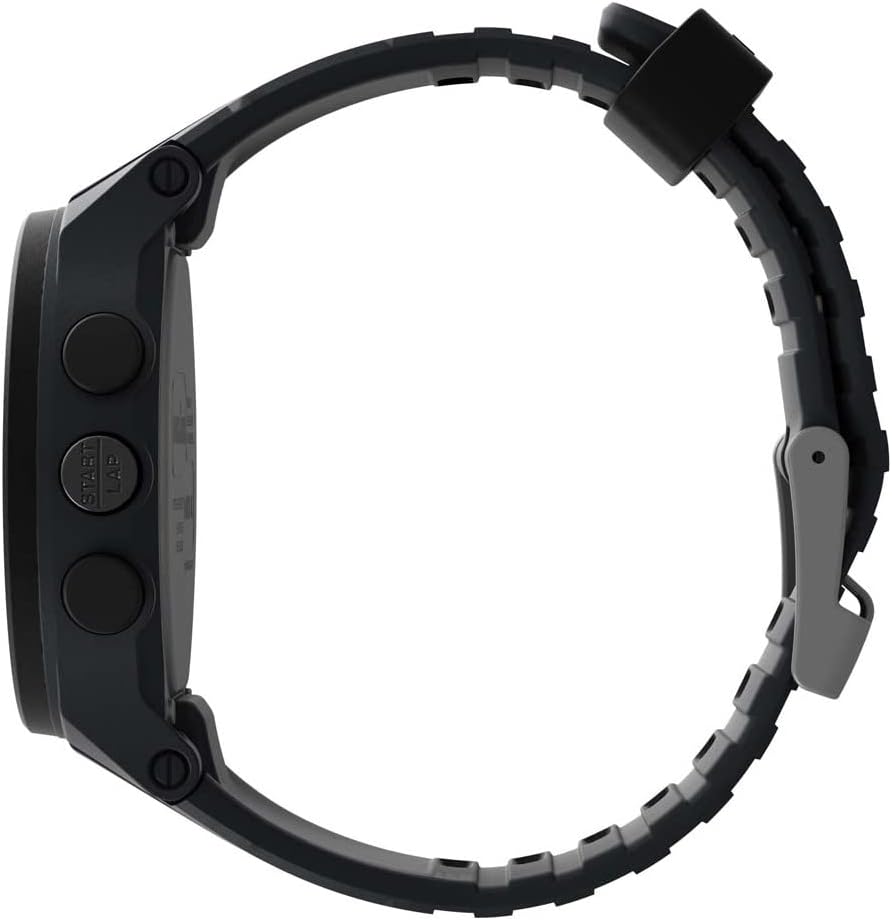
شڪل 2: پاسي view illustrating button placement.
سيٽ اپ ڪريو
1. شروعاتي وقت ۽ تاريخ جي سيٽنگ
- In Timekeeping mode, press and hold the سيٽ / ياد ڪريو بٽڻ دٻايو جيستائين ڊسپلي چمڪي.
- کي دٻايو START/LAP or اسٽاپ/ري سيٽ ڪريو button to adjust the flashing segment (e.g., hour, minute, year, month, day).
- کي دٻايو موڊ button to advance to the next segment.
- سڀ سيٽنگون مڪمل ٿيڻ کان پوءِ، دٻايو سيٽ / ياد ڪريو سيٽنگ موڊ مان نڪرڻ لاءِ بٽڻ.
2. پٽي جي ترتيب
The watch features an adjustable silicone strap designed for comfort and secure fit. Adjust the buckle to fit your wrist circumference, ensuring it is snug but not overly tight.
آپريٽنگ هدايتون
1. وقت جي نگراني جو طريقو
This is the default display mode, showing the current time, day, and date. Press the انڊيوگو button to activate the backlight for visibility in low-light conditions.
2. ڪرونوگراف (اسٽاپ واچ)
The chronograph measures elapsed time up to 100 hours with a 200-lap memory.
- From Timekeeping mode, press the موڊ button until 'CHRONO' or stopwatch icon appears.
- دٻايو START/LAP وقت شروع ڪرڻ لاء.
- دٻايو START/LAP again to record a lap time while the chronograph continues running.
- دٻايو اسٽاپ/ري سيٽ ڪريو ڪرونوگراف کي روڪڻ لاءِ. دٻايو START/LAP ٻيهر شروع ڪرڻ يا اسٽاپ/ري سيٽ ڪريو ٻيهر صفر ڏانهن ري سيٽ ڪرڻ لاء.
- ليپ ٽائمز کي ياد ڪرڻ لاءِ، دٻايو سيٽ / ياد ڪريو جڏهن ته ڪرونوگراف کي روڪيو ويو آهي.
3. Interval Training Timer
The watch supports interval training with customizable warm-up, interval, and cool-down segments.
- From Timekeeping mode, press the موڊ button until 'INTERVAL' or interval icon appears.
- دٻايو ۽ رکو سيٽ / ياد ڪريو to enter setting mode for intervals.
- Adjust warm-up, interval duration, number of repeats, and cool-down times using START/LAP or اسٽاپ/ري سيٽ ڪريو, and advance with موڊ.
- دٻايو سيٽ / ياد ڪريو سيٽنگون بچائڻ لاء.
- دٻايو START/LAP to begin the interval training sequence.
4. ڳڻپ ٽائمر
A 24-hour countdown timer is available for various activities.
- From Timekeeping mode, press the موڊ button until 'TIMER' or timer icon appears.
- دٻايو ۽ رکو سيٽ / ياد ڪريو گهربل ڳڻپ جي مدت مقرر ڪرڻ لاءِ.
- دٻايو START/LAP countڻپ شروع ڪرڻ لاءِ.
- The watch will emit an alert when the countdown reaches zero.
5. الارم
Set up to 3 daily, weekday, or weekend alarms.
- From Timekeeping mode, press the موڊ button until 'ALARM' or alarm icon appears.
- دٻايو موڊ to cycle through Alarm 1, Alarm 2, Alarm 3.
- دٻايو ۽ رکو سيٽ / ياد ڪريو to set the alarm time and type (daily, weekday, weekend).
- دٻايو START/LAP الارم کي آن/آف ڪرڻ لاءِ.
6. Dual Time Zones
The watch allows for tracking two different time zones.
- From Timekeeping mode, press the موڊ button until 'T2' or dual time icon appears.
- دٻايو ۽ رکو سيٽ / ياد ڪريو to adjust the second time zone.
سار سنڀال
1. صفائي
Clean your watch with a soft, damp cloth. Avoid harsh chemicals or abrasive materials that could damage the case or strap. For water-resistant models, rinse with fresh water after exposure to salt water or chlorine.
2. پاڻي جي مزاحمت
This watch is water resistant to 100 meters (330 feet), making it suitable for swimming and snorkeling. It is not recommended for diving. Do not press any buttons while the watch is submerged to prevent water intrusion.
3. بيٽري مٽائڻ
The watch uses one Lithium Metal battery (CR2025). Battery replacement should be performed by a qualified watch technician to ensure water resistance is maintained. Attempting to replace the battery yourself may void the warranty and compromise the watch's water resistance.

Figure 3: Case back detailing water resistance and battery type.
مشڪلاتون
- ڊسپلي خالي يا مدھم آهي: The battery may be low or depleted. Replace the battery as described in the Maintenance section.
- بٽڻ غير جوابي آهن: Ensure the watch is not in a locked mode (if applicable, refer to specific model features). If the issue persists, a soft reset may be required by pressing all four side buttons simultaneously for a few seconds.
- Indiglo light not working: This could indicate a low battery or a malfunction. If battery replacement does not resolve the issue, contact customer support.
- غلط وقت/تاريخ: Re-enter the time and date settings as described in the Setup section. Ensure the correct time zone is selected.
وضاحتون
| ماڊل نمبر | TW5M48900SO |
| ڪيس قطر | 42mm |
| ڪيس جو مواد | رال |
| لينس مواد | اکري |
| پٽي جو مواد | سليڪون |
| پاڻي جي مزاحمت | 100 ميٽر (330 فوٽ) |
| ڪرنوگراف | 100 ڪلاڪ 200-ليپ ياداشت سان |
| ٽائمر | 24 ڪلاڪن جي ڳڻپ |
| الارم | 3 روزاني، هفتي جي ڏينهن، يا هفتي جي آخر ۾ الارم |
| پٺاڻ | انڊيگلو لائيٽ اپ واچ ڊائل |
| بيٽري جو قسم | 1 ليٿيم ڌاتو جي بيٽري (CR2025) |
وارنٽي ۽ سپورٽ
Your Timex watch is covered by a limited warranty. For specific warranty details, service, or support, please refer to the warranty information included with your purchase or visit the official Timex webسائيٽ. وارنٽي دعوائن لاءِ خريداري جو ثبوت رکو.
وڌيڪ مدد لاءِ، توهان دورو ڪري سگهو ٿا ايميزون تي ٽائمڪس اسٽور or the official Timex customer support portal.


