تعارف
This manual provides comprehensive instructions for the setup, operation, and maintenance of your Tesla Smart Pet Feeder (Model TSL-PC-BL4). Please read this manual thoroughly before using the device to ensure proper functionality and safety for your pet.
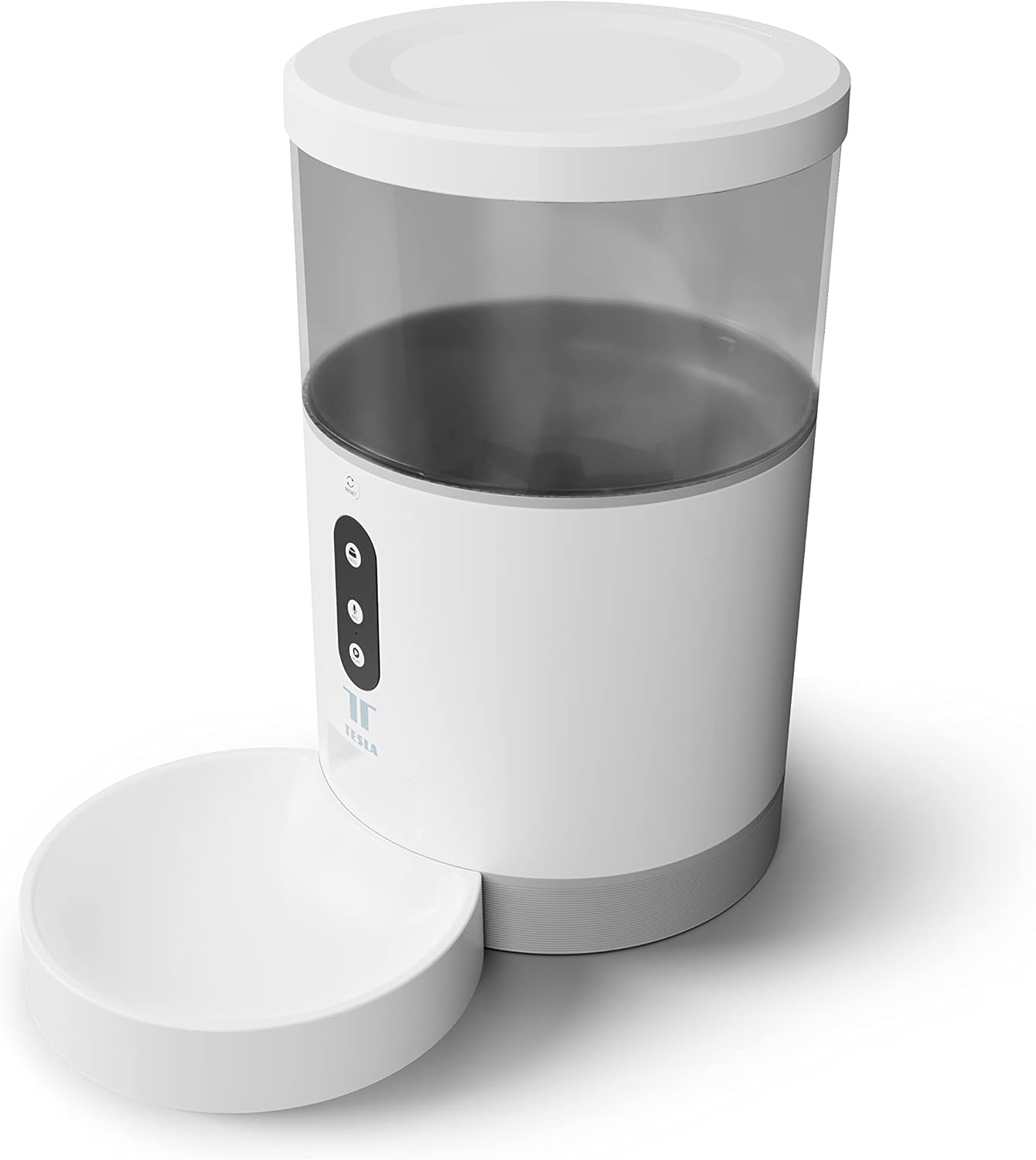
تصوير: سامهون view of the Tesla Smart Pet Feeder, showing the main unit with a transparent food reservoir, control buttons, and an attached white food bowl.
اهم حفاظتي ڄاڻ
ڊوائيس کي زخم يا نقصان کان بچڻ لاءِ مھرباني ڪري ھيٺ ڏنل حفاظتي احتياطن تي عمل ڪريو:
- مکيه يونٽ کي پاڻي يا ٻين مائع ۾ نه وسايو.
- Ensure the feeder is placed on a stable, level surface.
- Keep out of reach of small children and pets when not in use or during assembly.
- Use only dry pet food with a kibble size up to 10 mm.
- ڊوائيس کي الڳ ڪرڻ يا مرمت ڪرڻ جي ڪوشش نه ڪريو. مدد لاءِ ڪسٽمر سپورٽ سان رابطو ڪريو.
- Always unplug the feeder before cleaning.
پيڪيج مواد
پڪ ڪريو ته سڀئي جزا پيڪيج ۾ موجود آهن:
- Tesla Smart Pet Feeder Main Unit
- کاڌي جو پيالو
- پاور اڊاپٽر
- استعمال ڪندڙ جو دستياب (ھي دستاويز)
سيٽ اپ گائيڊ
1. اسيمبلي
- Place the main feeder unit on a flat, stable surface.
- Attach the food bowl to the designated slot at the base of the main unit. Ensure it clicks securely into place.

تصوير: سامهون view of the feeder highlighting the control panel with feed, record, and play buttons.
2. ڊوائيس کي طاقت ڏيڻ
- اي سي پاور: Connect the power adapter to the feeder's power input port and plug it into a standard wall outlet.
- بيٽري بيڪ اپ (اختياري): بجلي جي فراهمي دوران بي ترتيب آپريشن لاءِtages, insert three LR20 (D-cell) batteries into the battery compartment located at the bottom of the unit. بيٽريون شامل نه آهن ۽ الڳ الڳ خريد ڪرڻ گهرجن.

تصوير: پوئين پاسي view of the Tesla Smart Pet Feeder, showing the power input and battery compartment location.
3. Filling the Food Container
- Remove the lid from the top of the feeder.
- Pour dry pet food into the transparent container. The feeder has a capacity of 4 liters. Ensure kibble size does not exceed 10 mm to prevent jamming.
- لڪير کي محفوظ طور تي تبديل ڪريو.

تصوير: هڪ ويجهو تصوير view of dry pet food kibble in the feeder's bowl, demonstrating the type of food suitable for the device.
4. ايپ ڊائون لوڊ ۽ وائي فائي ڪنيڪشن
- Download the Tesla Smart app from the App Store (iOS) or Google Play Store (Android).
- Open the app and follow the on-screen instructions to create an account and add your Tesla Smart Pet Feeder.
- ڪامياب ڪنيڪشن لاءِ پڪ ڪريو ته توهان جو وائي فائي نيٽ ورڪ 2.4 GHz آهي.
آپريٽنگ هدايتون
1. Scheduling Feeds via App
The primary method for controlling the feeder is through the Tesla Smart app. The app allows you to:
- Set feeding schedules: Define specific times for food dispensing.
- Adjust portion sizes: Control the amount of food dispensed per feeding. The feeder can dispense up to 10 portions per feeding.
- View کاڌ خوراڪ جي تاريخ.

Image: An orange cat resting beside the Tesla Smart Pet Feeder, illustrating the feeder in a home environment.
2. دستي کارائڻ
To dispense food manually, press the "Feed" button on the feeder's control panel. Each press will dispense one portion of food.
3. Voice Recording and Playback
The feeder includes a built-in microphone and speaker, allowing you to record a short message to call your pet at feeding times.
- رڪارڊ: Press and hold the "Record" button (microphone icon) on the control panel. Speak your message. Release the button to save.
- راند: Press the "Play" button (speaker icon) to play your recorded message. The message will also play automatically at scheduled feeding times.
4. سمارٽ هوم انٽيگريشن
The Tesla Smart Pet Feeder is compatible with Google Assistant and Amazon Alexa. You can control the feeder using voice commands after linking it through the respective smart home applications.
سار سنڀال ۽ صفائي
Regular cleaning ensures the longevity and hygienic operation of your pet feeder.
- Food Bowl: The food bowl can be detached and washed by hand with mild soap and water. Rinse thoroughly and dry completely before reattaching.
- Food Container: The transparent food container can be wiped clean with a damp ڪپڙو. کاڌي سان ڀرڻ کان اڳ پڪ ڪريو ته اهو مڪمل طور تي سڪي ويو آهي.
- مکيه يونٽ: Wipe the exterior of the main unit with a soft, dry cloth. Do not use abrasive cleaners or immerse the main unit in water.
- کاڌي جي جاءِ: Periodically check the food outlet for any blockages or food residue and clear as necessary.
Important: Always unplug the feeder from the power source before cleaning.
مشڪلاتون
| مسئلو | ممڪن سبب | حل |
|---|---|---|
| فيڊر آن نه ٿي رهيو آهي. | No power from outlet; batteries depleted or incorrectly installed. | Check power adapter connection and wall outlet. Replace or install D-cell batteries correctly. |
| کاڌو نه پيو ورهائجي. | Food jammed; container empty; incorrect kibble size; feeder offline. | Check for food blockages in the outlet. Refill container. Ensure kibble is max 10mm. Check Wi-Fi connection and app status. |
| وائي فائي سان ڳنڍجي نٿو سگھي. | Incorrect Wi-Fi password; 5GHz network; feeder too far from router. | Verify Wi-Fi password. Ensure you are connecting to a 2.4 GHz network. Move feeder closer to router. Restart feeder and router. |
| Voice recording not working. | Microphone issue; recording procedure incorrect. | Ensure you are pressing and holding the record button correctly. Try restarting the feeder. |
وضاحتون
| خاصيت | تفصيل |
|---|---|
| ماڊل نمبر | TSL-PC-BL4 |
| طول و عرض (L x W x H) | 30 x 30 x 20 سينٽي |
| وزن | 1.92 ڪلوگرام |
| مواد | پلاسٽڪ |
| رنگ | اڇو |
| ظرف | 4 ليٽر |
| ڪٻٽ جي ماپ | 10 ملي ميٽر تائين |
| طاقت جو ذريعو | AC Adapter, 3x LR20 (D-cell) batteries (not included) |
| رابطي | وائي فائي (2.4 GHz) |
| خاص خاصيتون | Wi-Fi and App Control, Voice Recording, Google Assistant/Amazon Alexa Compatible |
وارنٽي ۽ سپورٽ
For warranty information, technical support, or service inquiries, please refer to the official Tesla Smart webسائيٽ تي وڃو يا انهن جي ڪسٽمر سروس ڊپارٽمينٽ سان رابطو ڪريو. خريداري جي ثبوت طور پنهنجي خريداري جي رسيد رکو.
For the most up-to-date information and support resources, visit: www.teslasmart.com


