تعارف
Thank you for choosing the Xtorm XP300U Portable Power Station. This device is designed to provide reliable and portable power for various applications, from home use to outdoor camping. With a 300W output and multiple charging options, it ensures your devices stay powered wherever you are. This manual provides essential information on the safe operation, setup, maintenance, and troubleshooting of your power station.
حفاظت جي ڄاڻ
Please read all safety warnings and instructions before using this product to ensure safe operation and prevent damage. Keep this manual for future reference.
- يونٽ کي ڌار نه ڪريو، مرمت نه ڪريو، يا تبديل نه ڪريو. غلط ٻيهر گڏ ڪرڻ سان باهه يا زخم ٿي سگهي ٿو.
- يونٽ کي باهه يا تيز گرمي پد (60°C/140°F کان مٿي) جي سامهون نه رکو.
- يونٽ کي سڌي سج جي روشني يا گرم ماحول ۾ استعمال يا ذخيرو نه ڪريو.
- يونٽ کي غسل خاني ۾ يا پاڻي يا نمي جي سامهون وارن علائقن ۾ استعمال يا ذخيرو نه ڪريو.
- يونٽ کي نه ڇڏيو، نه ماريو، يا مضبوط اثرن جي تابع نه ڪريو.
- ٻارن جي پهچ کان پري رکو.
- Use only the original or certified charging cables and adapters.
- استعمال ۽ چارجنگ دوران مناسب وينٽيليشن کي يقيني بڻايو. يونٽ کي نه ڍڪيو.
- In case of leakage from the battery, do not allow the liquid to come into contact with skin or eyes. If contact occurs, wash with plenty of water and seek medical advice.

Image: Safety features of the Xtorm XP300U, highlighting Pure Sine Wave, Short Circuit Protection, Temperature Control, Overcharge Protection, APM Chip, A-Class Batteries, and High Efficiency.
پيڪيج مواد
مھرباني ڪري کولڻ تي پيڪيج جي مواد کي چيڪ ڪريو. جيڪڏھن ڪا به شيءِ غائب يا خراب آھي، پنھنجي پرچون ڪندڙ سان رابطو ڪريو.
- Xtorm XP300U Portable Power Station
- اي سي وال چارجر ڪندڙ
- ڪار چارجر ڪيبل
- MC4 to DC Cable (for solar panel connection, solar panel not included)
- استعمال ڪندڙ دستي

Image: The Xtorm XP300U Portable Power Station displayed with its included accessories: AC wall charger, car charger cable, and MC4 to DC cable.
پيداوار ختمview
Familiarize yourself with the different parts of your Xtorm XP300U Power Station.
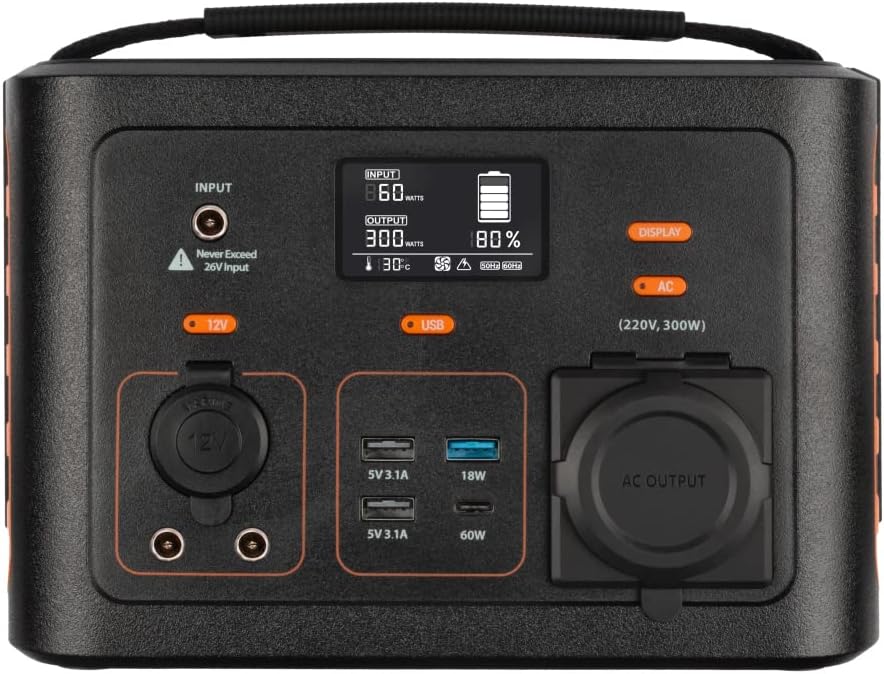
تصوير: ويجهو تصوير view of the Xtorm XP300U's front panel, showing the digital display, input port, 12V DC output, USB-A and USB-C ports, and AC output socket.
فرنٽ پينل خاصيتون:
- LCD ڊسپلي: بيٽري جي سطح، ان پٽ/آئوٽ پٽ پاور، ۽ اسٽيٽس اشارا ڏيکاري ٿو.
- ان پٽ پورٽ: For charging the power station via AC adapter, car charger, or solar panel.
- 12V ڊي سي آئوٽ: For powering 12V devices.
- USB-A بندرگاهن: Multiple USB-A outputs for charging various devices (e.g., 5V 3.1A, 18W Quick Charge).
- USB-C PD پورٽ: High-speed USB-C Power Delivery output (up to 60W).
- AC آئوٽ پٽ ساکٽ: Standard AC outlet for powering household appliances (220V, 300W).
- ڪنٽرول بٽڻ: Buttons for turning on/off specific outputs (e.g., AC, DC, USB).

تصوير: مٿي view of the Xtorm XP300U, highlighting its integrated carrying handle for portability.

تصوير: پوئين پاسي view of the Xtorm XP300U, featuring the Xtorm brand logo and "Portable Power Station 300" text.
سيٽ اپ ڪريو
Before first use, it is recommended to fully charge your Xtorm XP300U Power Station.
- پيڪ ڪريو: پيڪنگ مان پاور اسٽيشن ۽ سڀني لوازمات کي احتياط سان هٽايو.
- Initial Charge (AC Wall Charger):
- Connect the AC wall charger to the input port on the power station.
- Plug the AC wall charger into a standard wall outlet.
- The LCD display will show the charging status. Charge until the battery indicator shows 100%.
- لڳائڻ: Place the power station on a stable, flat surface in a well-ventilated area, away from direct sunlight or heat sources.
آپريٽنگ هدايتون
The Xtorm XP300U offers multiple ways to charge and power your devices.
پاور اسٽيشن کي چارج ڪرڻ:
The XP300U can be recharged using four different methods:
Image: Visual representation of the four charging methods for the Xtorm XP300U: via wall socket, USB-C PD, solar panel (not included), and 12V car charger.
- Via Wall Socket (AC Charger): Connect the included AC wall charger to the input port and a wall outlet.
- USB-C PD ذريعي: Use a compatible USB-C Power Delivery charger (not included) to charge the unit via its USB-C port.
- شمسي پينل ذريعي: Connect a compatible solar panel (not included) to the input port using the provided MC4 to DC cable. Ensure the solar panel is placed in direct sunlight for optimal charging.
- Via 12V Car Charger: Connect the included car charger cable to the input port and your vehicle's 12V cigarette lighter socket.
The LCD display will show the input wattage and battery charge status during charging. You can use the outputs even while the power station is charging (pass-through charging).
Using the Outputs:
The XP300U provides various output ports to power different types of devices.

Image: The Xtorm XP300U demonstrating its universal compatibility with icons representing various devices and output types: 1x AC 300W/220V, 1x USB-C PD 60W, 2x DC 5.5mm 60W, 2x USB QC3.0 18W, 1x USB 18W, and 1x 12V Car 120W.
- AC Output (220V, 300W):
- Press the "AC" button to activate the AC output. The AC indicator on the display will light up.
- Plug your device's power cord into the AC outlet.
- Ensure your device's power consumption does not exceed 300W.
- Press the "AC" button again to turn off the AC output when not in use.
- ڊي سي آئوٽ (12V):
- Press the "12V" button to activate the DC output. The DC indicator will light up.
- Connect your 12V device to the DC port.
- Press the "12V" button again to turn off the DC output.
- USB Outputs (USB-A, USB-C PD):
- The USB outputs are typically always active when the unit is on.
- Connect your USB-powered devices to the appropriate USB-A or USB-C PD ports.
- The display will show the output wattage for connected devices.
The power station can provide power for extended periods, depending on the connected devices' power consumption.

تصوير: Examples of device runtimes with the Xtorm XP300U: 17.5 hours for a 10W LED light, 5.5 hours for a 30W small TV, 4 hours for a 40W small coolbox, and 6 hours for a 40W small coolbox (via 12V carplug output).
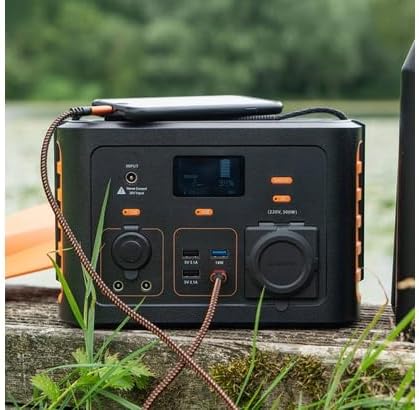
Image: The Xtorm XP300U Portable Power Station being used outdoors on a wooden surface, charging a smartphone, demonstrating its portability and utility in various environments.
سار سنڀال
مناسب سار سنڀال توهان جي پاور اسٽيشن جي ڊگهي عمر ۽ بهترين ڪارڪردگي کي يقيني بڻائي ٿي.
- صفائي: يونٽ جي ٻاهرين حصي کي صاف ڪرڻ لاءِ نرم، سڪل ڪپڙو استعمال ڪريو. رگڙيندڙ صاف ڪندڙ يا محلول استعمال نه ڪريو.
- اسٽوريج:
- پاور اسٽيشن کي ٿڌي، سڪل جاءِ تي، سڌي سج جي روشني ۽ انتهائي گرمي پد کان پري رکو.
- ڊگهي مدت جي اسٽوريج لاءِ، بيٽري جي صحت کي برقرار رکڻ لاءِ يونٽ کي هر 3-6 مهينن ۾ تقريباً 50-80٪ تائين چارج ڪريو.
- وڌيڪ نمي واري ماحول ۾ ذخيرو ڪرڻ کان پاسو ڪريو.
- بيٽري جي سنڀال: Do not fully discharge the battery frequently, as this can reduce its lifespan. Recharge promptly when the battery level is low.
مشڪلاتون
If you encounter issues with your Xtorm XP300U, refer to the following common problems and solutions.
| مسئلو | ممڪن سبب | حل |
|---|---|---|
| يونٽ چالو ناهي. | بيٽري مڪمل طور تي ختم ٿي وئي آهي. | Connect the power station to an AC wall outlet and charge it for at least 30 minutes. |
| اي سي آئوٽ پُٽ ڪم نه ڪري رهيو آهي. | AC output not activated; device exceeds 300W; overheating. | Press the "AC" button to activate. Check device wattage. Allow unit to cool down if overheated. |
| USB پورٽ چارج نه ٿي رهيا آهن. | Device not compatible; cable faulty. | Ensure device is compatible. Try a different USB cable. |
| سست چارج. | Using a low-power charger; environmental factors (e.g., cloudy for solar). | Use the original AC charger or a higher wattage USB-C PD charger. Optimize solar panel placement. |
If the problem persists, please contact Xtorm customer support.
وضاحتون
Detailed technical specifications for the Xtorm XP300U Portable Power Station.
| خاصيت | تفصيل |
|---|---|
| ماڊل نالو | XP300U |
| برانڊ | ايڪسٽرم |
| ٻاھر نڪرڻ جي طاقت | 300 Watts (AC) |
| انٽ واليمtage | 12 وولٽ (DC) |
| طاقت جو ذريعو | AC Wall, USB-C PD, Solar, Car Charger |
| تجويز ڪيل استعمال | Home, Camping |
| وزن | 3300 گرام (3.3 ڪلوگرام) |
| رنگ | نارنگي |
| شامل اجزاء | 1 package (Power Station, AC Charger, Car Charger, MC4 to DC Cable) |

Image: Dimensions of the Xtorm XP300U Portable Power Station (240mm x 154mm x 142mm) and its weight (3.3 kg), highlighting its convenient travel size.
وارنٽي ۽ سپورٽ
Xtorm products come with a standard warranty. Please refer to the warranty card included in your package or visit the official Xtorm webتفصيلي وارنٽي شرطن ۽ ضابطن لاءِ سائيٽ.
For technical support, troubleshooting assistance, or warranty claims, please contact Xtorm customer service:
- Webسائيٽ: www.xtorm.eu (سپورٽ رابطي جي معلومات لاءِ چيڪ ڪريو)
- اي ميل: Refer to the Xtorm website for specific support email addresses.
- فون: Refer to the Xtorm website for regional support phone numbers.
When contacting support, please have your product model (XP300U) and purchase details ready.


