1. تعارف
Welcome to the user manual for the Phanteks Evolv Shift XT, an extendable small form-factor chassis designed for mini-ITX gaming systems. This manual provides comprehensive instructions for setting up, operating, maintaining, and troubleshooting your new PC case. Please read this manual carefully before beginning installation to ensure optimal performance and longevity of your system.
The Evolv Shift XT offers unique flexibility, allowing you to adjust its height to accommodate various cooling configurations, from ultra-compact air cooling to advanced liquid cooling solutions. Its premium construction with anodized aluminum panels and integrated D-RGB lighting ensures both durability and aesthetic appeal.
2. پراڊڪٽ ختمview
2.1 اهم خاصيتون
- وڌائڻ وارو ڊيزائن: Unique capability to extend chassis height for enhanced cooling performance (Compact, Air Boost, Liquid Cooled modes).
- GPU Support: Accommodates large 3-slot GPUs up to 324mm in length with an included PCI-e x16 Gen4 Riser Cable.
- پريميئم تعمير: Crafted from 3mm thick anodized aluminum panels for durability and a high-end finish.
- انٽيگريٽيڊ ڊي-آر جي بي لائٽنگ: Features an Infinity Mirror with built-in lighting effects, expandable and syncable with other system components.
- بهتر ڪيل هوا جو وهڪرو: Ultra-fine Mesh panels provide direct fresh air to components.
- Convenient I/O: Front I/O includes USB-C 10Gb/s and a USB 3.0 port.
2.2 جزا ۽ حصا
Familiarize yourself with the main components of the Evolv Shift XT chassis:
- Main Chassis Frame
- Top and Bottom Aluminum Panels
- Side Mesh Panels
- Front I/O Module (USB-C, USB 3.0, D-RGB controls)
- PCI-e Gen4 X16 Riser Cable
- Accessory Box (screws, cable ties, manual)

Figure 2.2.1: The Phanteks Evolv Shift XT chassis in its compact configuration, showcasing its sleek silver design and front panel. This view highlights the ventilation on the side panels and the central light strip.

شڪل 2.2.2: سامهون view of the Evolv Shift XT, detailing the front I/O panel with USB-C, USB 3.0 ports, and power/reset buttons. The Phanteks logo is visible at the bottom.

شڪل 2.2.3: پاسي view of the Evolv Shift XT, emphasizing the ultra-fine mesh panels designed for optimal airflow. The horizontal black band separates the top and bottom sections of the chassis.

Figure 2.2.4: Illustration showing the three adjustable height configurations of the Evolv Shift XT: Compact, Air Boost (+30mm), and Liquid Cooled (+60mm). This demonstrates the chassis's adaptability for different cooling needs.
3. سيٽ اپ ۽ تنصيب
3.1 قبل از انسٽاليشن چيڪ لسٽ
- Ensure all components are compatible with Mini-ITX form factor.
- Gather necessary tools: Phillips head screwdriver, cable ties (included), anti-static wrist strap (recommended).
- Unpack the chassis and verify all parts are present according to the packing list.
3.2 Opening the Chassis
The Evolv Shift XT features an open chassis design for easy access. Gently pull the top and bottom aluminum panels outwards to detach them. The side mesh panels can then be removed by sliding them off their mounting points.
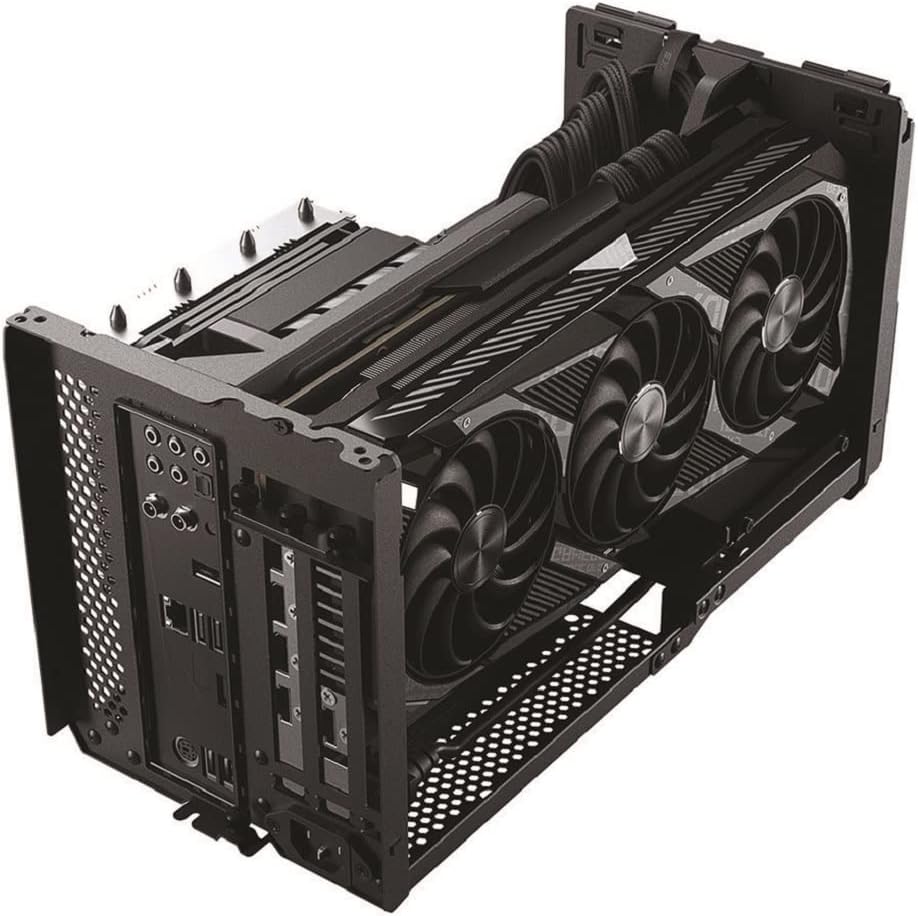
Figure 3.2.1: The Evolv Shift XT with its top panel hinged open, providing full access to the internal layout for component installation. This view shows a liquid cooling radiator and fans mounted to the top panel.
3.3 Motherboard جي انسٽاليشن
- Install the CPU, CPU cooler (if air cooler), and RAM onto your Mini-ITX motherboard before placing it into the chassis.
- Carefully align the motherboard with the standoffs inside the chassis.
- مهيا ڪيل اسڪرو استعمال ڪندي مدر بورڊ کي محفوظ ڪريو.
3.4 GPU جي انسٽاليشن
The chassis supports triple-slot GPUs up to 324mm in length using the pre-installed PCI-e Gen4 Riser Cable.
- Connect your GPU to the PCI-e Gen4 Riser Cable.
- Secure the GPU within its designated slot using the provided screws and GPU straps.
- Ensure the riser cable is securely locked into place.

شڪل 3.4.1: هڪ اندروني view of the Evolv Shift XT showcasing a large triple-slot graphics card securely installed. This image highlights the compact yet efficient layout for high-performance components.
3.5 Power Supply Installation (SFX/SFX-L)
The Evolv Shift XT requires an SFX or SFX-L power supply.
- Mount the SFX/SFX-L power supply into its dedicated bracket.
- Secure the bracket and power supply within the chassis.
- Connect all necessary power cables to the motherboard, GPU, and other components. Utilize the cable hooks and velcro ties for organized cable management.

شڪل 3.5.1: هڪ اندروني view illustrating the placement of the SFX power supply and the importance of cable management within the compact chassis.
3.6 Cooling Configuration (Compact, Air Boost, Liquid Cooled)
The Evolv Shift XT can be configured in three modes based on your cooling needs:
- ڪمپيڪٽ موڊ: Default configuration, ideal for air-cooled systems with CPU coolers up to 72mm tall.
- Air Boost Mode: Extend the chassis height by 30mm to accommodate two 120mm or 140mm fans at the top for enhanced airflow.
- Liquid Cooled Mode: Extend the chassis height by 60mm to install a 240mm AIO liquid cooler at the top for maximum cooling performance.

Figure 3.6.1: Compact Mode - Internal view showing components in the smallest configuration.

Figure 3.6.2: Air Boost Mode - Internal view with added space for top fans.
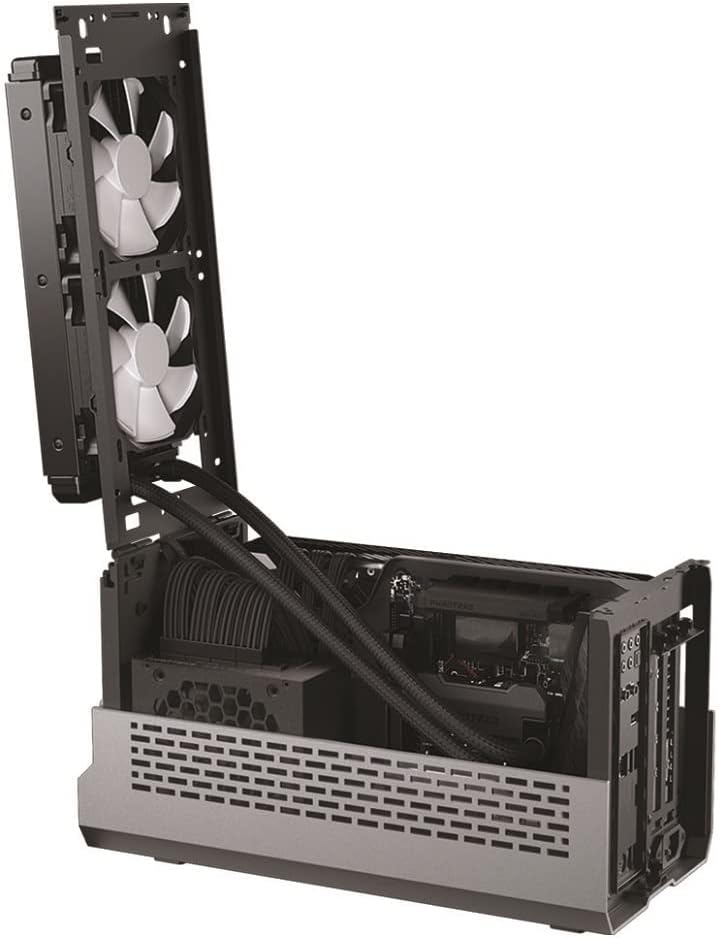
Figure 3.6.3: Liquid Cooled Mode - Internal view showing a 240mm AIO radiator installed at the top.
To extend the chassis, gently pull the top section upwards until it clicks into the desired height. Re-attach the top aluminum panel once configured.
4. آپريٽنگ هدايتون
4.1 پاور آن/آف
- پاور آن: Press the power button located on the front I/O panel.
- بجلي بند: Perform a graceful shutdown through your operating system. For a forced shutdown, press and hold the power button for 5 seconds.
4.2 ڊي-آر جي بي لائيٽنگ ڪنٽرول
The Evolv Shift XT features integrated D-RGB lighting with an Infinity Mirror effect. The lighting can be controlled directly from the front I/O panel.
- موڊ بٽڻ: Press to cycle through various pre-programmed lighting effects.
- رنگ جو بٽڻ: Press to change the color of the current lighting effect.
- هم وقت سازي: The D-RGB lighting can be synchronized with compatible motherboard software (e.g., ASUS Aura Sync, MSI Mystic Light Sync, Gigabyte RGB Fusion, Razer Chroma) by connecting the D-RGB cable from the chassis to the motherboard's D-RGB header.

Figure 4.2.1: The Evolv Shift XT with its D-RGB Infinity Mirror lighting illuminated, showcasing the dynamic visual effects.
5. سار سنڀال
5.1 Cleaning the Chassis
- Regularly clean the exterior panels with a soft, dry, lint-free cloth.
- For dust accumulation on mesh panels and internal components, use compressed air. Ensure the system is powered off and unplugged before cleaning.
- Do not use liquid cleaners directly on electronic components.
5.2 Dust Filter Maintenance
The Evolv Shift XT features ultra-fine mesh panels that act as dust filters. Periodically remove these panels and clean them with a soft brush or compressed air to maintain optimal airflow.
6. مسئلا حل ڪرڻ
| مسئلو | ممڪن سبب | حل |
|---|---|---|
| سسٽم تي طاقت نه آهي. | Loose power connections, faulty power supply, incorrect front panel header connection. | Check all power cables (24-pin, 8-pin CPU, GPU PCIe) are securely connected. Verify power supply switch is ON. Ensure front panel power switch cable is correctly connected to motherboard. |
| ڪابه ڊسپلي پيداوار. | GPU not seated correctly, faulty riser cable, monitor cable issues. | Reseat the GPU. Ensure the PCI-e Gen4 Riser Cable is fully connected and locked. Test with a different monitor cable or monitor. |
| تيز گرمي پد. | Insufficient cooling, dust buildup, incorrect fan orientation. | Ensure chassis is in Air Boost or Liquid Cooled mode if using high-performance components. Clean dust from mesh panels and fans. Verify fans are installed with correct airflow direction. Consider upgrading cooling solution. |
| D-RGB lighting not working. | Loose D-RGB cable, incompatible motherboard header, software conflict. | Check D-RGB cable connection to the front I/O and motherboard. Ensure motherboard D-RGB header is 3-pin 5V Addressable RGB, not 4-pin 12V RGB. Try controlling via front panel buttons first. |
7. وضاحتون
| خاصيت | تفصيل |
|---|---|
| ماڊل نالو | Evolv Shift XT Galaxy Silver |
| ماڊل نمبر | PH-ES121XT_DGS01 |
| چيسس جو قسم | Small Form-Factor (SFF) |
| Motherboard مطابقت | ميني ITX |
| مواد | Anodized Aluminum, Steel, Tempered Glass |
| طول و عرض (L x W x H) | 19.69 x 19.69 x 11.02 inches (Compact Mode) |
| وزن | 11.08 پائونڊ |
| GPU ڪليئرنس | Up to 324mm length, 3-slot width |
| سي پي يو کولر ڪليئرنس | Up to 72mm height (Compact Mode) |
| پاور سپلائي سپورٽ | SFX، SFX-L |
| سامهون I/O | 1x USB-C 10Gb/s, 1x USB 3.0, D-RGB Control Buttons |
| PCI-e Riser Cable | PCI-e Gen4 X16 (included) |
| Cooling Support (Top) | 2x 120mm/140mm fans or 1x 240mm AIO radiator (in extended modes) |
8. وارنٽي ۽ سپورٽ
Phanteks products are manufactured to the highest quality standards. For specific warranty information regarding your Evolv Shift XT chassis, please refer to the warranty card included in your product packaging or visit the official Phanteks webسائيٽ.
For technical support, troubleshooting assistance beyond this manual, or to inquire about replacement parts, please contact Phanteks customer support through their official webسائيٽ يا توهان جي خريداري دستاويزن سان مهيا ڪيل رابطي جي معلومات.
سرڪاري فينٽيڪس Webسائيٽ: www.phanteks.com


