1. تعارف
This manual provides comprehensive instructions for the installation, operation, and maintenance of your MUBVIEW Adjustable Angle Mount. This accessory is designed to enhance the viewing capabilities of your compatible video doorbell by allowing precise angle adjustments.

Figure 1: MUBVIEW Doorbell with Adjustable Angle Mount installed.
2. مطابقت
MUBVIEW Adjustable Angle Mount is specifically designed for use with the following MUBVIEW video doorbell models:
- MUBVIEW J7 Doorbell
- MUBVIEW J9 Doorbell
- MUBVIEW J9 Plus Doorbell
Ensure your doorbell model is listed above for proper fit and function.

Figure 2: Visual representation of compatible MUBVIEW doorbell models (J7, J9, J9 Plus).
3. اهم خاصيتون
- ترتيب ڏيڻ وارو Viewزاويه: Allows horizontal adjustment from 25 to 50 degrees to optimize your doorbell's field of view.
- وڌايل حرڪت جي چڪاس: Improves the doorbell's ability to detect motion by providing a broader or more targeted viewing علائقو.
- پائيدار تعمير: Manufactured from rugged materials designed to withstand various outdoor weather conditions.
- آسان تنصيب: Designed for straightforward installation, typically completed within 10-15 minutes with included hardware.
4. پيڪيج مواد
مھرباني ڪري تصديق ڪريو ته انسٽاليشن شروع ڪرڻ کان اڳ سڀئي جزا موجود آھن:
- MUBVIEW Adjustable زاويه جبل
- Mounting Screws (Stainless Steel)
- Wall Anchors (if applicable)
- انسٽاليشن گائيڊ (هي دستاويز)
5. انسٽاليشن گائيڊ
Follow these steps to install your MUBVIEW Adjustable Angle Mount:
- چڙهڻ واري مٿاڇري کي تيار ڪريو: Choose a suitable location on your wall where the doorbell will be installed. Ensure the surface is clean and stable.
- Attach the Angle Mount: Position the angle mount at the desired location. Use the provided screws to secure the mount to the wall. If mounting on masonry or drywall, use appropriate wall anchors.
- زاويه کي ترتيب ڏيو: Loosen the adjustment screw on the side of the mount. Rotate the doorbell to achieve the desired horizontal viewing angle (between 25 and 50 degrees). Once the angle is set, tighten the adjustment screw firmly to secure the position.
- Mount the Doorbell: Attach your compatible MUBVIEW J7, J9, or J9 Plus doorbell onto the adjustable angle mount according to your doorbell's specific mounting instructions. Ensure it is securely fastened.
- ٽيسٽ ڪارڪردگي: Verify that the doorbell is securely mounted and that the camera's field of view is optimized for your needs.
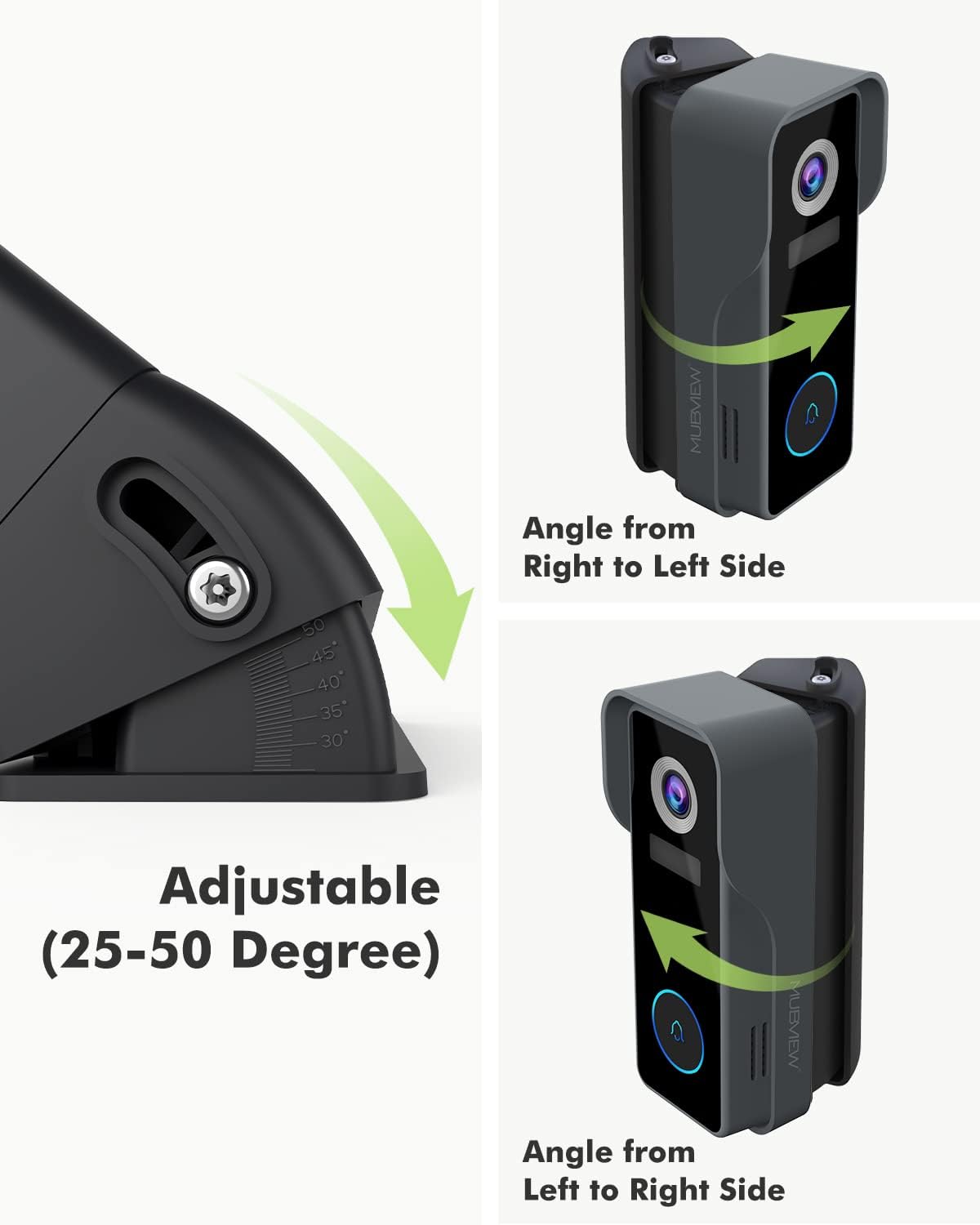
Figure 3: Illustration of the adjustable angle mechanism, allowing rotation from 25 to 50 degrees.

شڪل 4: مثالample of the MUBVIEW Adjustable Angle Mount with doorbell securely installed on a wall.

Figure 5: Comparison demonstrating the expanded visible area achieved with the angle mount versus without it.
6. آپريشن
The primary function of the MUBVIEW Adjustable Angle Mount is to provide flexible positioning for your doorbell camera. Once installed, you can fine-tune the horizontal viewزاويه:
- To adjust the angle, gently loosen the adjustment screw located on the side of the mount.
- Carefully rotate the doorbell and mount assembly to the left or right until the desired field of view is achieved. The mount allows for adjustments between 25 and 50 degrees.
- Once the optimal angle is found, securely tighten the adjustment screw to lock the position. This ensures the doorbell remains stable and maintains its set viewزاويه.
7. سار سنڀال
MUBVIEW Adjustable Angle Mount is constructed from durable, weather-resistant materials designed for outdoor use. Minimal maintenance is required:
- صفائي: Periodically wipe the mount with a soft, damp cloth to remove dust, dirt, or debris. Avoid using harsh chemicals or abrasive cleaners, as these may damage the finish.
- چڪاس: Occasionally check the mounting screws to ensure they remain tight and secure. Re-tighten if necessary.
8. مسئلا حل ڪرڻ
If you encounter issues with your MUBVIEW Adjustable Angle Mount, consider the following:
- جبل ڍلو محسوس ٿئي ٿو: Ensure all mounting screws are securely tightened. If installed with wall anchors, verify they are properly seated in the wall.
- زاويه کي ترتيب ڏيڻ ۾ ڏکيائي: Check that the adjustment screw is sufficiently loosened before attempting to rotate the mount. Do not force the rotation.
- غريب viewing angle after adjustment: Re-adjust the angle as described in the "Operation" section. Use your doorbell's live view feature to confirm the optimal field of view.
9. وضاحتون
| برانڊ | MUBVIEW |
| ماڊل | Adjustable زاويه جبل |
| چڙهڻ جو قسم | ڀت جبل |
| Adjustable Angle Range | 25 to 50 degrees (horizontal) |
| مواد | Stainless Steel (screws), Rugged Composite (mount) |
| شيءِ جو وزن | 3.52 اونس |
| پيڪيج جي ماپ | 5.12 x 3.19 x 1.73 انچ |
| ٺاهيندڙ | MUBVIEW |
| تاريخ پهرين دستياب | فيبروري 22، 2022 |
10. وارنٽي ۽ سپورٽ
MUBVIEW products are designed for reliability and performance. For specific warranty information or technical support, please refer to the documentation included with your original MUBVIEW doorbell or visit the official MUBVIEW webسائيٽ. وارنٽي جي دعوي لاء توهان جي خريداري جي رسيد رکو.


