1. تعارف
The Bloody M70 TWS True Wireless Gaming Earbuds are designed to provide a high-quality audio experience for gaming and music. Featuring Bluetooth 5.0 connectivity, dual ENC noise-canceling microphones, deep bass, and low latency, these earbuds are built for immersive sound. The IPX4 water-resistant rating ensures durability against splashes.

Image: Bloody M70 TWS True Wireless Gaming Earbuds in their open charging case, highlighting the design and red LED indicators.
2. پيڪيج مواد
Verify that all items are present in your Bloody M70 TWS Earbuds package:
- Bloody M70 TWS Earbuds (Left and Right)
- چارج ڪيس
- USB چارجنگ ڪيبل
- Silicone Ear Tips (Small, Medium, Large)
- استعمال ڪندڙ دستي

Image: An illustration showing the Bloody M70 TWS Earbuds, charging case, various ear tip sizes, and charging cable as included in the package.
3. شروع ڪرڻ
3.1 ائربڊس ۽ ڪيس کي چارج ڪرڻ
Before first use, fully charge the earbuds and charging case. The charging case features a slide-lid design for easy access.
- ائربڊس کي چارجنگ ڪيس ۾ رکو. پڪ ڪريو ته اهي صحيح طرح سان ويٺا آهن.
- USB چارجنگ ڪيبل کي ڪيس تي چارجنگ پورٽ ۽ پاور سورس سان ڳنڍيو.
- The charging time for the earbuds is approximately 1.5 hours. The case provides extended playtime up to 24 hours.

Image: The Bloody M70 TWS charging case demonstrating its slide-lid mechanism for opening.

Image: A visual representation of the Bloody M70 TWS Earbuds' battery performance, showing 6 hours of music playback, 24 hours with the charging case, and 1.5 hours for earbud charging.
3.2 بلوٽوٽ جوڙي
The Bloody M70 TWS Earbuds utilize Bluetooth 5.0 for a stable and fast connection.
- Open the charging case and remove the earbuds. They will automatically enter pairing mode.
- پنهنجي ڊوائيس (اسمارٽ فون، ٽيبليٽ، ڪمپيوٽر) تي، بلوٽوٿ کي فعال ڪريو.
- ڳولھيو available devices and select "Bloody M70" from the list.
- هڪ ڀيرو ڳنڍيل، توهان کي هڪ تصديق وارو آواز ٻڌڻ ۾ ايندو، ۽ ائربڊس استعمال لاءِ تيار هوندا.
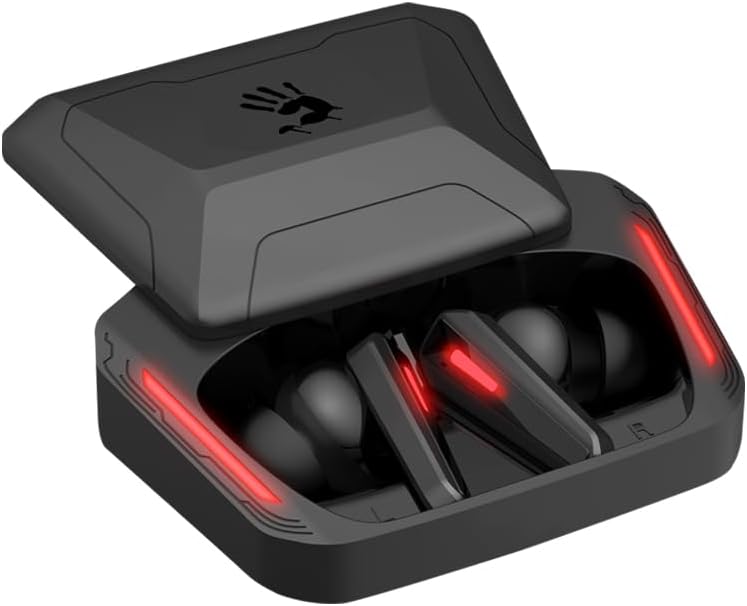
Image: A visual guide to Bluetooth pairing, showing a smartphone's Bluetooth menu with the 'Bloody M70' selected for connection.
4. آپريشن
4.1 ٽچ ڪنٽرول
The Bloody M70 earbuds feature intuitive touch controls for managing audio and calls.
- جلد جو: Long tap the left earbud for 2 seconds.
- جلد +: Long tap the right earbud for 2 seconds.
- Play / Call: ڪنهن به ائربڊ تي هڪ ڀيرو ٽيپ ڪريو.
- پويون ٽريڪ: کاٻي ائربڊ کي ٻه ڀيرا ٽيپ ڪريو.
- اڳيون ٽريڪ: ساڄي ائربڊ کي ٻه ڀيرا ٽيپ ڪريو.
- آواز جو اسسٽنٽ: کاٻي ائربڊ کي ٽي ڀيرا ٽيپ ڪريو.
- Gaming / Audio Mode Switch: ساڄي ائربڊ کي ٽي ڀيرا ٽيپ ڪريو.

Image: A comprehensive diagram detailing the touch gestures and their corresponding functions on both the left and right Bloody M70 earbuds.
4.2 Dual-Mode Options (Game/Audio)
Switch between Game Mode for low-latency audio and Audio Mode for general listening by triple tapping the right earbud.

Image: A visual comparison of the Bloody M70 TWS Earbuds operating in Game Mode (highlighting low latency for gaming) and Audio Mode (for general music enjoyment).
4.3 پاڻي جي مزاحمت (IPX4)
The earbuds are rated IPX4 water-resistant, protecting them from splashes and sweat. This makes them suitable for workouts and outdoor activities, but they are not designed for submersion.

Image: An earbud being splashed with water, visually representing the IPX4 water-resistant feature of the Bloody M70 TWS Earbuds.
5. آرام ۽ فٽ
Achieving a proper fit is crucial for both sound quality and comfort. The Bloody M70 TWS Earbuds come with three sizes of silicone ear tips (Small, Medium, Large).
- Experiment with different ear tip sizes to find the best seal for your ears. A good seal enhances bass response and noise isolation.
- Gently insert the earbuds into your ear canal and twist slightly until they feel secure and comfortable.

Image: An illustration demonstrating the proper fit of an earbud in the ear, alongside the three available ear tip sizes (Small, Medium, Large) for optimal comfort and sound.
6. سنڀال ۽ سار سنڀال
To ensure the longevity and optimal performance of your Bloody M70 TWS Earbuds, follow these care guidelines:
- صفائي: ائربڊس ۽ چارجنگ ڪيس کي باقاعدي طور تي نرم، سڪل، لِنٽ فري ڪپڙي سان صاف ڪريو. سخت ڪيميڪل يا رگڙيندڙ مواد استعمال نه ڪريو.
- ڪن جي صلاح: Remove and clean the silicone ear tips with mild soap and water, then dry thoroughly before reattaching.
- رابطا چارج ڪرڻ: صحيح چارجنگ برقرار رکڻ لاءِ پڪ ڪريو ته ائربڊس ۽ ڪيس جي اندر چارجنگ ڪانٽيڪٽس صاف ۽ ملبي کان پاڪ آهن.
- اسٽوريج: جڏهن استعمال ۾ نه هجي، ته ائربڊس کي انهن جي چارجنگ ڪيس ۾ رکو ته جيئن انهن کي مٽي ۽ نقصان کان بچائي سگهجي.
- انتهائي حالتن کان بچڻ: Do not expose the earbuds to extreme temperatures, humidity, or direct sunlight for extended periods.
7. مسئلا حل ڪرڻ
If you encounter issues with your Bloody M70 TWS Earbuds, refer to the following common solutions:
- ائربڊس جوڙو نه پيا لڳن:
- پڪ ڪريو ته ٻئي earbuds چارج ٿيل آهن.
- پنهنجي ڊوائيس تي بلوٽوٿ بند ڪريو، پوءِ ان کي واپس آن ڪريو.
- Forget "Bloody M70" from your device's Bluetooth list and attempt to pair again.
- Place earbuds back in the case, close the lid, wait a few seconds, then reopen to reset.
- هڪ ائربڊ مان آواز نه ٿو اچي:
- پڪ ڪريو ته ٻئي earbuds چارج ٿيل آهن.
- Try placing both earbuds back in the charging case, closing the lid, and then taking them out again.
- ائربڊ ۽ ڪيس ٻنهي تي چارجنگ ڪانٽيڪٽس کي صاف ڪريو.
- گهٽ آواز يا خراب آواز جي معيار:
- پنهنجي ڊوائيس ۽ ائربڊس ٻنهي تي واليوم کي ترتيب ڏيو.
- Ensure ear tips provide a proper seal in your ear canal. Try different sizes.
- ائربڊ ميش مان ڪنهن به ڪن جي موم يا ملبي کي صاف ڪريو.
- چارجنگ ڪيس چارج نه ٿي رهيو آهي:
- پڪ ڪريو ته چارجنگ ڪيبل ڪيس ۽ پاور سورس ٻنهي سان محفوظ طور تي ڳنڍيل آهي.
- ڪوشش ڪريو هڪ مختلف USB ڪيبل يا پاور اڊاپٽر.
- ڪيس تي چارجنگ پورٽ صاف ڪريو.
8. وضاحتون
| خاصيت | تفصيل |
|---|---|
| ماڊل نالو | M70 |
| رابطي ٽيڪنالاجي | وائرليس (بلوٽوٿ 5.0) |
| بلوٽوٿ رينج | 10 ميٽر |
| شور ڪنٽرول | فعال شور منسوخي (مائڪ لاءِ ENC) |
| بيٽري جي زندگي (ايربڊس) | 6 ڪلاڪ |
| ڪُل راند جو وقت (ڪيس سان) | 24 ڪلاڪ تائين |
| چارج ڪرڻ وقت | 1.5 ڪلاڪ |
| پاڻي جي مزاحمت جي سطح | IPX4 (پنروڪ) |
| ڪنٽرول قسم | ٽچ ڪنٽرول |
| آڊيو ڊرائيور جو قسم | Dynamic Driver (Hybrid Diaphragm Technology) |
| مطابقت رکندڙ ڊوائيسز | Gaming Consoles, Desktops, Laptops, Mobile Devices |
| شيءِ جو وزن | 0.24 ڪلوگرام (8.4 اونس) |
| مواد | ڌاتو، پلاسٽڪ، سلڪون |
9. وارنٽي ۽ سپورٽ
Bloody offers a 24-مهيني وارنٽي for the M70 TWS True Wireless Gaming Earbuds. This warranty covers manufacturing defects and ensures product reliability.
For technical support, warranty claims, or any questions regarding your Bloody M70 earbuds, please refer to the contact information provided on the official Bloody website or your purchase documentation. When contacting support, please have your product model (M70) and proof of purchase readily available.


