1. تعارف
خريد ڪرڻ لاءِ مهربانيasing the Muse MT-106 BT Stereo Turntable. This manual provides essential information for the safe and efficient operation of your new device. Please read it thoroughly before use and retain it for future reference.
The Muse MT-106 BT is a versatile 3-speed (33/45/78 RPM) stereo turntable featuring a Bluetooth receiver, a USB port for playback and encoding, and two integrated speakers. It is designed to play vinyl records and can also stream music from any Bluetooth-compatible device such as a tablet, smartphone, or laptop.
2. حفاظتي هدايتون
- طاقت جو ذريعو: بجلي جي فراهمي کي يقيني بڻائيtagاي يونٽ تي ڏنل درجه بندي سان ملندو آهي.
- پاڻي ۽ نمي: Do not expose the unit to rain, moisture, or dripping water. Do not place objects filled with liquids, such as vases, on the unit.
- وينٽيليشن: مناسب هوا جي وهڪري کي يقيني بڻايو. هوا جي وهڪري جي سوراخن کي بند نه ڪريو.
- گرمي: يونٽ کي گرمي جي ذريعن جهڙوڪ ريڊيئيٽر، گرمي رجسٽر، اسٽو، يا ٻين گرمي پيدا ڪندڙ سامان کان پري رکو.
- صفائي: صفائي ڪرڻ کان اڳ يونٽ کي ڀت جي آئوٽليٽ مان ڪڍو. نرم، سڪل ڪپڙو استعمال ڪريو. مائع ڪلينر يا ايروسول ڪلينر استعمال نه ڪريو.
- خدمت ڪرڻ: ھن پراڊڪٽ کي پنھنجي خدمت ڪرڻ جي ڪوشش نه ڪريو. س servني خدمتن جو حوالو ڏيو قابل سروس اهلڪارن کي.
- لڳائڻ: Place the unit on a stable, flat surface to prevent damage from falling.
3. پيڪيج مواد
مھرباني ڪري چيڪ ڪريو ته ھيٺيون شيون توھان جي پيڪيج ۾ شامل آھن:
- Muse MT-106 BT Stereo Turntable
- استعمال ڪندڙ دستي
- پاور اڊاپٽر
- 45 آر پي ايم اڊاپٽر
4. پراڊڪٽ ختمview
Familiarize yourself with the components and controls of your Muse MT-106 BT Turntable.

شڪل 4.1: مجموعي طور view of the Muse MT-106 BT Stereo Turntable. This image displays the turntable from an angled perspective, with its transparent dust cover lifted. The wooden base and integrated speakers are visible, along with the black platter, tonearm, and control knobs on the right side.
4.1 Front and Top Components
- مٽي ڍڪڻ: پليٽر ۽ ٽوني بازو کي مٽيءَ کان بچائي ٿو.
- پليٽ: گھمندڙ پليٽ فارم جتي رڪارڊ رکيا ويندا آهن.
- اسپنڊل: پليٽ تي رڪارڊ کي جاءِ تي رکي ٿو.
- 45 RPM اڊاپٽر: وڏن سينٽر هولن سان 7 انچ رڪارڊ کيڏڻ لاءِ استعمال ٿيندو آهي.
- ٽونيرم: اسٽائلس کي جهلي ٿو ۽ رڪارڊ گرووز کي ٽريڪ ڪري ٿو.
- اسٽائلس (سوئي): The part that reads the record grooves.
- ڪيو ليور: ٽون بازو کي مٿي ۽ هيٺ ڪري ٿو.
- رفتار چونڊيندڙ: Switch to select 33, 45, or 78 RPM.
- مربوط ڳالهائيندڙ: آڊيو آئوٽ لاءِ بلٽ ان اسپيڪر.

Figure 4.2: Control Panel. This image provides a detailed view of the control panel located on the right side of the turntable. It shows three rotary knobs for volume and function selection, along with several buttons for playback control and mode switching.
4.2 ڪنٽرول پينل
- طاقت / حجم نوب: Turns the unit on/off and adjusts the volume.
- فنڪشن چونڊيندڙ نوب: Switches between Phono, Bluetooth, USB, and Aux-in modes.
- پلے بیک ڪنٽرول بٽڻ: Play/Pause, Skip Forward, Skip Backward (for USB mode).
- آٽو اسٽاپ سوئچ: Enables or disables the automatic stop function for vinyl playback.
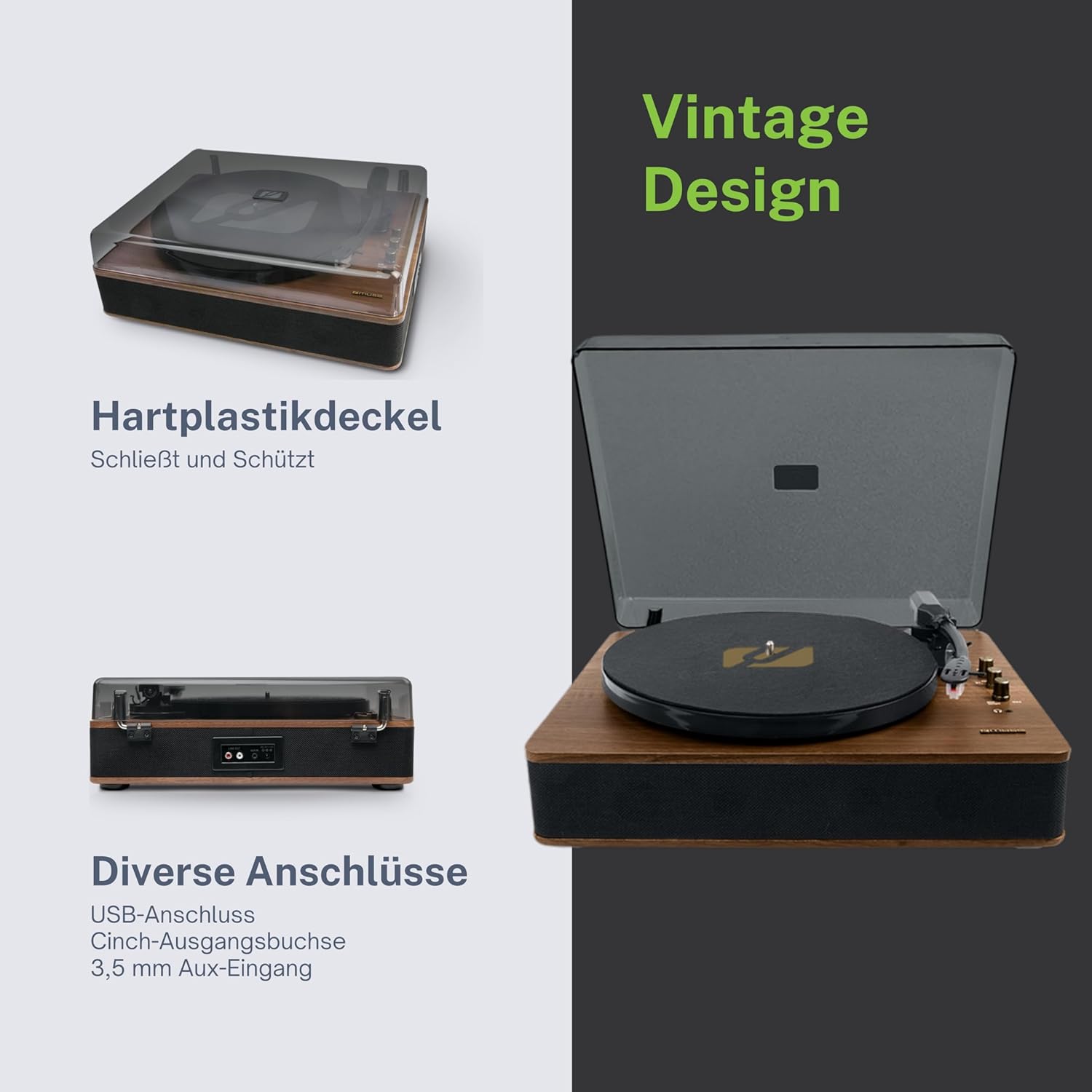
Figure 4.3: Rear Connections. The rear panel of the turntable is shown, featuring various connection ports including RCA audio outputs, a USB port, and an auxiliary input jack, allowing connection to external audio systems or devices.
4.3 پوئين ۽ پاسي جا ڪنيڪشن
- آر سي اي آئوٽ پُٽ جڪس (ايل/آر): هڪ خارجي سان ڳنڍيو ampلائفائر يا طاقتور اسپيڪر.
- USB پورٽ: MP3 هلائڻ لاءِ files from a USB drive or encoding vinyl to USB.
- آڪس ان جڪ (3.5 ايم ايم): ٻاهرين آڊيو ڊوائيسز کي ڳنڍيو.
- جيڪ ۾ ڊي سي: پاور اڊاپٽر کي ڳنڍيو.
- هيڊ فون جڪ (3.5mm): ذاتي ٻڌڻ لاءِ.

Figure 4.4: Key Functions Overview. An illustrative graphic highlighting the key functions and connectivity options of the turntable. Icons represent features such as USB encoding, MP3 playback via USB, RCA output, auto-stop, integrated speakers, headphone jack, auxiliary input, and AC power input.
5. سيٽ اپ
5.1 کولڻ
- احتياط سان ان جي پيڪنگنگ مان يونٽ کي هٽايو.
- سڀ پيڪنگ مواد ۽ حفاظتي فلمون هٽايو.
- Keep the packaging for future transport or storage.
5.2 لڳائڻ
- Place the turntable on a flat, stable, and level surface.
- Avoid placing it near strong magnetic fields, direct sunlight, or heat sources.
- پڪ ڪريو ته يونٽ جي چوڌاري مناسب وائيٽليشن لاء ڪافي جاء آهي.
5.3 پاور ڪنيڪشن
- Connect the supplied power adapter to the DC IN jack on the rear of the turntable.
- پاور اڊاپٽر کي مناسب وال آئوٽليٽ ۾ لڳايو.
5.4 مٽيءَ جي ڍڪڻ جي انسٽاليشن
- Carefully attach the dust cover to the hinges on the back of the turntable.
- The dust cover protects the unit when not in use. Remove it or lift it fully when playing records.
6. آپريٽنگ هدايتون
6.1 ونائل ريڪارڊ هلائڻ
- مٽي جي ڍڪ کي مٿي ڪريو.
- Rotate the Power/Volume knob clockwise to turn on the unit.
- Set the Function Selector knob to 'Phono'.
- Place a record on the platter. If playing a 45 RPM single, place the 45 RPM adapter on the spindle first.
- Select the correct speed (33, 45, or 78 RPM) using the Speed Selector switch.
- اسٽائلس مان اسٽائلس محافظ کي هٽايو.
- Lift the tonearm using the cue lever.
- Move the tonearm over the desired starting point of the record.
- Gently lower the tonearm onto the record using the cue lever. The music will begin to play.
- پاور/واليوم نوب استعمال ڪندي حجم کي ترتيب ڏيو.
- At the end of the record, if the Auto Stop switch is ON, the platter will stop rotating. If OFF, the platter will continue to rotate. Manually lift the tonearm and return it to its rest.
6.2 بلوٽوٽ موڊ
- Rotate the Power/Volume knob clockwise to turn on the unit.
- Set the Function Selector knob to 'BT' (Bluetooth). The Bluetooth indicator will flash, indicating pairing mode.
- Enable Bluetooth on your external device (smartphone, tablet, etc.) and search for available devices.
- Select 'MUSE MT-106 BT' from the list of devices. Once connected, the Bluetooth indicator will stop flashing and remain solid.
- You can now play music from your external device through the turntable's speakers. Adjust volume using both the turntable's knob and your external device.
6.3 USB Playback and Encoding
6.3.1 USB پلے بیک
- Rotate the Power/Volume knob clockwise to turn on the unit.
- Set the Function Selector knob to 'USB'.
- Insert a USB flash drive into the USB port. The unit will automatically detect and begin playing MP3 files.
- Use the Playback Control Buttons (Play/Pause, Skip Forward, Skip Backward) to navigate tracks.
6.3.2 USB Encoding (Recording Vinyl to USB)
The MT-106 BT allows you to convert your vinyl records into digital MP3 files on a USB drive.
- Ensure a USB flash drive is inserted into the USB port.
- Set the Function Selector knob to 'Phono'.
- Start playing your vinyl record as described in section 6.1.
- Press the 'Record' button (refer to Figure 4.2 for button location, typically indicated by a circle or 'REC' label). The recording indicator will illuminate.
- To stop recording, press the 'Record' button again. The recording indicator will turn off.
- The recorded audio will be saved as an MP3 file on your USB drive.
6.4 معاون ان پٽ (AUX IN)
- Rotate the Power/Volume knob clockwise to turn on the unit.
- Set the Function Selector knob to 'AUX'.
- Connect an external audio device (e.g., MP3 player, CD player) to the AUX IN jack (3.5mm) on the rear of the turntable using an audio cable (not supplied).
- Play audio from your external device. The sound will be output through the turntable's speakers.
6.5 آر سي اي آئوٽ
To connect your turntable to an external amplifier or powered speakers:
- Ensure the turntable and the external audio system are turned off.
- Connect an RCA audio cable (not supplied) from the RCA Output Jacks (L/R) on the rear of the turntable to the corresponding audio input jacks on your ampلائفائر يا طاقتور اسپيڪر.
- Turn on both the turntable and your external audio system.
- Select the appropriate input on your external audio system.
7. سار سنڀال
7.1 اسٽائلس کي صاف ڪرڻ
- هڪ نرم برش استعمال ڪريو، خاص طور تي اسٽائلس جي صفائي لاءِ ٺهيل، اسٽائلس کي پوئتي کان اڳيان تائين نرميءَ سان برش ڪرڻ لاءِ.
- Do not use excessive force or brush from side to side, as this can damage the stylus.
- Replace the stylus approximately every 300-500 hours of playback, or if you notice a degradation in sound quality.
7.2 يونٽ جي صفائي
- Wipe the exterior of the turntable with a soft, dry, lint-free cloth.
- گھڙڻ وارا صاف ڪندڙ، موم، يا محلول استعمال نه ڪريو ڇو ته اهي ختم کي نقصان پهچائي سگهن ٿا.
- For the dust cover, use a soft cloth and a mild, non-abrasive cleaner if necessary.
8. مسئلا حل ڪرڻ
If you experience issues with your turntable, please consult the following table before contacting support.
| مسئلو | ممڪن سبب | حل |
|---|---|---|
| طاقت نه آهي | پاور اڊاپٽر ڳنڍيل نه آهي يا آئوٽ ليٽ خراب آهي. | پڪ ڪريو ته پاور اڊاپٽر محفوظ طور تي ڳنڍيل آهي ۽ آئوٽ ليٽ ڪم ڪري رهيو آهي. |
| آواز ڪونهي | Volume too low; incorrect function mode; external speakers not connected/powered. | Increase volume; select correct function (Phono, BT, USB, AUX); check external speaker connections and power. |
| Poor sound quality (vinyl) | Dirty or worn stylus; dirty record; incorrect speed selected. | Clean or replace stylus; clean record; select correct RPM. |
| بلوٽوٿ ڳنڍي نه ٿو | Turntable not in pairing mode; device too far; already connected to another device. | Ensure turntable is in BT mode and flashing; move device closer; disconnect from other devices. |
| USB پلے بیک ڪم نه ڪري رهيو آهي | USB ڊرائيو صحيح طرح سان داخل نه ڪئي وئي آهي؛ غير معاون file فارميٽ؛ USB ڊرائيو ناقص آهي. | USB ڊرائيو ٻيهر داخل ڪريو؛ پڪ ڪريو files are MP3 format; try a different USB drive. |
9. وضاحتون
| برانڊ | MUSE |
| ماڊل نالو | MT-106 بي ٽي |
| رنگ | ڪاٺ |
| مواد | ڪاٺ |
| شيءِ جو وزن | 4.3 ڪلوگرام |
| گردش جي رفتار | 33، 45، 78 RPM |
| رابطي | Bluetooth, USB, RCA Output, 3.5mm AUX Input, 3.5mm Headphone Jack |
| خاص خاصيتون | Integrated Speaker, Dust Protection, Adjustable Speed, USB Encoding |
| مطابقت رکندڙ ڊوائيسز | اسمارٽ فون، ٽيبليٽ |
| طاقت جو ذريعو | AC Adapter (1 AAAA battery required for unspecified function, likely remote or internal clock) |
| اصل جو ملڪ | چين |
10. وارنٽي ۽ سپورٽ
This product is covered by a manufacturer's warranty. Please refer to the warranty card included with your purchase or visit the official MUSE webتفصيلي وارنٽي شرطن ۽ ضابطن لاءِ سائيٽ.
For technical support, troubleshooting assistance, or inquiries regarding spare parts, please contact MUSE customer service through their official channels. Information regarding spare parts availability is currently not available.


