1. تعارف
The Nokia Comfort Earbuds TWS-411-WH are designed to provide a balanced audio experience with a focus on comfort and durability. These wireless Bluetooth earbuds feature 10mm drivers for clear sound and are built to withstand daily use with IPX5 water and sweat resistance. This manual provides instructions for setting up, operating, maintaining, and troubleshooting your earbuds.
1.1. دٻي ۾ ڇا آهي
- نوڪيا آرام واري ايئربڊس
- 3 pairs of ear tips (Small, Medium & Large)
- چارج ڪيس
- USB قسم-سي ڪيبل
- تڪڙو شروع ھدايت

Image 1.1: The Nokia Comfort Earbuds, charging case, three pairs of ear tips, USB-C cable, and quick start guide.
2. سيٽ اپ
2.1. ائربڊس ۽ ڪيس کي چارج ڪرڻ
Before first use, fully charge the earbuds and the charging case. Place the earbuds into the charging case. Connect the USB Type-C cable to the charging port on the case and to a power source. The indicator light on the case will show the charging status. A full charge provides up to 9.5 hours of listening time for the earbuds, with the charging case offering an additional 19.5 hours, totaling up to 29 hours of playback.

Image 2.1: The Nokia Comfort Earbuds inside their charging case, illustrating the charging contacts and compact design.
2.2. هڪ ڊوائيس سان جوڙڻ
- پڪ ڪريو ته earbuds چارج ٿيل آهن.
- چارجنگ ڪيس کوليو. ائربڊس پاڻمرادو پيئرنگ موڊ ۾ داخل ٿي ويندا.
- On your device (phone, laptop, tablet), enable Bluetooth.
- ڳولھيو available Bluetooth devices and select "Nokia Comfort Earbuds" from the list.
- هڪ ڀيرو ڳنڍيل، هڪ تصديق وارو آواز هلندو، ۽ ائربڊس استعمال لاءِ تيار آهن.
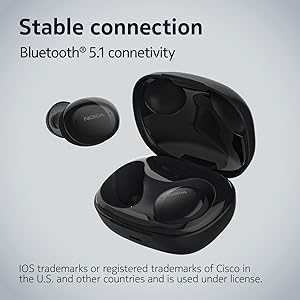
Image 2.2: The earbuds and charging case, highlighting the stable Bluetooth 5.1 connectivity.
3. ائربڊس هلائڻ
3.1. ائربڊس پائڻ
Select the ear tips that provide the most comfortable and secure fit. Gently insert the earbuds into your ears and twist slightly to ensure a snug seal. The natural ergonomic form and unique comfort ring are designed for a secure fit.
3.2. ٽچ ڪنٽرول
The Nokia Comfort Earbuds feature touch controls for easy management of audio and calls. Refer to the quick start guide for specific tap gestures for functions such as play/pause, skip tracks, answer/end calls, and activate voice assistant.
3.3. ڪال مينيجمينٽ
The earbuds support easy automatic switching between using one or both earbuds for phone calls, providing flexibility during conversations.

Image 3.1: A user wearing the Nokia Comfort Earbuds, demonstrating comfortable usage during daily activities.
4. سار سنڀال
4.1. صفائي
Regularly clean your earbuds and charging case to ensure optimal performance and hygiene. Use a soft, dry, lint-free cloth to wipe the surfaces. For ear tips, remove them from the earbuds and clean with a mild soap solution, then rinse and dry thoroughly before reattaching.
4.2. Water and Sweat Resistance
The Nokia Comfort Earbuds are rated IPX5 for water and sweat resistance. This means they are protected against low-pressure water jets from any direction. They are suitable for workouts and light rain but should not be submerged in water. Ensure the earbuds are dry before placing them back in the charging case to prevent damage.

Image 4.1: The Nokia Comfort Earbuds demonstrating their IPX5 water and sweat resistance.
5. مسئلا حل ڪرڻ
5.1. عام مسئلا ۽ حل
- ائربڊس جوڙو نه پيا لڳن: پڪ ڪريو ته ٻئي ائربڊ چارجنگ ڪيس ۾ آهن، پوءِ پيئرنگ موڊ کي چالو ڪرڻ لاءِ لڪ کوليو. پنهنجي ڊوائيس جي بلوٽوٿ سيٽنگز چيڪ ڪريو ۽ ٻيهر ڳنڍڻ جي ڪوشش ڪريو.
- ڪابه آواز يا گهٽ آواز: پنهنجي ڊوائيس ۽ ائربڊس ٻنهي تي واليوم ليول چيڪ ڪريو. پڪ ڪريو ته ائربڊس توهان جي ڪنن ۾ صحيح طرح سان لڳل آهن.
- وقفي وقفي سان ڳنڍڻ: Move closer to your connected device. Avoid obstacles that may interfere with the Bluetooth signal.
- ائربڊس چارج نه ٿي رهيا آهن: Ensure the charging cable is securely connected to both the case and the power source. Verify that the charging contacts on the earbuds and inside the case are clean and free of debris.
6. وضاحتون
| خاصيت | تفصيل |
|---|---|
| ماڊل نالو | سچا وائرليس ائربڊس |
| ماڊل نمبر | TWS-411 WH |
| رابطي ٽيڪنالاجي | وائرليس (بلوٽوٿ 5.1) |
| آڊيو ڊرائيور جو قسم | متحرڪ ڊرائيور |
| ڊرائيور جي ماپ | 10 ملي ميٽر |
| بيٽري جي زندگي (ايربڊس) | 9.5 ڪلاڪ تائين |
| ڪُل راند جو وقت (ڪيس سان) | 29 ڪلاڪ تائين |
| پاڻي جي مزاحمت | IPX5 (Waterproof, Sweatproof) |
| ڪنٽرول جو طريقو | ڇڪڻ |
| مائڪروفون | ها |
| فارم فيڪٽر | ڪن ۾ |
| مواد | پلاسٽڪ |
| شيءِ جو وزن | 48.17 گرام |
| پيداوار جي ماپ | 10 x 10 x 4.9 سينٽي |
| ماڊل سال | 2022 |

Image 6.1: Detailed dimensions of the Nokia Comfort Earbuds and their charging case.
7. وارنٽي ۽ سپورٽ
7.1. وارنٽي ڄاڻ
This product comes with a standard brand warranty. For detailed information regarding the warranty period, coverage, and terms, please refer to the warranty card included in the product packaging or visit the official Nokia support webسائيٽ.
7.2. ڪسٽمر سپورٽ
For further assistance, technical support, or service inquiries, please contact Nokia customer support through their official channels. Contact details can typically be found on the Nokia webسائيٽ يا پيداوار جي دستاويز ۾.
8. پراڊڪٽ ختمview وڊيو
وڊيو 8.1: هڪ سرڪاري اوورview of the Nokia Comfort Earbuds, showcasing their design, features, and key benefits such as ergonomic fit, sound balance, and water resistance.


