1. تعارف
The Rand McNally OverDryve 8 Pro II is an advanced all-in-one device designed for professional truck drivers. It integrates a truck-specific GPS navigation system, a versatile tablet, an adjustable dash camera, and a built-in satellite radio receiver. This manual provides essential information for setting up, operating, maintaining, and troubleshooting your device to ensure optimal performance on the road.

Image 1.1: The Rand McNally OverDryve 8 Pro II device displaying its primary user interface with icons for Truck Tools, Rand Navigation, DriverConnect, Cameras, Communication, and Entertainment.
2. دٻي ۾ ڇا آهي
Verify that all components are present upon unboxing your Rand McNally OverDryve 8 Pro II:
- 1 x OverDryve 8 Pro II Device
3. پراڊڪٽ ختمview
The OverDryve 8 Pro II features an 8-inch display and a robust design suitable for vehicle environments. It includes various ports for connectivity and an integrated dash camera.

تصوير 3.1: سامهون view of the device, highlighting the 8-inch display and the main menu interface.

تصوير 3.2: سائڊ پروfile of the device, illustrating the adjustable dash camera lens protruding from the unit.
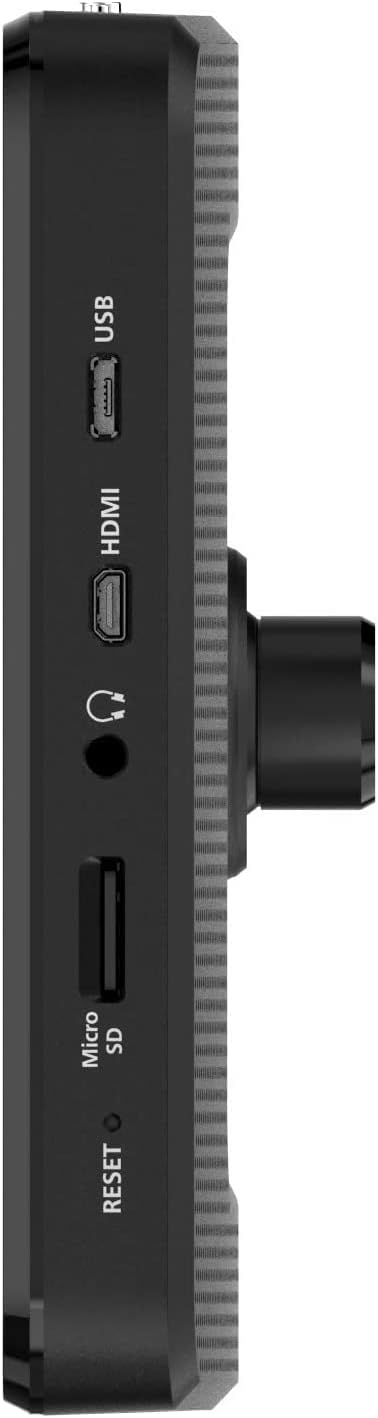
تصوير 3.3: پاسي view detailing the device's connectivity ports, including USB, HDMI, audio jack, Micro SD card slot, and a reset button.

تصوير 3.4: ريئر view of the device, displaying the magnetic mounting interface and the integrated dash camera.
4. اهم خاصيتون
- Mileage and Fuel Logs: This feature allows for precise tracking of fuel purchases and mileage, enabling accurate calculation of fuel economy. It assists in managing expenses and optimizing vehicle efficiency.
- On-Screen Alerts: Customizable warnings can be set for various road conditions, including speed limit changes and sharp curves. These alerts provide real-time information to enhance driver awareness and safety.
- Adjustable Dash Cam: The integrated dash camera is adjustable, facilitating optimal positioning for recording. It includes automatic G-sensor activation and loop recording, ensuring critical moments are captured and saved.
- Built-In Satellite Radio: An embedded SiriusXM receiver in the device's mount allows streaming of satellite radio channels directly or through your truck's stereo system, providing continuous entertainment.
- Connected Capabilities: The device supports hands-free calls, text messaging, weather checks, and access to various applications. This functionality helps maintain connectivity and safety without diverting attention from driving.

Image 4.1: A collage of six screen captures from the OverDryve 8 Pro II, demonstrating various functionalities such as navigation routes, fuel logging interface, and 3D map views.
5. سيٽ اپ گائيڊ
5.1 شروعاتي چارجنگ
Before first use, fully charge the device using the provided power adapter. Connect the adapter to the device's power port and a suitable power source. The battery indicator will show charging status.
5.2 ڊوائيس تي چڙهڻ
The OverDryve 8 Pro II utilizes a magnetic mount for secure attachment to your vehicle's dashboard or windshield. Ensure the mounting surface is clean and dry. Attach the mount securely, then align the device with the magnetic plate on the mount until it clicks into place. Verify the device is firmly seated before driving.
5.3 پاور آن ۽ شروعاتي ترتيب
- Press and hold the power button until the Rand McNally logo appears.
- پنهنجي ٻولي، ٽائيم زون، ۽ ٻيون شروعاتي سيٽنگون چونڊڻ لاءِ اسڪرين تي ڏنل هدايتن تي عمل ڪريو.
- Connect to a Wi-Fi network to enable connected features and download necessary software updates. A stable internet connection is crucial for optimal performance and access to real-time data.
- Perform any available software updates to ensure your device has the latest maps and features.
6. آپريٽنگ هدايتون
6.1 نيويگيشن
- Truck Routing: Enter your truck's dimensions and weight in the settings for customized routes that avoid restricted roads.
- Destination Entry: Use the on-screen keyboard or voice commands to enter addresses, points of interest, or coordinates.
- حقيقي وقت جو ڊيٽا: With a Wi-Fi connection, the device provides live traffic updates, weather forecasts, and fuel prices. Access these features through the 'DriverConnect' or 'Rand Navigation' applications.
6.2 Dash Camera Operation
- Adjusting the Camera: Physically adjust the camera lens to achieve the desired viewing angle of the road ahead.
- رڪارڊنگ: The dash cam typically begins recording automatically when the device powers on. Footage is saved to the internal memory or an inserted Micro SD card.
- جي-سينسر: In the event of a sudden impact or sharp maneuver, the G-sensor will automatically lock and protect the current recording segment from being overwritten.
6.3 Satellite Radio (SiriusXM)
The integrated SiriusXM receiver allows access to satellite radio channels. Ensure your SiriusXM subscription is active. You can stream audio directly from the device or connect it to your truck's stereo system via Bluetooth or auxiliary cable (if available).
6.4 Connected Features
Pair your smartphone via Bluetooth to enable hands-free calling and text messaging. Access various applications for weather, news, and other utilities through the device's interface, requiring a Wi-Fi connection or tethering to your smartphone's hotspot.
6.5 Mileage and Fuel Logs
Access the 'Truck Tools' application to input and manage your mileage and fuel purchase data. This information is used to calculate fuel economy and track operational costs.
7. سار سنڀال
7.1 سافٽ ويئر اپڊيٽ
Regularly check for and install software updates to ensure your device has the latest maps, features, and security enhancements. Connect to a stable Wi-Fi network and navigate to the device's settings menu to check for updates.
7.2 صفائي
Use a soft, lint-free cloth to clean the screen and exterior of the device. Avoid abrasive cleaners or solvents that could damage the surfaces. Ensure the device is powered off before cleaning.
7.3 بيٽري جي سنڀال
To prolong battery life, avoid exposing the device to extreme temperatures. Fully charge the device periodically if it is not in regular use.
8. مسئلا حل ڪرڻ
- ڊوائيس منجمد يا غير جوابده: If the device becomes unresponsive, perform a soft reset by pressing and holding the power button for approximately 10-15 seconds until it powers off, then restart it. If issues persist, locate the small reset button (often recessed) and use a thin object (like a paperclip) to press it.
- Poor Sound Quality or Low Volume: Ensure the device's volume is set to maximum. If connected to your truck's stereo, check the stereo's volume and input settings. For navigation prompts, consider using an auxiliary cable connection if Bluetooth audio quality is insufficient, especially in noisy environments.
- Mount Instability: Ensure the mounting surface is clean and free of debris. If using a suction cup mount, moisten the suction cup slightly before applying and ensure the lever is fully engaged. Extreme temperature fluctuations can affect suction cup adhesion; consider alternative mounting solutions if this is a recurring issue.
- اپڊيٽ جا مسئلا: Ensure a strong and stable Wi-Fi connection during updates. Insufficient storage space can also prevent updates; check available memory and consider removing unnecessary files or using a larger Micro SD card if applicable.
- جي پي ايس سگنل جو نقصان: پڪ ڪريو ته ڊوائيس صاف آهي view of the sky. Obstructions like tall buildings or tunnels can temporarily block the signal. Move to an open area if experiencing prolonged signal loss.
9. وضاحتون
| خاصيت | تفصيل |
|---|---|
| شيءِ جو وزن | 3.27 پائونڊ |
| پيداوار جي ماپ | 0.85 x 8.15 x 5.25 انچ |
| شيون ماڊل نمبر | 528026704 |
| بيٽريون | 1 ليتيم آئن بيٽري (شامل) |
| ڊسپلي سائيز | 8 انچ |
| آواز جو حڪم | ٽچ اسڪرين |
| رابطي ٽيڪنالاجي | وائي فائي |
| نقشي جو قسم | سيٽلائيٽ |
| آڊيو آئوٽ پٽ موڊ | Speaker, Stereo |
| چڙهڻ جو قسم | ڊيش بورڊ جبل |
| قرارداد | 480 x 272 |
| ٺاهيندڙ | رينڊ مک اينلي |
10. وارنٽي ۽ سپورٽ
Specific warranty details are not provided within the product information. For warranty claims, technical support, or service inquiries, please refer to the official Rand McNally website or contact their customer service directly. Keep your proof of purchase for any warranty-related requests.
11. سرڪاري پراڊڪٽ وڊيوز
No official product videos from the seller were found in the provided product data. Please check the manufacturer's website or official channels for any available video resources.


