1. تعارف
This manual provides comprehensive instructions for the setup, operation, maintenance, and troubleshooting of your SteelSeries Arctis Nova 3 Multi-Platform Gaming Headset. Please read this manual thoroughly before using the product to ensure optimal performance and longevity.
The Arctis Nova 3 headset features the custom-designed Nova Acoustic System with High Fidelity Drivers, 360° Spatial Audio, and a 10-band Parametric EQ. It includes an AI-powered noise-cancelling ClearCast Gen 2 microphone and dynamic RGB lighting. Designed for multi-platform compatibility, it connects via USB-C to PC, PlayStation, Xbox Series X|S, Switch, and mobile devices.
2. پراڊڪٽ ختمview
2.1 پيڪيج مواد
- SteelSeries Arctis Nova 3 Gaming Headset
- USB-C کان USB-C ڪيبل
- USB-C کان USB-A ايڊاپٽر ڪيبل
- USB-C کان 3.5mm آڊيو ڪيبل
- دستاويز (هي دستور العمل)
2.2 هيڊ سيٽ جا جزا
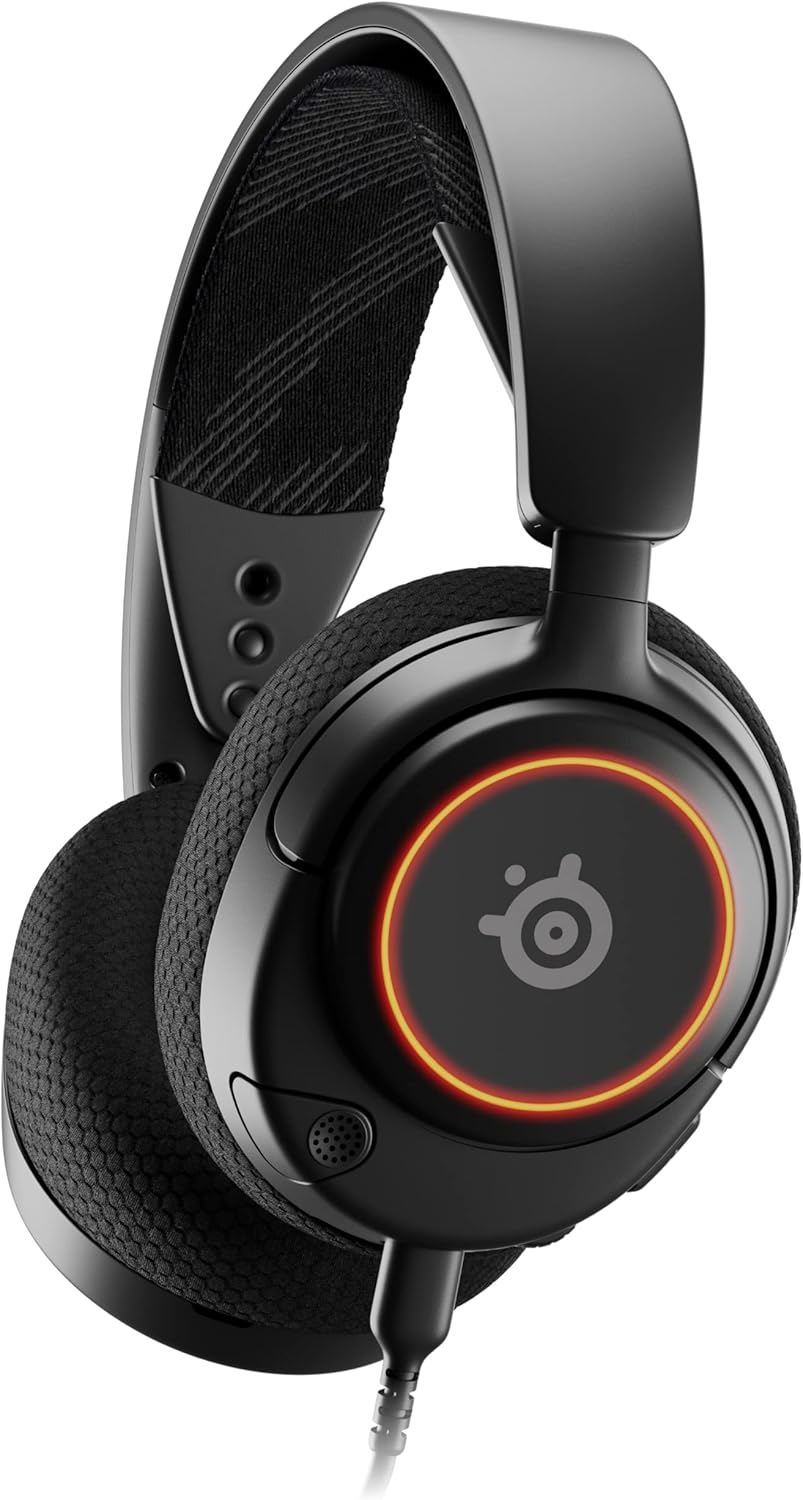
شڪل 1: سامهون view of the Arctis Nova 3 headset.

شڪل 2: Key features of the Arctis Nova 3, including ComfortMAX System, 360° Spatial Audio, Dual-Zone RGB, Nova Acoustic System, ClearCast Gen 2 AI-Powered Noise-Cancelling Mic, and Multi-Platform Support.
- ComfortMAX System: Features height-adjusting, rotating earcups with AirWeave Memory Foam cushions and a stretchy band for comfortable wear.
- ClearCast Gen 2 Mic: AI-powered noise-cancelling microphone, fully retractable into the earcup.
- Dual-Zone RGB Lighting: Customizable 16.8 million color options on the earcups.
- Nova Acoustic System: Custom-designed with High Fidelity Drivers for superior sound.
- ڪنٽرول: Volume wheel and microphone mute switch located on the earcup.
- ڪنيڪٽوٽي پورٽ: USB-C port for various cable connections.
3. سيٽ اپ
3.1 هيڊ سيٽ کي ڳنڍڻ
The Arctis Nova 3 offers versatile connectivity options:
- USB-C ڪنيڪشن: Use the provided USB-C to USB-C cable to connect directly to devices with a USB-C port (e.g., PC, PlayStation 5, Nintendo Switch, mobile devices).
- USB-A ڪنيڪشن: For devices with only USB-A ports, use the USB-C to USB-A adapter cable. Connect the USB-C end to the headset and the USB-A end to your device.
- 3.5mm آڊيو ڪنيڪشن: For devices requiring a 3.5mm audio jack (e.g., Xbox controllers, older consoles, some mobile devices), use the USB-C to 3.5mm audio cable. Connect the USB-C end to the headset and the 3.5mm jack to your device.
وڊيو 1: پيداوار ختمview demonstrating various connectivity options and features of the Arctis Nova 3 headset.
وڊيو 2: هڪ 360 درجا view of the Arctis Nova 3 Black headset, showcasinان جي ڊيزائن ۽ خاصيتن کي سڀني زاوين کان ڏسو.
3.2 Adjusting the Fit
The ComfortMAX System allows for personalized fit:
- هيڊ بينڊ ايڊجسٽمينٽ: The elastic suspension band can be adjusted to different lengths using the three holes on each side of the headband, ensuring a comfortable fit that distributes weight evenly.
- ڪن جي ڪپ جي گردش: The earcups can rotate 90 degrees, allowing the headset to lay flat for storage or comfortable resting around the neck.

شڪل 3: The adjustable headband and rotating earcups of the Arctis Nova 3 for a personalized and comfortable fit.

شڪل 4: The super lightweight design (253g) of the Arctis Nova 3 with memory foam earcup cushions for extended comfort.
4. آپريٽنگ هدايتون
4.1 آڊيو ڪنٽرول
- حجم ڦيٿي: Rotate the wheel on the left earcup up or down to adjust the headset's audio volume.
- مائڪروفون ميوٽ سوئچ: Slide the switch on the left earcup to mute or unmute the ClearCast Gen 2 microphone. An orange indicator will be visible when muted.
4.2 مائڪروفون جو استعمال
- وڌايو/واپس وٺو: The ClearCast Gen 2 microphone is fully retractable. Gently pull it out from the left earcup for use and push it back in for storage.
- پوزيشن: Position the microphone approximately 1-2 inches from your mouth for optimal voice clarity.

شڪل 5: The ClearCast Gen 2 mic, which silences background noise and fully retracts into the earcup.
4.3 RGB Lighting Customization (PC Only)
Dynamic RGB lighting can be customized via the SteelSeries Engine software on PC. This allows for 16.8 million color options and reactive lighting effects.

شڪل 6: Customizable PrismSync RGB lighting with 16.8 million colors on the Arctis Nova 3 headset.
5. سار سنڀال
- صفائي: هيڊ سيٽ صاف ڪرڻ لاءِ نرم، سڪل ڪپڙو استعمال ڪريو. رگڙيندڙ صاف ڪندڙ يا محلولن کان پاسو ڪريو.
- اسٽوريج: هيڊ سيٽ کي سڌي سج جي روشني ۽ انتهائي گرمي پد کان پري ٿڌي، سڪل جاءِ تي رکو.
- ڪيبل جي سنڀال: Avoid sharp bends or excessive pulling on the cables to prevent damage.
6. مسئلا حل ڪرڻ
| مسئلو | ممڪن سبب | حل |
|---|---|---|
| هيڊسيٽ مان ڪوبه آڊيو ناهي | Incorrect connection, low volume, muted device. | Ensure cables are securely connected. Check headset volume wheel and device audio settings. Confirm device is not muted. |
| مائڪرو فون ڪم نه ڪري رهيو آهي | Microphone muted, incorrect input device selected, mic not extended. | Check microphone mute switch (orange indicator means muted). Ensure microphone is fully extended. Verify correct input device is selected in your system's sound settings. |
| RGB lighting not working (PC) | Software issue, incorrect USB connection. | Ensure SteelSeries Engine software is installed and updated. Confirm headset is connected via USB-C or USB-A (RGB not supported via 3.5mm). |
| استعمال دوران تڪليف | نامناسب فٽ. | Adjust the elastic headband and earcup positions for optimal comfort. |
7. وضاحتون
| خاصيت | تفصيل |
|---|---|
| ماڊل نالو | SteelSeries Arctis Nova 3 Multi-Platform Gaming Headset |
| ماڊل نمبر | 61631 |
| رابطي ٽيڪنالاجي | USB-C (includes USB-A and 3.5mm adapters) |
| آڊيو ڊرائيور جو قسم | Dynamic Driver (Nova Acoustic System) |
| تعدد جواب | 20-22000 هز |
| رڪاوٽ | 36 اوم |
| مائڪروفون | ClearCast Gen 2 AI-Powered Noise-Cancelling, Retractable |
| فضائي آڊيو | 360° Spatial Audio (compatible with Tempest 3D Audio for PS5 / Microsoft Spatial Sound) |
| وزن | 8.3 آونس (تقريبن 235 گرام) |
| طول و عرض (LxWxH) | 7.32 x 6.82 x 3.47 انچ |
| مواد | Foam, Aluminum |
| آر بي جي روشني | Dynamic 16.8 million color options (PrismSync RGB) |
| مطابقت رکندڙ ڊوائيسز | PC, PlayStation 5|4, Xbox Series X|S, Switch, Mobile |
8. وارنٽي ۽ سپورٽ
For warranty information and technical support, please visit the official SteelSeries webسائيٽ تي وڃو يا انهن جي ڪسٽمر سروس سان رابطو ڪريو. وارنٽي دعوائن لاءِ خريداري جو ثبوت رکو.
سرڪاري اسٽيل سيريز Webسائيٽ: SteelSeries Store on Amazon


