تعارف
This manual provides essential information for the setup, operation, and maintenance of your SteelSeries Apex 9 TKL Optical Gaming Keyboard. Please read these instructions carefully to ensure optimal performance and longevity of your device.
The SteelSeries Apex 9 TKL is a compact tenkeyless (TKL) gaming keyboard featuring OptiPoint optical switches, designed for high-speed performance and customization.
پيڪيج مواد
- SteelSeries Apex 9 TKL Keyboard
- ڌار ٿيندڙ USB-C کان USB-A ڪيبل
- ڪيپ ڪيپيندڙ
- مٽائڻ وارو
- دستاويز (هي دستور العمل)
سيٽ اپ ڪريو
1. ڪي بورڊ کي ڳنڍڻ
- Locate the detachable USB-C to USB-A cable.
- Connect the USB-C end of the cable to the port on the back of the Apex 9 TKL keyboard.
- ڪيبل جي USB-A ڇيڙي کي پنهنجي ڪمپيوٽر تي موجود USB پورٽ سان ڳنڍيو.
- ڪيبورڊ خودڪار طريقي سان توهان جي آپريٽنگ سسٽم طرفان ڳولي ۽ ترتيب ڏنو ويندو.
2. Software Installation (SteelSeries GG)
For full customization options, including RGB lighting, key remapping, and actuation point adjustment, download and install the SteelSeries GG software from the official SteelSeries webسائيٽ (steelseries.com/gg).
- Visit the SteelSeries website and navigate to the software download section.
- Download the SteelSeries GG installer for your operating system.
- انسٽالر کي هلايو ۽ اسڪرين تي ڏنل هدايتن تي عمل ڪريو.
- Once installed, launch SteelSeries GG to configure your Apex 9 TKL keyboard.

Image: The SteelSeries Apex 9 TKL keyboard, showcasing its compact design and vibrant RGB lighting, connected to a computer via its detachable USB-C cable.
ڪي بورڊ هلائڻ
اهم خاصيتون ۽ افعال
- OptiPoint Optical Switches: These switches utilize light for actuation, providing fast response times.
- 2-Point Actuation: Adjust the key actuation point between 1.0mm for rapid gaming inputs and 1.5mm for more deliberate typing. This setting is configurable via the SteelSeries GG software.
- Swappable Switches: The OptiPoint switches are hot-swappable, allowing for customization, replacement, or repair. Use the included switch puller for removal and installation.
- TKL Form Factor: The tenkeyless design removes the numeric keypad, providing more desk space for mouse movement.
- ڊبل شاٽ پي بي ٽي ڪي ڪيپس: Durable keycaps designed for longevity and a consistent texture.
- RGB حسب ضرورت: Per-key RGB lighting is fully customizable through the SteelSeries GG software.
- Rapid Tap: A feature that prioritizes the last key press in a selected pair for faster input, useful in competitive gaming scenarios. Requires the latest SteelSeries GG software update.

Image: Visual representation of the Apex 9 TKL's performance metrics, highlighting its 0.2ms response time and faster actuation compared to other optical keyboards.
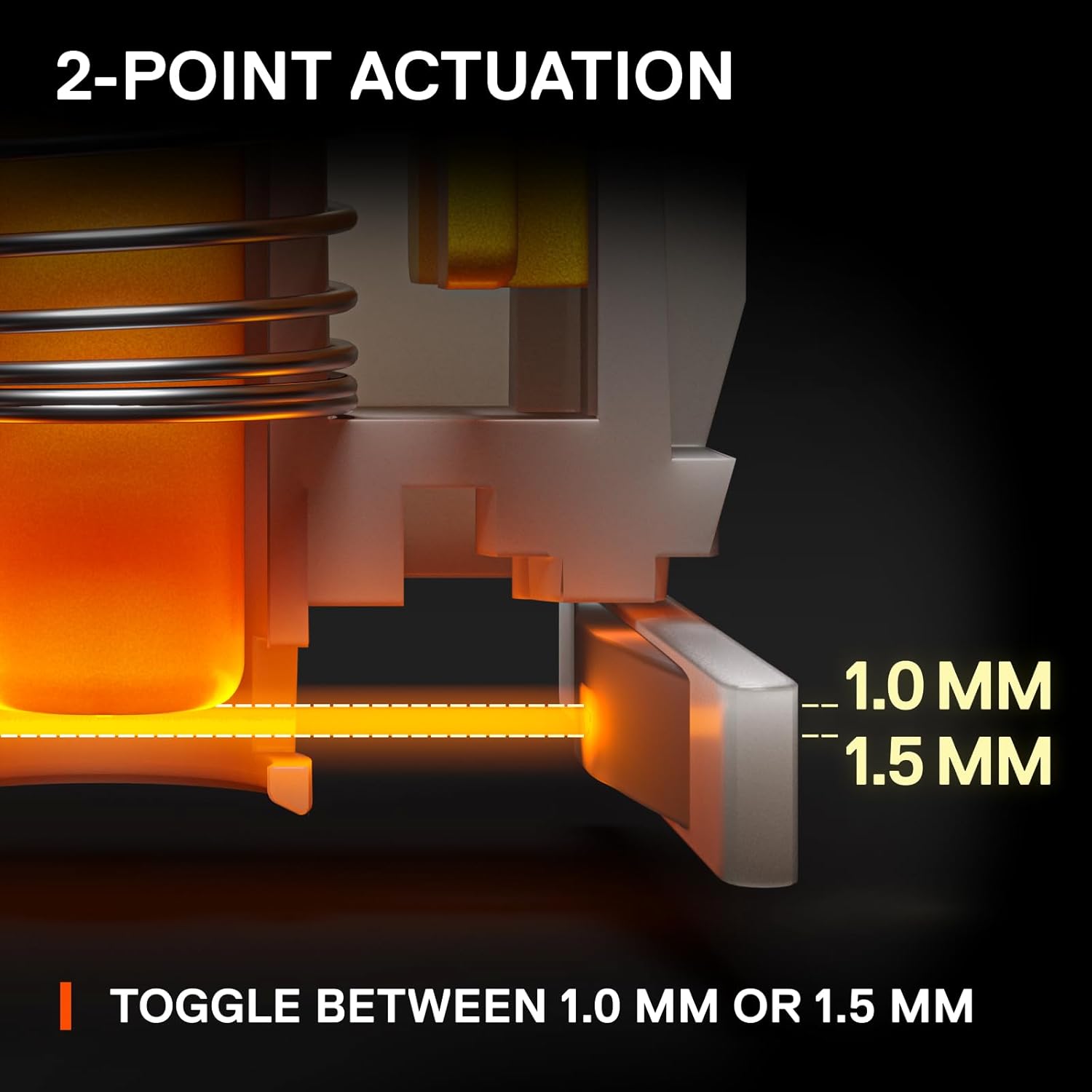
Image: An illustration detailing the adjustable 2-point actuation of the OptiPoint switches, allowing users to select between 1.0mm and 1.5mm actuation depths.

تصوير: هڪ ويجهو تصوير view of the keyboard illustrating the process of swapping OptiPoint switches, with a keycap and switch partially removed.

Image: A diagram explaining the 'Rapid Tap' feature, comparing standard input with Rapid Tap enabled, demonstrating how it enhances responsiveness by prioritizing the last key press.
سار سنڀال
ڪي بورڊ جي صفائي
- صفائي ڪرڻ کان اڳ ڪيبورڊ کي ڪمپيوٽر کان ڌار ڪريو.
- ڪي ڪيپس جي وچ مان مٽي ۽ ملبہ هٽائڻ لاءِ دٻيل هوا جو ڪين استعمال ڪريو.
- For surface cleaning, gently wipe the keycaps and frame with a soft, damp ڪپڙو. سخت ڪيميائي يا ٻرندڙ مواد استعمال ڪرڻ کان پاسو ڪريو.
- پڪ ڪريو ته ڪيبورڊ مڪمل طور تي سڪي ويو آهي ان کي ڪمپيوٽر سان ٻيهر ڳنڍڻ کان اڳ.
ڪي ڪيپس ۽ سوئچز کي تبديل ڪرڻ
The Apex 9 TKL features swappable OptiPoint switches and standard keycaps, allowing for easy replacement.
- ڪي ڪيپ هٽائڻ: Use the included keycap puller to gently lift keycaps straight up.
- مٽائڻ مٽايو After removing the keycap, use the included switch puller to carefully grip the switch and pull it straight up.
- تنصيب: Align the new switch with the pins on the keyboard's PCB and press down firmly until it clicks into place. Then, press the new keycap onto the switch stem.

تصوير: هڪ ڌماڪو ٿيو view illustrating the durable construction of double shot PBT keycaps, highlighting their two-layer design for fade resistance.
مشڪلاتون
- ڪي بورڊ جواب نه ڏئي رهيو آهي:
- پڪ ڪريو ته USB ڪيبل ڪيبورڊ ۽ ڪمپيوٽر ٻنهي سان محفوظ طور تي ڳنڍيل آهي.
- ڪيبورڊ کي پنهنجي ڪمپيوٽر تي ڪنهن ٻئي USB پورٽ سان ڳنڍڻ جي ڪوشش ڪريو.
- پنهنجي ڪمپيوٽر کي ٻيهر شروع ڪريو.
- Check if the keyboard works on another computer to rule out a system-specific issue.
- آر جي بي لائيٽنگ ڪم نه ڪري رهي آهي/غلط:
- Ensure the SteelSeries GG software is installed and running.
- Check the lighting settings within the SteelSeries GG software.
- Update the keyboard firmware via SteelSeries GG.
- چاٻيون جيڪي رجسٽر نه ٿي رهيون آهن يا ٻٽي ٽائيپ ڪري رهيون آهن:
- This could indicate a faulty switch. Use the switch puller to remove the affected switch and inspect it. If necessary, replace it with a new OptiPoint switch.
- پڪ ڪريو ته سوئچ مڪمل طور تي ان جي ساڪٽ ۾ رکيل آهي.
- Clean any debris around the switch area.
- Software Issues (SteelSeries GG):
- Ensure your SteelSeries GG software is up to date.
- Try reinstalling the SteelSeries GG software.
- Consult the SteelSeries support website for known issues or updates.
وضاحتون
| برانڊ | اسٽيل سيريز |
| ماڊل نمبر | 64847 |
| ڪي بورڊ لي آئوٽ | ٽينڪي ليس (TKL) |
| سوئچ جو قسم | OptiPoint Optical Switches (Swappable) |
| ايڪٽيويشن پوائنٽس | Adjustable 1.0mm / 1.5mm |
| جوابي وقت | 0.2ms |
| ڪي ڪيپ مواد | ڊبل شاٽ پي بي ٽي |
| رابطي | USB-C (Detachable Cable) |
| پٺڀرائي | في اهم RGB |
| هارڊويئر پليٽ فارم | PC |
| طول و عرض (LxWxH) | 13.99 x 5.05 x 1.65 انچ |
| وزن | 2.3 پائونڊ |
وارنٽي ڄاڻ
SteelSeries products are covered by a limited warranty. The specific terms and duration of the warranty may vary by region and product. For detailed warranty information, please refer to the official SteelSeries webسائيٽ يا وارنٽي ڪارڊ جيڪو توهان جي پراڊڪٽ سان شامل آهي.
وارنٽي دعويٰ لاءِ خريداري جو ثبوت رکو.
حمايت
وڌيڪ مدد، ٽيڪنيڪل سپورٽ، يا جديد ڊرائيورن ۽ فرم ويئر اپڊيٽس تائين رسائي حاصل ڪرڻ لاءِ، مهرباني ڪري سرڪاري اسٽيل سيريز سپورٽ جو دورو ڪريو. webسائيٽ:
You can also find FAQs, troubleshooting guides, and community forums on the support page.


