Keychron Q10 وائرڊ ڪسٽم ميڪيڪل ڪي بورڊ يوزر مينوئل
Model: Q10 | Brand: Keychron
1. تعارف
The Keychron Q10 is a premium 75% Alice layout mechanical keyboard designed for ergonomic comfort and extensive customization. Featuring a split, curved frame, it aims to reduce wrist strain during prolonged use. This manual provides detailed instructions for setting up, operating, customizing, and maintaining your Keychron Q10 keyboard.

Image 1.1: Keychron Q10 Alice Layout Mechanical Keyboard with an example Gateron G Pro Blue Switch.
2. پيڪيج مواد
Please verify that all items listed below are included in your Keychron Q10 package:
- 1x Fully Assembled Keyboard (including Aluminum case, PCB, Steel Plate, Sound Absorbing Foam, 14x Gaskets, 5 sets Stabilizers, 1 set Keycaps (Double-Shot PBT), 1 set Switches (Gateron G Pro), 1x Acoustic Tape)
- 1x ٽائپ-سي کان ٽائپ-سي ڪيبل
- 1x ٽائپ-اي کان ٽائپ-سي اڊاپٽر
- 1x سوئچ پلر
- 1x ڪي ڪيپ پلر
- 1x اسڪوائر
- 1x ھيڪس چاٻي

Image 2.1: Visual representation of the Keychron Q10 keyboard and its included accessories.
3. سيٽ اپ
- ڪي بورڊ کوليو: Carefully remove the Keychron Q10 keyboard and all accessories from its packaging.
- ڪيبل ڳنڍيو: Use the provided Type-C to Type-C cable to connect the keyboard to your computer. If your computer only has Type-A ports, use the included Type-A to Type-C adapter.
- آپريٽنگ سسٽم مطابقت: The Keychron Q10 is compatible with Mac, Windows, and Linux operating systems. No additional drivers are typically required for basic functionality.
- شروعاتي ٽيسٽ: Open a text editor or word processor and test typing on the keyboard to ensure all keys are functioning correctly.
4. ڪي بورڊ هلائڻ
4.1 بنيادي ٽائپنگ
The Keychron Q10 functions as a standard mechanical keyboard. Its 75% Alice layout provides an ergonomic split design for comfortable typing. Familiarize yourself with the key placement, especially the split spacebar and modified bottom row.
4.2 Programmable Knob
The integrated programmable knob offers quick access to various functions. By default, it often controls volume (rotate) and mute (press). Its functions can be customized extensively using the QMK/VIA software.

Image 4.1: The programmable knob, typically used for volume control and muting audio.
4.3 آر بي جي بائيٽ لائٽنگ
The keyboard features 22+ RGB backlight effects. These can be cycled through using specific key combinations (refer to the keyboard's default keymap or QMK/VIA software for details). The south-facing RGB lighting ensures compatibility with various keycap profiles.
5. حسب ضرورت
The Keychron Q10 is designed for deep customization, allowing users to tailor the keyboard to their specific needs.
5.1 QMK/VIA پروگراميبلٽي
The keyboard fully supports QMK (Quantum Mechanical Keyboard) firmware and VIA software. This allows you to remap any key, create custom macros, and adjust lighting effects across multiple layers without needing to flash new firmware. The VIA configurator is a web-based tool for easy customization.

Image 5.1: The VIA web-based configurator for customizing keymaps and macros.
5.2 گرم مٽائڻ وارا سوئچ
The Q10 features a hot-swappable PCB, allowing you to change mechanical switches without soldering. It is compatible with most MX-style 3-pin and 5-pin switches. This enables users to experiment with different switch types to find their preferred typing feel.
- سوئچز کي هٽائڻ: سوئچ جي مٿين ۽ هيٺئين ڪلپس کي احتياط سان پڪڙڻ لاءِ مهيا ڪيل سوئچ پلر استعمال ڪريو ۽ ان کي سڌو مٿي ڇڪيو.
- سوئچ لڳائڻ: Align the pins of the new switch with the holes on the PCB. Gently press the switch down until it clicks into place. Ensure pins are not bent.

Image 5.2: A keycap removed, revealing the hot-swappable switch socket.
5.3 Keycaps
The keyboard comes with OSA Profile Double-Shot PBT Keycaps, known for their durability and comfortable feel. These can also be replaced with other MX-compatible keycap sets.
- ڪي ڪيپس هٽائڻ: مهيا ڪيل ڪي ڪيپ پلر استعمال ڪريو ڪي ڪيپس کي آساني سان سڌو مٿي ڇڪڻ لاءِ.
- ڪي ڪيپس لڳائڻ: Align the keycap stem with the switch stem and press down firmly until it is seated.
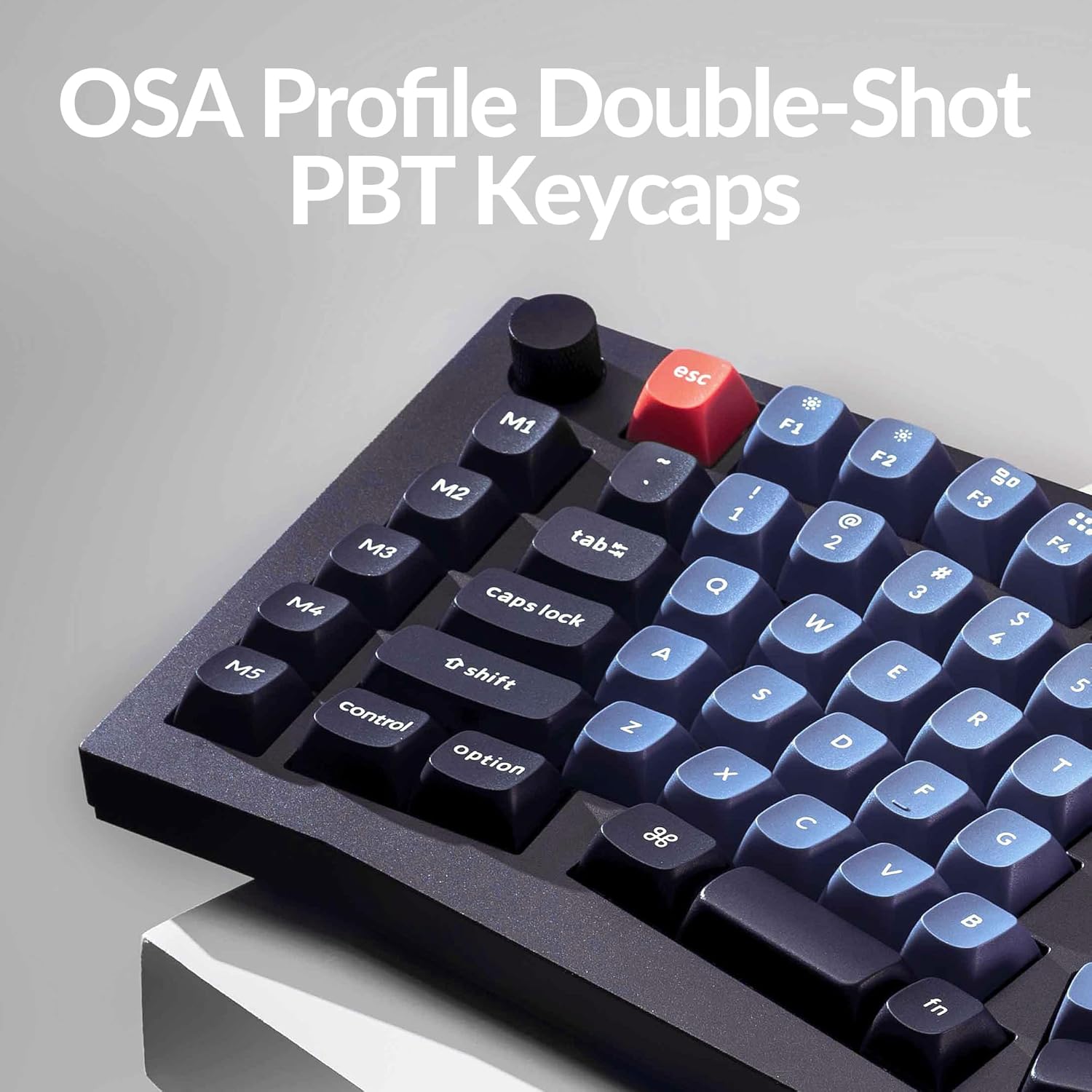
Image 5.3: The OSA Profile Double-Shot PBT Keycaps on the Keychron Q10.
6. سار سنڀال
6.1 ڪي بورڊ صاف ڪرڻ
باقاعده صفائي ڪيبورڊ جي ڪارڪردگي ۽ ظاهر کي برقرار رکڻ ۾ مدد ڪري ٿي.
- صفائي ڪرڻ کان اڳ ڪيبورڊ کي ڪمپيوٽر کان ڌار ڪريو.
- ڪي ڪيپس جي وچ مان مٽي ۽ ملبہ هٽائڻ لاءِ دٻيل هوا جو ڪين استعمال ڪريو.
- For stubborn dirt, remove keycaps using the keycap puller and clean the exposed switches and plate with a soft brush or a damp cloth (ensure it's not dripping wet).
- Wipe keycaps with a mild cleaning solution on a cloth, then dry thoroughly.
6.2 Double Gasket Design
The keyboard features an innovative double-gasket design with silicone pads to minimize sound resonance and improve typing acoustics. This design requires no special maintenance from the user.

Image 6.1: Cross-section diagram showing the double-gasket structure for enhanced typing sound.
7. مسئلا حل ڪرڻ
If you encounter issues with your Keychron Q10 keyboard, try the following troubleshooting steps:
- ڪي بورڊ جواب نه ڏئي رهيو آهي: Ensure the USB-C cable is securely connected to both the keyboard and your computer. Try a different USB port or cable.
- مخصوص ڪنجيون ڪم نه ڪري رهيون آهن: If a single key is not functioning, it might be a faulty switch. Since the keyboard is hot-swappable, try replacing the switch with a known working one. Ensure the switch pins are straight before insertion.
- آر جي بي بيڪ لائيٽ جا مسئلا: Check if the backlight is enabled. If using VIA, ensure the lighting settings are correctly configured.
- ڪسٽمائيزيشن لاڳو نه ٿي رهي آهي: Ensure you have saved and applied changes within the VIA software. Sometimes, restarting the VIA application or reconnecting the keyboard can resolve this.
- Firmware Reset: If issues persist, a firmware reset might be necessary. Refer to the official Keychron website for specific instructions on how to reset or reflash the Q10 firmware.
For further assistance, please visit the official Keychron support page or contact their customer service.
8. وضاحتون
| خاصيت | تفصيل |
|---|---|
| برانڊ | ڪيڪرون |
| ماڊل | سوال10 |
| ترتيب | 75% Alice Layout |
| رابطي | وائرڊ (USB-C) |
| سوئچ جو قسم | Gateron G Pro Blue (Hot-swappable) |
| ڪيپ ڪيپ | Double-Shot PBT (OSA Profile) |
| جسماني مواد | Full CNC Aluminum |
| پٺاڻ | 22+ RGB Effects (South-facing) |
| پروگرام جي صلاحيت | QMK/VIA سپورٽ |
| خاص خاصيتون | Programmable Knob, Double Gasket Design |
| مطابقت رکندڙ ڊوائيسز | PC (Mac, Windows, Linux) |
| شيءِ جو وزن | 7.1 پائونڊ |
| پيڪيج جي ماپ | 16.26 x 8.27 x 2.87 انچ |

Image 8.1: The Keychron Q10 keyboard, highlighting its robust full CNC aluminum body.
9. وارنٽي ۽ سپورٽ
Keychron products typically come with a limited warranty. For detailed warranty information, terms, and conditions, please refer to the official Keychron webسائيٽ يا وارنٽي ڪارڊ جيڪو توهان جي پراڊڪٽ سان شامل آهي.
For technical support, troubleshooting assistance, or any product-related inquiries, please visit the Keychron support page or contact their customer service team directly. You can usually find contact information on the official Keychron webسائيٽ: www.keychron.com


