1. تعارف
This manual provides essential information for the installation, operation, and maintenance of your Axis Communications M2035-LE HDTV 1080P Surveillance Camera. Please read this manual thoroughly before using the product to ensure proper setup and functionality. Keep this manual for future reference.
2. حفاظت جي ڄاڻ
پراڊڪٽ کي نقصان پهچائڻ يا پاڻ ۽ ٻين کي نقصان پهچائڻ کان بچڻ لاءِ هيٺ ڏنل حفاظتي احتياطن تي عمل ڪريو:
- Ensure the power source matches the camera's requirements (28 Volts, 4.2 watts).
- Do not expose the camera to extreme temperatures or humidity beyond its operating specifications.
- مضبوط روشني جي ذريعن جي سڌي نمائش کان پاسو ڪريو، جيڪو تصوير سينسر کي نقصان پهچائي سگھي ٿو.
- ڪئميرا کي ڌار ڪرڻ يا تبديل ڪرڻ جي ڪوشش نه ڪريو. سڀني سروسنگ کي قابل اهلڪارن جي حوالي ڪريو.
- ڪئميرا کي محفوظ طور تي انسٽال ڪريو ته جيئن ان کي ڪري نه پوي.
- Keep the camera away from water and moisture, despite its water-resistant rating (IP54).
3. پيڪيج مواد
پڪ ڪريو ته سڀئي شيون پيڪيج ۾ موجود آهن:
- Axis M2035-LE Camera Unit
- Mounting Stand/Bracket
- انسٽاليشن گائيڊ (هي دستاويز)
- ماؤنٽنگ هارڊويئر (اسڪرو، اينڪر)
نوٽ: مخصوص مواد علائقي يا پيڪيج جي لحاظ کان ٿورو مختلف ٿي سگهي ٿو.
4. پراڊڪٽ ختمview
The Axis M2035-LE is a compact, outdoor-ready dome surveillance camera designed for high-definition video monitoring. It features 1080p resolution, a wide viewing angle, and infrared night vision for reliable performance in various lighting conditions.
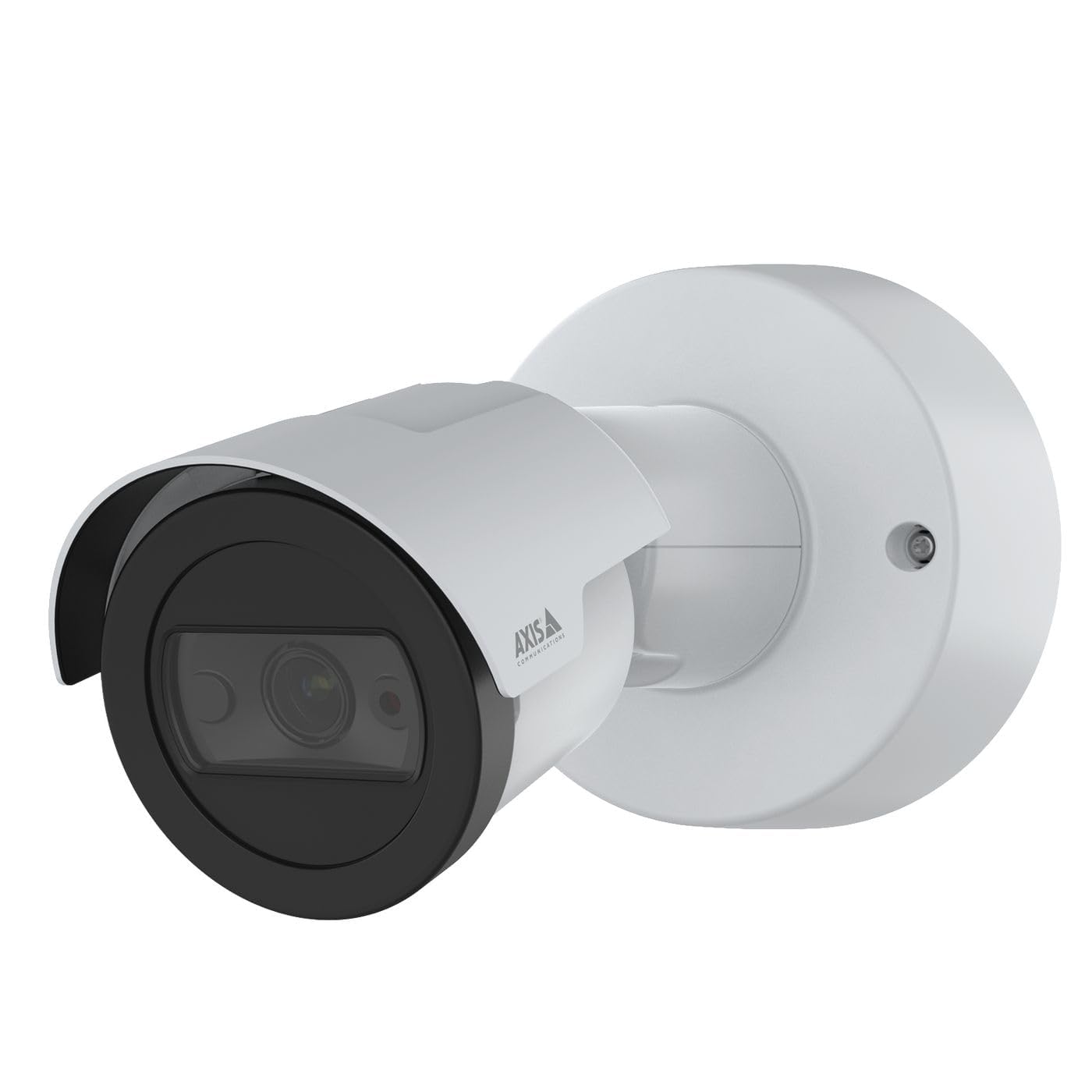
شڪل 1: سامهون view of the Axis M2035-LE HDTV 1080P Surveillance Camera. This image shows the compact dome design suitable for outdoor installation.
5. سيٽ اپ ۽ تنصيب
The Axis M2035-LE camera supports various mounting options, including table mount and recessed installation. Ensure the chosen location provides a clear field of view and stable mounting surface.
5.1. چڙهڻ جا ويچار
- ٻاهرين استعمال: The camera is designed for outdoor environments.
- طاقت: The camera requires a 28V power supply. Ensure proper wiring and power delivery.
- رابطي: The camera supports Wi-Fi and Ethernet connectivity. Plan your network connection accordingly.
5.2. Table Mount Installation
- Attach the mounting stand to the camera unit using the provided screws.
- ڪئميرا کي هڪ مستحڪم، فليٽ مٿاڇري تي رکو.
- ڪئميرا کي ترتيب ڏيو viewضرورت مطابق زاويه.
5.3. Recessed Mount Installation (Soffit Exampلي)
For recessed mounting, particularly in soffits, careful planning is required to ensure sufficient depth and avoid obstructions.
- Verify Depth: Before cutting, confirm the soffit has adequate depth for the recessed mount. You can use a small pilot hole and a wire to measure the available space.
- Mark and Cut: Mark the desired location and carefully cut the opening in the soffit according to the template provided with the recessed mount kit (sold separately).
- انسٽال ڪريو جبل: Secure the recessed mount bracket into the opening.
- Connect and Secure: Connect the necessary cables (power, Ethernet) and then secure the camera unit into the recessed mount.
- زاويه ترتيب ڏيو: Adjust the camera lens to achieve the desired field of view.
6. آپريٽنگ هدايتون
6.1. شروعاتي پاور اپ ۽ نيٽ ورڪ ڪنيڪشن
- ڪئميرا کي پاور سپلائي سان ڳنڍيو.
- For initial setup, it is recommended to connect via Ethernet to your network router or switch.
- Use the Axis IP Utility or a web browser to discover the camera on your network and configure its settings.
- For Wi-Fi connectivity, configure the wireless settings through the camera's web انٽرفيس.
6.2. وڊيو مانيٽرنگ ۽ رڪارڊنگ
- The camera provides 1080p video resolution at 30 frames per second.
- لائيو تائين رسائي view and recording features through the camera's web انٽرفيس يا مطابقت رکندڙ وڊيو مئنيجمينٽ سافٽ ويئر (VMS).
- The camera is compatible with Digital Video Recorders (DVRs).
- Video capture format is MPEG-4.
6.3. Low Light and Night Vision
The M2035-LE features "Night Color" low light technology and an infrared (IR) light source for clear imaging in dark conditions.
- The camera automatically switches to night mode when ambient light is low.
- Ensure the IR illuminator is not obstructed for optimal night vision performance.
6.4. حرڪت جي ڳولا ۽ الرٽ
The camera supports motion-only alert types.
- Configure motion detection zones and sensitivity settings via the camera's web انٽرفيس.
- Set up alert actions such as email notifications or recording triggers.
6.5. ريموٽ ڪنٽرول
The camera can be controlled remotely through its web interface or compatible VMS, allowing for adjustments to settings and viewلائيو فيڊز ڏئي رهيو آهي.
7. سار سنڀال
- صفائي: ڪئميرا لينس ۽ جسم کي نرم، ڊي سان نرميءَ سان صاف ڪريو.amp ڪپڙو. استعمال نه ڪريو سخت ڪيميائي يا گھڻائي صاف ڪندڙ.
- فرم ويئر اپڊيٽس: ايڪسس ڪميونيڪيشن کي باقاعدي طور تي چيڪ ڪريو website for firmware updates to ensure optimal performance and security. Follow the instructions provided with the firmware update.
- ڪيبل جي چڪاس: وقتي طور تي سڀني ڪيبلن جو معائنو ڪريو ته جيئن انهن جي خرابي يا نقصان جي نشانين لاءِ، خاص طور تي ٻاهرين تنصيبات ۾.
8. مسئلا حل ڪرڻ
| مسئلو | ممڪن سبب | حل |
|---|---|---|
| بجلي ناهي / ڪئميرا آن نه ٿي رهيو آهي | Incorrect power supply; Loose connection; Power outage | Verify power adapter and connections; Check power outlet; Ensure correct voltagاي (28V). |
| Cannot connect to camera via network | Incorrect IP address; Network cable issue; Wi-Fi configuration error; Firewall blocking connection | Use Axis IP Utility to find camera; Check Ethernet cable; Reconfigure Wi-Fi settings; Temporarily disable firewall for testing. |
| خراب تصوير جو معيار | Dirty lens; Insufficient lighting; Incorrect focus/settings; Network bandwidth issues | Clean the lens; Ensure adequate lighting or proper night vision settings; Adjust focus/image settings; Check network speed. |
| حرڪت جي چڪاس ڪم نه ڪندي | Incorrect sensitivity settings; Detection zones not configured; Obstructions in view | Adjust motion detection sensitivity; Define detection zones in settings; Clear any obstructions. |
9. وضاحتون
| خاصيت | تفصيل |
|---|---|
| ماڊل نمبر | M2035-لي |
| اندروني / ٻاهران استعمال | ٻاھران |
| رابطي ٽيڪنالاجي | Ethernet، وائي فائي |
| وڊيو ڪيپچر ريزوليوشن | 1080 ص |
| فريم جي شرح | 30 frames_per_second |
| Viewزاويه | 110 درجا |
| گھٽ روشني ٽيڪنالاجي | رات جو رنگ |
| روشني جو ذريعو قسم | انفراريڊ |
| انتباہ جو قسم | صرف حرڪت |
| ڪنٽرول جو طريقو | ريموٽ |
| طاقت جو ذريعو | Information Not Available (Note: Requires 28V, 4.2W) |
| جلدtage | 28 وولٽ |
| واتtage | 4.2 واٽ |
| مواد | ڌاتو |
| رنگ | اڇو |
| طول و عرض (L x W x H) | 1.1 x 9.7 x 6.5 انچ |
| شيءِ جو وزن | 0.634 اونس |
| بين الاقوامي تحفظ جي درجه بندي | IP54 (پاڻي مزاحمتي) |
| مطابقت رکندڙ ڊوائيسز | ڊجيٽل وڊيو رڪارڊر |
| فوٽو سينسر ٽيڪنالاجي | CMOS |
| وڊيو ڪيپچر فارميٽ | MPEG-4 |
10. وارنٽي ۽ سپورٽ
تفصيلي وارنٽي جي معلومات لاءِ، مھرباني ڪري سرڪاري ايڪسس ڪميونيڪيشنز جو حوالو ڏيو website or contact your local distributor. Technical support and additional resources can also be found on the Axis Communications support portal.
ٺاهيندڙ: AXIS
Webسائيٽ: www.axis.com