1. تعارف
خريد ڪرڻ لاءِ مهربانيasing the LEICKE Portable DAB+ Radio. This device offers a versatile listening experience with DAB/DAB+ and FM radio, Bluetooth 5.0 connectivity, and various media playback options. Its compact design and rechargeable battery make it ideal for both indoor and outdoor use. Please read this manual carefully to ensure proper operation and to get the most out of your radio.
2. حفاظتي هدايتون
- ڊوائيس کي مينهن، نمي، يا انتهائي گرمي پد جي سامهون نه رکو.
- ڊوائيس کي مضبوط اثرن لاءِ ڇڏڻ يا تابع ڪرڻ کان پاسو ڪريو.
- ڊوائيس کي پاڻ ڌار نه ڪريو يا مرمت ڪرڻ جي ڪوشش نه ڪريو. سڀني سروسنگ کي قابل اهلڪارن جي حوالي ڪريو.
- Keep the device away from heat sources such as radiators, stoves, or other heat-producing appliances.
- صرف مهيا ڪيل پاور ڪيبل ۽ لوازمات استعمال ڪريو.
- آپريشن دوران ڊوائيس جي چوڌاري مناسب وينٽيليشن کي يقيني بڻايو وڃي.
3. پيڪيج مواد
مھرباني ڪري چيڪ ڪريو ته سڀ شيون دٻي ۾ موجود آھن:
- 1 x LEICKE Portable DAB+ Radio
- 1 x پاور ڪيبل
- 1 x AUX آڊيو ڪيبل
- 1 x تڪڙو شروع ھدايت

تصوير: پراڊڪٽ پيڪيج جو مواد.
4. پراڊڪٽ ختمview
Familiarize yourself with the radio's controls and ports.
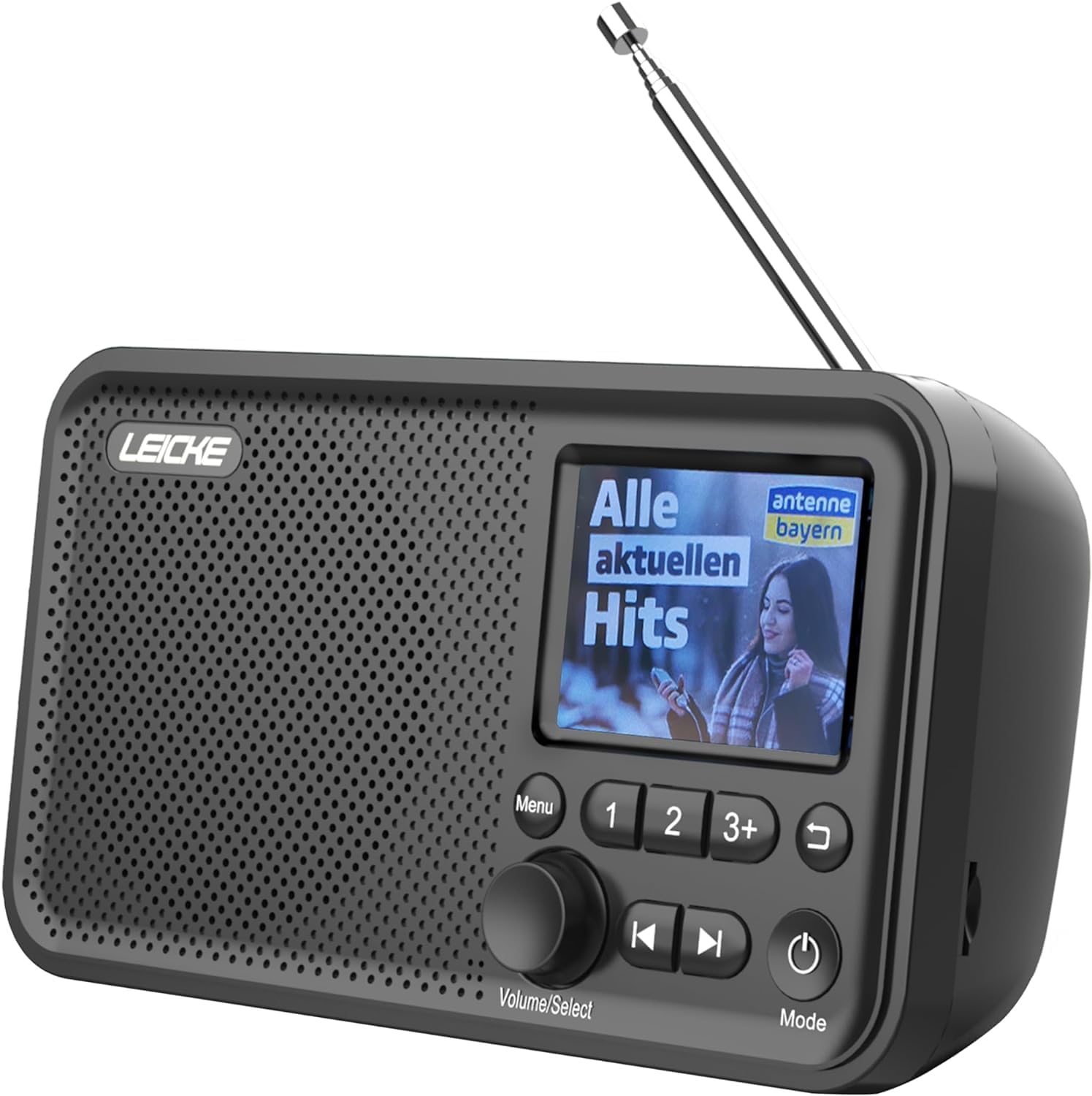
تصوير: سامهون view of the LEICKE Portable DAB+ Radio.
ڪنٽرول ۽ ڊسپلي:
- 2.4-inch Colour Display: اسٽيشن جي معلومات، وقت، ۽ مينيو آپشن ڏيکاري ٿو.
- مينيو بٽڻ: مکيه مينيو تائين رسائي.
- Volume/Select Knob: Rotates to adjust volume or navigate menus; presses to select.
- Preset Buttons (1, 2, 3+): Quick access to saved stations.
- پوئين/اڳيون بٽڻ: Navigates through stations or tracks.
- پوئتي بٽڻ: پوئين اسڪرين ڏانهن واپسي.
- پاور / موڊ بٽڻ: Turns the radio on/off and switches between modes (DAB, FM, Bluetooth, AUX, MicroSD).
بندرگاهن ۽ ڪنيڪشن:

تصوير: پوئين پاسي view of the radio highlighting the MicroSD/TF card slot and 3.5mm headphone jack.
- Telescopic Antenna: For optimal radio reception.
- MicroSD/TF Card Slot: آڊيو هلائڻ لاءِ files from a memory card.
- 3.5mm هيڊ فون جڪ: ذاتي ٻڌڻ لاءِ.
- AUX ان پٽ: ٻاهرين آڊيو ڊوائيسز کي ڳنڍڻ لاءِ.
- ڊي سي 5V پورٽ: For charging the internal battery and powering the device.
5. سيٽ اپ
5.1 بيٽري کي چارج ڪرڻ
The radio has a built-in 2000 mAh rechargeable battery. Before first use, fully charge the battery.
- Connect the provided power cable to the DC 5V port on the radio.
- Plug the other end of the power cable into a suitable USB power adapter (not always included) or a powered USB port.
- The charging indicator on the display will show the charging status.
- Once fully charged, the indicator will show a full battery icon.

Image: The radio displaying battery charging status.
5.2 اينٽينا سيٽ اپ
For optimal radio reception, extend the telescopic antenna fully.
5.3 Initial Power On & Language Selection
- کي دٻايو ۽ رکو پاور / موڊ ريڊيو کي چالو ڪرڻ لاء بٽڻ.
- Upon first use, the radio may prompt you to select a language.
- گھمايو Volume/Select knob to scroll through the language options.
- کي دٻايو Volume/Select توهان جي چونڊ جي تصديق ڪرڻ لاء knob.
6. آپريٽنگ موڊس
6.1 DAB/DAB+ Radio Mode
The radio supports DAB/DAB+ (Digital Audio Broadcasting) for crystal clear digital radio reception.

Image: The radio displaying radio frequency information.
6.1.1 اسٽيشنن جي اسڪيننگ
- کي دٻايو پاور / موڊ button to switch to DAB mode.
- The radio will automatically perform a full scan for available DAB/DAB+ stations. This may take a few moments.
- Once the scan is complete, the first available station will begin playing.
6.1.2 اسٽيشنن جي چونڊ
- گھمايو Volume/Select knob to browse through the list of available stations.
- کي دٻايو Volume/Select knob to select and tune into a station.
6.1.3 محفوظ ٿيندڙ پري سيٽس
You can store up to 20 DAB+ stations as presets.
- Tune to the desired DAB+ station.
- Press and hold one of the preset buttons (1, 2، يا 3+) until the display confirms the station has been saved.
- For presets beyond 3, press and hold 3+, then rotate the Volume/Select knob to choose a preset number (4-20), and press to confirm.
6.1.4 RDS/DLS Information
The 2.4-inch colour display shows station information (DLS - Dynamic Label Segment) and program details (RDS - Radio Data System) where available.
6.2 FM ريڊيو موڊ
The radio supports FM radio with RDS (Radio Data System).
6.2.1 اسٽيشنن جي اسڪيننگ
- کي دٻايو پاور / موڊ FM موڊ تي سوئچ ڪرڻ لاء بٽڻ.
- کي دٻايو ۽ رکو Volume/Select knob to initiate an auto-scan for FM stations. The radio will scan and save all strong signals.
6.2.2 اسٽيشنن جي چونڊ
- گھمايو Volume/Select knob to manually tune the frequency.
- استعمال ڪريو اڳيون/اڳيون buttons to jump to the next available strong station.
6.2.3 محفوظ ٿيندڙ پري سيٽس
You can store up to 40 FM stations as presets, similar to DAB+ mode.
- گهربل FM اسٽيشن تي ٽيون.
- Press and hold one of the preset buttons (1, 2، يا 3+) until the display confirms the station has been saved.
- For presets beyond 3, press and hold 3+, then rotate the Volume/Select knob to choose a preset number (4-40), and press to confirm.
6.3 بلوٽوٽ موڊ
پنهنجي بلوٽوٿ-فعال ڊوائيسز تان وائرليس طور تي آڊيو اسٽريم ڪريو.

Image: The radio displaying Bluetooth connection status.
6.3.1 جوڙڻ
- کي دٻايو پاور / موڊ button to switch to Bluetooth mode. The display will show "Bluetooth" and indicate it's ready for pairing.
- پنهنجي بلوٽوٿ ڊيوائس (مثال طور، اسمارٽ فون، ٽيبليٽ) تي، بلوٽوٿ کي فعال ڪريو ۽ موجود ڊوائيسز جي ڳولا ڪريو.
- Select "LEICKE DAB Radio" from the list of devices.
- Once paired, the radio will confirm the connection on its display.
6.3.2 آڊيو هلائڻ
- Once connected, play audio from your Bluetooth device. The sound will be output through the radio's speaker.
- استعمال ڪريو Volume/Select knob on the radio or the volume controls on your connected device to adjust the volume.
- جي اڳيون/اڳيون buttons on the radio can control track skipping on your connected device.
6.4 MicroSD/TF Card Playback
آڊيو کيڏيو files directly from a MicroSD/TF card.
6.4.1 Inserting Card
- Ensure the radio is powered off or in another mode.
- Carefully insert a MicroSD/TF card (up to 32GB, FAT32 format) into the card slot until it clicks into place.
6.4.2 آڊيو هلائڻ
- کي دٻايو پاور / موڊ button to switch to MicroSD/TF mode.
- The radio will automatically start playing audio files ڪارڊ مان.
- استعمال ڪريو اڳيون/اڳيون ٽريڪ جي وچ ۾ نيويگيٽ ڪرڻ لاءِ بٽڻ.
- گھمايو Volume/Select حجم کي ترتيب ڏيڻ لاء knob.
6.5 AUX ان پٽ
3.5mm AUX ڪيبل استعمال ڪندي ٻاهرين آڊيو ڊوائيسز کي ڳنڍيو.
6.5.1 ٻاهرين ڊوائيسز کي ڳنڍڻ
- Connect one end of the 3.5mm AUX audio cable to the AUX input port on the radio.
- ٻئي ڇيڙي کي پنهنجي ٻاهرين ڊوائيس جي هيڊ فون جيڪ يا آڊيو آئوٽ پٽ سان ڳنڍيو (مثال طور، MP3 پليئر، اسمارٽ فون).
- کي دٻايو پاور / موڊ AUX موڊ تي سوئچ ڪرڻ لاءِ بٽڻ.
- پنهنجي ٻاهرين ڊوائس تان آڊيو هلايو. آواز ريڊيو جي اسپيڪر ذريعي آئوٽ پُٽ ٿيندو.
6.6 الارم افعال
The radio features dual alarm clocks.
6.6.1 الارم لڳائڻ
- کي دٻايو مينيو بٽڻ
- گھمايو Volume/Select knob to navigate to "Alarm" and press to select.
- Select "Alarm 1" or "Alarm 2".
- Follow the on-screen prompts to set the alarm time, source (Buzzer, DAB, or FM), frequency (Once, Daily, Weekdays, Weekends), and volume.
- کي دٻايو Volume/Select knob to confirm each setting.
6.6.2 Snooze/Stop Alarm
- جڏهن الارم ل soundsندو آهي ، کي دايو Volume/Select knob to activate snooze (alarm will sound again after a short period).
- To stop the alarm completely, press the پاور / موڊ بٽڻ
6.7 سمهڻ جو ٽائيم
Set the radio to automatically turn off after a specified period.
- کي دٻايو مينيو بٽڻ
- گھمايو Volume/Select knob to navigate to "Sleep Timer" and press to select.
- Choose the desired sleep duration (e.g., 15, 30, 60, 90, 120 minutes, or Off).
- چونڊيل وقت کان پوءِ ريڊيو پاڻمرادو بند ٿي ويندو.
7. سار سنڀال
7.1 صفائي
- صفائي ڪرڻ کان اڳ هميشه پاور ڪيبل کي ڊسڪنيڪٽ ڪريو.
- ريڊيو جي ٻاهرئين حصي کي صاف ڪرڻ لاءِ نرم، سڪل ڪپڙو استعمال ڪريو.
- گھڙڻ وارا صاف ڪندڙ، موم، يا محلول استعمال نه ڪريو ڇو ته اهي ختم کي نقصان پهچائي سگهن ٿا.
7.2 بيٽري جي سنڀال
- بيٽري جي زندگي کي وڌائڻ لاءِ، بيٽري کي بار بار مڪمل طور تي چارج ڪرڻ کان پاسو ڪريو.
- If the radio will not be used for an extended period, charge it fully before storage and recharge every few months.
7.3 اسٽوريج
- Store the radio in a cool, dry place, away from direct sunlight and extreme temperatures.
8. مسئلا حل ڪرڻ
If you encounter issues with your radio, please refer to the following table:
| مسئلو | ممڪن سبب | حل |
|---|---|---|
| No power/Radio won't turn on | بيٽري ختم ٿي وئي آهي؛ پاور ڪيبل صحيح طرح سان ڳنڍيل نه آهي. | بيٽري چارج ڪريو؛ پڪ ڪريو ته پاور ڪيبل محفوظ طور تي ڳنڍيل آهي. |
| Poor radio reception (DAB/FM) | اينٽينا نه وڌايو ويو آهي؛ ڪمزور سگنل علائقو؛ مداخلت. | Fully extend the telescopic antenna; Relocate the radio to an area with better signal; Move away from other electronic devices. |
| بلوٽوٿ ڳنڍي نه ٿو | Radio not in Bluetooth mode; Device not in pairing mode; Already connected to another device. | Switch radio to Bluetooth mode; Ensure your device's Bluetooth is on and searching; Disconnect from other devices. |
| No sound from MicroSD/TF card | ڪارڊ صحيح طرح سان داخل نه ڪيو ويو آهي؛ غير معاون file فارميٽ؛ خراب ٿيل files. | Reinsert the card; Ensure files are in a supported format (e.g., MP3); Try a different card. |
| ڊسپلي خالي يا منجهيل آهي. | عارضي سافٽ ويئر جي خرابي. | Press and hold the Power/Mode button for 10 seconds to force a restart. |
9. وضاحتون

Image: Dimensions of the LEICKE Portable DAB+ Radio.
| خاصيت | تفصيل |
|---|---|
| ماڊل نمبر | اي پي 18227 |
| برانڊ | ليکي |
| DAB/DAB+ فريڪوئنسي | 174-240 MHz |
| FM فريکوئنسي | 87.5 - 108 ميگا هرٽز |
| بلوٽوت ورزن | 5.0 |
| ڏيکاريو | 2.4 inch Colour LCD |
| اڳواٽ | 60 (40 FM, 20 DAB+) |
| بيٽري جي گنجائش | 2000 mAh |
| طاقت جو ذريعو | Battery Powered / DC 5V |
| رابطي | Bluetooth, Auxiliary, MicroSD/TF |
| پيداوار جي ماپ | 17 x 5.5 x 9.5 سينٽي ميٽر (تقريبن) |
| وزن | 370 گرام (تقريبن) |
10. وارنٽي ۽ سپورٽ
LEICKE products come with a standard manufacturer's warranty. For detailed warranty terms and conditions, please refer to the warranty card included with your product or visit the official LEICKE webسائيٽ.
If you require technical support or have any questions regarding your LEICKE Portable DAB+ Radio, please contact LEICKE customer service through the following channels:
- Webسائيٽ: www.leicke.com
- اي ميل: Refer to the contact information on the LEICKE website or your quick start guide.
Please have your model number (EP18227) and purchase details ready when contacting support.


