تعارف
Thank you for choosing the HTC Neckband Headphones. These headphones are designed to provide a superior audio experience with advanced features such as Bluetooth 5.0 connectivity, Active Noise Cancellation (ANC), and Environmental Noise Cancellation (ENC) for clear calls. With an IPX5 waterproof rating and up to 16 hours of playtime, they are suitable for various activities, from daily commutes to intense workouts.

Image: The HTC Neckband Headphones in red, showcasing their ergonomic design and in-ear earbuds.
حفاظت جي ڄاڻ
- ٻڌڻ جي نقصان کي روڪڻ لاءِ وڏي آواز ۾ گهڻي وقت تائين ٻڌڻ کان پاسو ڪريو.
- اهڙين حالتن ۾ هيڊفون استعمال نه ڪريو جتي ماحول جي آوازن کي ٻڌڻ ۾ ناڪامي خطرناڪ ٿي سگهي ٿي (مثال طور، ڊرائيونگ، سائيڪل هلائڻ، ٽرئفڪ ۾ هلڻ).
- Keep the headphones dry. Do not expose them to extreme temperatures or humidity.
- صرف مهيا ڪيل چارجنگ ڪيبل يا تصديق ٿيل برابر استعمال ڪريو.
- مقامي ضابطن جي مطابق ذميواري سان پيداوار کي ختم ڪريو.
پيڪيج مواد
- HTC Neckband Headphones
- USB قسم-سي چارجنگ ڪيبل
- ڪنن جي ٽوٽن جا ڪيترائي سائز
- استعمال ڪندڙ دستي
پيداوار ختمview
The HTC Neckband Headphones feature a flexible neckband design with integrated controls and magnetic earbuds for secure storage. The earbuds are designed for comfortable in-ear fit, and the neckband rests lightly around your neck.
ڪنٽرول ۽ اشارا

تصوير: تفصيلي view of the control panel on the neckband, indicating buttons for On/Off, Volume +, Volume -, ANC Noise Reduction, Type-C charging port, and LED indicator.
- آن / آف بٽڻ: هيڊفونز کي آن يا آف ڪري ٿو.
- حجم + بٽڻ: Increases volume, next track (long press).
- حجم - بٽڻ: Decreases volume, previous track (long press).
- ANC بٽڻ: فعال شور منسوخي کي چالو يا غير فعال ڪري ٿو.
- ٽائپ-سي چارجنگ پورٽ: ڊوائيس چارج ڪرڻ لاء.
- LED اشارو: Shows power status, charging status, and pairing mode.
سيٽ اپ ڪريو
1. هيڊفون چارج ڪرڻ
Before first use, fully charge your headphones. Connect the provided USB Type-C charging cable to the charging port on the neckband and the other end to a USB power source. The LED indicator will show charging status. A full charge takes approximately 1 hour and 50 minutes, providing up to 16 hours of playtime.
2. بلوٽوٽ جوئر
- پڪ ڪريو ته هيڊفون بند ٿيل آهن.
- Press and hold the On/Off button until the LED indicator flashes rapidly (usually blue and red), indicating pairing mode.
- پنهنجي ڊوائيس (اسمارٽ فون، ٽيبليٽ، وغيره) تي، بلوٽوٿ کي فعال ڪريو ۽ موجود ڊوائيسز جي ڳولا ڪريو.
- Select "HTC Neckband Headphones" from the list of devices.
- هڪ ڀيرو ڳنڍيل، LED اشارو عام طور تي هڪ مضبوط نيري روشني ڏيکاريندو يا آهستي آهستي چمڪندو.
آپريٽنگ هدايتون
پاور آن / آف
- پاور آن ڪرڻ: Press and hold the On/Off button for approximately 3 seconds until the LED indicator lights up.
- پاور آف ڪرڻ: Press and hold the On/Off button for approximately 5 seconds until the LED indicator turns off.
موسيقي پلے بیک
- راند/روڪ: هڪ ڀيرو آن / آف بٽڻ کي دٻايو.
- حجم مٿي حجم + بٽڻ کي دايو.
- حجم ھيٺ واليوم - بٽڻ دٻايو.
- اڳيون ٽريڪ: واليوم + بٽڻ کي ڊگھو دٻايو.
- پويون ٽريڪ: واليوم - بٽڻ کي ڊگھو دٻايو.
ڪال انتظام
- جواب/آخر ڪال: هڪ ڀيرو آن / آف بٽڻ کي دٻايو.
- ڪال رد ڪريو: آن/آف بٽڻ کي ڊگھو دٻايو.
- ريڊل آخري نمبر: Double-press the On/Off button.
فعال شور جي منسوخي (ANC)
The ANC feature reduces ambient noise, allowing for a more immersive audio experience. The headphones also feature Environmental Noise Cancellation (ENC) for clearer voice calls.

Image: HTC Neckband Headphones with visual representation of sound waves, highlighting the ANC + ENC Noise Reduction feature for pure music enjoyment.
- ANC کي فعال/غير فعال ڪريو: Press the ANC button once. The LED indicator may change to confirm activation/deactivation.
هيڊفون پائڻ
For optimal comfort and sound quality, ensure the earbuds fit snugly in your ears. The neckband is designed to rest comfortably around your neck. The magnetic design of the earbuds allows them to securely attach to each other when not in use, preventing tangling and ensuring they stay in place around your neck.

Image: A woman wearing the red HTC Neckband Headphones comfortably around her neck and in her ears while exercising, demonstrating the secure fit.

Image: A man and a woman wearing HTC Neckband Headphones, illustrating the comfortable and secure fit. Inset shows different ear tip sizes (L and S) for customization.
سار سنڀال ۽ سنڀال
- صفائي: Gently wipe the headphones with a soft, damp ڪپڙو. سخت ڪيميائي يا رگڻ واري مواد استعمال نه ڪريو.
- اسٽوريج: When not in use, store the headphones in a cool, dry place, away from direct sunlight and extreme temperatures. The magnetic earbuds help keep them tidy.
- پاڻي جي مزاحمت: The headphones are IPX5 waterproof, meaning they are resistant to sweat and light splashes of water. Do not submerge them in water or expose them to heavy rain.

Image: A man exercising, wearing the HTC Neckband Headphones, with an overlay indicating IPX5 Waterproof Design, suitable for sweat and light rain.
مشڪلاتون
- هيڊفون آن نه ٿي رهيا آهن: پڪ ڪريو ته هيڊفون مڪمل طور تي چارج ٿيل آهن.
- آواز ڪونهي: Check if the headphones are paired correctly and the volume is turned up on both the headphones and your device.
- ڳنڍڻ جا مسئلا: Make sure the headphones are in pairing mode (flashing LED). Turn off Bluetooth on other nearby devices to avoid interference. Try unpairing and re-pairing.
- خراب ڪال معيار: Ensure the microphone is not obstructed. Check for strong Bluetooth signal.
وضاحتون
| خاصيت | تفصيل |
|---|---|
| برانڊ | ايڇ ٽي سي |
| ماڊل نالو | Neckband Headphones Bluetooth 5.0 ANC |
| وائرليس ڪميونيڪيشن ٽيڪنالاجي | بلوٽوٿ |
| پاڻي جي مزاحمت جي سطح | IPX5 (پنروڪ) |
| بيٽري جي گنجائش | 130mAh (approximate, inferred from image) |
| موسيقي جو وقت | Up to 16 hours (inferred from product title and image) |
| Call Duration Time | Up to 10 hours (inferred from image) |
| اسٽينڊ بائي ٽائيم | Up to 180 days (inferred from image) |
| چارج ڪرڻ وقت | Approx. 1 hour 50 minutes (inferred from video) |
| مواد | رٻڙ، سلڪون |
| شيءِ جو وزن | 9.1 اونس |
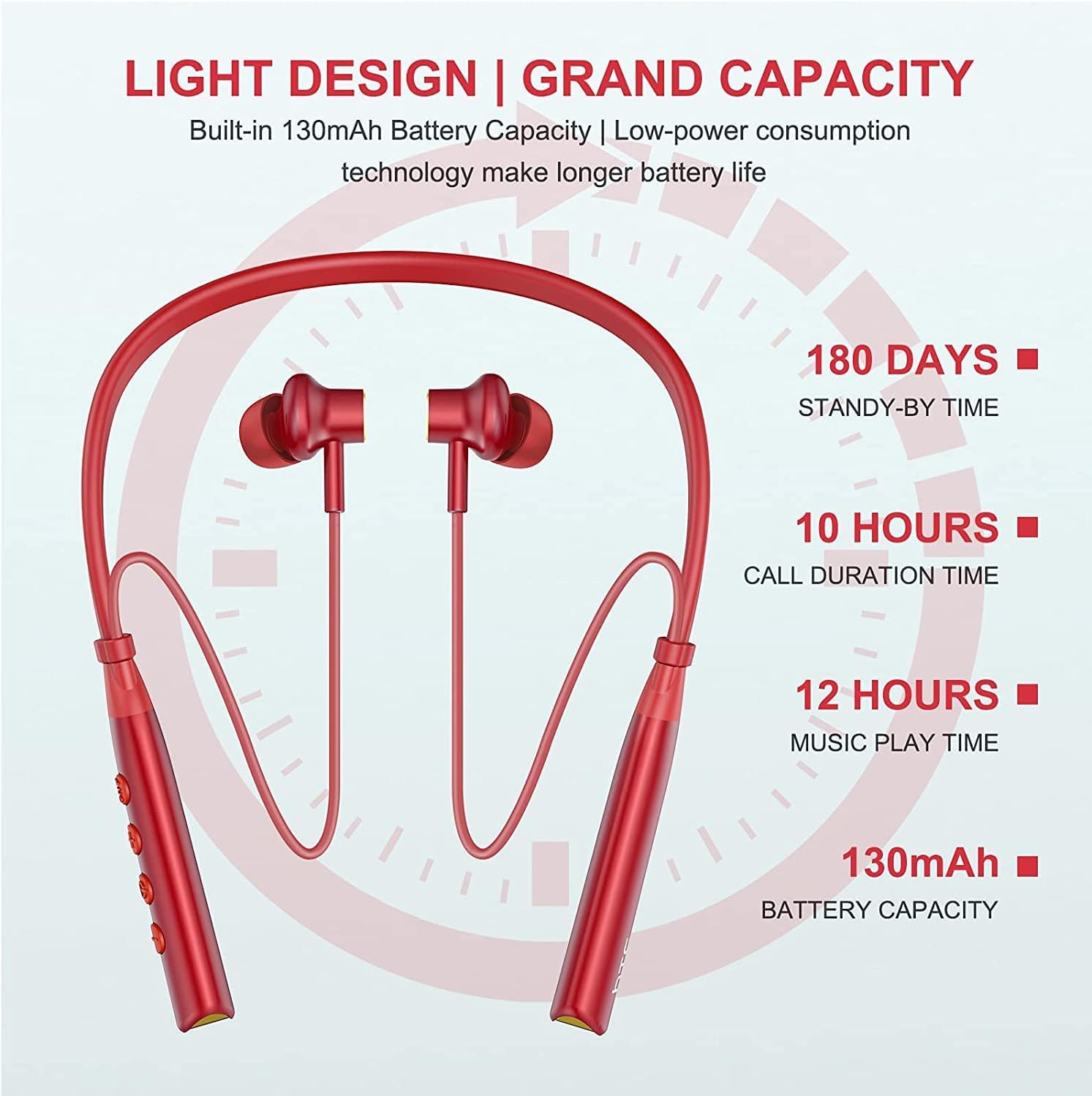
Image: Visual representation of battery specifications, including 180 days standby, 10 hours call duration, 12 hours music playtime, and 130mAh battery capacity.
وارنٽي ۽ سپورٽ
HTC products are manufactured to the highest quality standards. For warranty information or technical support, please refer to the official HTC website or contact your local customer service representative. Keep your purchase receipt for warranty claims.
Product Video Guide
Video: An official product video demonstrating the features and usage of the HTC Wireless Neckband Bluetooth Headphones, including pairing, controls, and comfort.


