1. پراڊڪٽ ختمview
The Baseus Metal Gleam Series 8-in-1 USB-C Hub is a versatile docking station designed to expand the connectivity of your USB-C enabled devices. It integrates multiple essential ports, including USB 3.0, HDMI, USB-C Power Delivery (PD), and microSD/SD card readers, into a single compact unit. This hub is ideal for enhancing productivity by connecting various peripherals, external displays, and charging your device simultaneously.

The Baseus Metal Gleam Series 8-in-1 USB-C Hub is presented in its retail box, showcasing the product and its key features on the packaging.
2. اهم خاصيتون
- 8-ان-1 ڪنيڪشن: Provides comprehensive port expansion for modern USB-C devices.
- Triple USB 3.0 Ports: Offers high-speed data transfer up to 5Gbps for peripherals like external hard drives, keyboards, and mice.
- Dual HDMI Outputs: Supports dual-display ultra-clear expansion, enabling connection to two external monitors for enhanced multitasking.
- USB-C پاور پهچائڻ (PD): Allows for fast charging of your host device with up to 100W power pass-through.
- MicroSD/SD Card Readers: Facilitates quick access to photos and videos from memory cards.
- ڪمپيڪٽ ۽ پورٽبل ڊيزائن: Metal gleam series design ensures durability and easy portability.
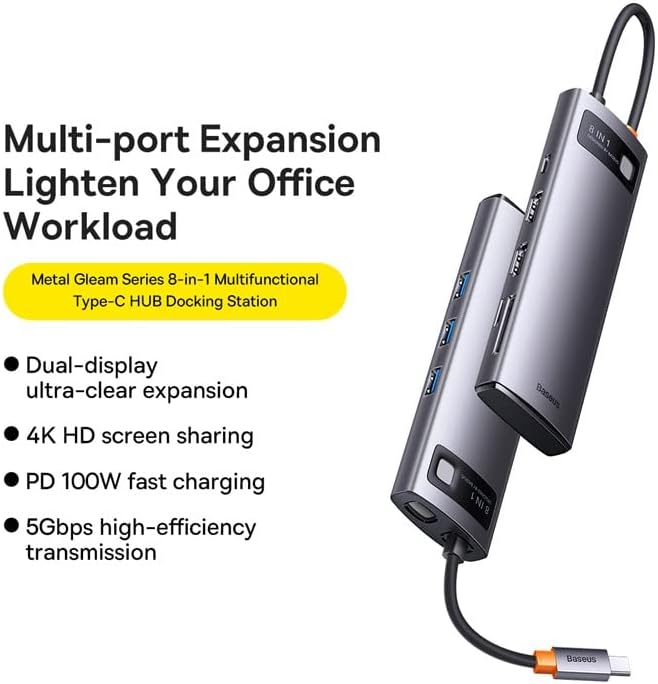
This graphic highlights the multi-port expansion capabilities of the Baseus Metal Gleam Series 8-in-1 USB-C Hub, emphasizing its ability to lighten office workload with features like dual-display, 4K HD screen sharing, PD 100W fast charging, and 5Gbps high-efficiency transmission.
3. پيڪيج مواد
- 1 x Baseus Metal Gleam Series 8-in-1 USB-C Hub
- 1 x استعمال ڪندڙ دستياب
4. سيٽ اپ جون هدايتون
- هوسٽ ڊيوائس سان ڳنڍيو: Plug the USB-C connector of the hub into the USB-C port of your laptop, tablet, or smartphone. Ensure the connection is secure.
- پردي سان ڳنڍڻ: Connect your USB devices (e.g., mouse, keyboard, external hard drive) to the USB 3.0 ports on the hub.
- ڊسپلي ڳنڍيو: Use HDMI cables to connect your external monitors to the HDMI ports on the hub.
- بجلي پهچائڻ (اختياري): If your host device requires charging, connect your original USB-C power adapter to the USB-C PD port on the hub. This will charge your device while using the hub.
- ميموري ڪارڊ داخل ڪريو: Insert your microSD or SD cards into the corresponding slots for data access.

This image provides an angled perspective of the Baseus Metal Gleam Series 8-in-1 USB-C Hub, highlighting its sleek design and the three accessible USB 3.0 ports on its side.
5. آپريٽنگ هدايتون
5.1. USB 3.0 Data Transfer
Connect USB devices such as flash drives, external hard drives, or other USB peripherals to the USB 3.0 ports. The hub supports data transfer speeds of up to 5Gbps.
5.2. HDMI Display Output
Connect your monitors using HDMI cables. The hub supports dual HDMI output. For optimal performance, ensure your display settings on your computer are configured correctly for extended or mirrored displays.
- ونڊوز سسٽم: Supports triple-display (A+B+C) at 1080P@60Hz in expansion mode, and (A+A+A) at 1080P@60Hz in mirroring mode.
- Apple OS Systems: Supports dual-display (A+B+B) at 4K@30Hz in expansion mode, and (A+A+A) at 4K@30Hz in mirroring mode.

This visual guide demonstrates the dual-display functionality of the Baseus Metal Gleam Series 8-in-1 USB-C Hub, showing both expansion and mirroring modes for Windows systems (1080P@60Hz) and Apple OS systems (4K@30Hz).
5.3. USB-C Power Delivery
The USB-C PD port allows you to charge your host device (laptop, tablet) while simultaneously using the hub's other functions. Connect your device's original USB-C power adapter to this port. The hub supports up to 100W power pass-through.
5.4. SD/MicroSD Card Reader
Insert your SD or microSD cards into the designated slots. The hub will allow your device to read and write data to these cards.
6. سار سنڀال
- صفائي: حب جي مٿاڇري کي صاف ڪرڻ لاءِ نرم، سڪل ڪپڙو استعمال ڪريو. مائع صاف ڪندڙ يا رگڙيندڙ مواد استعمال ڪرڻ کان پاسو ڪريو.
- اسٽوريج: حب کي سڌي سج جي روشني ۽ انتهائي گرمي پد کان پري ٿڌي، سڪل جاءِ تي رکو.
- سنڀالڻ: حب کي ڇڏڻ يا ان کي مضبوط ڌڪن جي تابع ڪرڻ کان پاسو ڪريو. ڊوائيس کي ڌار ڪرڻ جي ڪوشش نه ڪريو.

An exploded diagram of the Baseus Metal Gleam Series 8-in-1 USB-C Hub illustrates its internal electronic components and sophisticated circuit board design.
7. مسئلا حل ڪرڻ
- ڪابه ڊسپلي آئوٽ پٽ ناهي:
- Ensure the HDMI cables are securely connected to both the hub and the monitor.
- Verify that your monitor input source is set to the correct HDMI port.
- پنهنجي ڪمپيوٽر جي ڊسپلي سيٽنگز کي چيڪ ڪريو ته جيئن پڪ ڪري سگهجي ته ٻاهرين مانيٽر کي ڳوليو ويو آهي ۽ ترتيب ڏنو ويو آهي.
- توھان جي ڪمپيوٽر کي ٻيهر شروع ڪرڻ جي ڪوشش ڪريو.
- Devices Not Recognized (USB/SD/MicroSD):
- Ensure the hub's USB-C connector is fully inserted into your host device.
- ڪوشش ڪريو ته ڊوائيس سڌو سنئون پنهنجي ڪمپيوٽر جي USB پورٽ سان ڳنڍيو ته جيئن تصديق ڪري سگهجي ته اهو آزاديءَ سان ڪم ڪري ٿو.
- پنهنجو ڪمپيوٽر ٻيهر شروع ڪريو ۽ حب کي ٻيهر ڳنڍيو.
- بجلي جي پهچائڻ/چارجنگ ناهي:
- Ensure your USB-C power adapter is connected to the hub's PD port and is functioning correctly.
- تصديق ڪريو ته توهان جو هوسٽ ڊوائيس USB-C پاور ڊليوري کي سپورٽ ڪري ٿو.
- وقتي ڪنيڪشن:
- پڪ ڪريو ته سڀئي ڪنيڪشن مضبوط ۽ مستحڪم آهن.
- مضبوط برقي مقناطيسي مداخلت جي ذريعن جي ويجهو حب رکڻ کان پاسو ڪريو.
8. وضاحتون
| وصف | قدر |
|---|---|
| پيداوار جي ماپ | 3.94 x 1.97 x 1.18 انچ |
| شيءِ جو وزن | 5.3 اونس |
| شيون ماڊل نمبر | WKWG050113 |
| ھارڊويئر انٽرفيس | USB 3.0, HDMI, USB-C, SD, MicroSD |
| خاص خصوصيت | پورٽبل |
| مطابقت رکندڙ ڊوائيسز | ڊوائيسز USB-C پورٽ سان |
| ڪل USB بندرگاهن | 8 (3x USB 3.0, 2x HDMI, 1x USB-C PD, 1x MicroSD, 1x SD) |
| HDMI قرارداد | Up to 4K@30Hz (Apple OS), 1080P@60Hz (Windows) |
| USB-C PD ان پٽ | 100W تائين |
| ڊيٽا جي منتقلي جي رفتار | 5Gbps تائين (USB 3.0) |
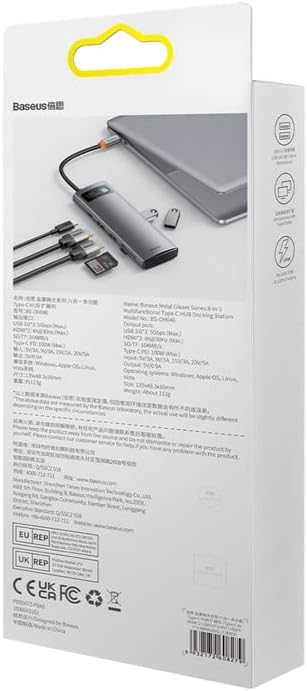
پوئتي view of the product packaging displays detailed technical specifications and compliance information for the Baseus Metal Gleam Series 8-in-1 USB-C Hub.
9. وارنٽي ۽ سپورٽ
For warranty information, technical support, or further inquiries, please visit the official Baseus webسائيٽ تي وڃو يا انهن جي ڪسٽمر سروس سان رابطو ڪريو. وارنٽي دعوائن لاءِ پنهنجي خريداري جي رسيد رکو.
سرڪاري بيسس Webسائيٽ: www.baseus.com


