1. تعارف
The Inrico B01 Wireless Bluetooth Speaker Microphone is designed to enhance communication for users of Android and iOS smart devices. This device pairs easily via Bluetooth 4.2 and offers features such as Push-to-Talk (PTT) and volume control, making it ideal for use with applications like Zello and RealPTT. Full functionality may vary depending on the specific application and its support for external devices.
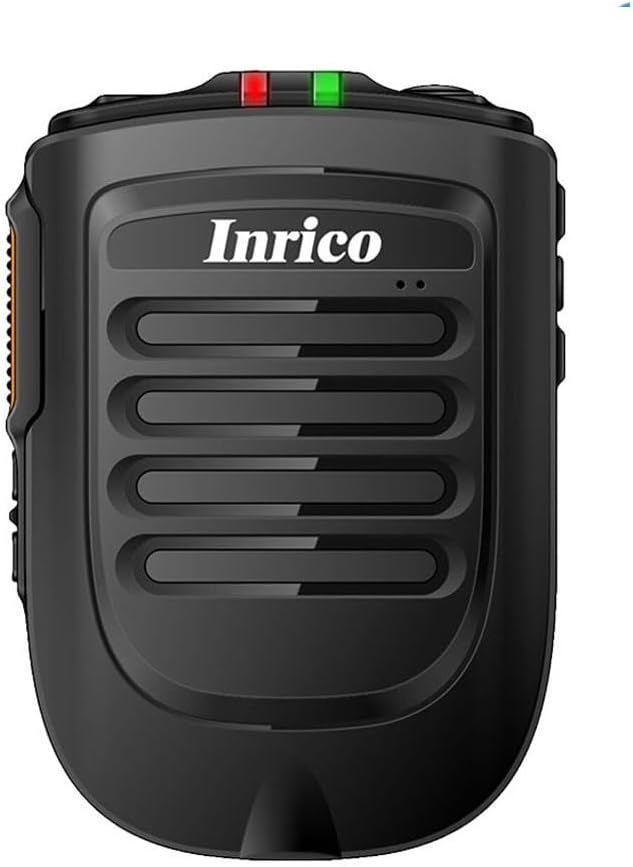
شڪل 1: سامهون view of the Inrico B01 Wireless Bluetooth Speaker Microphone. This image shows the sleek black design with the Inrico logo and speaker grille.
2. مصنوعات جون خاصيتون
- Embedded PTT and Volume Control Buttons: Designed for easy access and operation, compatible with applications like Zello and other popular communication platforms.
- 3.5mm ائرفون جڪ: Allows for connection of external listen-only earpieces for private audio.
- LED اشارو: A discreet LED on the top of the speaker provides visual status in various environments.
- ايپليڪيشن مطابقت: Works effectively with Zello and RealPTT. Note that some features may not be fully supported by other applications.
- Desktop Charger Compatibility: Designed to be compatible with the B01 Desktop Charger (sold separately).
- شامل اجزاء: Comes with a Micro USB Cable for charging.
3. پيڪيج مواد
پيڪيج کولڻ تي، مھرباني ڪري تصديق ڪريو ته ھيٺ ڏنل سڀ شيون شامل آھن:
- Inrico B01 Wireless Bluetooth Speaker Microphone
- USB چارجر
- USB ڊيٽا ڪيبل
- هدايت نامو (هي دستاويز)
- بيلٽ ڪلپ
- ليٿيم آئن بيٽري (اڳ ۾ نصب ٿيل يا الڳ)
4. ڊوائيس لي آئوٽ ۽ ڪنٽرول
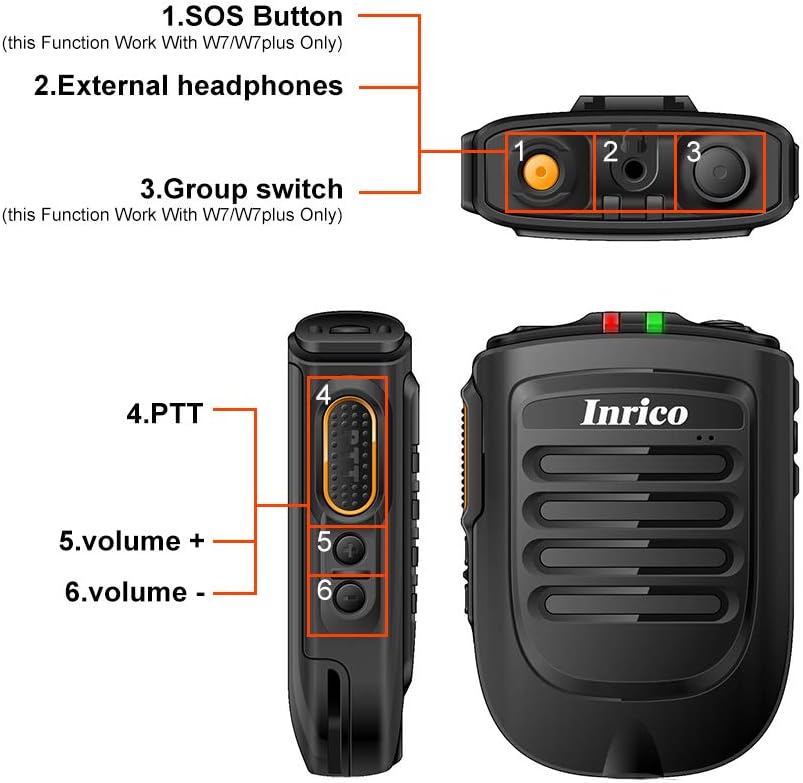
Figure 2: Detailed diagram illustrating the various buttons and ports on the Inrico B01.
- 1. SOS Button: (Functionality may depend on application and device compatibility, e.g., W7/W7plus).
- 2. External Headphones Jack: 3.5mm port for connecting an external earpiece.
- 3. Group Switch: (Functionality may depend on application and device compatibility, e.g., W7/W7plus).
- 4. PTT (Push-to-Talk) Button: Main communication button.
- 5. Volume + Button: آڊيو حجم وڌائي ٿو.
- 6. Volume - Button: آڊيو حجم گھٽائي ٿو.
5. سيٽ اپ
5.1 ڊوائيس چارج ڪرڻ
Before initial use, fully charge the Inrico B01. Connect the provided USB data cable to the device's charging port and the other end to a USB charger or a computer's USB port. The LED indicator will show charging status (refer to LED indicator section for details).

Figure 3: Illustration of the Inrico B01's 2000mAh battery capacity and estimated usage times. The image shows battery level indicators and approximate talking, PTT, and standby times.
| ميٽرڪ | تقريبن وقت |
|---|---|
| ڳالهائڻ وقت | ≈14 ڪلاڪ |
| PTT time | ≈14 ڪلاڪ |
| اسٽينڊ بائي ٽائيم | > 90 ڪلاڪ |
5.2 بلوٽوٽ جوڙي
- Ensure the Inrico B01 is powered on and in pairing mode (refer to device's LED indicator for pairing status, usually a blinking blue light).
- On your smartphone (Android or iOS), navigate to the Bluetooth settings.
- ڳولھيو available devices. The Inrico B01 should appear in the list (e.g., "Inrico B01" or similar).
- Select the Inrico B01 to initiate pairing. If prompted for a passcode, enter "0000" (four zeros).
- Once paired, the LED indicator on the B01 will change to a solid blue light, indicating a successful connection.
6. آپريٽنگ هدايتون
6.1 Using Push-to-Talk (PTT)
After successfully pairing the device with your smartphone and configuring it within your chosen communication application (e.g., Zello, RealPTT):
- Open your communication application on your smartphone.
- To transmit, press and hold the PTT button (labeled '4' in Figure 2) on the Inrico B01. Speak clearly into the microphone.
- Release the PTT button to stop transmitting and listen for replies.
6.2 حجم کي ترتيب ڏيڻ
Use the Volume + (labeled '5' in Figure 2) and Volume - (labeled '6' in Figure 2) buttons on the side of the device to adjust the speaker's output volume.
6.3 Using the Earphone Jack
For private listening, connect a 3.5mm listen-only earpiece to the external headphones jack (labeled '2' in Figure 2) on the top of the device. Audio will be routed to the earpiece instead of the internal speaker.
6.4 LED اشاري جي حالت
- بليو LED چمڪائڻ: Device is in pairing mode or waiting for connection.
- Blue LED Solid: Device is successfully connected via Bluetooth.
- Red LED Solid: ڊوائيس چارج ڪري رهيو آهي.
- سائو LED مضبوط: ڊوائيس مڪمل طور تي چارج ٿيل آهي.
- ڳاڙهي LED چمڪندڙ: گھٽ بيٽري ڊيڄاريندڙ.
7. سار سنڀال
- صفائي: ڊوائيس کي نرم، سڪل ڪپڙي سان صاف ڪريو. سخت ڪيميڪل يا رگڙيندڙ صاف ڪندڙ استعمال نه ڪريو.
- اسٽوريج: ڊوائيس کي سڌي سج جي روشني ۽ انتهائي گرمي پد کان پري ٿڌي، سڪل جاءِ تي رکو.
- بيٽري جي سنڀال: بيٽري جي زندگي کي وڌائڻ لاءِ، بيٽري کي بار بار مڪمل طور تي چارج ڪرڻ کان پاسو ڪريو. ڊوائيس کي باقاعدي طور تي چارج ڪريو، جيتوڻيڪ ڊگهي عرصي تائين استعمال ۾ نه هجي.
- پاڻي جي مزاحمت: هي ڊوائيس پاڻي کان بچاءُ وارو ناهي. پاڻي يا گهڻي نمي جي سامهون اچڻ کان پاسو ڪريو.

Figure 4: Image showing the metal sheet on the battery cover, designed for compatibility with magnetic car holders. This feature allows for convenient mounting in vehicles.
8. مسئلا حل ڪرڻ
| مسئلو | ممڪن سبب | حل |
|---|---|---|
| ڊوائيس تي طاقت نه آهي. | بيٽري چارج گهٽ يا نه. | Charge the device fully using the provided USB cable and charger. |
| اسمارٽ فون سان جوڙو نه ٿو ٺاهي سگهجي. | Bluetooth is off on smartphone; device not in pairing mode; too far from smartphone. | Ensure Bluetooth is enabled on your phone. Put the B01 into pairing mode. Keep devices within 10 meters. Try restarting both devices. |
| No audio from speaker/earpiece. | Volume too low; device not connected; application not configured correctly. | Increase volume. Verify Bluetooth connection. Check audio settings within your communication application. |
| پي ٽي ٽي بٽڻ ڪم نه ڪري رهيو آهي. | Application not running or not configured to recognize the PTT button. | Ensure your communication application is active and properly configured to use the external PTT button. Some applications may require specific settings. |
9. وضاحتون

Figure 5: Physical dimensions and weight of the Inrico B01. The image provides measurements in both millimeters and feet, and weight in grams and ounces.
| پيرا ميٽر | قدر |
|---|---|
| برانڊ | انريڪو |
| ماڊل نالو | بي 01 |
| بلوٽوت ورزن | 4.2 |
| بلوٽوت پروٽوڪول | HFP / HSP / A2DP / AVRCP / SPP |
| ٽرانسميشن جي حد | 10 ايم |
| ٽرانسميشن پاور | ڪلاس 2، 4 ڊي بي ايم |
| حساسيت | 80dBm < 0.1%BER |
| آڊيو ڪارڪردگي | SBC Decode |
| Audio to Noise Ratio | ≥75dB |
| اسپيڪر پاور | 1W/8R (116dB) |
| LED اشارو | Blue/Green LED Indicator |
| ائرفون جيڪ | 3.5mm |
| بيٽري جي گنجائش | 2000mA @ 3.7V (Lithium Ion) |
| طول و عرض (L*W*H) | 90 x 63 x 25.6 ملي ميٽر (تقريبن 3.54 x 2.48 x 1.01 انچ) |
| شيءِ جو وزن | 8.8 آونس (تقريبن 249 گرام) |
| مطابقت رکندڙ ڊوائيسز | اسمارٽ فون (اينڊرائيڊ ۽ آئي او ايس) |
| يو پي سي | 785582409181 |

Figure 6: The Inrico B01 is compatible with various mobile radios, such as the TM-7 7plus, expanding its utility beyond just smartphones.
10. وارنٽي ۽ سپورٽ
وارنٽي جي معلومات ۽ ٽيڪنيڪل سپورٽ لاءِ، مھرباني ڪري سرڪاري انريڪو جو حوالو ڏيو website or contact your point of purchase. Keep your purchase receipt as proof of purchase for warranty claims.
وڌيڪ مدد لاءِ، توهان پڻ حوالو ڏئي سگهو ٿا Amazon تي پراڊڪٽ پيج.


