1. تعارف
خريد ڪرڻ لاءِ مهربانيasing the ROADSTAR RS-3760BR Car CD Player. This manual provides essential information for the proper installation, operation, and maintenance of your new car audio system. Please read this manual thoroughly before using the product to ensure safe and optimal performance. Keep this manual for future reference.
2. حفاظت جي ڄاڻ
- تنصيب: Professional installation is highly recommended. Incorrect wiring can cause damage to the unit or your vehicle.
- بجلي جي فراهمي: This unit is designed for 12V DC negative ground systems only.
- حجم ڪنٽرول: Keep the volume at a level where you can still hear outside traffic sounds. Excessive volume can impair your ability to hear emergency vehicles or other warnings.
- نمي: بجليءَ جي جھٽڪي يا باهه کان بچڻ لاءِ يونٽ کي نمي يا پاڻي جي سامهون نه رکو.
- صفائي: صفائي لاءِ نرم، سڪل ڪپڙو استعمال ڪريو. رگڙيندڙ صاف ڪندڙ يا محلول استعمال نه ڪريو.
- سي ڊي سنڀالڻ: سي ڊيز کي انهن جي ڪنارن کان هٿ ڪريو. راند جي مٿاڇري کي نه ڇهو.
3. پيڪيج مواد
پڪ ڪريو ته سڀئي شيون پيڪيج ۾ موجود آهن:
- ROADSTAR RS-3760BR Car CD Player Unit
- ريموٽ ڪنٽرول
- وائرنگ وارن
- استعمال ڪندڙ جو دستياب (ھي دستاويز)
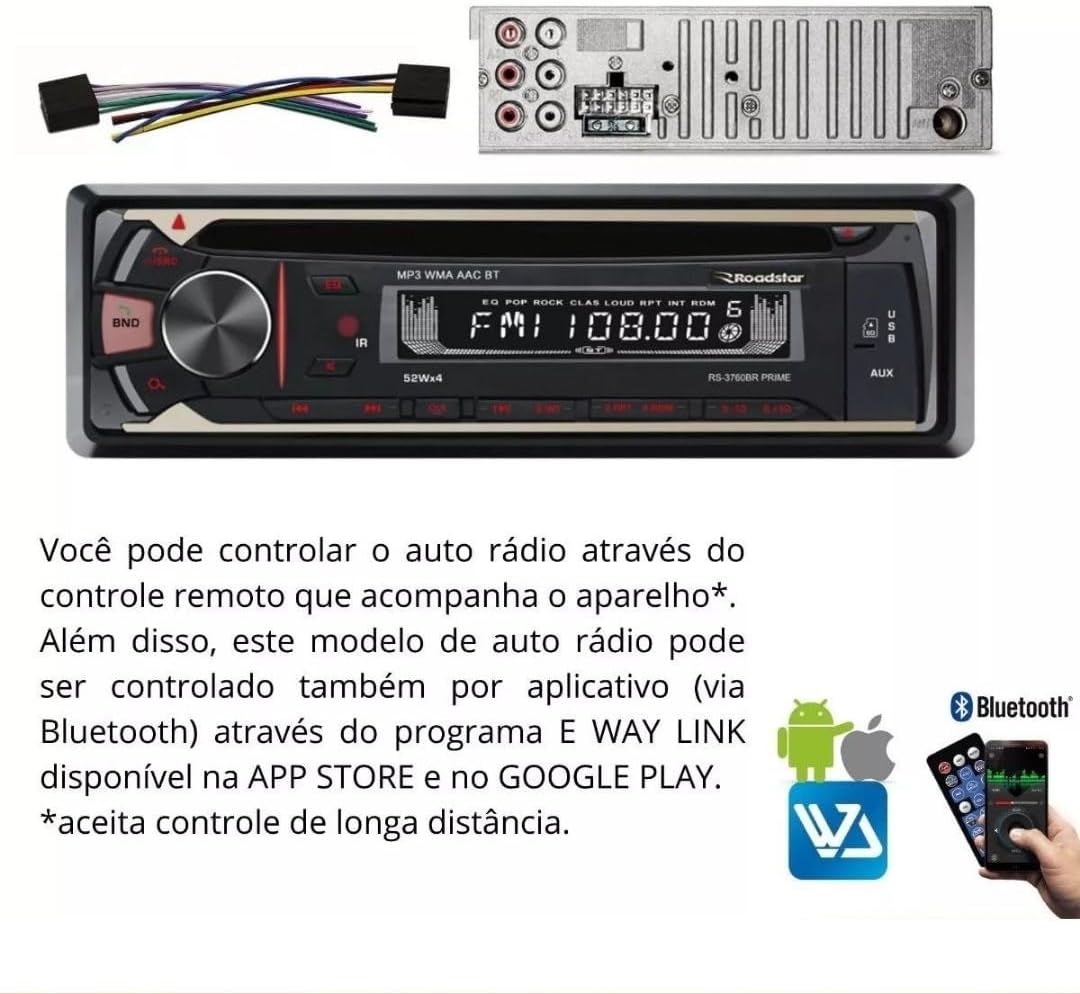
Image: The RS-3760BR unit, its wiring harness, and the included remote control.
4. مصنوعات جون خاصيتون
The ROADSTAR RS-3760BR is a versatile car audio system designed to enhance your driving experience with multiple playback options and convenient controls.
- سي ڊي پليئر: Supports playback of audio CDs and MP3/WMA files on CD-R/RW discs.
- AM/FM ريڊيو: Digital tuner with memory for 18 FM and 12 AM stations.
- بلوٽوت ڪنيڪشن: مطابقت رکندڙ ڊوائيسز تان هينڊز فري ڪالنگ ۽ وائرليس آڊيو اسٽريمنگ لاءِ.
- USB ان پٽ Frontal USB port for MP3/WMA file playback and folder browsing.
- SD ڪارڊ سلاٽ: Frontal SD card slot for MP3/WMA file playback and folder browsing.
- معاون ان پٽ: Frontal 3.5mm auxiliary input for connecting external audio devices.
- آر سي اي جا نتيجا: 4 RCA outputs for connecting external ampجان بچائيندڙ.
- ڏيکاريو: LED display with 7 selectable illumination colors (blue, light blue, white, yellow, red, purple, green).
- ڪنٽرول: Bass, Treble, and Balance adjustments.
- ريموٽ ڪنٽرول: Includes a physical remote control and supports app control via Bluetooth (E WAY LINK app).
- پاور آئوٽ: 4 channels x 52 Watts RMS.

Image: Visual representation of the unit's key features including CD, Bluetooth, USB, and remote control.
5. سيٽ اپ ۽ تنصيب
Proper installation is crucial for the performance and longevity of your car stereo. If you are unsure about any steps, consult a professional installer.
5.1 وائرنگ ڊاگرام
Refer to the wiring harness provided with your unit. Each wire is color-coded and labeled for specific connections. Ensure all connections are secure and properly insulated to prevent short circuits.
- پيلو: مسلسل 12V (بيٽري)
- ڳاڙهو: سوئچ ٿيل 12V (اگنيشن/ACC)
- ڪارو: زمين
- نيرو: پاور اينٽينا / Ampلائفائر ريموٽ ٽرن آن
- اسپيڪر وائر: Typically white, gray, green, purple (with black stripes for negative). Connect to corresponding vehicle speakers.
5.2 يونٽ لڳائڻ
The RS-3760BR is a single-DIN unit. Use the included mounting sleeve and hardware to secure the unit in your vehicle's dashboard opening. Ensure adequate space for wiring and ventilation.

تصوير: سامهون view of the RS-3760BR car stereo with its remote control, showing the unit's dimensions.
6. آپريٽنگ هدايتون
This section details the basic functions and operations of your RS-3760BR car stereo.
6.1 فرنٽ پينل اوورview

Image: Close-up of the RS-3760BR front panel, indicating the CD slot, USB input, and Auxiliary input.
- طاقت / حجم نوب: آن/آف ڪرڻ لاءِ دٻايو. حجم کي ترتيب ڏيڻ لاءِ گھمايو.
- موڊ بٽڻ: Press to cycle through sources (CD, USB, SD, AUX, FM, AM, Bluetooth).
- بينڊ بٽڻ In radio mode, press to switch between FM1, FM2, FM3, AM1, AM2 bands.
- EQ بٽڻ: Press to select preset equalizer settings.
- ڏيکاريو: Shows current mode, frequency, track information, etc.
- USB پورٽ: ميڊيا پلے بیک لاءِ USB فليش ڊرائيوز ڳنڍيو.
- SD ڪارڊ سلاٽ: ميڊيا پلے بیک لاءِ SD ڪارڊ داخل ڪريو.
- AUX ان پٽ: 3.5mm ڪيبل استعمال ڪندي ٻاهرين آڊيو ڊوائيسز کي ڳنڍيو.
6.2 ريڊيو آپريشن (اي ايم/ايف ايم)
- کي دٻايو موڊ FM يا AM ريڊيو چونڊڻ لاءِ بٽڻ دٻايو.
- کي دٻايو بينڊ button to select the desired band (FM1, FM2, FM3, AM1, AM2).
- خودڪار ڳولا: کي دٻايو ۽ رکو TUNE UP/DOWN buttons (forward/backward arrows) to automatically search for the next strong station.
- دستي ڳولا: مختصر طور تي دٻايو TUNE UP/DOWN buttons to manually tune the frequency step by step.
- اسٽور اڳواٽ: To store a station, tune to the desired frequency, then press and hold one of the numeric preset buttons (1-6) until you hear a beep.
6.3 سي ڊي/يو ايس بي/ايس ڊي پلے بیک
- سي ڊي: Insert an audio CD or a CD with MP3/WMA files into the CD slot. The unit will automatically switch to CD mode and begin playback.
- USB: Insert a USB flash drive into the front USB port. The unit will switch to USB mode and begin playback.
- ايس ڊي: Insert an SD card into the front SD card slot. The unit will switch to SD mode and begin playback.
- راند/روڪ: کي دٻايو راند/روڪ button (usually the volume knob press) to pause or resume playback.
- ٽريڪ ڇڏڻ: کي دٻايو ا /يون/اREوڻو ٽريڪ ڇڏڻ لاءِ بٽڻ (اڳتي/پوئتي تير).
- فولڊر نيويگيشن: MP3/WMA لاءِ files, press and hold the ا /يون/اREوڻو buttons for two seconds to navigate between folders.
6.4 Bluetooth Pairing and Operation
- بلوٽوت کي فعال ڪريو: کي دٻايو موڊ button to select Bluetooth mode. The display will show "BT" or "PAIRING".
- جوڙڻ: On your mobile device, enable Bluetooth and search for available devices. Select "ROADSTAR RS-3760BR" (or similar) from the list. If prompted for a password, enter "0000".
- آڊيو وهڪرو: Once paired, you can play audio from your device, and it will stream through the car stereo. Use the unit's controls or your device to manage playback.
- هينڊ فري ڪالنگ: When a call comes in, the unit will display the caller ID. Press the ڪال button (often the green phone icon on the remote) to answer, or the ڪال ختم ڪريو button (red phone icon) to reject.
6.5 App Control (E WAY LINK)
The RS-3760BR can be controlled via a smartphone app called E WAY LINK, available on the App Store and Google Play. This allows for convenient control of various functions from your phone.
- ايپ ڊائون لوڊ ڪريو ڳولھيو "E WAY LINK" in your device's app store and install it.
- ڳنڍڻ: Ensure your phone is paired with the RS-3760BR via Bluetooth.
- ايپ لانچ ڪريو: Open the E WAY LINK app. It should automatically connect to the car stereo.
- ڪنٽرول: Use the app interface to control functions such as source selection, volume, radio tuning, track skipping, and equalizer settings.

Image: The RS-3760BR unit's display, technical specifications, and a visual guide to controlling the unit via the E WAY LINK app on a smartphone.
7. سار سنڀال
باقاعده سار سنڀال توهان جي ڪار اسٽيريو جي ڊگهي عمر ۽ بهترين ڪارڪردگي کي يقيني بڻائڻ ۾ مدد ڪري ٿي.
- يونٽ جي صفائي: سامهون واري پينل کي صاف ڪرڻ لاءِ نرم، سڪل ڪپڙو استعمال ڪريو. ضدي مٽيءَ لاءِ، ڊيampen the cloth lightly with water. Never use harsh chemicals, solvents, or abrasive cleaners.
- سي ڊي پليئر جي سار سنڀال: Avoid inserting dirty, scratched, or warped CDs. If the CD player malfunctions, try using a CD lens cleaner disc.
- ڪنيڪشن: وقتي طور تي سڀني وائرنگ ڪنيڪشنن کي چيڪ ڪريو ته جيئن پڪ ڪري سگهجي ته اهي محفوظ ۽ سنکنرن کان پاڪ آهن.
- فرم ويئر اپڊيٽس: Check the Roadstar official webتوهان جي ماڊل لاءِ ڪنهن به دستياب فرم ويئر اپڊيٽ لاءِ وقتاً فوقتاً سائيٽ چيڪ ڪريو.
8. مسئلا حل ڪرڻ
If you encounter problems with your RS-3760BR, refer to the following common issues and solutions before contacting support.
| مسئلو | ممڪن سبب | حل |
|---|---|---|
| طاقت نه آهي | Blown fuse; Incorrect wiring; Loose power connection | Check vehicle's fuse box and unit's fuse; Verify wiring connections (Yellow, Red, Black); Ensure power cables are securely connected. |
| آواز ڪونهي | آواز تمام گهٽ آهي؛ خاموش چالو آهي؛ غلط اسپيڪر وائرنگ؛ Amplifier not powered (if applicable) | آواز وڌايو؛ خاموشي کي غير فعال ڪريو؛ اسپيڪر ڪنيڪشن چيڪ ڪريو؛ ٻاهرين تصديق ڪريو ampلفٽ جي طاقت. |
| CD/USB/SD not playing | Disc/device not inserted correctly; Incompatible file format; Damaged disc/device | Re-insert disc/device; Ensure files are MP3/WMA; Try a different disc/device. |
| بلوٽوت جوڙڻ جي ناڪامي | Bluetooth not enabled on device/unit; Device too far; Interference | Ensure Bluetooth is active on both devices; Bring devices closer; Restart both devices. |
| ناقص ريڊيو استقبال | Antenna not connected; Weak signal area; Damaged antenna | اينٽينا ڪنيڪشن چيڪ ڪريو؛ بهتر سگنل واري علائقي ڏانهن منتقل ٿيو؛ نقصان لاءِ اينٽينا جو معائنو ڪريو. |
9. وضاحتون
Detailed technical specifications for the ROADSTAR RS-3760BR.
- ماڊل: RS3760BR
- پينل جو قسم: Fixed with 7-color illumination buttons (blue, light blue, white, yellow, red, purple, green)
- ڏيکاريو: ايل اي ڊي
- ريڊيو: AM/FM with 18 FM and 12 AM station memory
- ڪنٽرول: Bass, Treble, Balance
- ڪنيڪشن: Bluetooth, Frontal SD, Frontal USB, Frontal Auxiliary Input, 2 RCA Audio Inputs
- آئوٽ پُٽ: 4 آر سي اي آئوٽ پُٽ
- ريموٽ ڪنٽرول: Physical remote and App control (E WAY LINK)
- پاور آئوٽ: 4 x 52 واٽ RMS
- مطابقت رکندڙ ڊوائيسز: Portable computer, Smartphone, Tablet (for Bluetooth/App control)
- سپورٽ ٿيل آڊيو فارميٽ: MP3, WMA (from CD, USB, SD)
- پيداوار جي ماپ: 9 x 23 x 27 سينٽي ميٽر (تقريبن 3.5 x 9 x 10.6 انچ)
- پيداوار جو وزن: 1.5 ڪلوگرام (تقريبن 3.3 پائونڊ)
- سرٽيفڪيشن: Anatel Homologation: 05898-19-12378
10. وارنٽي ۽ سپورٽ
10.1 وارنٽي ڄاڻ
The ROADSTAR RS-3760BR comes with a 1 سالن جي ٺاهيندڙ جي وارنٽي. This warranty covers defects in materials and workmanship under normal use. It does not cover damage caused by improper installation, accident, misuse, abuse, neglect, unauthorized modification, or normal wear and tear. Please retain your proof of purchase for warranty claims.
10.2 ڪسٽمر سپورٽ
For technical assistance, warranty claims, or further inquiries, please contact Roadstar customer support through their official website or the contact information provided with your purchase documentation. Before contacting support, please ensure you have reviewed the troubleshooting section of this manual.


