1. تعارف
This manual provides instructions for the LogiLink ID0209 Wireless Keyboard. This keyboard is designed for comfortable, precise, and quiet typing, featuring an adjustable RGB backlight and a long-lasting battery. It connects wirelessly via 2.4 GHz radio technology and is compatible with various operating systems.

Figure 1: LogiLink ID0209 Wireless Keyboard
2. پيڪيج مواد
مھرباني ڪري ھيٺ ڏنل شين لاءِ پيڪيج چيڪ ڪريو:
- LogiLink ID0209 Wireless Keyboard
- USB 2.4 GHz Receiver Dongle
- USB-A to Micro USB Charging Cable
- استعمال ڪندڙ جو دستياب (ھي دستاويز)
3. سيٽ اپ
3.1 ڪي بورڊ کي چارج ڪرڻ
Before initial use, fully charge the keyboard. Connect the supplied USB-A to Micro USB cable to the keyboard's Micro USB port (located on the side) and the other end to a USB power source (e.g., computer USB port, USB wall adapter).
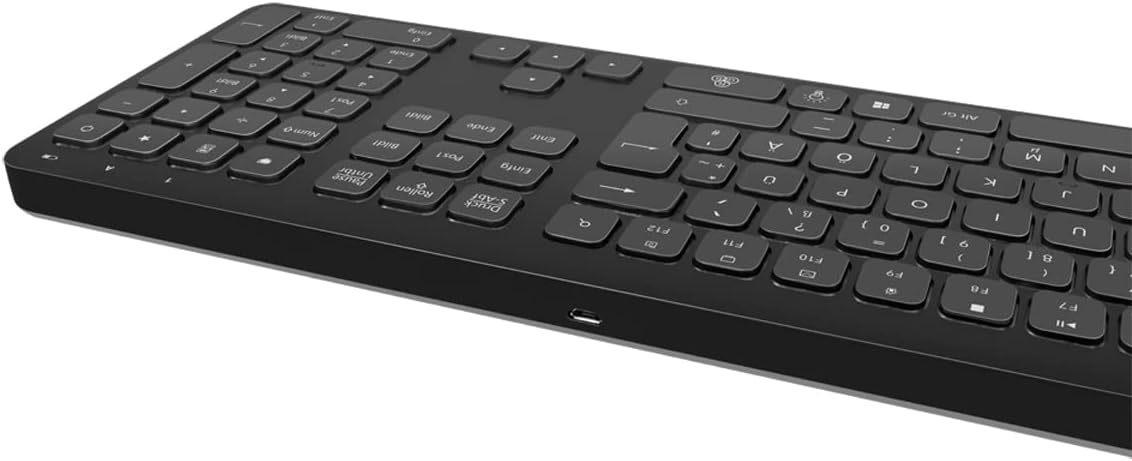
Figure 2: Keyboard side view with Micro USB charging port
3.2 Connecting the USB Receiver Dongle
Insert the 2.4 GHz USB receiver dongle into an available USB port on your computer or compatible device. The system will automatically detect and install the necessary drivers.

Figure 3: USB 2.4 GHz Receiver Dongle
3.3 پاور آن/آف
Locate the ON/OFF switch on the back of the keyboard. Slide the switch to the 'ON' position to power on the keyboard. Slide it to 'OFF' when not in use to conserve battery life.
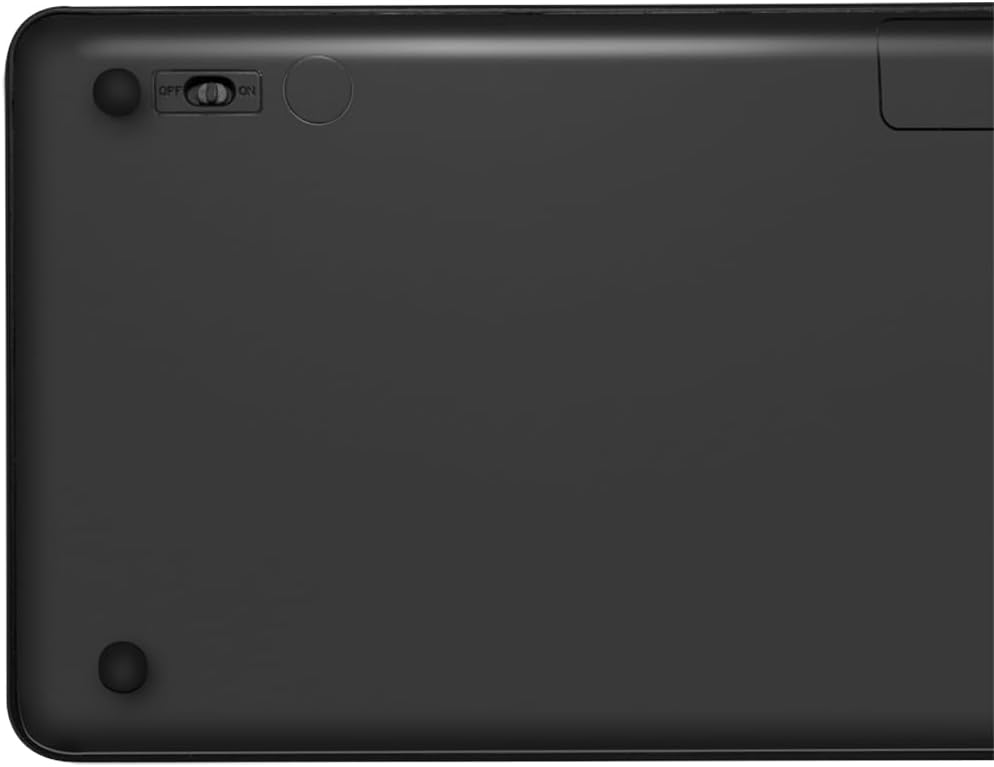
Figure 4: Keyboard back with ON/OFF switch
The keyboard should automatically connect to the USB receiver once both are powered on and within range (up to 10 meters).
4. آپريٽنگ هدايتون
4.1 Backlight ڪنٽرول
The keyboard features an adjustable RGB backlight with 7 colors and 3 brightness levels, including a breathing mode.
- رنگ تبديل ڪرڻ: کي دٻايو Fn + Light Bulb key to cycle through the 7 available colors (green, blue, yellow, purple, cyan, white, red).
- روشني کي ترتيب ڏيڻ: کي دٻايو Fn + Up Arrow key روشني وڌائڻ ۽ Fn + Down Arrow key to decrease brightness. There are 3 brightness levels.
- سانس جو طريقو: کي دٻايو Fn + RGB Cycle key (often depicted as a swirling icon) to activate or deactivate the breathing backlight mode.

Figure 5: Keyboard with RGB backlight in use
4.2 شارٽ ڪٽ ڪيز
The keyboard includes 17 shortcut keys for quick access to various functions. Some shortcut keys are specifically designed for Windows operating systems.
To use a shortcut key, press and hold the Fn key, then press the desired function key (e.g., F1-F12, multimedia keys).
- ملٽي ميڊيا ڪنٽرول: Play/Pause, Stop, Previous Track, Next Track, Volume Up, Volume Down, Mute.
- پيداوار: Open Mail, Web Browser, My Computer, Search.
- ٻيا: Lock Screen, Calculator.

Figure 6: Close-up of keyboard keys, including numpad and function row
4.3 Automatic Energy-Saving Mode
The keyboard is equipped with an automatic energy-saving mode. After a period of inactivity, the keyboard will enter a sleep state to conserve battery. Press any key to wake it up.
5. سار سنڀال
پنهنجي ڪيبورڊ جي ڊگهي عمر ۽ بهترين ڪارڪردگي کي يقيني بڻائڻ لاءِ، انهن سار سنڀال جي هدايتن تي عمل ڪريو:
- صفائي: ڪيبورڊ جي مٿاڇري کي صاف ڪرڻ لاءِ نرم، سڪل، لِنٽ فري ڪپڙو استعمال ڪريو. ضدي مٽيءَ لاءِ، ٿورو ڊيampڪپڙي کي پاڻي يا نرم صفائي واري محلول سان ڌوئڻ ڏيو. گهڻي نمي کان پاسو ڪريو.
- اسٽوريج: ڪيبورڊ کي سڌي سج جي روشني ۽ انتهائي گرمي پد کان پري ٿڌي، سڪل جاءِ تي رکو.
- مائع کان بچاء: Do not expose the keyboard to liquids. In case of accidental spills, immediately power off the keyboard and allow it to dry completely before use.
- سنڀال سان سنڀال: ڪيبورڊ ڇڏڻ يا ان کي مضبوط اثرن جي تابع ڪرڻ کان پاسو ڪريو.
6. مسئلا حل ڪرڻ
If you encounter issues with your LogiLink ID0209 keyboard, refer to the following common problems and solutions:
| مسئلو | ممڪن سبب | حل |
|---|---|---|
| ڪي بورڊ جواب نه ڏئي رهيو آهي | Keyboard is off گھٽ بيٽري USB رسيور ڳنڍيل ناهي حد کان ٻاهر | Ensure keyboard is ON ڪيبورڊ چارج ڪريو USB رسيور کي مضبوطيءَ سان ڪم ڪندڙ USB پورٽ ۾ لڳايو. Move keyboard closer to the receiver (within 10m) |
| Backlight ڪم نه ڪندي | Backlight بند آهي گھٽ بيٽري | Press Fn + Light Bulb key to turn on/cycle ڪيبورڊ چارج ڪريو |
| چاٻيون چپچپا يا غير جوابده آهن | چاٻين جي هيٺان مٽي يا مٽي | Clean the keyboard as per maintenance instructions |
| ڪنيڪشن اڪثر گھٽجي ٿو | مداخلت حد کان ٻاهر گھٽ بيٽري | ٻين وائرليس ڊوائيسز کان پري وڃو Move keyboard closer to the receiver ڪيبورڊ چارج ڪريو |
7. وضاحتون
| خاصيت | تفصيل |
|---|---|
| برانڊ | LogiLink |
| ماڊل نمبر | ID0209 |
| رابطي ٽيڪنالاجي | 2.4 GHz Wireless (High-frequency) |
| وائرلیس رينج | 10 ميٽر تائين |
| ڪنجي جو تعداد | 111 چاٻيون |
| شارٽ ڪٽ ڪيز | 17 (some Windows-specific) |
| پٺاڻ | Adjustable RGB (7 colors, 3 brightness levels, breathing mode) |
| اهم قسم | Flat keys |
| مطابقت رکندڙ ڊوائيسز | Windows, Mac OS, Android, iOS, Smart TV systems |
| خاص خاصيتون | Ergonomic, Backlit, Automatic Energy-Saving Mode |
| چارجنگ پورٽ | مائڪرو USB |
| رنگ | ڪارو |
| مواد | پلاسٽڪ |
| ٺاهيندڙ | 2direct GmbH |
| اصل جو ملڪ | چين |
8. وارنٽي ۽ سپورٽ
For warranty information and technical support, please refer to the documentation provided with your purchase or visit the official LogiLink webسائيٽ. وارنٽي دعوائن لاءِ خريداري جو ثبوت رکو.