تعارف
This manual provides detailed instructions for the operation and maintenance of your Raynic CR1019 8.7-inch Digital Alarm Clock. Please read this manual thoroughly before use to ensure proper functionality and to maximize your product experience. This device features a large LED display, dual alarms, USB and Type-C charging ports, temperature and humidity display, and adjustable brightness and volume.
پيڪيج مواد
- Raynic CR1019 Digital Alarm Clock
- پاور اڊاپٽر (ڪورڊڊ اليڪٽرڪ)
- استعمال ڪندڙ دستي
پيداوار ختمview
The Raynic CR1019 Digital Alarm Clock is designed for ease of use and includes multiple features for convenience. The front panel displays time, date, day of the week, temperature, and humidity. The top panel features control buttons for various settings.

شڪل 1: سامهون view of the Raynic CR1019 Digital Alarm Clock displaying time, date, temperature, and humidity, with a smartphone connected for charging.

شڪل 2: مٿانview of the Raynic Digital Alarm Clock highlighting its large LED display, dual alarms, USB/Type-C charging, snooze, 12/24H/DST, temperature/humidity, adjustable brightness, and volume.
سيٽ اپ ڪريو
1. پاور ڪنيڪشن
- Connect the provided power adapter to the DC IN port on the back of the alarm clock.
- Plug the adapter into a standard electrical outlet. The display will illuminate.
2. Battery Backup Installation (Optional)
The clock requires 2 AAA batteries (not included) for battery backup. These batteries are only used to remember time and alarm settings during a power outage and do not power the display.

شڪل 3: ريڙهه view of the alarm clock with the battery compartment open, showing where to insert two AAA batteries for backup.
- گھڙي جي پٺي تي بيٽري جي خاني کي ڳولھيو.
- بيٽري جي ڪمري واري ڍڪ کي کوليو.
- 2 AAA بيٽريون داخل ڪريو، صحيح پولارٽي کي يقيني بڻائي (+/-).
- بيٽري جي ڪمري واري ڍڪ کي بند ڪريو.
آپريٽنگ هدايتون
1. وقت ۽ تاريخ مقرر ڪرڻ
Refer to the specific buttons on the top of the clock for time and date adjustments. Typically, a 'SET' or 'TIME SET' button is used to enter setting mode, and '+' / '-' buttons adjust values.
2. Dual Alarm Settings
The clock supports two independent alarms with four mode options: Weekdays (Mon-Fri), Weekends (Sat-Sun), Everyday (Mon-Sun), and One Time.

شڪل 4: Illustration of dual alarm functionality, allowing two separate wake-up times for different users or purposes.
- Press the 'ALARM 1' or 'ALARM 2' button to select the desired alarm.
- Use the adjustment buttons to set the alarm time.
- Select the alarm mode (Weekdays, Weekends, Everyday, One Time) using the mode selection button.
- الارم کي چالو ڪرڻ لاءِ سيٽنگن جي تصديق ڪريو.
3. چمڪ جي ترتيب
The display brightness can be adjusted to 5 levels (L1 to L5) to suit your preference, especially for light-sensitive individuals.
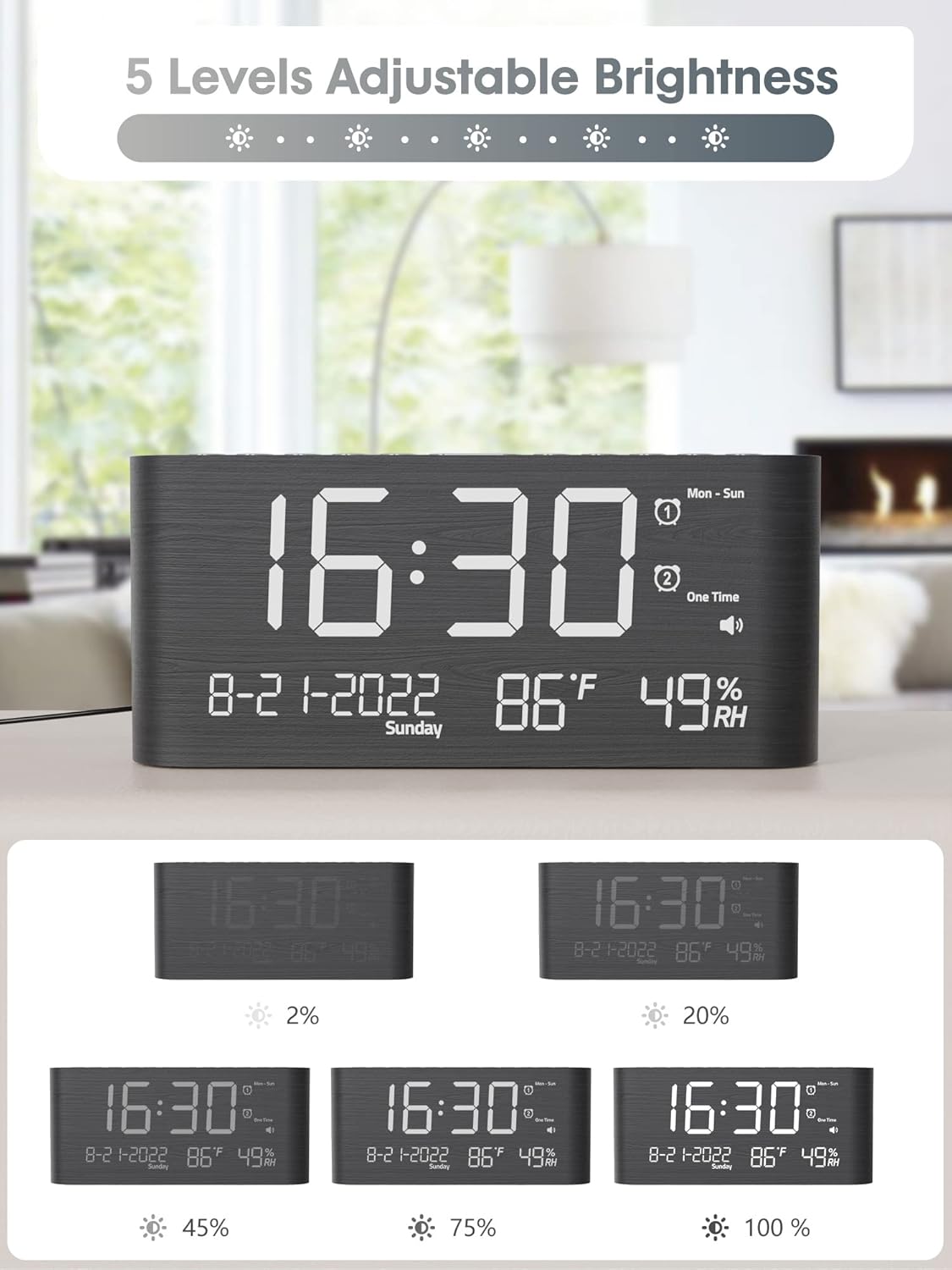
شڪل 5: Visual representation of the 5 adjustable brightness levels of the clock display.
- Press the 'DIMMER' or 'BRIGHTNESS' button repeatedly to cycle through the 5 brightness levels.
- مطلوب روشني چونڊيو.
4. حجم جي ترتيب
The alarm volume can be set to 5 levels, ranging from 0dB to 120dB, with a gradual ascending tone.

شڪل 6: Depiction of the 5 adjustable volume levels for the alarm, suitable for various sleeping preferences.
- During alarm setting or when the alarm is sounding, use the 'VOLUME' or adjustment buttons to change the volume level.
5. 12H/24H/DST Switchable
You can switch between 12-hour and 24-hour time formats, and activate Daylight Saving Time (DST).

شڪل 7: Illustration of switching between 12-hour, 24-hour, and Daylight Saving Time (DST) display modes.
- Press the '12/24H' button to toggle between 12-hour and 24-hour formats.
- Press the 'DST' button to activate or deactivate Daylight Saving Time.
6. اسنوز فنڪشن
When the alarm sounds, press the 'SNOOZE' button to temporarily silence the alarm for 9 minutes.

شڪل 8: Demonstrating the 9-minute snooze function by pressing the snooze button on the clock.
7. USB and Type-C Charging Ports
The clock includes both USB and Type-C charging ports for convenient charging of external devices.

شڪل 9: The back of the alarm clock with a smartphone and smartwatch charging simultaneously via the integrated USB and Type-C ports.
- Connect your device's charging cable to either the USB-A or Type-C port on the back of the clock.
- Ensure your device begins charging.
8. گرمي پد ۽ نمي جي نمائش
The clock displays accurate indoor temperature and humidity readings.

شڪل 10: The clock displaying current temperature and humidity, indicating its function for health care monitoring.
- The temperature and humidity are displayed automatically on the screen.
- To switch between Celsius and Fahrenheit, refer to the specific button (often combined with time/date settings).
سار سنڀال
- صفائي: گھڙي کي نرم، سڪل ڪپڙي سان صاف ڪريو. گھڙيال صاف ڪندڙ يا محلول استعمال نه ڪريو.
- لڳائڻ: Place the clock on a stable, flat surface. Avoid direct sunlight, extreme temperatures, and high humidity.
- طاقت: هميشه مهيا ڪيل پاور اڊاپٽر استعمال ڪريو.
مشڪلاتون
- ڊسپلي خالي آهي:
Ensure the power adapter is securely connected to both the clock and a working electrical outlet. If using battery backup, remember it only saves settings, it does not power the display. - الارم نٿو وڄي:
Check if the alarm is activated and set to the correct time and mode. Verify the alarm volume is not set to 0dB. - وقت غلط آهي:
Re-enter the time and date settings. Ensure 12H/24H format and DST settings are correct for your region. - Devices not charging via USB/Type-C:
Ensure the clock is powered on. Check the charging cables and the devices themselves. Try a different port or cable.
وضاحتون
| خاصيت | تفصيل |
|---|---|
| برانڊ | رينڪ |
| ماڊل نمبر | CR1019 |
| ڊسپلي جو قسم | ڊجيٽل LED |
| پيداوار جي ماپ | 1.7"W x 3.6"H (Note: Full dimensions are 8.7"L x 1.7"W x 3.6"H) |
| شيءِ جو وزن | 7.7 آونس (0.48 پائونڊ) |
| طاقت جو ذريعو | تار ٿيل برقي |
| بيٽري جو بيڪ اپ | 2 AAA batteries required (not included) for memory only |
| خاص خاصيتون | Dual Alarms, USB & Type-C Charging, Temperature, Humidity, Date, 5-level Brightness, 5-level Volume, 9-min Snooze, 12H/24H/DST |
| مواد | ڪاٺ |
وارنٽي ۽ سپورٽ
Raynic products are designed for reliability and performance. For warranty information or technical support, please refer to the contact details provided with your purchase documentation or visit the official Raynic webسائيٽ. وارنٽي جي دعوي لاء توهان جي خريداري جي رسيد رکو.


