تعارف
This manual provides instructions for the setup, operation, and maintenance of your eKids Rainbow High Digital Piggy Bank. This electronic safe is designed for children aged 3 and up, featuring a digital keypad for secure storage and a removable drawer for organizing treasures.
پيڪيج مواد
- eKids Rainbow High Digital Piggy Bank Unit
- هٽائڻ وارو اسٽوريج دراز

Image: The eKids Rainbow High Digital Piggy Bank with its door open, revealing the interior and the removable storage drawer. The drawer is shown partially pulled out, demonstrating its functionality.
سيٽ اپ ڪريو
1. بيٽري لڳائڻ
- محفوظ دروازي جي اندر بيٽري جي خاني کي ڳوليو.
- بيٽري جي ڪمري واري ڍڪ کي کوليو.
- Insert 3 x 'AAA' batteries (not included), ensuring correct polarity (+/-).
- بيٽري جي ڪمري واري ڍڪ کي محفوظ طور تي بند ڪريو.
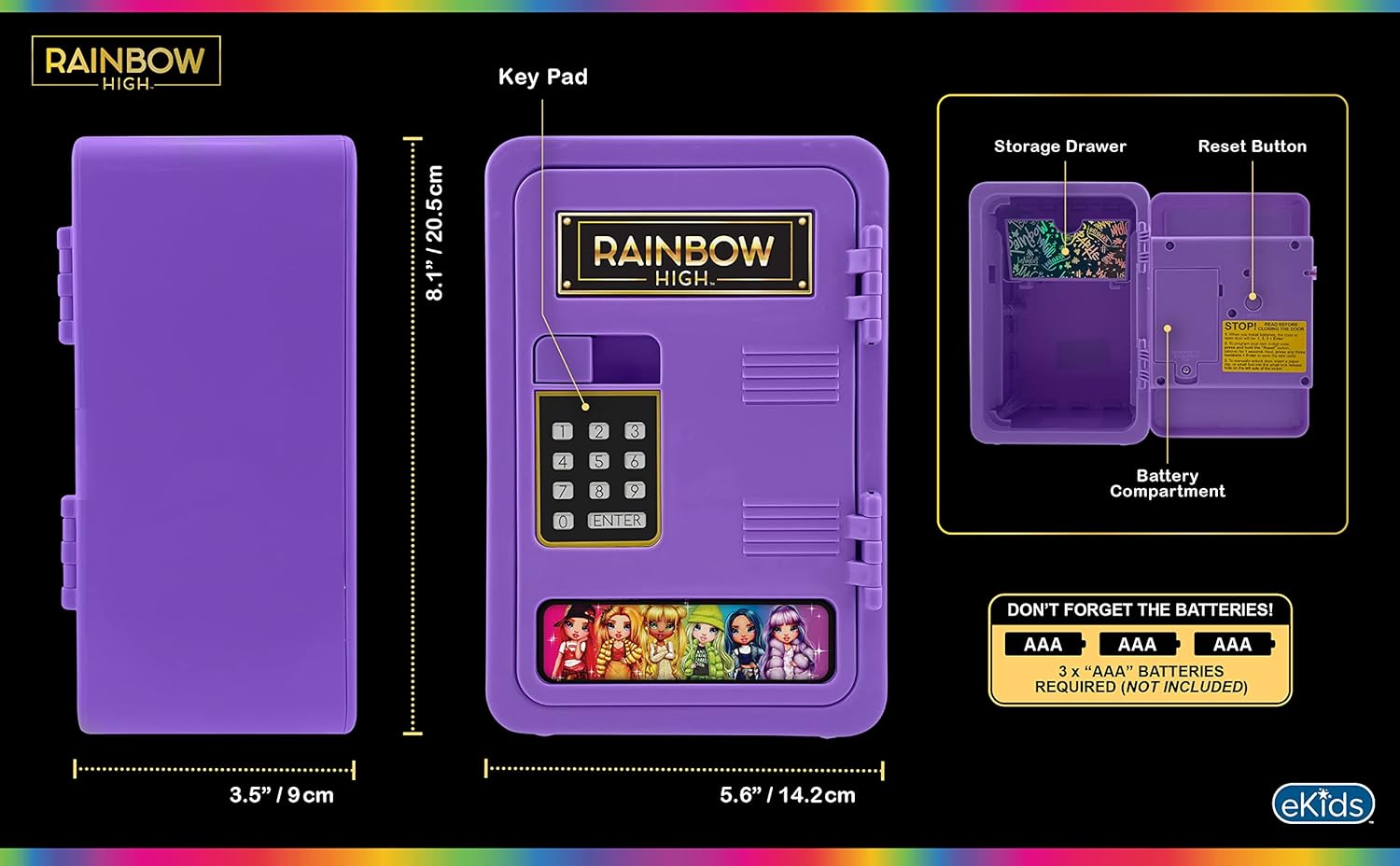
Image: A detailed diagram of the eKids Rainbow High Digital Piggy Bank, highlighting the keypad, storage drawer, reset button, and the battery compartment located inside the door. Text indicates that 3 AAA batteries are required and not included.
2. Setting Your Personal Passcode
- With the door open, press the ري سيٽ ڪريو button located inside the safe door (refer to the diagram above).
- Enter your desired 4-digit passcode using the keypad.
- کي دٻايو داخل ڪريو تصديق ڪرڻ لاءِ بٽڻ.
- Your new passcode is now set. Test it with the door open before closing.
آپريٽنگ هدايتون
سيف کولڻ
- Enter your 4-digit passcode on the keypad.
- کي دٻايو داخل ڪريو بٽڻ
- The door will unlock. Pull the door open.

Image: A young girl is shown pressing buttons on the digital keypad of the purple eKids Rainbow High Digital Piggy Bank, demonstrating the process of entering a passcode.
سيف کي بند ڪرڻ
- محفوظ دروازو مضبوطيءَ سان بند ڪريو.
- The safe will automatically lock.
Using the Removable Storage Drawer
The safe includes a removable drawer for organizing smaller items or money. To access it, open the safe door and slide the drawer out. To reinsert, align it with the tracks inside the safe and push it in until it is fully seated.

Image: A visual representation of the eKids Rainbow High Digital Piggy Bank's key features. It shows how to create a passcode and highlights the slide-out storage drawer, filled with small items, emphasizing its use for keeping treasures safe.
سار سنڀال
- Clean the exterior of the safe with a soft, dry cloth. Do not use abrasive cleaners or solvents.
- Avoid exposing the safe to extreme temperatures or direct sunlight.
- If the safe will not be used for an extended period, remove the batteries to prevent leakage.
مشڪلاتون
Forgotten Passcode
If you forget your passcode, you can reset it:
- Locate the small reset hole on the inside of the safe door (refer to the diagram in the Setup section).
- Insert a paperclip or similar thin object into the hole and press the internal reset button.
- While holding the reset button, enter your new 4-digit passcode on the keypad.
- کي دٻايو داخل ڪريو تصديق ڪرڻ لاءِ بٽڻ.
- Your new passcode is now set.
Safe Not Opening / Batteries Dead
If the batteries are depleted or the safe is not responding, you can open it using the emergency override:
- Locate the small emergency override hole, typically near the keypad or hinges.
- Insert a paperclip or similar thin object into the hole to manually release the lock mechanism.
- Once open, replace the batteries as described in the "Battery Installation" section.
وضاحتون
| ماڊل نمبر | رڇ-715 |
| پيداوار جي ماپ | 6.69 x 4.72 x 9.45 انچ |
| شيءِ جو وزن | 1.23 پائونڊ |
| رنگ | واڱڻائي |
| بيٽرين جي ضرورت آهي | 3 x 'AAA' (Not Included) |
وارنٽي ۽ سپورٽ
Warranty information for this product is not provided in this manual. For details regarding warranty coverage, technical support, or replacement parts, please contact eKids customer service directly or visit their official webسائيٽ.
You can often find contact information on the product packaging or by searching for "eKids customer support" online.


