1. تعارف
This manual provides essential instructions for the safe and efficient use of your Alcatel 3085 mobile phone. Please read this guide thoroughly before operating the device to ensure proper functionality and to prevent damage. Keep this manual for future reference.
2. پيڪيج مواد
تصديق ڪريو ته توھان جي پيڪيج ۾ ھيٺيون شيون شامل آھن:
- الڪٽيل 3085 موبائل فون
- بيٽري
- چارجر
- تڪڙو شروع ھدايت
- (Optional) Charging Cradle
جيڪڏهن ڪا به شيءِ غائب يا خراب آهي، مهرباني ڪري پنهنجي پرچون ڪندڙ سان رابطو ڪريو.
3. سيٽ اپ
3.1. سم ڪارڊ ۽ بيٽري داخل ڪرڻ
- پوئتي ڪپڙا هٽايو: Gently pry open the back cover of the phone using the notch provided.
- سم ڪارڊ داخل ڪريو: Locate the SIM card slot(s). Align your SIM card with the cut corner and slide it into the slot until it clicks into place. Ensure the gold contacts face downwards.
- بيٽري داخل ڪريو: Place the battery into the battery compartment, ensuring the gold contacts on the battery align with the contacts in the phone.
- پوئين ڍڪ تبديل ڪريو: پوئين ڍڪ کي احتياط سان ترتيب ڏيو ۽ ان کي مضبوطيءَ سان دٻايو جيستائين اهو جاءِ تي نه اچي.
3.2. بيٽري کي چارج ڪرڻ
پهرين استعمال کان اڳ، فون جي بيٽري کي مڪمل طور تي چارج ڪريو.
- Connect the charger to the charging port on the phone or place the phone in the charging cradle (if included).
- چارجر کي پاور آئوٽليٽ ۾ لڳايو.
- چارجنگ انڊيڪيٽر اسڪرين تي ظاهر ٿيندو. بيٽري مڪمل چارج ٿيڻ کان پوءِ چارجر کي ڊسڪنيڪٽ ڪريو.
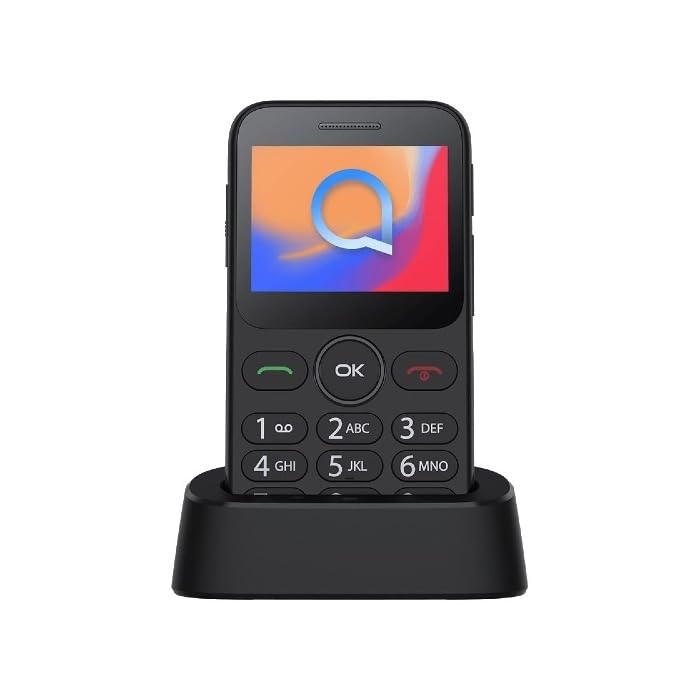
Image 1: Alcatel 3085 mobile phone placed in its charging cradle. The phone features a small color screen and a physical keypad with large, clearly labeled buttons.
4. آپريٽنگ هدايتون
4.1. پاور آن/آف
- پاور آن ڪرڻ: کي دٻايو ۽ رکو Power/End Call button (red button) until the screen lights up.
- پاور آف ڪرڻ: کي دٻايو ۽ رکو Power/End Call button until the power-off options appear, then select "Power off".
4.2. ڪالون ڪرڻ ۽ وصول ڪرڻ
- ڪال ڪرڻ: ڪي پيڊ استعمال ڪندي فون نمبر داخل ڪريو ۽ دٻايو سڏ بٽڻ (سائي بٽڻ).
- ڪال وصول ڪرڻ: جڏهن فون جي گھنٽي وڄي، دٻايو سڏ جواب ڏيڻ لاءِ بٽڻ.
- ڪال ختم ڪرڻ: کي دٻايو ڪال ختم ڪريو بٽڻ
4.3. پيغام موڪلڻ ۽ وصول ڪرڻ
- ڏانهن وڃو نياپا menu from the main screen.
- Select "Create new message" or "New SMS".
- Enter the recipient's number and type your message using the keypad.
- "موڪليو" کي دٻايو.
4.4. بنيادي نيويگيشن
- استعمال ڪريو نيويگيشن ڪنجيون (up, down, left, right) to scroll through menus.
- کي دٻايو ٺيڪ / چونڊيو button (center button) to confirm a selection.
- کي دٻايو پوئتي / صاف button (often the right soft key) to go back to the previous screen or delete characters.
5. سار سنڀال ۽ سنڀال
- صفائي: فون جي اسڪرين ۽ باڊي کي صاف ڪرڻ لاءِ نرم، سڪل ڪپڙو استعمال ڪريو. مائع صاف ڪندڙن کان پاسو ڪريو.
- اسٽوريج: فون کي سڌي سج جي روشني ۽ انتهائي گرمي پد کان پري ٿڌي، سڪل جاءِ تي رکو.
- بيٽري جي سنڀال: Do not expose the battery to high temperatures or dispose of it in fire. Use only approved chargers.
- پاڻي جي مزاحمت: This phone is not water-resistant. Avoid exposure to liquids.
6. مسئلا حل ڪرڻ
| مسئلو | ممڪن حل |
|---|---|
| فون آن نٿو ٿئي | پڪ ڪريو ته بيٽري صحيح طرح سان لڳل ۽ چارج ٿيل آهي. فون کي گهٽ ۾ گهٽ 30 منٽن تائين چارج ڪرڻ جي ڪوشش ڪريو. |
| ڪالون نه ٿو ڪري سگھجي ۽ نه ئي وصول ڪري سگھجي ٿو | Check if the SIM card is properly inserted. Verify that you have network coverage. Contact your service provider if the issue persists. |
| بيٽري جلدي ختم ٿي ويندي آهي | Reduce screen brightness. Close unused applications. Ensure the phone is not in an area with poor network signal, which can increase battery consumption. |
| ڪي پيڊ غير جوابدار | فون کي ٻيهر شروع ڪريو. پڪ ڪريو ته ڪا به جسماني رڪاوٽ ڪنجين کي متاثر نه ڪري رهي آهي. |
7. وضاحتون
| خاصيت | تفصيل |
|---|---|
| برانڊ | Alcatel |
| ماڊل نمبر | 3085 (HP02945) |
| رنگ | ڌاتو ڪارو |
| ASIN | B0B8X482MH |
| ٺاهيندڙ | Alcatel |
| سافٽ ويئر اپڊيٽ جي ضمانت جيستائين | معلومات دستياب ناهي |
| اسپيئر پارٽس جي دستيابي | معلومات دستياب ناهي |
8. وارنٽي ۽ سپورٽ
For warranty information, please refer to the warranty card included in your product packaging or visit the official Alcatel website. For technical support, please contact Alcatel customer service through their official channels.
You can find more information and support resources on the official Alcatel webسائيٽ: www.alcatelmobile.com
9. حفاظت جي ڄاڻ
- فون کي ڌار ڪرڻ يا تبديل ڪرڻ جي ڪوشش نه ڪريو.
- صرف اصل يا منظور ٿيل لوازمات استعمال ڪريو.
- Avoid exposing the phone to extreme temperatures, direct sunlight, or moisture.
- Keep the phone away from medical devices, as it may interfere with their operation.
- Dispose of the phone and battery responsibly according to local regulations.


