تعارف
This manual provides detailed instructions for the installation, operation, and maintenance of your Blaupunkt MEMPHIS440BT 6.2" In-Dash Touch Screen DVD Receiver. Please read this manual thoroughly before using the product to ensure proper functionality and to prevent damage.
پيداوار ختمview
The Blaupunkt MEMPHIS440BT is a versatile in-dash multimedia receiver featuring a 6.2-inch touch screen display. It supports DVD/CD playback, Bluetooth connectivity for hands-free calling and audio streaming, USB and SD card media playback, and AM/FM radio. The unit is designed to be the central entertainment system in your vehicle.

تصوير: سامهون view of the Blaupunkt MEMPHIS440BT in-dash receiver with its remote control. The receiver features a 6.2-inch touch screen displaying various function icons like Radio, Disc, USB, SD, and Bluetooth. The remote control has numerous buttons for navigation and media control.
حفاظت جي ڄاڻ
- Always operate the vehicle safely. Do not operate the unit's functions that distract you from safe driving.
- شارٽ سرڪٽ ۽ بجلي جي خطرن کي روڪڻ لاءِ مناسب وائرنگ ڪنيڪشن کي يقيني بڻايو.
- جيڪڏهن توهان کي ڪنهن به قدم بابت پڪ ناهي ته انسٽاليشن لاءِ ڪنهن ماهر سان صلاح ڪريو.
- يونٽ کي نمي يا انتهائي گرمي پد جي سامهون نه آڻيو.
سيٽ اپ ۽ تنصيب
پيڪيج مواد
- Blaupunkt MEMPHIS440BT DVD Receiver
- ريموٽ ڪنٽرول
- وائرنگ وارن
- لڳائڻ هارڊويئر
- استعمال ڪندڙ جو دستياب (ھي دستاويز)
وائرنگ ڊراگرام
Refer to the detailed wiring diagram provided in the separate installation guide for specific connections. Ensure all connections are secure and correctly matched to your vehicle's electrical system.
تصوير: پاسي view of the Blaupunkt MEMPHIS440BT receiver, illustrating the various ports and connections on the rear and side panels, including the USB and Mini SD slots on the front left side.
يونٽ لڳائڻ
- ڊيش بورڊ مان موجوده ڪار اسٽيريو هٽايو.
- Connect the wiring harness to the vehicle's wiring and the MEMPHIS440BT.
- Slide the MEMPHIS440BT into the dashboard opening until it clicks into place.
- Secure the unit using the provided mounting screws.
آپريٽنگ هدايتون
پاور آن / آف
کي دٻايو پاور button (usually a knob on the left side) to turn the unit on or off. Hold for 2 seconds to power off.
ٽچ اسڪرين انٽرفيس
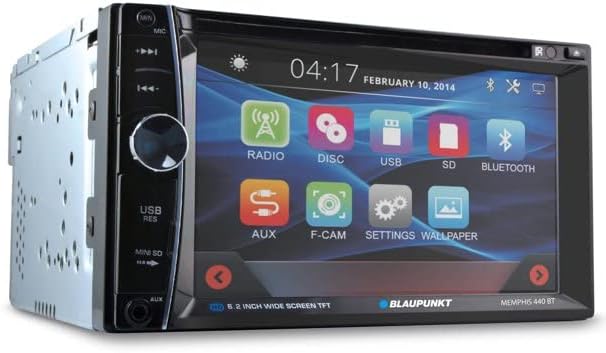
The 6.2-inch touch screen allows for intuitive control of all functions. Tap icons to select modes (Radio, Disc, USB, SD, Bluetooth, AUX, F-CAM, Settings, Wallpaper).

تصوير: ڪنڊ وارو سامهون view of the Blaupunkt MEMPHIS440BT receiver, highlighting the touch screen interface with its main menu icons and the physical control knob on the left side.
بلوٽوٽ جوئر
- مکيه مينيو تي ، ٽيپ ڪريو بلوٽوٿ آئڪن
- پنهنجي موبائيل ڊيوائس تي بلوٽوٿ کي فعال ڪريو ۽ دستياب ڊوائيسز جي ڳولا ڪريو.
- Select "MEMPHIS440BT" from the list.
- Enter the default PIN "0000" if prompted.
- هڪ ڀيرو جوڙيو ويو، توهان ڪال ڪري/ وصول ڪري سگهو ٿا ۽ آڊيو اسٽريم ڪري سگهو ٿا.
Media Playback (DVD/CD/USB/SD)
- ڊي وي ڊي/سي ڊي: Insert a disc into the slot. The unit will automatically switch to Disc mode.
- USB: Insert a USB drive into the USB port. Tap the USB icon to access files.
- ايس ڊي: Insert a miniSD card into the SD card slot. Tap the SD icon to access files.

تصوير: ويجهو تصوير view of the USB port and Mini SD card slot located on the front left side of the Blaupunkt MEMPHIS440BT receiver, beneath a protective flap.
ريڊيو آپريشن
- تي ٽيپ ڪريو ريڊيو icon to enter radio mode.
- Use the touch screen controls to scan for stations, tune manually, or select preset stations.
- To save a station, tune to the desired frequency, then press and hold a preset button on the screen.
سار سنڀال
- صفائي: Use a soft, dry cloth to clean the touch screen and unit exterior. Do not use abrasive cleaners or solvents.
- ڊسڪ جي سنڀال: ڊسڪ کي ڪنارن کان هٿ ۾ رکو. انهن کي صاف ۽ خراش کان پاڪ رکو.
- فرم ويئر اپڊيٽس: سرڪاري بلائوپنڪٽ چيڪ ڪريو website periodically for any available firmware updates.
مشڪلاتون
| مسئلو | ممڪن سبب | حل |
|---|---|---|
| طاقت نه آهي | غلط وائرنگ؛ ڦاٽل فيوز | Check power and ground connections; Replace fuse if necessary. |
| آواز ڪونهي | آواز تمام گهٽ آهي؛ خاموش چالو آهي؛ اسپيڪر وائرنگ جو مسئلو آهي. | آواز وڌايو؛ خاموشي کي غير فعال ڪريو؛ اسپيڪر ڪنيڪشن چيڪ ڪريو. |
| بلوٽوٿ ڳنڍي نه ٿو | Device not in pairing mode; Incorrect PIN | Ensure device is discoverable; Re-enter PIN "0000". |
| ڊسڪ جي غلطي | Dirty or scratched disc; Incorrect disc format | Clean disc; Try a different disc; Ensure disc is compatible. |
وضاحتون
- اسڪرين جي ماپ: 6.2 انچ
- ڊسپلي جو قسم: LCD ٽچ اسڪرين
- ميڊيا جو قسم: DVD, CD, USB, SD
- رابطي: بلوٽوٿ
- شئي ماڊل نمبر: MEMPHIS440BT
- شيء جو وزن: 4.25 پائونڊ
- پيڪيج جي ماپ: 9.69 x 9.17 x 6.85 انچ
- ٺاهيندڙ: BLAUPUNKT
وارنٽي ۽ سپورٽ
وارنٽي جي معلومات ۽ ٽيڪنيڪل سپورٽ لاءِ، مھرباني ڪري پنھنجي پراڊڪٽ سان شامل وارنٽي ڪارڊ جو حوالو ڏيو يا سرڪاري بلاپونڪٽ جو دورو ڪريو. webسائيٽ. وارنٽي دعوائن لاءِ خريداري جي ثبوت طور پنهنجي خريداري جي رسيد رکو.
بلوپنڪٽ آفيشل Webسائيٽ: www.blaupunkt.com


