1. تعارف
This manual provides essential information for the proper setup, operation, and maintenance of your Sharp 32FG6EA 32-inch HD Android TV. The Sharp 32FG6EA offers a wide range of connection options and features the Android TV operating system, providing a modern and intuitive television experience. It functions as an all-in-one entertainment hub, integrating Google Assistant for a smarter viewing experience. Users can quickly access entertainment, control smart devices, and obtain on-screen information using voice commands.
2. حفاظت جي ڄاڻ
Please read all safety instructions carefully before using the television. Keep this manual for future reference.
- بجلي جي فراهمي: Ensure the TV is connected to a power source with the correct voltage. بجلي جي آئوٽليٽن کي اوورلوڊ نه ڪريو.
- وينٽيليشن: وينٽيليشن جي سوراخن کي نه روڪيو. ٽي وي جي چوڌاري مناسب جاءِ ڏيو ته جيئن هوا جي وهڪري کي وڌيڪ گرم ٿيڻ کان روڪي سگهجي.
- پاڻي ۽ نمي: Do not expose the TV to rain, moisture, or excessive humidity. Avoid placing objects filled with liquids on or near the TV.
- صفائي: Unplug the TV before cleaning. Use a soft, dry cloth. Do not use liquid cleaners or aerosol sprays.
- لڳائڻ: Place the TV on a stable, level surface. If wall-mounting, ensure the mount is securely installed and can support the TV's weight.
- خدمت ڪرڻ: ٽي وي جي پاڻ خدمت ڪرڻ جي ڪوشش نه ڪريو. سڀني خدمت کي قابل خدمت اهلڪارن جي حوالي ڪريو.
3. پيڪيج مواد
پڪ ڪريو ته سڀئي شيون پيڪنگ ۾ موجود آهن:
- Sharp 32FG6EA 32-inch HD Android TV
- ريموٽ ڪنٽرول (2 AAA بيٽرين سان)
- Stand Type Base
- ھدايت وارو دستور
- پاور ڪيبل
4. سيٽ اپ
4.1 کولڻ
Carefully remove the TV and all accessories from the packaging. Retain the packaging materials for future transport or servicing.
4.2 اسٽينڊ کي ڳنڍڻ
If you are not wall-mounting the TV, attach the included stand base:
- نقصان کان بچڻ لاءِ ٽي وي اسڪرين کي نرم، سڌي مٿاڇري تي هيٺ رکو.
- ٽي وي جي تري ۾ لڳل سوراخن سان اسٽينڊ بيس کي ترتيب ڏيو.
- مهيا ڪيل اسڪرو استعمال ڪندي اسٽينڊ کي محفوظ ڪريو. پڪ ڪريو ته اسٽينڊ مضبوطيءَ سان ڳنڍيل آهي.
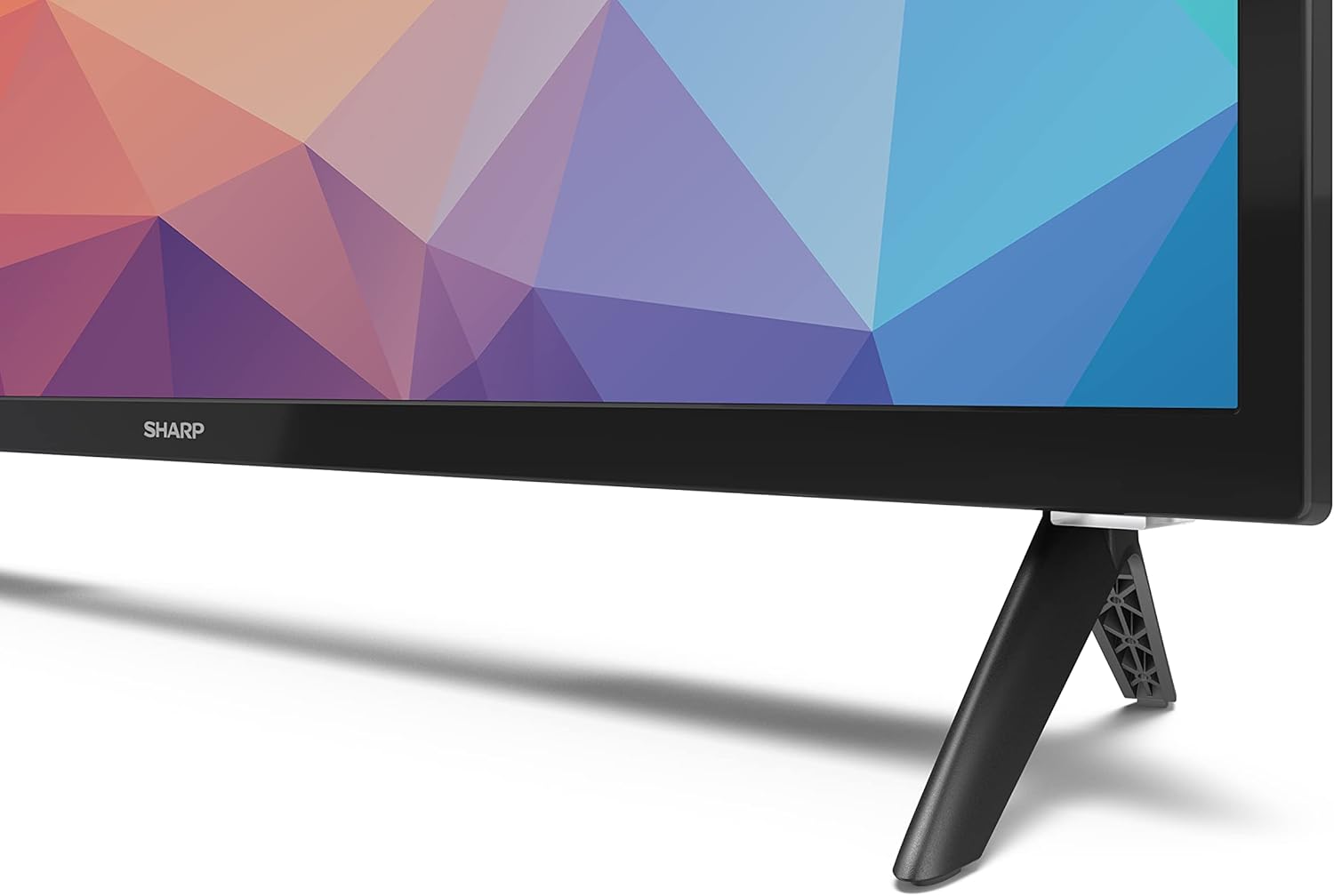
Image: Close-up of the TV stand attachment.
4.3 ڀت لڳائڻ
The Sharp 32FG6EA supports VESA wall mounts with dimensions of 75 x 75 mm. Wall mount hardware is not included. Follow the instructions provided with your wall mount kit.
4.4 ٻاهرين ڊوائيسز کي ڳنڍڻ
توهان جي ٽي وي ۾ مختلف ڊوائيسز کي ڳنڍڻ لاءِ ڪيترائي پورٽ آهن:
- HDMI: Connect Blu-ray players, game consoles, or set-top boxes to the 2 HDMI ports.
- USB: Connect USB storage devices for media playback to the 2 USB ports.
- اينٽينا / ڪيبل: براڊڪاسٽ چينلز لاءِ اينٽينا يا ڪيبل ٽي وي سورس ڳنڍيو.
- Ethernet: وائرڊ انٽرنيٽ ڪنيڪشن لاءِ.
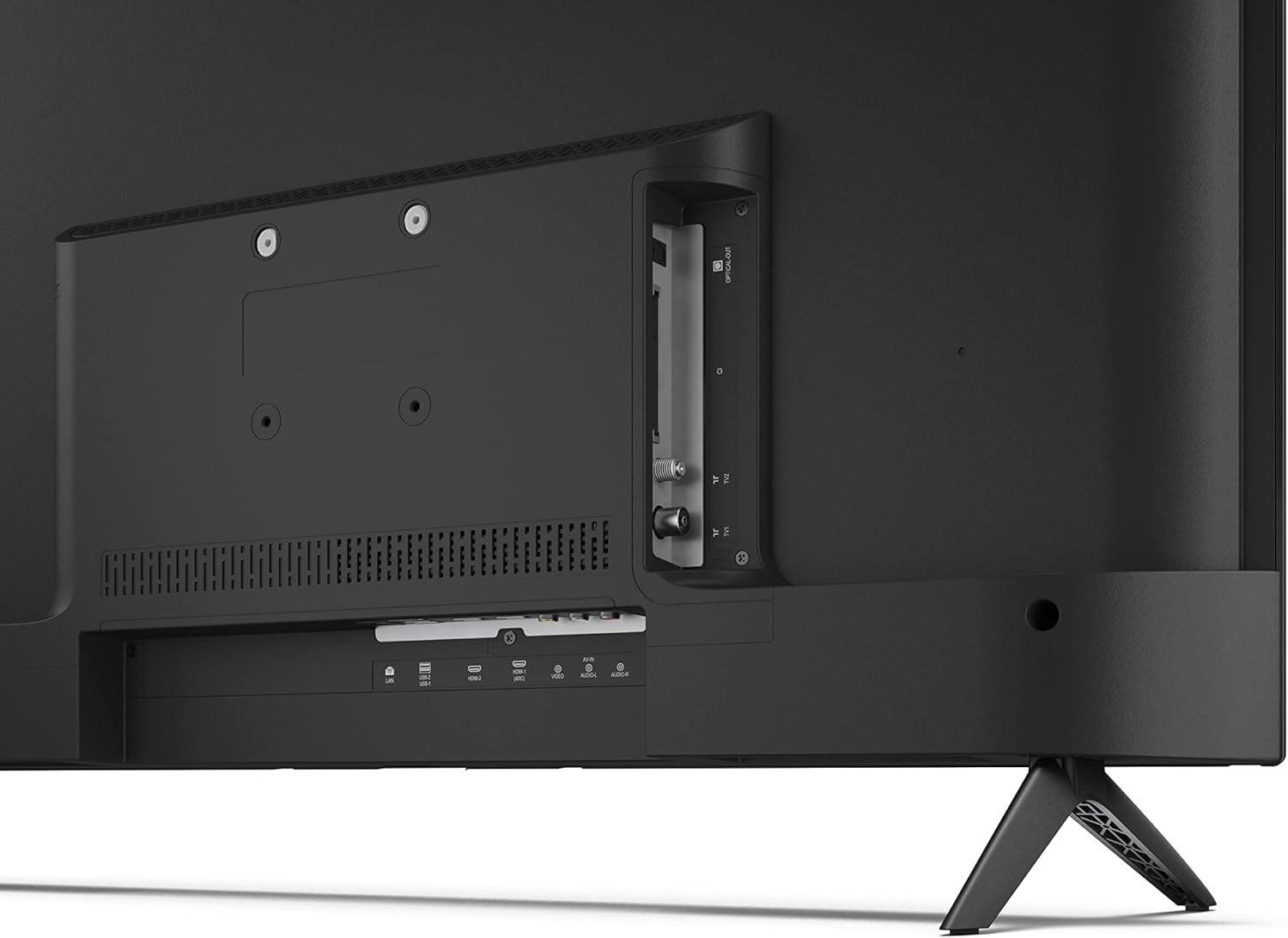
تصوير: پوئين پاسي view of the TV with connection ports.
4.5 پاور ڪنيڪشن
After connecting all necessary devices, plug the power cable into the TV and then into a wall outlet.
4.6 شروعاتي سيٽ اپ مددگار
پهرين پاور آن ٿيڻ تي، ٽي وي توهان کي شروعاتي سيٽ اپ جي عمل ذريعي رهنمائي ڪندو. ان ۾ شامل آهن:
- Languageوليءَ جي چونڊ.
- نيٽ ورڪ ڪنيڪشن (وائي فائي يا ايٿرنيٽ).
- Google account sign-in (required for full Android TV features).
- چينل اسڪيننگ.
5. آپريٽنگ
5.1 ريموٽ ڪنٽرول اوورview
The included remote control allows you to navigate the TV's features. Insert the 2 AAA batteries into the remote control before use.
- پاور بٽڻ: ٽي وي کي آن يا بند ڪري ٿو.
- Directional Pad (D-Pad) & OK Button: مينيو تي وڃو ۽ چونڊ جي تصديق ڪريو.
- پوئتي بٽڻ: پوئين اسڪرين ڏانهن واپسي.
- هوم بٽڻ: Android ٽي وي هوم اسڪرين تائين رسائي حاصل ڪري ٿو.
- حجم مٿي / ھيٺ: آڊيو حجم کي ترتيب ڏئي ٿو.
- چينل مٿي / هيٺ: ٽي وي چينلز بدلائي ٿو.
- گوگل اسسٽنٽ بٽڻ: آواز ڪنٽرول کي چالو ڪري ٿو.
- ايپ شارٽ ڪٽ بٽڻ: Dedicated buttons for popular streaming services like Netflix, Prime Video, and YouTube.
5.2 Android TV Interface Navigation
The Android TV home screen provides access to your installed apps, recommended content, and settings. Use the directional pad on your remote to navigate through the interface.
5.3 گوگل مددگار
Press the Google Assistant button on your remote and speak into the microphone to:
- ڳولھيو movies, shows, or information.
- سمارٽ گهر ڊوائيسز کي ڪنٽرول ڪريو.
- Open applications.
- ٽي وي سيٽنگون ترتيب ڏيو.
5.4 Chromecast بلٽ ان
The TV includes Chromecast built-in, allowing you to cast content from compatible apps on your smartphone, tablet, or computer directly to the TV screen.
5.5 بلوٽوٿ ڪنيڪشن
Connect Bluetooth devices such as headphones or speakers to your TV for a personalized audio experience. Navigate to the TV's settings menu to pair new Bluetooth devices.
5.6 آڊيو سيٽنگون
The TV supports Dolby Audio with 2 x 6 W RMS speakers. You can adjust audio settings, including sound modes and equalizer, through the TV's settings menu.
6. سار سنڀال
6.1 ٽي وي صاف ڪرڻ
To clean the TV screen and cabinet:
- وال آئوٽليٽ مان پاور ڪنڊ کي انپلگ ڪريو.
- Use a soft, lint-free cloth to gently wipe the screen and surfaces.
- ضدي نشانن لاءِ، ٿورو ڊيampڪپڙو پاڻي يا خاص اسڪرين ڪلينر سان (ڪپڙي تي لڳايو، سڌو سنئون اسڪرين تي نه).
- گھڙڻ وارا صاف ڪندڙ، موم، يا محلول استعمال نه ڪريو.
6.2 سافٽ ويئر اپڊيٽ
Your Android TV may receive periodic software updates to improve performance and add new features. Ensure your TV is connected to the internet to receive these updates. You can check for updates manually in the TV's settings menu.
7. مسئلا حل ڪرڻ
جيڪڏهن توهان کي پنهنجي ٽي وي سان مسئلا درپيش اچن ٿا، ته هيٺ ڏنل عام مسئلن ۽ حلن جو حوالو ڏيو:
- طاقت ناهي: پڪ ڪريو ته پاور ڪيبل ٽي وي ۽ ڪم ڪندڙ وال آئوٽليٽ ٻنهي ۾ محفوظ طور تي لڳل آهي. هڪ مختلف آئوٽليٽ آزمايو.
- ڪابه تصوير/آواز ناهي: Check that the correct input source is selected. Verify all cables (HDMI, antenna) are properly connected.
- ريموٽ ڪنٽرول ڪم نه ڪري رهيو آهي: بيٽرين کي چيڪ ڪريو ۽ پڪ ڪريو ته اهي صحيح طرح سان لڳل آهن. ريموٽ کي سڌو سنئون ٽي وي جي IR سينسر ڏانهن اشارو ڪريو.
- خراب تصويري معيار: Check antenna/cable connections. Adjust picture settings in the TV menu. For streaming content, ensure a stable internet connection.
- انٽرنيٽ ڪنيڪشن ناهي: Verify Wi-Fi password or Ethernet cable connection. Restart your router and the TV.
- ايپس ڪم نه ڪري رهيون آهن: پڪ ڪريو ته ٽي وي جو سافٽ ويئر اپ ٽو ڊيٽ آهي. ايپ جي ڪيش کي صاف ڪرڻ يا ايپ کي ٻيهر انسٽال ڪرڻ جي ڪوشش ڪريو.
If problems persist, consult the Sharp support webسائيٽ يا ڪسٽمر سروس سان رابطو ڪريو.
8. وضاحتون
| خاصيت | تفصيل |
|---|---|
| ماڊل نمبر | 32FG6EA |
| برانڊ | تيز |
| اسڪرين جي ماپ | 32 انچ (81 سينٽي ميٽر ويڪرو) |
| ڊسپلي ٽيڪنالاجي | ايل اي ڊي |
| قرارداد | 720p (1366 x 768 پکسلز) |
| اسپيڪٽ ريشو | 16:9 |
| ريفريش جي شرح | 50 هز |
| آپريٽنگ سسٽم | Android ٽي وي 11 |
| خاص خاصيتون | Android TV, Google Assistant, Chromecast built-in |
| آڊيو آئوٽ | 2 x 6 W RMS, Dolby Audio |
| HDMI بندرگاهن | 2 |
| USB بندرگاهن | 2 |
| رابطي | وائي فائي، بلوٽوت، ايٿرنيٽ |
| VESA وال جبل | 75 x 75 ملي ميٽر |
| اسٽينڊ سان طول و عرض (W x H x D) | 731 x 486 x 177 ملي ميٽر |
| طول و عرض بغير اسٽينڊ (W x H x D) | 731 x 433 x 68 ملي ميٽر |
| پيداوار جا طول و عرض (ڊي x ڊبليو x ايڇ) | 16 x 73 x 46.4 cm (approximate, with stand) |
| وزن | 3.9 ڪلو |
| توانائي جي ڪارڪردگي ڪلاس | E |

Image: TV dimensions diagram.

Image: Energy Label. For more details, visit EPREL ڊيٽابيس.
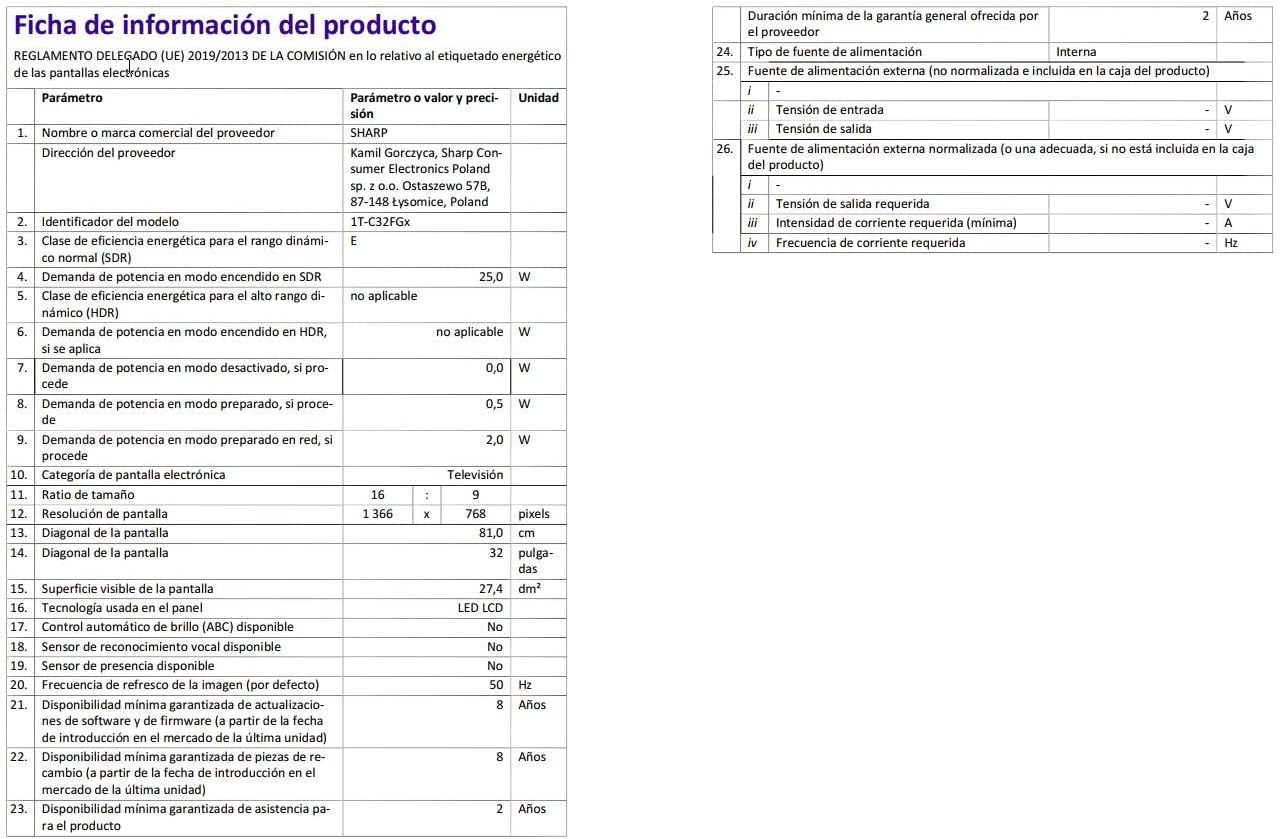
Image: Detailed product information sheet.
9. وارنٽي ۽ سپورٽ
The Sharp 32FG6EA television comes with a minimum general warranty duration of 2 years from the provider.
For technical support, warranty claims, or further assistance, please refer to the contact information provided with your purchase documentation or visit the official Sharp support webتوهان جي علائقي لاء سائيٽ.


