تعارف
This manual provides essential information for the setup, operation, and maintenance of your Humanscale eFloat Go Desk. The eFloat Go is an electric height-adjustable table designed to promote active working by allowing seamless transitions between sitting and standing positions.
It features innovative anti-collision technology, quiet motors, and a programmable hand switch for personalized height settings.
حفاظت جي ڄاڻ
Please read all safety instructions before assembly and operation. Failure to do so may result in injury or damage to the product.
- هن ڊيسڪ جي وڌ ۾ وڌ وزن جي گنجائش آهي 250 پائونڊهن حد کان وڌيڪ نه ڪريو.
- Ensure all cables are properly managed to prevent tripping hazards or entanglement during height adjustments.
- Keep hands and objects clear of moving parts during operation to avoid pinching or crushing.
- The desk is equipped with anti-collision technology, but always exercise caution.
- Assembly requires careful attention to instructions. It is recommended that at least one person is available for assembly.
سيٽ اپ ڪريو
The Humanscale eFloat Go Desk is designed for quick assembly, typically taking under 5 minutes. Follow the detailed assembly instructions provided in the packaging. Ensure all components are present before beginning.
پيڪنگ ۽ چڪاس
- احتياط سان پيڪنگ کوليو ۽ سڀني حصن کي هٽايو.
- Verify that all parts listed in the assembly guide are included and undamaged.
- اسيمبلي دوران ڇڪڻ کان بچڻ لاءِ اجزاء کي نرم، صاف مٿاڇري تي رکو.
اسيمبليء جا قدم
- Attach the desk legs to the tabletop using the provided hardware. Ensure all screws are tightened securely.
- Connect the motor cables according to the diagram in the assembly guide.
- Mount the programmable hand switch to the underside of the desk in a convenient location.
- پاور ڪنڊ کي گرائونڊ ٿيل برقي آئوٽليٽ ۾ لڳايو.
- Perform an initial test run to ensure smooth operation.

Figure 1: Desk Dimensions. This image illustrates the overall dimensions of the eFloat Go Desk, including its depth, width, and height, which are crucial for planning your workspace.
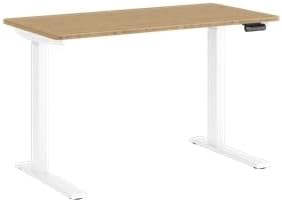
Figure 2: Assembled Desk. This image shows the fully assembled Humanscale eFloat Go Desk, highlighting its white base and bamboo top, ready for use in an office or home environment.
آپريٽنگ هدايتون
The eFloat Go Desk features an intuitive programmable hand switch for easy height adjustments.
بنيادي آپريشن
- To raise the desk, press and hold the مٿي تير بٽڻ
- To lower the desk, press and hold the هيٺيون تير بٽڻ
- Release the button at your desired height.
Programming Height Presets
The hand switch allows you to save up to three preferred height settings.
- Adjust the desk to your desired height for the first preset.
- کي دٻايو 'م' button (Memory). The display will show 'S-'.
- 3 سيڪنڊن اندر، گهربل پري سيٽ نمبر بٽڻ دٻايو ('1', '2'، يا '3'). The display will show 'S-1', 'S-2', or 'S-3' to confirm the setting.
- Repeat for other desired height presets.
Presets کي ياد ڪرڻ
To move the desk to a saved height, simply press the corresponding preset number button ('1', '2'، يا '3'). The desk will automatically adjust to the saved position.

شڪل 3: ڪنٽرول پينل. هي تصوير تفصيلي مهيا ڪري ٿي view of the desk's control panel, showing the buttons for height adjustment and memory presets.
سار سنڀال
Regular maintenance ensures the longevity and optimal performance of your eFloat Go Desk.
- صفائي: Wipe the desk surfaces with a dry cloth or a damp ڪپڙو. گھڻائي صاف ڪندڙ يا سخت ڪيميائي کان بچاء جيڪي ختم ڪري سگھن ٿيون.
- ڪيبل جو انتظام: Periodically check and organize cables to prevent tangling or interference with the desk's movement.
- فاسٽنر چيڪ: Every few months, inspect all screws and fasteners to ensure they remain tight. Retighten if necessary.
- موٽر سنڀال: The desk's motors are designed for quiet operation and require no special lubrication. If you notice unusual noises, refer to the troubleshooting section.
مشڪلاتون
If you encounter issues with your eFloat Go Desk, refer to the following common problems and solutions.
| مسئلو | ممڪن سبب | حل |
|---|---|---|
| ڊيسڪ حرڪت نٿي ڪري. | Power cord unplugged; circuit breaker tripped; motor overload. | Check power connection. Reset circuit breaker. Unplug for 30 minutes, then retry. |
| ڊيسڪ غير مساوي طور تي هلي ٿي يا غير معمولي شور ڪري ٿي. | Loose fasteners; obstruction; uneven weight distribution. | Check and tighten all fasteners. Remove any obstructions. Redistribute weight evenly on the tabletop. |
| Height presets are not working. | Presets not properly saved; power interruption. | Reprogram the height presets following the "Programming Height Presets" section. |
| Anti-collision feature triggers too often. | Sensitive setting; minor obstruction. | Ensure no objects are near the desk's path. Consult Humanscale support for sensitivity adjustment if needed. |
If the problem persists after attempting these solutions, please contact Humanscale customer support.
وضاحتون
Key technical specifications for the Humanscale eFloat Go Desk:
- ماڊل نمبر: FTR2448BM_FG1224DW
- پيداوار جا طول و عرض (ڊي x ڊبليو x ايڇ): 23"ڊي x 46"ڊي x 26.5"ايڇ
- مٿيون سائيز: 23" Depth x 46" Width
- رنگ: White on Bamboo
- بنيادي مواد: ڌاتو
- مٿيون مواد: بانس
- خاص خصوصيت: Electric Height-Adjustable
- شيء جو وزن: 150 پائونڊ
- وڌ ۾ گھٽ وزن سفارش: 250 پائونڊ
- گهربل اسيمبلي: ها
وارنٽي ڄاڻ
The Humanscale eFloat Go Desk is backed by a comprehensive warranty to ensure your peace of mind.
- وارنٽي مدت: 10-Year, 24/7 Humanscale Warranty.
- هي وارنٽي عام استعمال جي تحت مواد ۽ ڪم ڪار ۾ خرابين کي ڍڪيندي آهي.
- For full warranty terms and conditions, please refer to the warranty card included with your product or visit the official Humanscale webسائيٽ.
ڪسٽمر سپورٽ
For further assistance, technical support, or warranty claims, please contact Humanscale customer service.
- Humanscale Official Webسائيٽ: www.humanscale.com
- Refer to the product packaging or the Humanscale website for specific contact numbers or email addresses for your region.


