1. تعارف
Thank you for choosing the Beafon SL605 Silverline Flip Phone. This manual provides essential information for setting up, operating, and maintaining your device. The SL605 is designed with ease of use in mind, featuring large buttons, a clear display, and an SOS emergency call function, making it ideal for seniors.

Figure 1.1: Beafon SL605 Silverline Flip Phone (Closed)
This image shows the Beafon SL605 flip phone in its closed state, displaying the external screen with the current time and date. The phone has a sleek black and silver design.
2. پيڪيج مواد
مھرباني ڪري پيڪيج جي مواد کي انباڪس ڪرڻ وقت چيڪ ڪريو. جيڪڏھن ڪا به شيءِ غائب يا خراب آھي، پنھنجي پرچون ڪندڙ سان رابطو ڪريو.
- Beafon SL605 Flip Phone
- Rechargeable Lithium-ion جي بيٽري
- چارج ڪيبل
- Charging Cradle (if included with your model)
- استعمال ڪندڙ جو دستياب (ھي دستاويز)
3. ڊوائيس اوورview
Familiarize yourself with the key components of your Beafon SL605.

Figure 3.1: Beafon SL605 Silverline Flip Phone (Open)
This image displays the Beafon SL605 flip phone in its open position, revealing the internal color display and the large, illuminated keypad. The keypad features clearly marked buttons for easy dialing and navigation.
3.1 محاذ View (بند)
- Disاهرين ڊسپلي: Shows time, date, battery status, and incoming call information.
- نوٽيفڪيشن LED: Indicates new messages or missed calls.
3.2 محاذ View (کليل)
- اندروني ڊسپلي: مينيو، رابطن ۽ پيغامن لاءِ 2.4 انچ رنگين اسڪرين.
- ڪيپاد: Large, illuminated buttons for dialing and navigation. Includes dedicated call, end call, and SOS buttons.
- نيويگيشن ڪيچ: Up, Down, Left, Right, and OK/Confirm buttons.
- Photo Contact Indicator: Feature to display contact photos.
3.3 پوئتي View

شڪل 3.2: پوئتي View of Beafon SL605
This image shows the back of the Beafon SL605 flip phone, highlighting the prominent SOS emergency call button and the speaker grille at the bottom.
- SOS ايمرجنسي بٽڻ: Press and hold to activate the emergency call sequence.
- اسپيڪر: For loud ringtones and hands-free calls.
3.4 طرف View
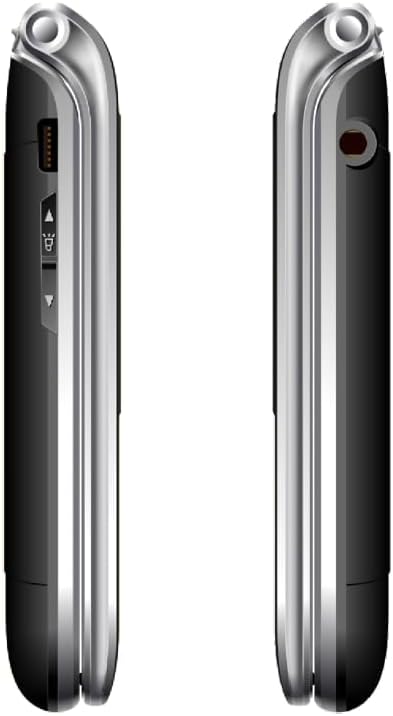
شڪل 3.3: پاسي View of Beafon SL605
هي تصوير هڪ پاسي پيش ڪري ٿي view of the Beafon SL605 flip phone, illustrating the charging port and volume control buttons located on the side of the device.
- چارج پورٽ: For connecting the charging cable or placing in the charging cradle.
- حجم بٽڻ: Adjust call volume and ringtone volume.
- هيڊ فون جڪ هيڊفونز لاءِ 3.5 ايم ايم پورٽ.
4. سيٽ اپ
4.1 بيٽري ۽ سم ڪارڊ انسٽال ڪرڻ
- فون جي پوئين ڍڪ کي هٽائي ان کي نوچ کان نرميءَ سان کوليو.
- Insert your SIM card into the designated slot. Ensure the gold contacts face downwards and the cut corner aligns with the slot.
- Insert the Lithium-ion battery, aligning the contacts with those in the phone.
- پوئين ڍڪ کي تبديل ڪريو، مضبوطيءَ سان دٻايو جيستائين اهو جاءِ تي نه اچي.
4.2 بيٽري کي چارج ڪرڻ
پهرين استعمال کان اڳ، فون جي بيٽري کي مڪمل طور تي چارج ڪريو.
- Connect the charging cable to the phone's charging port or place the phone in its charging cradle.
- ڪيبل جي ٻئي پڇاڙي کي پاور آئوٽ ۾ لڳايو.
- The battery icon on the display will indicate charging status. A full charge typically takes 2-3 hours.
4.3 پاور آن/آف
- پاور آن ڪرڻ: کي دٻايو ۽ رکو ڪال ختم ڪريو/پاور بٽڻ دٻايو جيستائين اسڪرين جي روشني نه ٿئي.
- پاور آف ڪرڻ: کي دٻايو ۽ رکو ڪال ختم ڪريو/پاور button until a power-off prompt appears, then confirm.
5. آپريٽنگ هدايتون
5.1 ڪالون ڪرڻ ۽ وصول ڪرڻ
- ڊائل ڪرڻ لاءِ: Open the phone, enter the phone number using the keypad, and press the سڏ بٽڻ
- رابطن کان: Navigate to the "Contacts" menu, select a contact, and press the سڏ بٽڻ
- جواب ڏيڻ: جڏهن فون جي گھنٽي وڄي، فلپ کوليو يا دٻايو سڏ بٽڻ
- ڪال ختم ڪرڻ لاءِ: کي دٻايو ڪال ختم ڪريو button or close the flip.
5.2 SOS Emergency Call Function
The SOS button is located on the back of the phone. It allows you to quickly contact pre-set emergency numbers.
- SOS نمبر مقرر ڪرڻ: ڏانهن وڃو Menu > SOS Settings to add up to 5 emergency contacts.
- SOS کي چالو ڪرڻ: کي دٻايو ۽ رکو SOS بٽڻ on the back of the phone for 3 seconds.
- The phone will automatically call the first number in the SOS list. If unanswered, it will call the next number, and so on, cycling through the list up to 3 times.
- An emergency SMS message will also be sent to all SOS contacts.
5.3 Messaging (SMS)
- To Send: ڏانهن وڃو Menu > Messages > Write Message. Enter your message and select a recipient from contacts or enter a number.
- To Read: New messages will be indicated by a notification. Go to Menu > Messages > Inbox پڙهڻ.
5.4 فون سيٽنگون
Access various settings via the مينيو بٽڻ
- رنگ ٽون جو آواز: Adjust using the side volume buttons or in مينيو> سيٽنگون> پروfiles.
- Number Announcement: Enable or disable the feature that announces dialed numbers by button press in Menu > Settings > Call Settings.
- ٻولي: The device supports multiple languages. Change the interface language in Menu > Settings > Phone Settings > Language. (Note: Some models may have limited language options, such as German as a primary language.)

Figure 5.1: Beafon SL605 Photo Contact Feature
This image shows two open Beafon SL605 phones side-by-side. The phone on the right demonstrates the photo contact feature, where a contact's picture is displayed on the screen, making it easier to identify callers.
6. سار سنڀال ۽ سنڀال
- Keep the phone dry. Liquids can corrode electronic circuits.
- فون کي صاف ڪرڻ لاءِ سخت ڪيميڪل، صفائي ڪندڙ سالوينٽس، يا مضبوط ڊٽرجنٽ استعمال نه ڪريو. ان کي نرم، ڊي سان صاف ڪريو.amp ڪپڙو.
- Do not store the phone in high temperatures, as this can shorten the life of electronic devices, damage batteries, and warp or melt certain plastics.
- Do not store the phone in cold temperatures, as moisture can form inside the phone when it returns to normal temperature, which could damage the electronic circuit boards.
- Do not drop, knock, or shake the phone. Rough handling can break internal circuit boards and fine mechanics.
- The phone has IP54 protection against dust and splashes. While it offers some protection, it is not waterproof and should not be submerged in water.
7. مسئلا حل ڪرڻ
| مسئلو | ممڪن سبب | حل |
|---|---|---|
| فون آن نٿو ٿئي. | بيٽري ختم ٿي وئي آهي يا صحيح طرح سان نصب نه ڪئي وئي آهي. | بيٽري چارج ڪريو. پڪ ڪريو ته بيٽري صحيح طرح سان لڳل آهي. |
| ڪالون نه ٿو ڪري سگھجي ۽ نه ئي وصول ڪري سگھجي ٿو. | ڪو به سم ڪارڊ ناهي، سم ڪارڊ صحيح طرح سان داخل نه ڪيو ويو آهي، يا ڪو به نيٽ ورڪ سگنل ناهي. | Ensure SIM card is properly inserted. Check network signal strength. Contact your service provider if issues persist. |
| Sound is too low/high. | Volume settings are incorrect. | Adjust volume using the side buttons during a call or in the phone's settings. |
| SOS بٽڻ ڪم نه ڪري رهيو آهي. | SOS numbers not set or incorrect. | Verify that SOS emergency numbers are correctly configured in the settings. |
| External display is blank or white. | Possible software glitch or hardware issue. | Try restarting the phone. If the problem persists, contact customer support. |
8. وضاحتون
- ماڊل: Beafon SL605
- پيداوار جو قسم: فولڊ ڪرڻ لائق موبائل فون
- رنگ: ڪارو
- آپريٽنگ سسٽم: Beafon OS
- اندروني ڊسپلي: 2.4 inches (6.09 cm) Color LCD
- Disاهرين ڊسپلي: 1.44 inches (3.65 cm) Color LCD
- سيلولر ٽيڪنالاجي: 2G
- رابطي: بلوٽوٿ، 3.5 ايم ايم جڪ
- خاص خاصيتون: IP54 Dust and Splash Protection, Rubberized Surface, Ergonomic Design, Extra Large Illuminated Buttons, Extra Loud Ringtone, Photo Contact Indicator, Number Announcement (optional)
- بيٽري: ليٿيم-آئن (شامل)
- ياداشت رکڻ جي گنجائش: 32 جي بي
- ٺاهيندڙ: بيفون
- اصليت جو ملڪ: چين
9. وارنٽي ۽ سپورٽ
For warranty information, please refer to the warranty card included in your product packaging or contact your point of purchase. Beafon provides customer support for product inquiries and technical assistance.
آن لائن سپورٽ: Visit the official Beafon webاڪثر پڇيا ويندڙ سوالن، سافٽ ويئر اپڊيٽس، ۽ رابطي جي معلومات لاءِ سائيٽ.
ڪسٽمر سروس: Contact details for customer service can typically be found on the manufacturer's webسائيٽ يا توهان جي خريداري دستاويزن ۾.
10. اهم حفاظتي ڄاڻ
- Do not attempt to disassemble or modify the phone. This can void the warranty and cause damage.
- صرف منظور ٿيل بيٽريون، چارجر ۽ لوازمات استعمال ڪريو.
- Dispose of the phone and battery responsibly according to local regulations. Do not dispose of them in household waste.
- Avoid using the phone in extreme temperatures or highly humid environments.
- Keep the phone away from pacemakers and other medical devices.
- گاڏي هلائڻ يا ڳري مشينري هلائڻ دوران فون استعمال نه ڪريو.
11. سرڪاري پراڊڪٽ وڊيوز
مهيا ڪيل ڊيٽا ۾ هن ماڊل لاءِ وڪرو ڪندڙ کان ڪا به سرڪاري پراڊڪٽ وڊيو نه ملي.


