تعارف
The AMIR Key Lock Box (Model HA67R) is a weatherproof 4-digit combination key storage solution designed for secure key access. It features a removable shackle for versatile mounting options and durable construction suitable for both indoor and outdoor use. This manual provides detailed instructions for setup, operation, and maintenance to ensure optimal performance and security.

Image: The AMIR Key Lock Box, Model HA67R, in red and black, with its front cover open, revealing keys stored inside. The combination dials are visible on the front.
پيداوار جون خاصيتون
- هٽائڻ وارو زنجيرو: Offers flexible installation options. The lock box can be hung on a door knob, car handle, railings, fences, or pipes, or it can be fixed to a wall.
- وڏي گنجائش: Designed to store up to 5 standard house keys or 3 larger keys. The internal dimensions are approximately 2.17 x 1.38 x 1.14 inches.
- مضبوط مواد: Constructed from high-strength zinc alloy for the body and hardened steel for the shackle, providing resistance against cutting and sawing. The material is rust-resistant, ensuring durability.
- هاء سيڪيورٽي: Features a 4-digit combination lock, offering 10,000 possible combinations for enhanced security. The combination can be reset as needed. It is recommended to record your new combination securely.
- Weatherproof ڊيزائن: Suitable for both indoor and outdoor environments, protecting stored keys from various weather conditions.

تصوير: هڪ تفصيلي view highlighting the detachable shackle, the 4-digit combination mechanism, and the reinforced metal body of the key lock box.
پيڪيج مواد
Upon opening your AMIR Key Lock Box package, you should find the following items:
- 1 x AMIR Key Lock Box (Model HA67R)
- 1 x استعمال ڪندڙ دستياب
سيٽ اپ ڪريو
توهان جي ميلاپ کي ترتيب ڏيو
The default combination for your new AMIR Key Lock Box is 0-0-0-0. پنهنجي ذاتي 4-عددن جي ميلاپ کي سيٽ ڪرڻ لاءِ انهن قدمن تي عمل ڪريو:
- باڪس کوليو: Dial the default code (0-0-0-0) to align with the indicator line, then pull down the front cover to open the key box.
- Locate Reset Lever: Inside the open compartment, locate the reset lever on the back of the front cover.
- Move Reset Lever: Push the RESET lever from position A to position B.
- نئون ميلاپ مقرر ڪريو: With the lever in position B, scroll the number dials to set your desired 4-digit combination. Ensure the numbers are aligned with the indicator line.
- Confirm New Combination: Push the RESET lever back to position A. Your new combination is now set.
- Test Combination: Close the front cover and scramble the dials. Then, enter your new combination to verify it opens correctly.
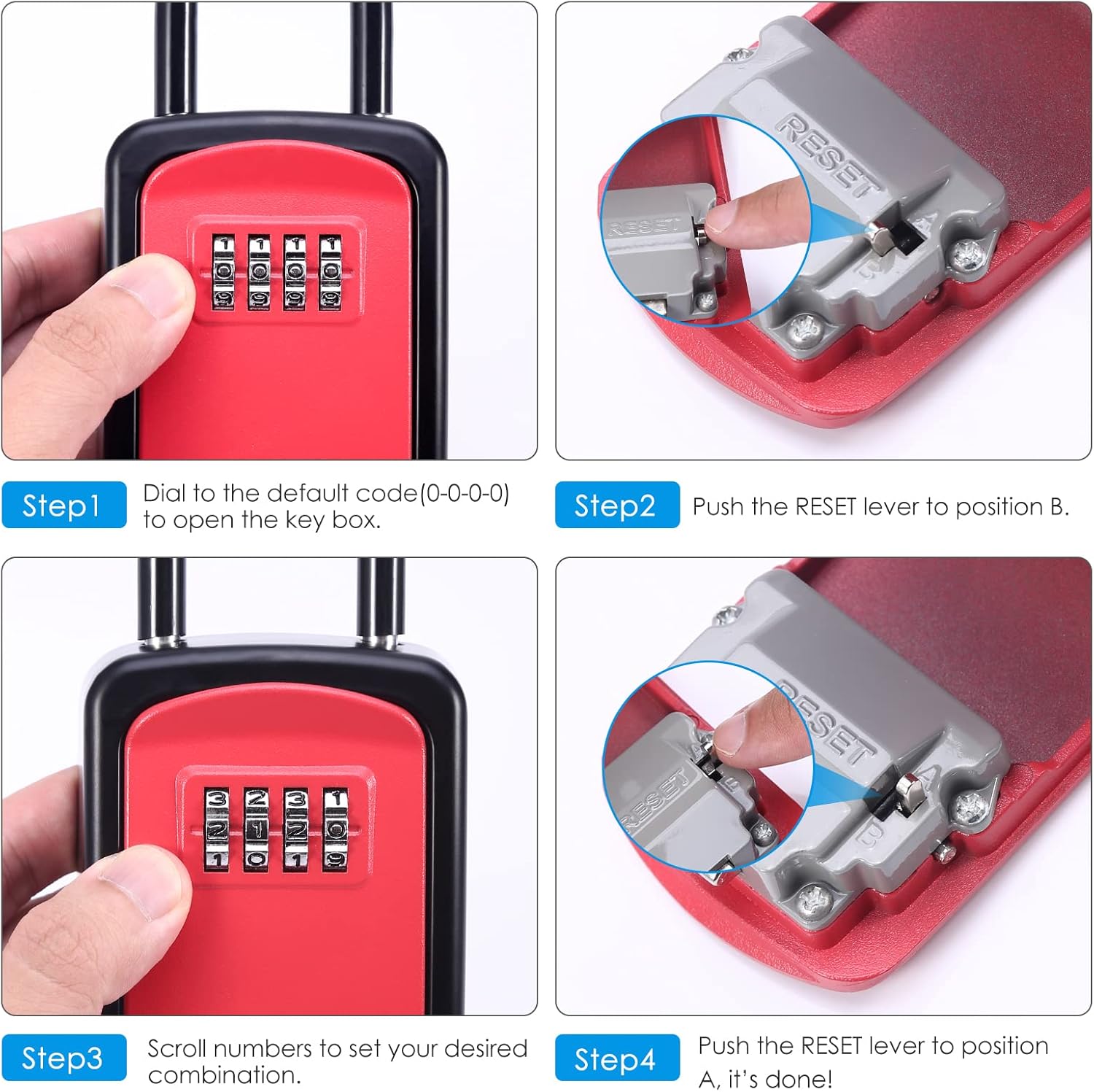
Image: A visual guide demonstrating the four steps to reset the combination code on the key lock box, including opening with the default code, moving the reset lever, setting new numbers, and returning the lever.
اهم: After setting a new combination, it is highly recommended to write it down and store it in a secure, memorable location. Do not store the combination inside the lock box.
Installing the Removable Shackle
The AMIR Key Lock Box features a removable shackle for flexible installation. You can use it as a portable lock box or mount it permanently.
- Remove Shackle: To remove the shackle, open the lock box. Inside the top part of the main body, locate and push the release button upwards. While holding the button, pull the shackle upwards to detach it.
- Attach Shackle: To attach the shackle, align its ends with the holes in the top of the lock box. Push the release button upwards and insert the shackle ends firmly until they click into place. Release the button to secure.
- لڳائڻ جا اختيار:
- لٽڪائڻ: With the shackle attached, hang the lock box on a door knob, gate, fence, or other suitable fixture.
- ڀت لڳائڻ: If you prefer permanent installation, the shackle can be removed. Use appropriate screws and anchors (not included) to secure the back of the lock box to a wall or solid surface. Ensure the mounting location is discreet and secure.
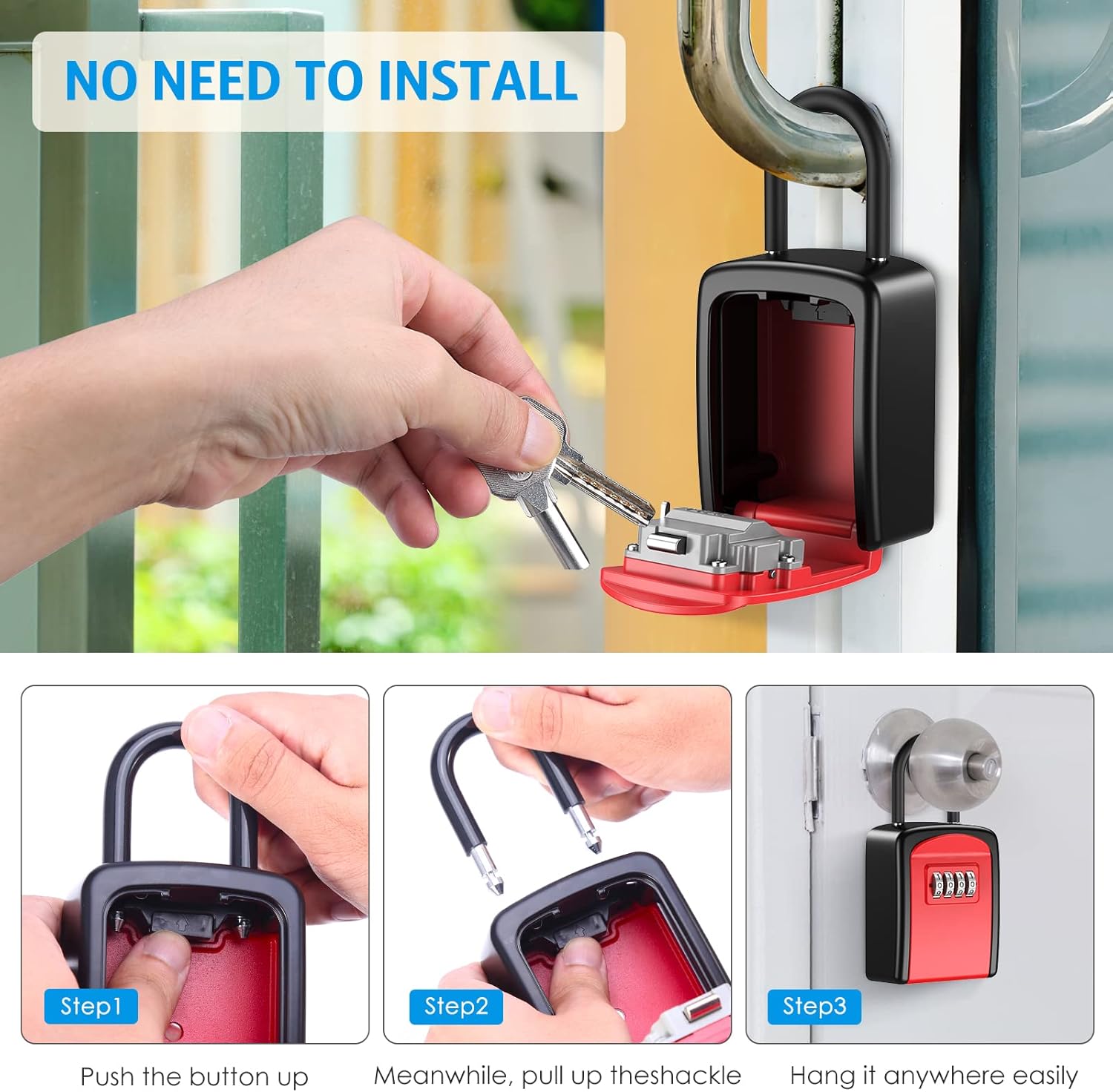
Image: A sequence of three images illustrating how to detach the shackle by pushing a button and pulling it up, and then how to hang the lock box on a door handle.
Operating the Lock Box
Opening the Lock Box
- Rotate the dials to align your set 4-digit combination with the indicator line on the front of the lock box.
- Pull down the front cover to open the compartment and access your keys.
Closing and Securing the Lock Box
- Place your keys securely inside the compartment.
- Close the front cover firmly until it latches.
- Scramble the combination dials to a random set of numbers. This locks the box and prevents unauthorized access.
سار سنڀال
To ensure the longevity and smooth operation of your AMIR Key Lock Box, follow these maintenance guidelines:
- صفائي: Regularly wipe the exterior and dials with a soft, damp cloth to remove dirt and grime. Avoid abrasive cleaners or solvents.
- لوڻ: If the dials become stiff, apply a small amount of graphite lubricant (e.g., pencil lead dust) to the moving parts. Avoid oil-based lubricants, as they can attract dust and debris.
- چڪاس: Periodically inspect the lock box for any signs of wear, damage, or corrosion, especially if used outdoors. Ensure the shackle mechanism operates smoothly.
- طاقت کان بچڻ: Never force the dials or the opening mechanism. If you encounter resistance, re-check your combination and ensure the dials are properly aligned.
مشڪلاتون
- Problem: Cannot open the lock box.
- حل 1: Double-check that you are entering the correct 4-digit combination. Ensure each number is precisely aligned with the indicator line.
- حل 2: If you recently reset the combination, ensure the reset lever inside the box was moved back to position A after setting the new code.
- حل 3: Scramble the dials completely, then carefully re-enter your combination. Sometimes a slight misalignment can prevent opening.
- Problem: Dials are stiff or difficult to turn.
- حل 1: Clean the dials and surrounding areas with a soft, dry cloth to remove any accumulated dust or debris.
- حل 2: Apply a small amount of graphite lubricant (e.g., from a pencil tip) to the gaps around the dials. Avoid using oil-based lubricants.
- Problem: Shackle is stuck or difficult to remove/attach.
- حل 1: Ensure the internal release button is fully pressed upwards when attempting to remove or attach the shackle.
- حل 2: Check for any obstructions or debris in the shackle holes or around the release button.
وضاحتون
| خاصيت | تفصيل |
|---|---|
| برانڊ | امير |
| ماڊل نمبر | ايڇ 67 آر |
| تالا جو قسم | 4-Digit Combination Lock |
| رنگ | ڳاڙهو |
| مواد | مصر جو فولاد ، زنڪ |
| خاص خاصيتون | چوري مخالف، ڪمبينيشن لاڪ، پورٽيبل، هٽائڻ وارو شيڪل، پنروڪ |
| چڙهڻ جو قسم | Handle (Removable Shackle), Wall Mountable |
| شيءِ جو وزن | 11.7 اونس |
| پيداوار جي ماپ | 4.13 x 3.34 x 2.16 انچ |
| پاڻي جي مزاحمت جي سطح | پنروڪ |
وارنٽي ۽ سپورٽ
AMIR is committed to providing high-quality products and customer satisfaction. Your AMIR Key Lock Box (Model HA67R) comes with the following:
- 6 Months Return Policy: For any issues within the first six months.
- 24 مهينن وارنٽي: Covering manufacturing defects and functional issues for two years from the date of purchase.
- لائف ٽائيم سپورٽ: Dedicated assistance for any operational difficulties, functionality concerns, or if the product arrives faulty or damaged.
For support or inquiries, please refer to the contact information provided with your purchase or visit the official AMIR webسائيٽ.


