تعارف
This manual provides detailed instructions for the setup, operation, and maintenance of your LFF Atomic Clock Model LWC204. This digital clock features a large, easy-to-read display, atomic time synchronization, and a wireless sensor for indoor and outdoor temperature readings. Please read this manual thoroughly before use to ensure proper functionality and longevity of your device.
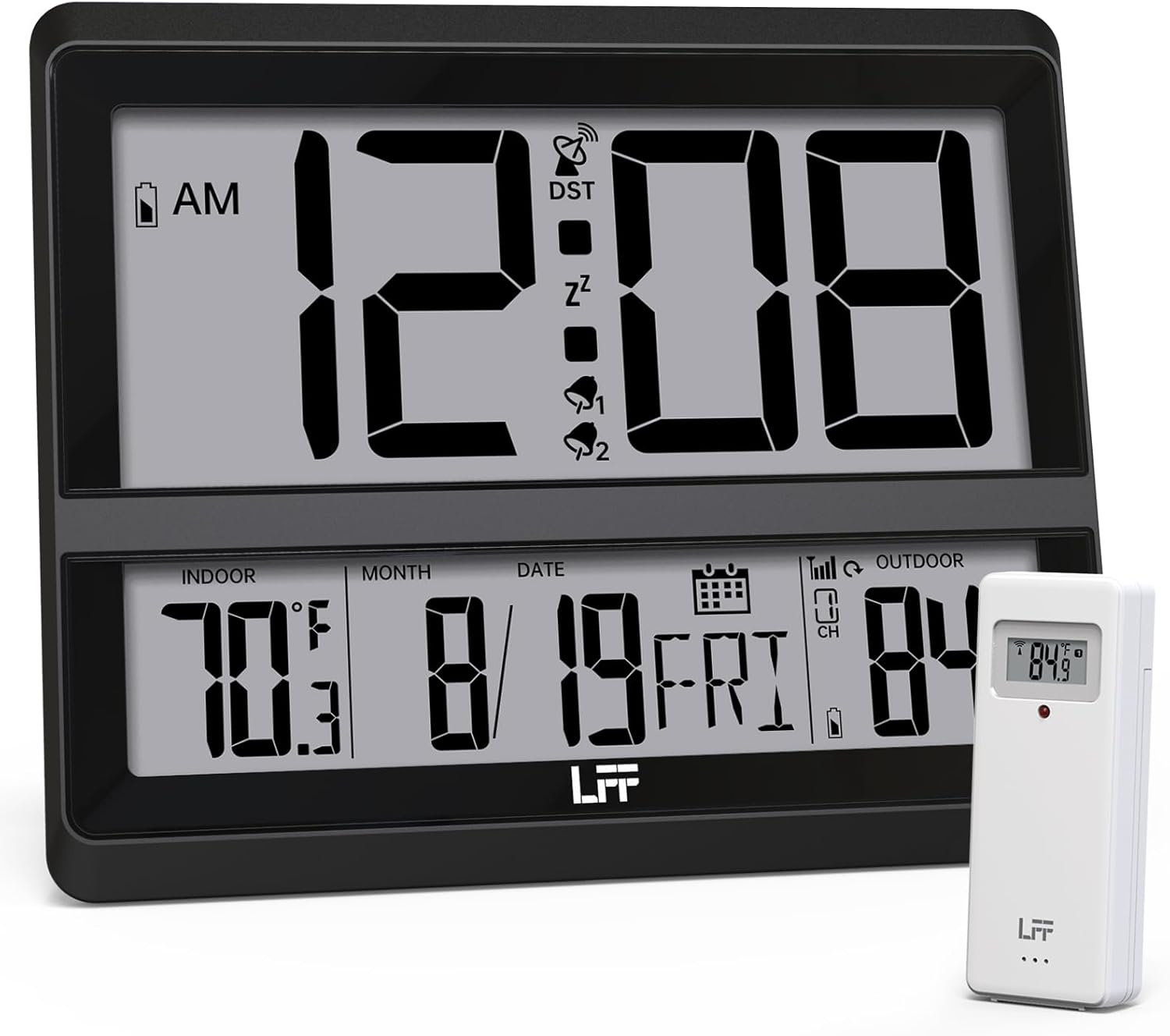
Image: The LFF Atomic Clock main unit with its wireless outdoor temperature sensor.
پيڪيج مواد
- LFF Atomic Clock Main Unit
- وائرليس آئوٽ ڊور گرمي پد سينسر
- هدايت نامو (هي دستاويز)
- Bracket for table standing
Note: Batteries are not included. The main clock unit requires 3x AA batteries, and the outdoor sensor requires 2x AAA batteries.
پيداوار ختمview
Familiarize yourself with the main components and controls of your LFF Atomic Clock.

Image: Front display and rear button layout of the LFF Atomic Clock.
ڊسپلي خاصيتون:
- وقت ڏيکاري: Large digits for current time (12/24 Hour format).
- صبح/ شام جو اشارو: 12 ڪلاڪن جي فارميٽ لاءِ.
- DST Symbol: Indicates Daylight Saving Time is active.
- RCC Reception Icon: Shows status of atomic time signal reception.
- Alarm Icons (Zz, 1, 2): Indicate active alarms and snooze function.
- اندروني درجه حرارت: Current temperature inside (°C/°F).
- ٻاھرين گرمي پد: Current temperature from wireless sensor (°C/°F).
- Date & Weekday: Month, Day, and Day of the Week.
- گھٽ بيٽري جو اشارو: For both main unit and outdoor sensor.
پوئتي بٽڻ:
- سيٽ بٽڻ: سيٽنگ موڊ ۾ داخل ٿئي ٿو.
- الارم بٽڻ: Accesses alarm settings.
- چينل بٽڻ: Cycles through outdoor sensor channels (if multiple sensors are used).
- DOWN/WAVE/°C/°F Button: Decreases values in setting mode, manually initiates atomic signal search (WAVE), or switches temperature units.
- UP/ALARM Button: Increases values in setting mode, or activates/deactivates alarm.
سيٽ اپ ڪريو
1. بيٽري لڳائڻ
- ٻاھرين سينسر:
- وائرليس آئوٽ ڊور سينسر جي پوئين پاسي بيٽري جو ڪمپارٽمينٽ کوليو.
- 2x AAA بيٽريون داخل ڪريو، صحيح قطبيت (+/-) کي ڏسندي.
- بيٽري جي ڪمري کي محفوظ طور تي بند ڪريو.
- Note: For temperatures below -4°F (-20°C), Lithium batteries are recommended for the outdoor sensor.
- Main Clock Unit:
- Open the battery compartment on the back of the main clock unit.
- 3x AA بيٽريون داخل ڪريو، صحيح قطبيت (+/-) کي ڏسندي.
- بيٽري جي ڪمري کي محفوظ طور تي بند ڪريو.

Image: Battery compartments for the main clock and outdoor sensor.
2. Initial Synchronization and Settings
Upon battery installation, the clock will automatically begin searching for the WWVB atomic time signal and attempt to connect with the outdoor sensor.
- The RCC Reception Icon will flash during the atomic signal search. This process may take several minutes or up to 24 hours depending on signal strength.
- The outdoor temperature should appear on the display within a few minutes after the sensor batteries are installed. If not, press the چينل button on the main unit to cycle through channels or press the reset button on the outdoor sensor.
3. Manual Settings (if needed)
If the atomic signal is not received or you wish to adjust settings manually:
- ٽائيم زون سيٽنگ:
- کي دٻايو ۽ رکو سيٽ button for 3 seconds to enter time zone setting.
- استعمال ڪريو UP/ALARM or DOWN/WAVE/°C/°F buttons to select your time zone (e.g., PST, MST, CST, EST).
- دٻايو سيٽ تصديق ڪرڻ ۽ ا settingيان سيٽنگ ڏانھن وو.
- 12/24 ڪلاڪ فارميٽ:
- After time zone, the hour format will flash. Use UP/ALARM or DOWN/WAVE/°C/°F to select 12-hour or 24-hour format.
- دٻايو سيٽ تصديق ڪرڻ.
- Manual Time and Date Setting:
- دٻائڻ جاري رکو سيٽ to cycle through Year, Month, Day, Hour, Minute settings.
- استعمال ڪريو UP/ALARM or DOWN/WAVE/°C/°F هر قيمت کي ترتيب ڏيڻ لاءِ.
- دٻايو سيٽ هر سيٽنگ جي تصديق ڪرڻ.
- ڏينهن جي روشني جي بچت جو وقت (DST):
- After setting the time, the DST setting will flash. Use UP/ALARM or DOWN/WAVE/°C/°F to enable or disable DST.
- دٻايو سيٽ سيٽنگ موڊ مان نڪرڻ لاءِ.

Image: The clock automatically corrects time daily via WWVB signal.
4. ٻاهرين سينسر جي جڳهه
- Place the wireless outdoor sensor within 330 feet (100 meters) of the main unit.
- Choose a shaded location to avoid direct sunlight, which can affect temperature accuracy.
- Ensure the sensor is protected from direct rain and snow.
- Avoid placing the sensor near large metal objects or electrical appliances that may interfere with the wireless signal.

Image: Wireless range of 330 feet for the outdoor sensor.
آپريٽنگ هدايتون
1. ڊسپلي موڊس
- The clock continuously displays time, indoor temperature, outdoor temperature, date, and day of the week.
- کي دٻايو DOWN/WAVE/°C/°F گرمي پد جي ڊسپلي لاءِ سيلسيس (°C) ۽ فارنهائيٽ (°F) جي وچ ۾ سوئچ ڪرڻ لاءِ بٽڻ.
2. الارم فنڪشن
- الارم سيٽنگ:
- کي دٻايو الارم button once to display Alarm 1 time. Press again for Alarm 2.
- While an alarm time is displayed, press and hold the الارم button for 3 seconds to enter alarm setting mode. The hour will flash.
- استعمال ڪريو UP/ALARM or DOWN/WAVE/°C/°F ڪلاڪ کي ترتيب ڏيڻ لاءِ پريس الارم تصديق ڪرڻ.
- منٽ چمڪيندو. استعمال ڪريو UP/ALARM or DOWN/WAVE/°C/°F منٽ کي ترتيب ڏيڻ لاء. دٻايو الارم الارم سيٽنگ جي تصديق ۽ نڪرڻ لاءِ.
- الارم کي چالو ڪرڻ/غير فعال ڪرڻ:
- کي دٻايو الارم button to display Alarm 1 or Alarm 2.
- کي دٻايو UP/ALARM button to toggle the alarm ON or OFF. The corresponding alarm icon (1 or 2) will appear/disappear on the display.
- سست جو ڪم:
- جڏهن الارم ل soundsندو آهي ، کي دايو سنيوز button (usually located on top or a dedicated button) to activate snooze. The alarm will sound again after approximately 5-10 minutes.
- الارم کي مڪمل طور تي بند ڪرڻ لاءِ، ڪو ٻيو بٽڻ دٻايو (مثال طور، الارم, سيٽ).
3. Manual Atomic Signal Search
If you wish to manually initiate a search for the WWVB atomic time signal, press and hold the DOWN/WAVE/°C/°F button for 3 seconds. The RCC Reception Icon will flash, indicating the search is in progress.
سار سنڀال
- صفائي: Wipe the clock and sensor with a soft, dry cloth. Do not use abrasive cleaners or solvents.
- بيٽري مٽائڻ: When the low battery indicator appears on the display for either the main unit or the outdoor sensor, replace the batteries promptly to ensure continuous operation and accurate readings. Refer to the "Battery Installation" section for details.
- اسٽوريج: جيڪڏهن ڊوائيس کي گهڻي عرصي تائين ذخيرو ڪري رهيا آهيو، ته پوءِ رسي کي روڪڻ لاءِ سڀئي بيٽريون هٽايو.
مشڪلاتون
| مسئلو | ممڪن سبب | حل |
|---|---|---|
| مکيه يونٽ تي ڪابه ڊسپلي ناهي. | بيٽريون مئل يا غلط نصب ٿيل آهن. | بيٽري جي پولارٽي چيڪ ڪريو ۽ تازين AA بيٽرين سان تبديل ڪريو. |
| ٻاهرئين گرمي پد نه ڏيکاريل آهي يا غلط آهي. |
|
|
| Atomic time signal not received (RCC icon flashing or not displayed). |
|
|
| Time is incorrect after atomic synchronization. | غلط ٽائيم زون سيٽنگ. | Adjust the time zone setting as described in the "Manual Settings" section. |
وضاحتون
| خاصيت | تفصيل |
|---|---|
| ماڊل نمبر | LWC204 |
| ڊسپلي جو قسم | ڊجيٽل LCD |
| طاقت جو ذريعو (مکيه يونٽ) | 3x AA بيٽريون (شامل نه آھن) |
| طاقت جو ذريعو (ٻاهرين سينسر) | 2x AAA بيٽريون (شامل نه آهن) |
| اندروني درجه حرارت جي حد | 32°F کان 122°F (0°C کان 50°C) |
| ٻاهرين درجه حرارت جي حد | -58°F کان 158°F (-50°C کان 70°C) |
| وائرلیس رينج | کليل هوا ۾ 330 فوٽ (100 ميٽر) تائين |
| وقت جي شڪل | 12/24 ڪلاڪ چونڊيل |
| طول و عرض (مکيه يونٽ) | 7.48" W x 8.66" H (approx.) |
| چڙهڻ جا اختيار | Wall Mount or Tabletop (bracket included) |
وارنٽي ۽ سپورٽ
LFF products are designed for reliability and performance. For specific warranty information, please refer to the warranty card included with your purchase or contact LFF customer support.
For technical assistance or further inquiries, please visit the official LFF webسائيٽ تي وڃو يا انهن جي ڪسٽمر سروس ڊپارٽمينٽ سان رابطو ڪريو. رابطي جا تفصيل عام طور تي پراڊڪٽ پيڪنگنگ يا برانڊ جي سرڪاري آن لائن موجودگي تي موجود هوندا آهن.


