تعارف
خريد ڪرڻ لاءِ مهربانيasing the Nedis Alarm Clock with Wireless Charger. This device combines a digital alarm clock with a Qi-certified wireless charging pad, a USB-A charging port, a dimmable display, dual alarm settings, and a color-changing night light. This manual provides essential information for safe and efficient use of your new device.
حفاظت جي ڄاڻ
- استعمال ڪرڻ کان پهريان سڀ هدايتون احتياط سان پڙهو.
- ڊوائيس کي پاڻي، نمي، ۽ انتهائي گرمي کان پري رکو.
- پاڻ ڊوائيس کي ڌار ڪرڻ يا مرمت ڪرڻ جي ڪوشش نه ڪريو. سڀني سروسنگ کي قابل اهلڪارن جي حوالي ڪريو.
- Ensure the power adapter used is compatible with the device's power requirements. For fast charging, a QC3.0 power adapter (not included) is recommended.
- Avoid placing metal objects on the wireless charging pad, as this may interfere with charging or cause overheating.
پيڪيج مواد
- Nedis Alarm Clock with Wireless Charger (Model WCACQ30WT)
- Power Adapter (if included, otherwise sold separately)
- استعمال ڪندڙ دستي
پيداوار ختمview
Familiarize yourself with the various components of your alarm clock:

تصوير 1: سامهون View. This image displays the front of the alarm clock, featuring the large digital time display and the touch-sensitive control buttons located above it. The buttons include controls for display brightness, time setting, and alarm adjustments.
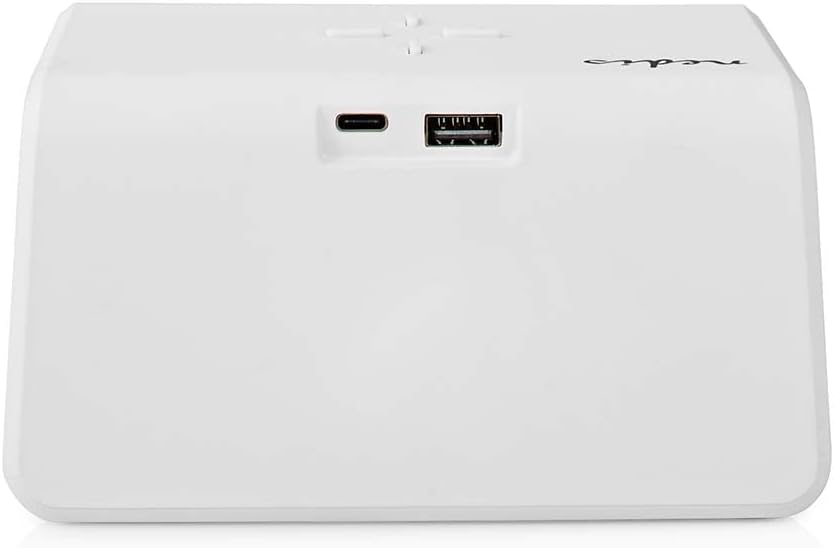
تصوير 2: ريئر View. The back of the alarm clock is shown, highlighting the USB-C port for power input and a standard USB-A port for charging external devices.
- ڊجيٽل ڊسپلي وقت، الارم جي حيثيت، ۽ ٻيا اشارا ڏيکاري ٿو.
- ڪنٽرول بٽڻ: (Located on top)
- Light Button: Controls night light.
- Time/Alarm Set Button: For setting time and alarms.
- +/- Buttons: Adjust values.
- وائرليس چارجنگ پيڊ: (Top surface) For Qi-compatible devices.
- USB-C ان پٽ: (Rear) For connecting the power adapter.
- USB-A putاھر: (Rear) For charging other devices via cable.
- Night Light Panel: (Side/Rear) Emits ambient light.
سيٽ اپ ڪريو
- پاور Connectنيو: Plug the provided power adapter into the USB-C input port on the back of the alarm clock. Connect the other end to a wall outlet. The display will light up.
- شروعاتي وقت جي سيٽنگ: The clock may display a default time. Proceed to the 'Operating Instructions' section to set the correct time.
آپريٽنگ هدايتون
1. وقت مقرر ڪرڻ
- کي دٻايو ۽ رکو Time/Alarm Set button (usually marked with a clock icon) until the hour digits start flashing.
- استعمال ڪريو + or - ڪلاڪ کي ترتيب ڏيڻ لاء بٽڻ.
- کي دٻايو Time/Alarm Set button again to switch to minute adjustment. The minute digits will flash.
- استعمال ڪريو + or - منٽن کي ترتيب ڏيڻ لاءِ بٽڻ.
- کي دٻايو Time/Alarm Set وقت سيٽنگ موڊ جي تصديق ۽ نڪرڻ لاءِ هڪ ڀيرو ٻيهر بٽڻ دٻايو.
2. الارم لڳائڻ (الارم 1 ۽ الارم 2)
This device supports two independent alarm times.
- کي دٻايو Time/Alarm Set button once to enter Alarm 1 setting mode. The alarm icon and hour digits for Alarm 1 will flash.
- استعمال ڪريو + or - buttons to adjust the hour for Alarm 1.
- کي دٻايو Time/Alarm Set button again to switch to minute adjustment for Alarm 1.
- استعمال ڪريو + or - buttons to adjust the minutes for Alarm 1.
- کي دٻايو Time/Alarm Set button again to confirm Alarm 1 and move to Alarm 2 setting mode (if applicable). Repeat steps 2-4 for Alarm 2.
- After setting Alarm 2, press the Time/Alarm Set الارم سيٽنگ موڊ جي تصديق ۽ نڪرڻ لاءِ بٽڻ.
- الارم کي چالو/غير فعال ڪرڻ لاءِ، مختصر دٻايو Time/Alarm Set button until the desired alarm icon (e.g., 'AL1' or 'AL2') appears or disappears on the display.
3. اسنوز فنڪشن
When an alarm sounds, press any button (except the alarm off button, if present) to activate the snooze function. The alarm will temporarily stop and sound again after a few minutes (typically 5-10 minutes, refer to specific model details if available). To turn off the alarm completely, press the designated alarm off button or follow the instructions for deactivating the alarm.
4. Wireless Charging (Qi)
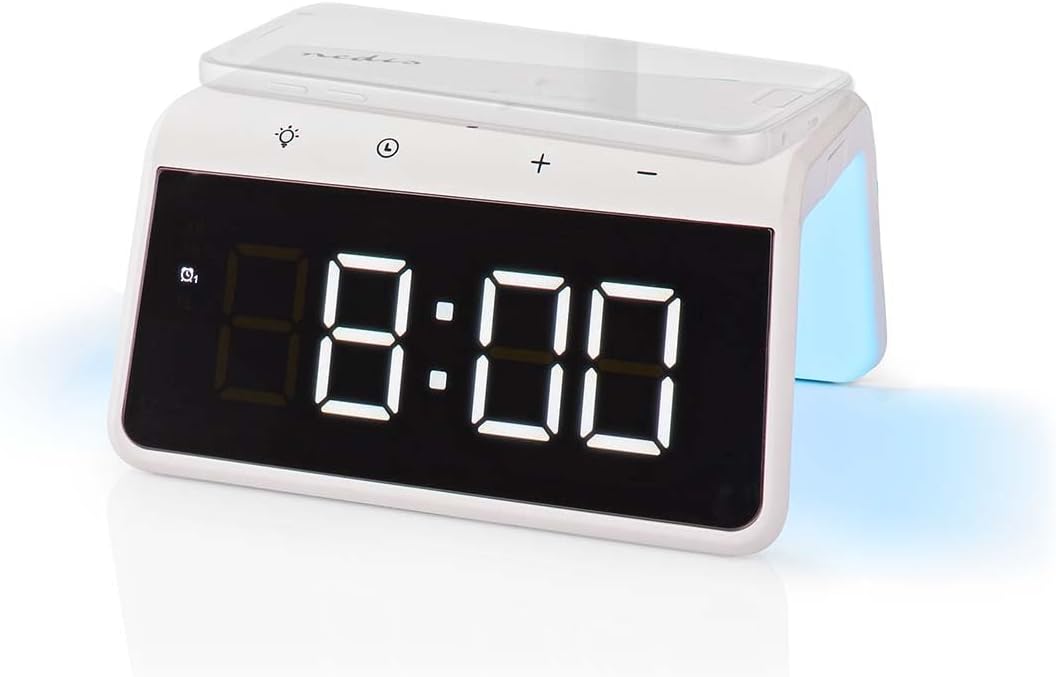
Image 3: Wireless Charging. A smartphone is shown resting on the top surface of the alarm clock, which functions as a Qi wireless charging pad.
- Place your Qi-compatible smartphone or device directly onto the wireless charging pad located on the top surface of the alarm clock.
- Ensure the device is centered on the charging pad for optimal performance.
- A charging indicator (e.g., an icon on the display or an LED light) will typically illuminate to confirm that charging has begun.
- The charger supports 5W, 7.5W, 10W, and 15W output, automatically adjusting to your device's requirements. For 15W fast charging, a QC3.0 power adapter (not included) is required.
5. USB-A Charging Output
The alarm clock features an additional USB-A port for charging devices that are not Qi-compatible or for simultaneous charging.
- Connect your device's USB charging cable to the USB-A output port on the back of the alarm clock.
- ڪيبل جي ٻئي پڇاڙي کي پنهنجي ڊوائيس سان ڳنيو.
- چارج خودڪار طريقي سان شروع ٿيندي.
6. رات جي روشني فنڪشن

Image 4: Night Light. This image shows the side of the alarm clock with its integrated night light emitting a soft glow.
- کي دٻايو روشني button (usually marked with a light bulb icon) to turn the night light on or off.
- بار بار دٻايو روشني button to cycle through different color modes or to set a specific color. The night light can display a diverse changing color palette.
- The night light can be set to remain on or to be manually activated as needed.
7. روشني جي ترتيب ڏيکاريو
The digital display features dimmable backlighting for comfortable viewروشني جي مختلف حالتن ۾.
- Look for a dedicated brightness button or a combination of buttons (e.g., a short press of the Light button or +/- buttons when not in setting mode) to adjust the display brightness.
- Cycle through available brightness levels (e.g., high, medium, low, off).
سار سنڀال
- صفائي: ڊوائيس کي نرم، سڪل، يا ٿوري ڊي سان صاف ڪريو.amp ڪپڙو. استعمال نه ڪريو abrasive cleaners يا solvents.
- اسٽوريج: جڏهن وڌايل مدي تائين استعمال ۾ نه هجي، ڊوائيس کي ان پلگ ان ڪريو ۽ ان کي ٿڌي، سڪل جڳهه ۾ ذخيرو ڪريو.
مشڪلاتون
- ڊوائيس تي طاقت نه آهي: Ensure the power adapter is securely connected to both the alarm clock and a working power outlet.
- Wireless charging not working:
- پڪ ڪريو ته توهان جو ڊوائيس Qi سان مطابقت رکي ٿو.
- Ensure your device is centered on the charging pad.
- Remove any thick phone cases or metal objects between the phone and the charging pad.
- USB-A charging not working: Check the USB cable for damage and ensure it is properly connected to both the alarm clock and your device.
- الارم نه پيو لڳي: Ensure the alarm is activated (check for the alarm icon on the display) and the volume is not set to zero (if adjustable).
- Display too dim/bright: Adjust the display brightness using the dedicated controls.
وضاحتون
| خاصيت | تفصيل |
|---|---|
| ماڊل نمبر | WCACQ30WT |
| برانڊ | نيڊس |
| پيداوار جي ماپ | 14 x 3.81 x 7 سينٽي |
| شيءِ جو وزن | 242 گرام |
| وائرليس چارجنگ آئوٽ | 5W / 7.5W / 10W / 15W (Qi Certified) |
| USB-اي آئوٽ | ها |
| ڊسپلي جو قسم | ڊجيٽل |
| خاص خاصيتون | Alarm, Charging Port, Dimmable Display, Night Light (Color Changing) |
| طاقت جو ذريعو | تار ٿيل برقي |
| رنگ | اڇو |
وارنٽي ۽ سپورٽ
Nedis products are manufactured to high quality standards. In the unlikely event of a defect during the warranty period, please contact your retailer for support. The warranty period is subject to the terms and conditions of the retailer and local consumer laws.
For further assistance or technical support, please refer to the official Nedis webسائيٽ تي وڃو يا سڌو سنئون انهن جي ڪسٽمر سروس سان رابطو ڪريو. خريداري جي ثبوت طور پنهنجي خريداري جي رسيد رکو.


