تعارف
The Amazon Echo Show 8 (3rd Gen) is a smart display designed to enhance your daily life with its HD touchscreen, spatial audio, and integrated smart home hub. This manual provides essential information for setting up, operating, maintaining, and troubleshooting your device.
اهم خاصيتون شامل آهن:
- Immersive entertainment with spatial audio and an 8" HD touchscreen.
- Enhanced video calling with a 13 MP camera and noise reduction.
- Built-in smart home hub supporting Zigbee, Matter, and Thread.
- Adaptive Content for glanceable information and personalized experiences.
- Amazon Photos integration for a digital photo frame.
سيٽ اپ ڪريو
ڇا شامل آهي
- ايڪو شو 8 ڊوائيس
- Power adapter (30W) with cable (4.9 ft.)
- تڪڙو شروع ھدايت
سسٽم گهرجون
The Echo Show 8 requires a WiFi connection. The Alexa app is compatible with Fire OS, Android, and iOS devices, and is also accessible via a web browser. Certain skills and services may require subscriptions or additional fees.
شروعاتي سيٽ اپ
- Connect the power adapter to your Echo Show 8 and plug it into a power outlet.
- Follow the on-screen instructions to connect to your WiFi network.
- Log in with your Amazon account.
- Complete the setup process, including language selection and personal preferences.
The device supports Amazon WiFi simple setup for easy connection to your network.
توهان جي ايڪو شو 8 کي هلائڻ
Alexa سان وائس ڪنٽرول
Your Echo Show 8 is primarily controlled using your voice with Alexa. Simply say "Alexa" followed by your command or question. Alexa speaks English and Spanish.

شڪل 1: The Echo Show 8 displaying a music interface, indicating voice control capabilities. Users can control music, shows, and other functions using voice commands.
Entertainment and Media
Enjoy content from Prime Video, Netflix, Fire TV Channels, Amazon Music, Apple Music, and Spotify on the 8" HD display with spatial audio. Say "Alexa, play [content]" or "Alexa, stream [music service]."

شڪل 2: The Echo Show 8 showcasing a music playlist, highlighting its compatibility with various streaming services like Amazon Music, Spotify, Apple Music, Prime Video, Netflix, and Fire TV Channels.
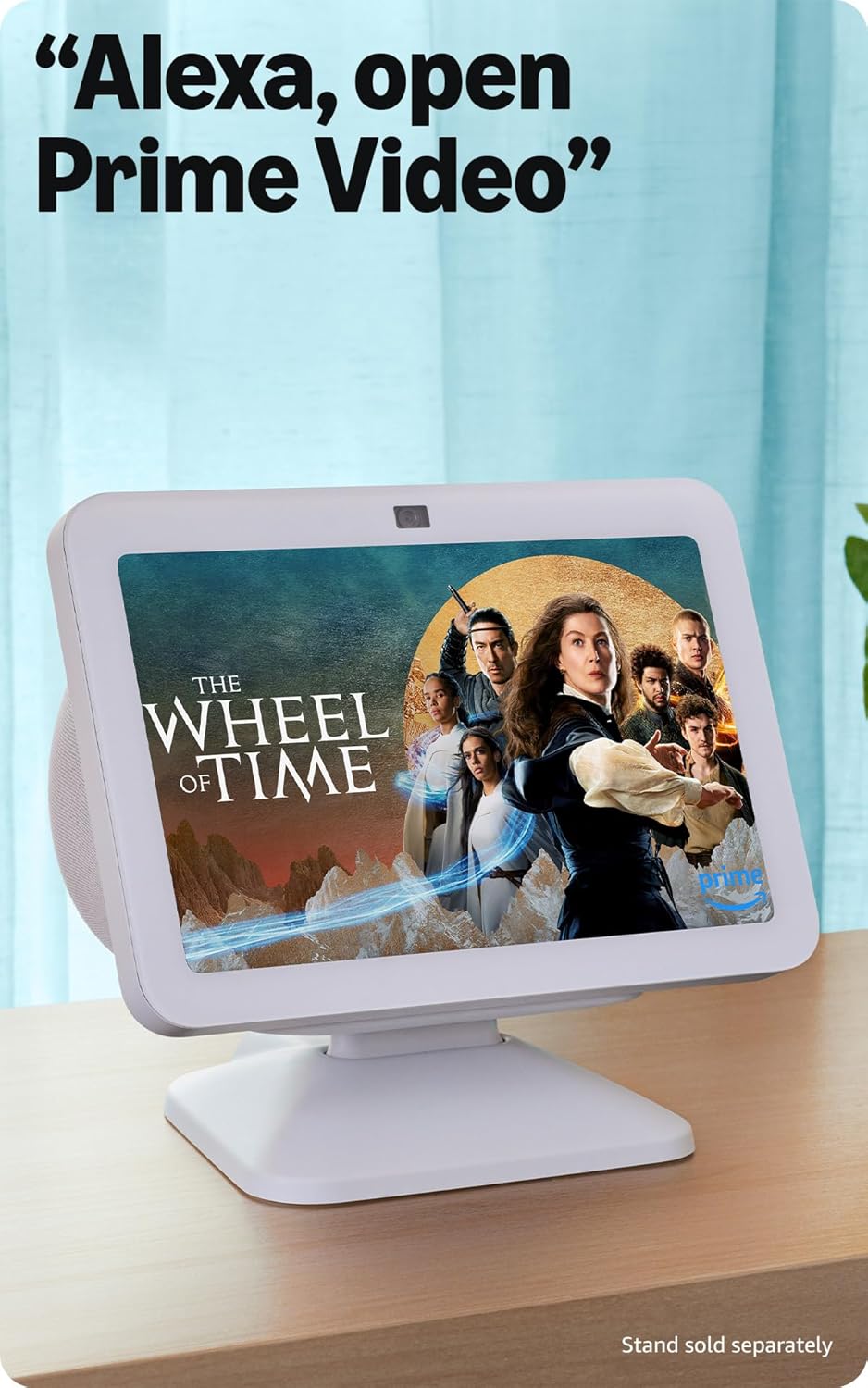
شڪل 3: The Echo Show 8 displaying a video from Prime Video, demonstrating its capability to stream content from various platforms.
سمارٽ گهر ڪنٽرول
The Echo Show 8 features a built-in smart home hub compatible with Zigbee, Matter, and Thread devices. You can pair and control smart cameras, lights, thermostats, and more using the display or your voice. Activate routines via motion detection.

شڪل 4: The Echo Show 8 showing a smart home control interface, allowing users to manage connected devices like thermostats and lights directly from the screen.
Video Calling and Communication
Make hands-free video calls using your voice. The 13 MP camera features auto-framing and noise reduction for clearer conversations. Use the Top Connections widget for quick calls.
فوٽو ڊسپلي
Turn your Echo Show 8 into a digital photo frame with Amazon Photos. Adaptive color technology ensures your photos look great in any lighting condition. You can also invite family and friends to share photos to your device.
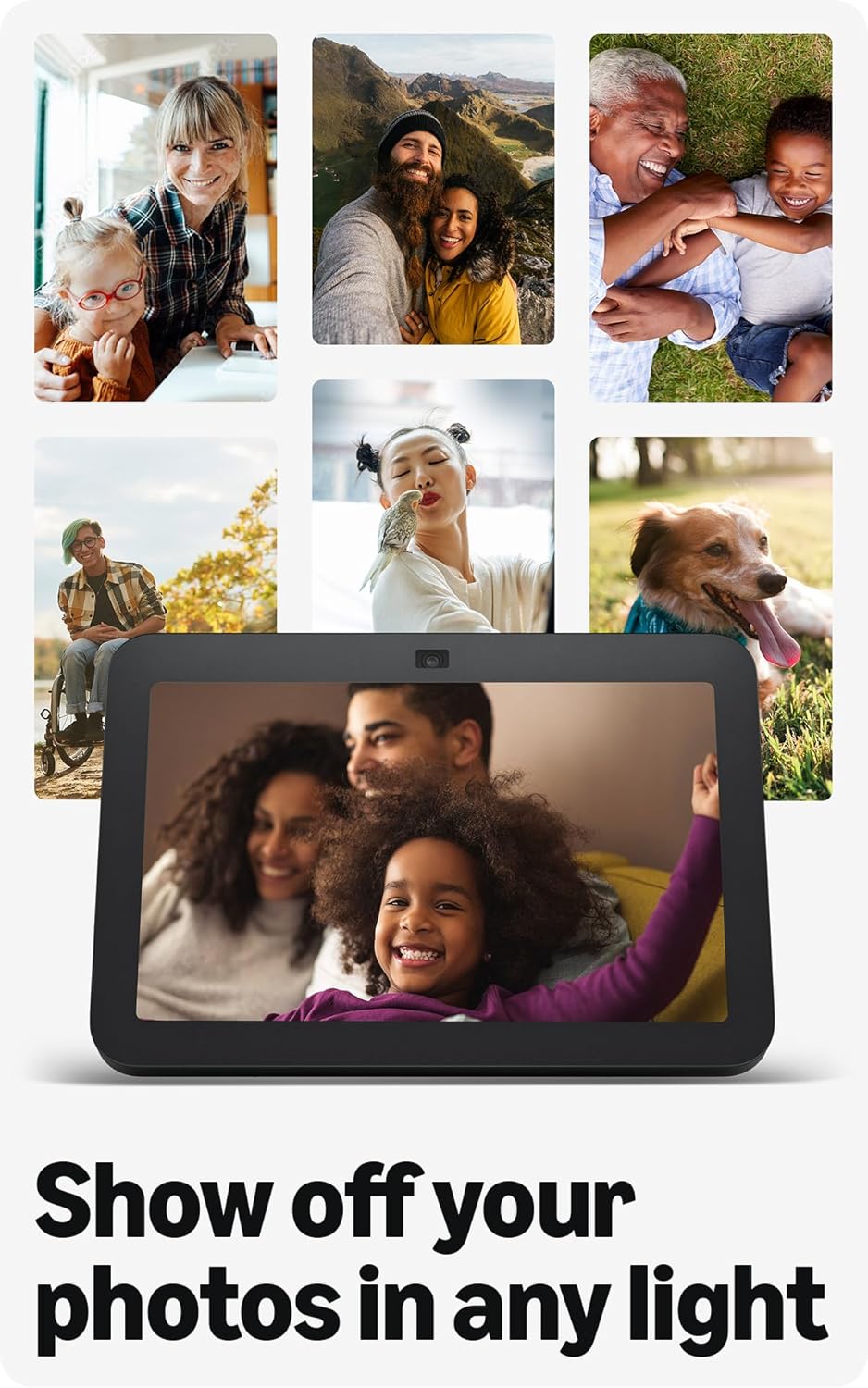
شڪل 5: The Echo Show 8 displaying a collection of personal photos, demonstrating its use as a digital photo frame with adaptive color technology.
موافقت وارو مواد
Adaptive Content allows you to view glanceable information like calendars or reminders from a distance, and more detailed content when you are closer to the device. Shortcut icons on the home screen provide quick access to frequently used widgets.
سار سنڀال
توهان جي ايڪو شو 8 جي بهترين ڪارڪردگي ۽ ڊگهي عمر کي يقيني بڻائڻ لاءِ:
- صفائي: اسڪرين ۽ ڊوائيس جي ٻاهرين حصي کي صاف ڪرڻ لاءِ نرم، لِنٽ فري ڪپڙو استعمال ڪريو. رگڙيندڙ ڪلينر يا اسپري کان پاسو ڪريو.
- لڳائڻ: ڊوائيس کي هڪ مستحڪم، هموار مٿاڇري تي رکو جيڪو سڌي سج جي روشني، گرمي جي ذريعن ۽ نمي کان پري هجي.
- سافٽ ويئر اپڊيٽ: Ensure your device receives regular software security updates. These are typically automatic when connected to Wi-Fi.
مشڪلاتون
If you encounter issues with your Echo Show 8, consider the following common solutions:
- طاقت ناهي: پڪ ڪريو ته پاور اڊاپٽر ڊوائيس ۽ ڪم ڪندڙ پاور آئوٽليٽ ٻنهي سان محفوظ طور تي ڳنڍيل آهي.
- وائي فائي رابطي جا مسئلا: Check your router and internet connection. Try restarting both your router and the Echo Show 8. Ensure the device is within range of your Wi-Fi network.
- اليڪسا جواب نه ڏئي رهي آهي: Verify that the microphone is not muted (check the microphone/camera off button). Speak clearly and ensure you are within hearing range of the device.
- اسڪرين غير جوابده: ڊوائيس کي ڪجهه سيڪنڊن لاءِ ان پلگ ان ڪري ٻيهر شروع ڪرڻ جي ڪوشش ڪريو ۽ ان کي واپس پلگ ان ڪريو.
- ڪئميرا مسئلا: Ensure the built-in camera shutter is open.

شڪل 6: هڪ بند اپ view of the Echo Show 8's top edge, illustrating the camera lens and the physical camera shutter for privacy control.
For more detailed troubleshooting or persistent issues, refer to the Amazon Alexa app help section or the official Amazon support webسائيٽ.
وضاحتون
| ماپ | 7.9 "x 5.5" x 4.2" (200mm x 139mm x 106mm) |
| وزن | 36.6 اوز (1034 گرام) |
| ڏيکاريو | 8.0 انچ HD ٽچ اسڪرين |
| ڪئميرا | 13 ايم پي سينٽرڊ ڪيمرا بلٽ ان شٽر سان |
| وائي فائي رابطو | Dual-band WiFi (802.11a/b/g/n/ac) |
| اسمارٽ گهر حب | زگبي + ميٽر + ٿريڊ بارڊر روٽر |
| بلوٽوت ڪنيڪشن | A2DP support for audio streaming, AVRCP for voice control of mobile devices |
| آڊيو | 2 x 2” مڪمل رينج نيوڊيميم ڊرائيور غير فعال بيس ريڊيٽر سان |
| پروسيسر | ايميزون AZ2 نيورل نيٽ ورڪ انجن سان گڏ آڪٽا-ڪور ايس او سي |
| ٻولي | اليڪسا انگريزي ۽ اسپيني ڳالهائي ٿي. |

شڪل 7: The Echo Show 8 with its physical dimensions clearly marked, illustrating its compact size.
رازداري خاصيتون
Amazon Echo Show 8 is designed with multiple layers of privacy controls:
- ويڪ ورڊ ٽيڪنالاجي: ڊوائيس صرف ويڪ لفظ ("Alexa") ڳولڻ کان پوءِ ٻڌڻ شروع ڪري ٿو.
- اسٽريمنگ اشارا: Visual indicators show when audio is being streamed to the cloud.
- مائڪروفون/ڪئميرا آف بٽڻ: هڪ جسماني بٽڻ توهان کي مائڪروفون ۽ ڪئميرا کي اليڪٽرانڪ طور تي ڊسڪنيڪٽ ڪرڻ جي اجازت ڏئي ٿو.
- بلٽ ان ڪئميرا شٽر: A physical shutter allows you to cover the camera lens.
- وائيس رڪارڊنگ جو انتظام: ڪرڻ جي صلاحيت view ۽ پنهنجيون آواز جون رڪارڊنگون ختم ڪريو.
For more information, visit the Alexa Privacy Hub.
رسائي جون خاصيتون
ايڪو شو 8 ۾ Alexa کي توهان جي صلاحيتن مطابق ذاتي بڻائڻ لاءِ مختلف رسائي جون خاصيتون شامل آهن. انهن تائين رسائي حاصل ڪري سگهجي ٿي سيٽنگون → رسائي توهان جي ڊوائيس تي.
- Alexa ڏانهن ٽيپ ڪريو: اسڪرين تي ٽائلس يا ڪي بورڊ استعمال ڪندي ٽچ ذريعي Alexa سان رابطو ڪريو.
- موافق ٻڌڻ: Alexa جي جواب ڏيڻ کان اڳ ڳالهائڻ ختم ڪرڻ لاءِ وڌيڪ وقت فراهم ڪري ٿو.
- ترجيحي ڳالهائڻ جي شرح: Alexa جي ڳالهائڻ جي رفتار کي ڪنٽرول ڪريو.
- اليڪسا ڪيپشننگ، ڪال ڪيپشننگ، بند ڪيپشننگ: Text captions for supported content and calls.
- ڏيکاريو ۽ ٻڌايو: Helps visually impaired users identify products by saying "Alexa, what am I holding."
- آوازView اسڪرين ريڊر: Provides audio feedback for visually impaired users.
- اسڪرين ميگنيفائر: زوم ان/آئوٽ ڪريو ۽ اسڪرين جي چوڌاري گھمايو.
- ويجهو هجڻ تي اطلاع ڏيو: جڏهن ڊوائيس جي ويجهو معلوم ٿئي ٿو ته اطلاع جا آواز وڄائي ٿو.
- ڪِنڊل زور سان پڙهو: اليڪسا ڪِنڊل ڪتاب بلند آواز سان پڙهي سگهي ٿي.
- اصل وقت جو متن: وڊيو ڪال دوران لائيو ٽيڪسٽ ٽائيپ ڪريو.
- Additional settings include Color Inversion, Color Correction, and Request Sound.
وارنٽي ۽ سپورٽ
وارنٽي ڄاڻ
The Echo Show 8 (3rd Gen) includes a 1-year limited warranty and service. An optional 1-year extended warranty is available for U.S. customers and sold separately. This device, being a Certified Refurbished Amazon device, comes with the same limited warranty as a new device.
ڪسٽمر سپورٽ
وڌيڪ مدد، ٽيڪنيڪل سپورٽ، يا وارنٽي دعوائن لاءِ، مھرباني ڪري سرڪاري Amazon سپورٽ جو دورو ڪريو. website or contact Amazon customer service. You can also find helpful resources within the Alexa app.


