1. تعارف
This manual provides detailed instructions for the setup, operation, and maintenance of your Wings Phantom 850 Low Latency Wireless Earbuds. Please read this manual thoroughly before using the product to ensure optimal performance and longevity.

Image: The Wings Phantom 850 Wireless Earbuds shown inside their open charging case, highlighting their design and readiness for use.
2. پيڪيج مواد
پڪ ڪريو ته سڀئي شيون توهان جي پراڊڪٽ پيڪنگنگ ۾ موجود آهن:
- Wings Phantom 850 Earbuds
- وائرليس چارجنگ ڪيس
- USB چارجنگ ڪيبل
- ڪنن جا کشن (مختلف سائز)
- استعمال ڪندڙ جو دستياب (ھي دستاويز)
3. سيٽ اپ
3.1. ائربڊس ۽ ڪيس کي چارج ڪرڻ
پهرين استعمال کان اڳ، ائربڊس ۽ چارجنگ ڪيس کي مڪمل طور تي چارج ڪريو.
- ائربڊس کي چارجنگ ڪيس ۾ رکو. پڪ ڪريو ته اهي صحيح طرح سان ويٺا آهن.
- USB چارجنگ ڪيبل کي ڪيس تي چارجنگ پورٽ ۽ پاور سورس سان ڳنڍيو (مثال طور، USB وال اڊاپٽر، ڪمپيوٽر USB پورٽ).
- The LED indicators on the case will show the charging status. A full charge typically takes approximately 1-2 hours.

Image: The Wings Phantom 850 Earbuds in their charging case, illustrating the charging process with illuminated LED lights.
3.2. بلوٽوٽ جوئر
پنھنجن ائربڊس کي ڪنھن ڊوائيس سان ڳنڍڻ لاءِ:
- پڪ ڪريو ته ائربڊس چارج ٿيل آهن ۽ چارجنگ ڪيس جي اندر آهن.
- چارجنگ ڪيس کوليو. ائربڊس پاڻمرادو پيئرنگ موڊ ۾ داخل ٿيندا (ائربڊس تي ايل اي ڊي لائيٽون چمڪائڻ سان ظاهر ٿئي ٿو).
- پنهنجي ڊوائيس (اسمارٽ فون، ٽيبليٽ، ليپ ٽاپ) تي، بلوٽوٿ کي فعال ڪريو ۽ موجود ڊوائيسز جي ڳولا ڪريو.
- Select "Wings Phantom 850" from the list of devices.
- هڪ ڀيرو ڳنڍجڻ کان پوءِ، ائربڊ ايل اي ڊي چمڪائڻ بند ٿي ويندا، ۽ توهان کي تصديق جو آواز ٻڌڻ ۾ ايندو.
ائربڊس جي خاصيت Open and On Tech™ for quick connection upon opening the case.
3.3. Wings Sync App Installation
Enhance your experience by installing the Wings Sync App. The app allows for custom controls, EQ modes, and locating misplaced earbuds.
- Download the "Wings Sync" app from your device's app store (App Store for iOS, Google Play Store for Android).
- Open the app and follow the on-screen instructions to connect your Phantom 850 earbuds.

Image: A visual representation of the Wings Sync App dashboard, showing options for touch controls, game mode, EQ modes, and locating earbuds.
Video: A demonstration of the Wings Sync App features, including custom touch controls, EQ modes, and the earbud locator function. This video illustrates how to personalize your earbud settings and find them if misplaced.
4. آپريٽنگ هدايتون
4.1. ٽچ ڪنٽرول
The Wings Phantom 850 earbuds feature intuitive touch controls. These can be customized via the Wings Sync App.
| عمل | فنڪشن (ڊفالٽ) |
|---|---|
| سنگل ٽيپ (L/R) | Volume Up/Down (Customizable) |
| ڊبل ٽيپ (L/R) | Play/Pause (Customizable) |
| ٽرپل ٽيپ (ايل) | Previous Track (Customizable) |
| ٽرپل ٽيپ (ر) | Next Track (Customizable) |
| ڊگھو پريس (L) | Voice Assistant (Customizable) |
| ڊگھو پريس (ر) | Game Mode ON/OFF (Customizable) |
| ايندڙ ڪال (سنگل ٽيپ) | ڪال جواب ڏيو |
| Incoming Call (Long Press) | ڪال رد ڪريو |
Note: Default functions may vary. Refer to the Wings Sync App for current settings and customization options.
4.2. گيمنگ موڊ
Activate Gaming Mode for ultra-low latency audio (40ms) during gameplay. This mode is designed to synchronize audio with on-screen action, providing a competitive edge.
- چالو ڪرڻ: Long press the right earbud (default setting) or activate via the Wings Sync App.
- غير فعال ٿيڻ: چالو ڪرڻ واري مرحلي کي ورجايو.

تصوير: هڪ اوورview of key features including the dedicated Gaming Mode with 40ms ultra-low latency, Bluetooth 5.3, IPX5 water resistance, and ENC Quad Mic technology.
4.3. ماحولياتي شور جي منسوخي (ENC)
The Quad ENC Mics reduce environmental noise during calls, ensuring clear communication.
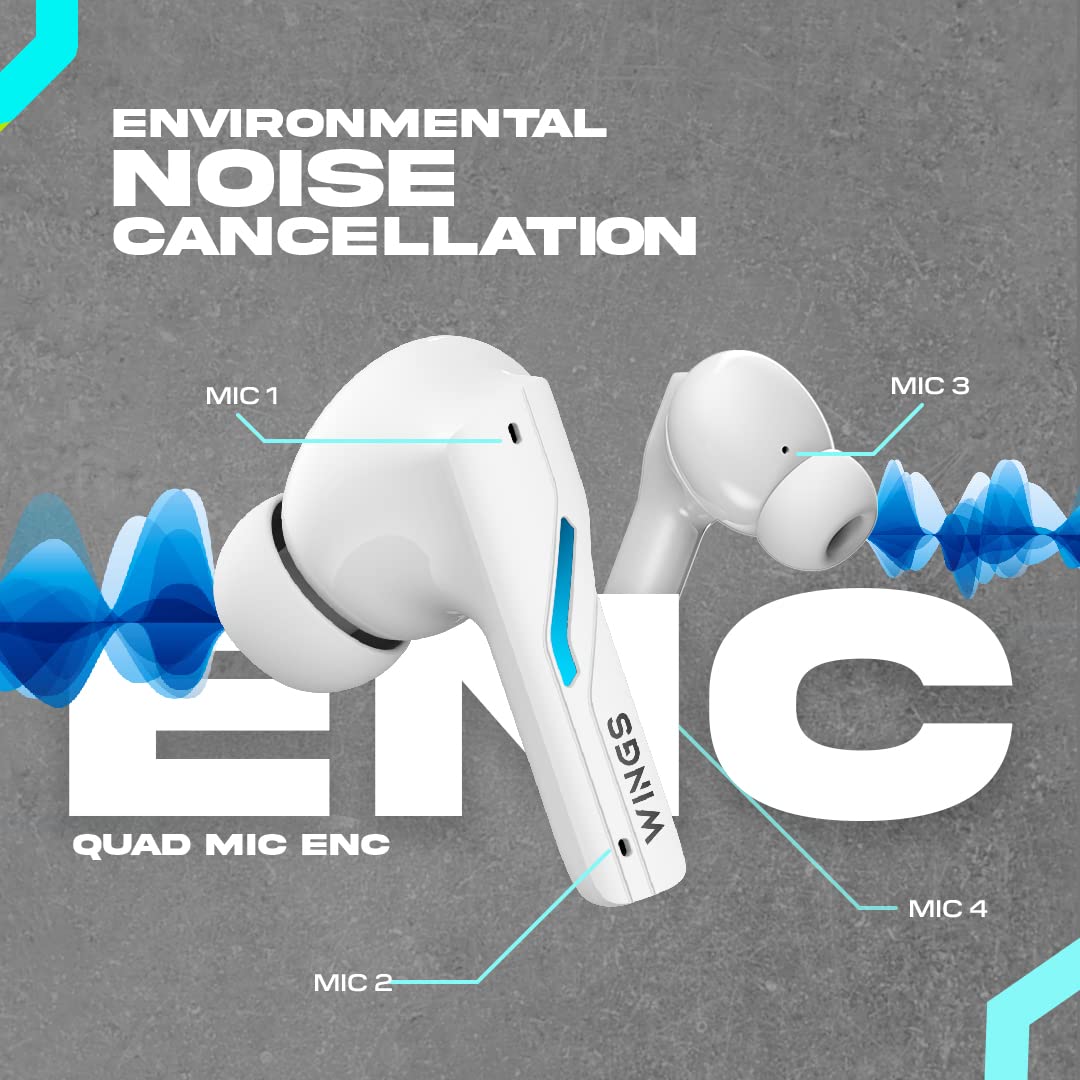
Image: A diagram illustrating the four Environmental Noise Cancellation (ENC) microphones on the Wings Phantom 850 earbuds, designed for clear call quality.
5. سار سنڀال
5.1. صفائي
باقاعده صفائي آواز جي معيار ۽ صفائي کي برقرار رکڻ ۾ مدد ڪري ٿي:
- نرم، سڪل، لِنٽ فري ڪپڙي سان ائربڊس ۽ چارجنگ ڪيس کي نرميءَ سان صاف ڪريو.
- ڪنن جا ڪنارا ڪڍو ۽ انهن کي هلڪي صابڻ ۽ پاڻي سان صاف ڪريو، پوءِ ٻيهر ڳنڍڻ کان اڳ چڱي طرح سڪيو.
- Use a dry cotton swab to clean the charging contacts on both the earbuds and the case.
5.2. پاڻي جي مزاحمت
The Wings Phantom 850 earbuds are rated IPX5 water resistant, meaning they can withstand splashes and sweat. They are not designed for submersion in water.
- Do not expose the earbuds to running water or wear them while swimming or showering.
- نقصان کان بچڻ لاءِ چارجنگ ڪيس ۾ واپس رکڻ کان اڳ پڪ ڪريو ته ائربڊس سڪي ويا آهن.
6. مسئلا حل ڪرڻ
If you encounter issues with your Wings Phantom 850 earbuds, refer to the following common solutions:
- ڪو به آواز/ڪنيڪٽيويٽي مسئلا نه آهن:
- پڪ ڪريو ته ٻئي earbuds چارج ٿيل آهن.
- پڪ ڪريو ته توهان جي ڊوائيس تي بلوٽوٿ فعال آهي ۽ ائربڊس چونڊيل آهن.
- پنهنجي ڊوائيس سان ائربڊس کي ختم ڪرڻ ۽ ٻيهر جوڙڻ جي ڪوشش ڪريو.
- پنهنجي ڊوائيس کي ٻيهر شروع ڪريو.
- هڪ ائربڊ ڪم نه ڪري رهيو آهي:
- Place both earbuds back in the charging case, close the lid, wait a few seconds, then open and try again.
- ائربڊ ۽ ڪيس ۾ چارجنگ ڪانٽيڪٽس کي صاف ڪريو.
- چارج ڪرڻ جا مسئلا:
- پڪ ڪريو ته چارجنگ ڪيبل محفوظ طور تي ڳنڍيل آهي.
- ڪو ٻيو USB پورٽ يا چارجنگ اڊاپٽر آزمايو.
- چارجنگ رابطن کي صاف ڪريو.
- گھٽ آواز / خراب آواز جي معيار:
- پنهنجي ڊوائيس ۽ ائربڊس ٻنهي تي واليوم کي ترتيب ڏيو.
- پڪ ڪريو ته ڪن جا ٽوٽا توهان جي ڪن جي واهه ۾ صحيح طرح سان بند ٿيل آهن. مختلف سائزن جي ڪن جا ٽوٽا آزمايو.
- ائربڊ اسپيڪر ميش مان ڪنهن به ملبي کي صاف ڪريو.
- Check EQ settings in the Wings Sync App.
وڌيڪ مدد لاءِ، مھرباني ڪري ڪسٽمر سپورٽ سان رابطو ڪريو.
7. وضاحتون
| خاصيت | تفصيل |
|---|---|
| ماڊل نالو | پريت 850 |
| رابطي ٽيڪنالاجي | وائرليس (بلوٽوٿ 5.3) |
| بلوٽوٿ رينج | 15 ميٽر |
| آڊيو ڊرائيور جو قسم | Dynamic Driver (13mm Composite Drivers) |
| بيٽري جي زندگي (ايربڊس) | 10 ڪلاڪ تائين |
| ڪُل راند جو وقت (ڪيس سان) | 50 ڪلاڪ تائين |
| چارج ٽيڪنالاجي | Bullet Charge™ (15 mins charge = 100 mins playtime) |
| خاص خصوصيت | ENC Quad Mic, Dedicated Gaming Mode (40ms Low Latency), App Support, Open and On Tech™ |
| پاڻي جي مزاحمت جي سطح | IPX5 (پگهر ۽ پاڻي جي مزاحمتي) |
| ڪنٽرول جو طريقو | ٽچ ، آواز |
| مطابقت رکندڙ ڊوائيسز | سيل فون، ڊيسڪ ٽاپ، گيمنگ ڪنسول، ليپ ٽاپ، ٽيبليٽ |
| شيءِ جو وزن | 150 گرام |
| پيداوار جي ماپ | 10 x 10 x 4 سينٽي |

تصوير: هڪ ڌماڪو ٿيو view diagram illustrating the 13mm composite drivers responsible for high-fidelity audio output in the earbuds.

Image: Information detailing the battery life, showing 50 hours of total playtime with the charging case and 10 hours of playtime on the earbuds alone.
8. وارنٽي ۽ سپورٽ
Your Wings Phantom 850 Wireless Earbuds come with a 1-سال وارنٽي خريداري جي تاريخ کان.
For warranty claims, technical support, or any other inquiries, please refer to the contact information provided on the official Wings webسائيٽ يا توهان جي خريداري دستاويز.


