پيداوار ختمview
The Unitech HT330 is a high-performance 4-inch rugged handheld terminal designed for demanding environments such as retail and warehousing. It features Android 12 with GMS certification, a powerful 2D scan engine, and robust connectivity options. Its durable design ensures reliable operation for extended periods.
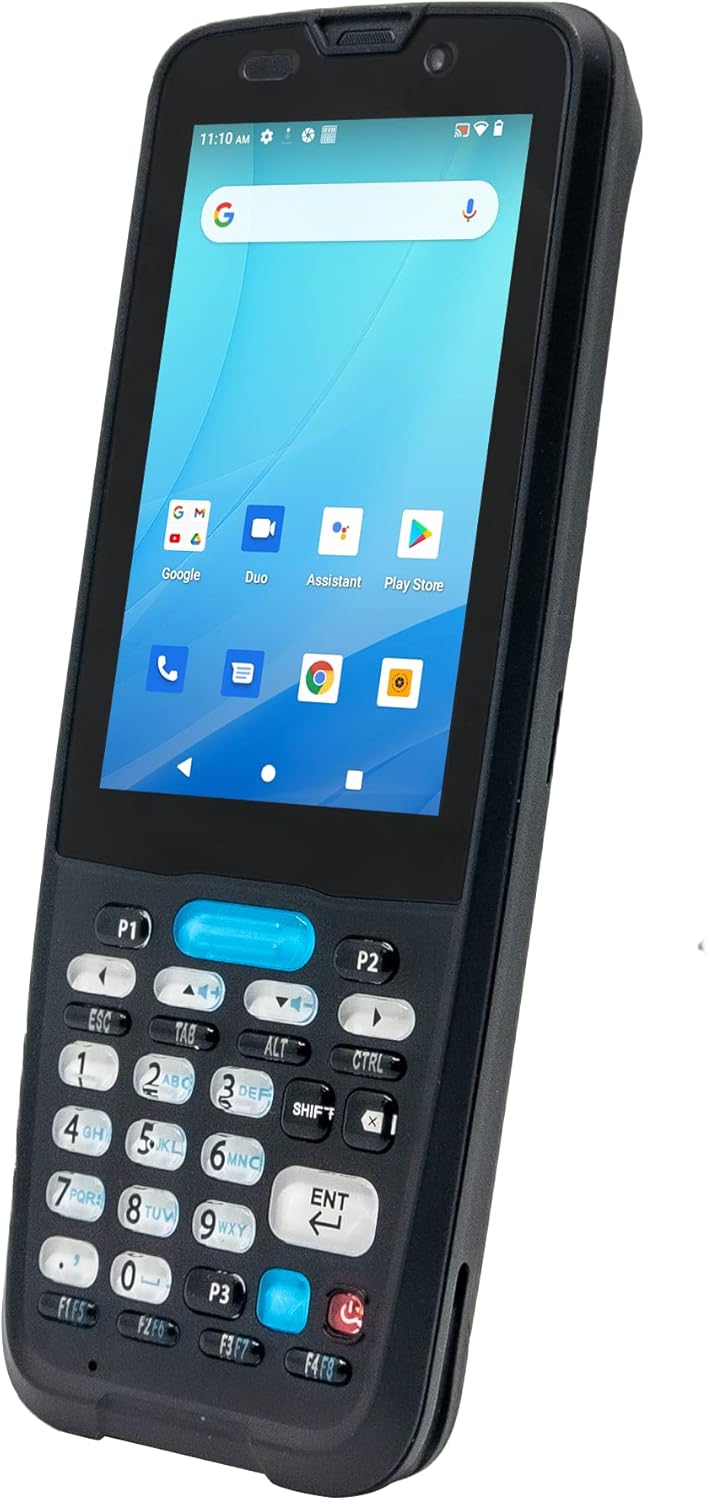
سامهون view of the Unitech HT330 Rugged Handheld Terminal, showcasing its 4-inch display and physical keypad.
اهم خاصيتون:
- Android 12 OS with GMS certified for access to Google services.
- Durable 32-key physical keypad with backlight, rated for 2.5 million lifetime clicks.
- Long-lasting 5200mAh removable battery providing up to 20 hours of operation.
- Integrated 2D scan engine for reliable barcode scanning.
- IP67 protection against water and dust, and 1.5m drop-resistant housing (1.8m with bumper).
- Support for Optical Character Recognition (OCR) technology.
- Rich wireless connectivity including Bluetooth 5.0 and 2.4G+5GHz Wi-Fi.
دٻي ۾ ڇا آهي
Upon unboxing your Unitech HT330, please verify that all the following components are included:
- Unitech HT330 Handheld Terminal (with Camera, GPS, HF RFID, 2D scan engine)
- Battery Pack (5200mAh Lithium-ion)
- هٿ جي پٽي
- USB ڪيبل
سيٽ اپ گائيڊ
1. بيٽري لڳائڻ ۽ چارج ڪرڻ
The HT330 comes with a removable 5200mAh Lithium-ion battery. Ensure the device is powered off before installing or removing the battery.
- ڊوائيس جي پٺي تي بيٽري جي خاني کي ڳولھيو.
- بيٽري جو ڍڪ کوليو.
- رابطن کي صحيح طرح سان ترتيب ڏيندي، بيٽري داخل ڪريو.
- بيٽري جي ڍڪ کي محفوظ طور تي بند ڪريو.
- Connect the provided USB cable to the HT330's USB port and the other end to a power adapter or computer.
- Allow the device to charge fully before first use. The charging indicator will show the battery status.

ريڙهه view of the Unitech HT330, showing the battery compartment and camera.
2. Attaching the Hand Strap
The included hand strap provides a secure grip and reduces the risk of accidental drops.
- Thread the hand strap through the designated attachment points on the device.
- Adjust the strap for a comfortable and secure fit.
3. شروعاتي پاور آن ۽ اينڊرائيڊ سيٽ اپ
Press and hold the Power button until the Unitech logo appears. Follow the on-screen prompts to complete the initial Android 12 setup, including Wi-Fi connection and Google account sign-in (GMS certified).
آپريٽنگ هدايتون
1. Navigating the Device
The HT330 combines a 4-inch touchscreen with a 32-key physical keypad for versatile input.
- ٽچ اسڪرين: Use touch gestures (tap, swipe, pinch) to navigate the Android interface. The display is sunlight readable (450 nits).
- جسماني ڪي پيڊ: Utilize the numeric and function keys for data entry and quick actions. The keypad is designed for durability with 2.5 million lifetime clicks.

بند ڪرڻ view of the Unitech HT330's physical keypad.
2. Barcode Scanning
The integrated 2D scan engine provides reliable performance for 1D and 2D barcodes.
- پنهنجي ڊوائيس تي اسڪيننگ ايپليڪيشن کوليو.
- Point the scanner at the barcode, ensuring the red aiming line covers the entire code.
- Press the scan button (typically located on the side or a dedicated key on the keypad) to activate the scanner.
- A successful scan will usually be indicated by an audible beep and/or a visual confirmation on the screen.
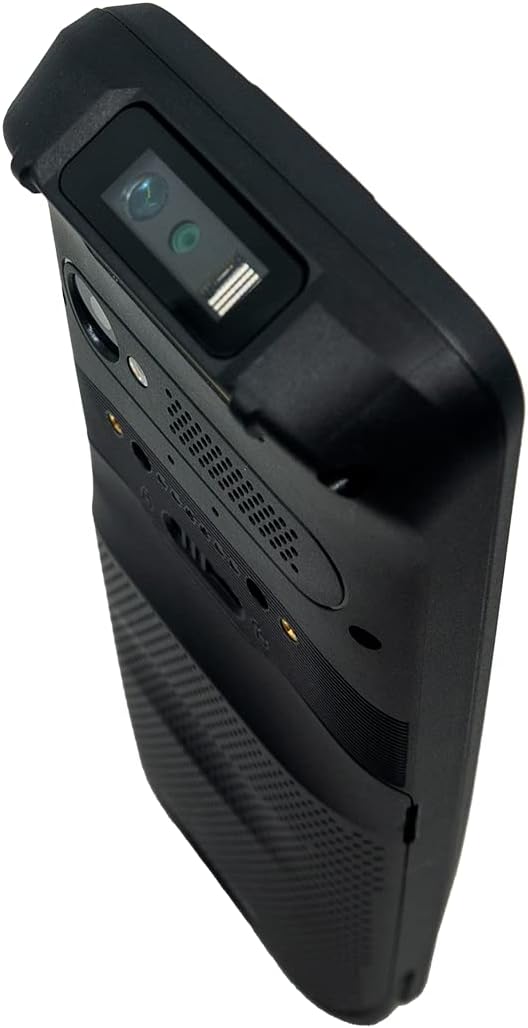
مٿو view of the Unitech HT330, highlighting the integrated 2D scan engine.
3. Optical Character Recognition (OCR)
The HT330 supports OCR technology through Unitech USS software, allowing for digital conversion of numbers or characters from various surfaces.
- Launch the Unitech USS application.
- Select the OCR function.
- Position the device's camera over the text you wish to recognize.
- Capture the image, and the software will convert the characters into digital format.
4. وائرليس ڪنيڪشن
- وائي فائي: Connect to 2.4G and 5GHz Wi-Fi networks via Android settings for high-speed data transfer.
- بلوٽوٿ: Pair with Bluetooth 5.0 compatible devices (e.g., printers, headsets) through Android's Bluetooth settings.
- جي پي ايس: The integrated GPS function allows for precise location tracking, useful for logistics and field services.
سار سنڀال
1. ڊوائيس صاف ڪرڻ
Thanks to its IP67 rating, the HT330 is protected against dust and temporary immersion in water. To clean the device:
- صاف ڪرڻ کان اڳ ڊوائيس بند ڪريو.
- نرم استعمال ڪريو، ڊيamp cloth with mild soap or a screen cleaner for the display.
- Avoid abrasive cleaners, solvents, or spraying liquids directly onto the device.
- پڪ ڪريو ته سڀئي پورٽ ڪَوَر محفوظ طور تي بند ٿيل آهن ته جيئن پاڻي ۽ مٽيءَ جي مزاحمت برقرار رهي.
2. بيٽري جي سنڀال
- بيٽري جي عمر وڌائڻ لاءِ، انتهائي گرمي پد کان پاسو ڪريو.
- بيٽري کي باقاعدي چارج ڪريو ۽ ان کي مڪمل طور تي بار بار چارج ٿيڻ کان پاسو ڪريو.
- If storing the device for an extended period, charge the battery to about 50% and remove it from the device.
3. جنرل ڊيوائس ڪيئر
While rugged, proper handling extends the device's life.
- Avoid dropping the device, even though it is rated for 1.5m drops (1.8m with optional bumper).
- Do not attempt to disassemble the device or perform repairs yourself. Refer to authorized service personnel.
- ڊوائيس کي مضبوط مقناطيسي شعبن کان پري رکو.
مشڪلاتون
This section provides solutions to common issues you might encounter with your Unitech HT330. For more complex problems, please contact Unitech support.
| مسئلو | ممڪن سبب | حل |
|---|---|---|
| ڊوائيس تي طاقت نه آهي. | Low or depleted battery; Battery not properly installed. | Charge the battery fully. Ensure the battery is correctly inserted and the cover is secured. |
| Cannot scan barcodes. | Scanner not activated; Barcode damaged or poorly lit; Incorrect scanning angle. | Ensure the scanning application is open and the scan button is pressed. Check barcode condition and lighting. Adjust scanning angle. |
| وائي فائي يا بلوٽوٿ ڪنيڪشن جا مسئلا. | Out of range; Incorrect network settings; Device interference. | Move closer to the Wi-Fi access point or Bluetooth device. Verify network passwords. Restart the device. |
| ڊوائيس سست يا غير جوابده آهي. | تمام گهڻيون ايپليڪيشنون هلي رهيون آهن؛ گهٽ ياداشت. | Close unnecessary applications. Restart the device. Clear cache if necessary. |
وضاحتون
| خاصيت | تفصيل |
|---|---|
| پيداوار جي ماپ | 7.6 x 2.7 x 0.9 انچ |
| شيءِ جو وزن | 10 اونس |
| شيون ماڊل نمبر | HT330-QA62UM3G |
| بيٽريون | 1 ليتيم آئن بيٽري گھربل (شامل) |
| آپريٽنگ سسٽم | Android 12 with GMS certified |
| ڏيکاريو | 4-inch touchscreen, Sunlight Readable 450 nits |
| ڪي پيڊ | 32 keys with backlight, 2.5 million lifetime clicks |
| ياداشت | 3GB RAM / 32GB Flash memory storage |
| بيٽري جي گنجائش | 5200mAh Lithium-ion (removable) |
| مزاحمت جي مزاحمت | 1.5m (1.8m with bumper) |
| IP جي درجه بندي | IP67 |
| رابطي ٽيڪنالاجي | Bluetooth 5.0, 2.4G+5GHz Wi-Fi, GPS, USB Cable |
| ٺاهيندڙ | Unitech |
وارنٽي ۽ سپورٽ
The Unitech HT330 is manufactured by Unitech. For specific warranty information, including terms and conditions, please refer to the warranty card included with your product or visit the official Unitech webسائيٽ. وارنٽي دعوائن لاءِ خريداري جو ثبوت رکو.
For technical support, service, or inquiries regarding your Unitech HT330, please contact Unitech customer service directly. You can find contact information on their official webسائيٽ يا پيداوار جي پيڪنگنگ ۾.
ٺاهيندڙ: Unitech
ماڊل: HT330-QA62UM3G


