تعارف
This manual provides comprehensive instructions for the Keychron K1 Pro TKL Ultra-Slim QMK/VIA Custom Mechanical Keyboard. It covers setup, operation, maintenance, and troubleshooting to ensure optimal use of your device. The K1 Pro features a tenkeyless (TKL) layout, ultra-slim design, QMK/VIA programmability, Bluetooth wireless and USB wired connectivity, hot-swappable low-profile Gateron mechanical switches, and RGB backlighting with durable PBT keycaps.
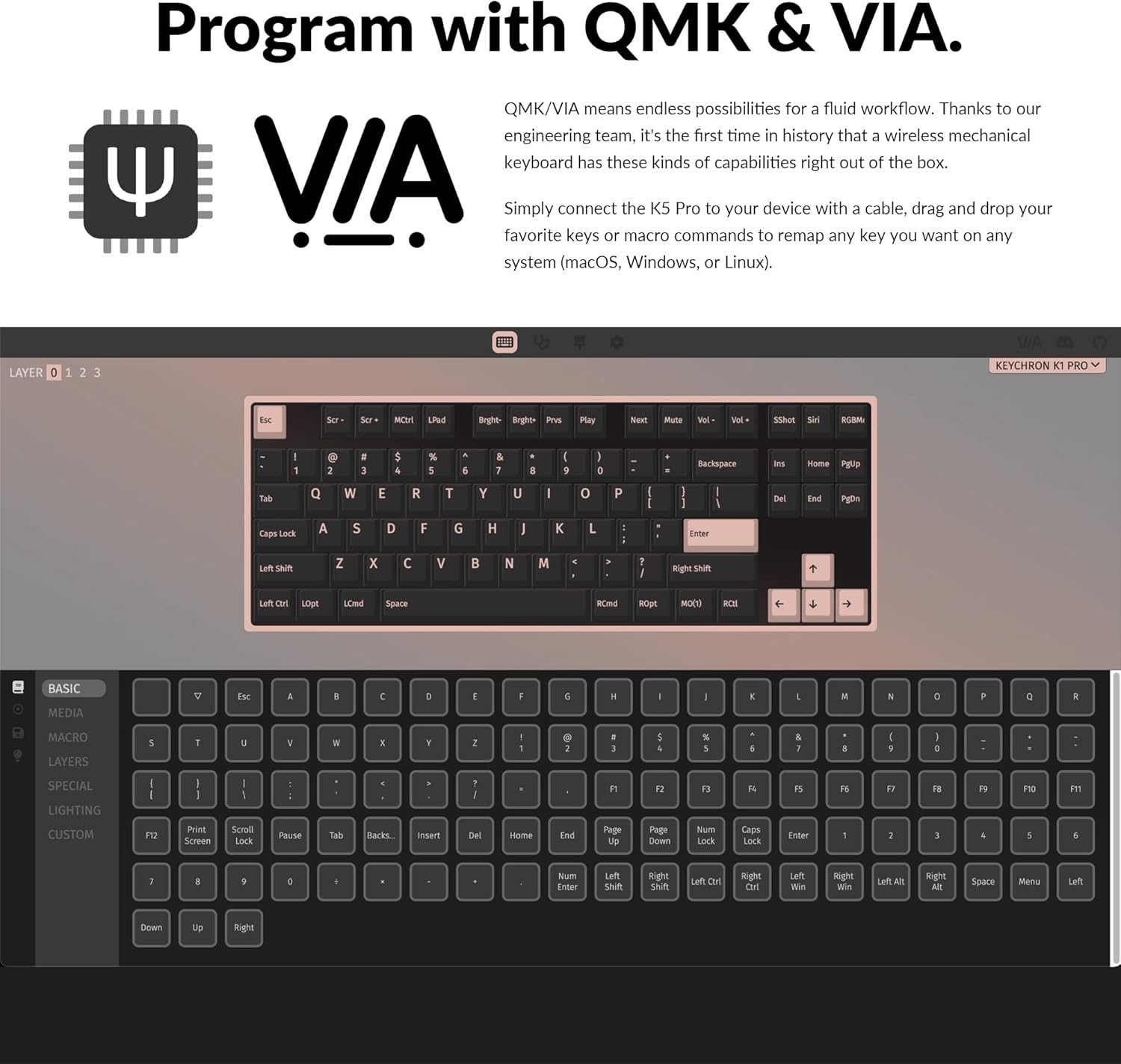
Image: The Keychron K1 Pro TKL mechanical keyboard, showcasing its compact tenkeyless layout and sleek design.
سيٽ اپ ڪريو
شامل اجزاء
The Keychron K1 Pro package includes:
- 1x Fully Assembled Keyboard (including case, PCB, keycaps, and Gateron low-profile switches)
- 1x ٽائپ-اي کان ٽائپ-سي ڪيبل
- 1x سوئچ پلر
- 1x ڪي ڪيپ پلر

تصوير: پاسي view of the Keychron K1 Pro, highlighting the physical switches for connectivity and operating system selection.
شروعاتي ڪنيڪشن
To begin, connect the keyboard to your computer using the provided USB Type-C cable. This will power the keyboard and allow for wired operation.
آپريٽنگ سسٽم سوئچ
Locate the operating system switch on the side of the keyboard. Slide it to the appropriate position for your system (Mac/iOS or Windows/Android) to ensure correct key mapping and functionality.
بلوٽوٽ جوئر
The K1 Pro supports Bluetooth 5.1, allowing connection to up to 3 devices wirelessly. To pair:
- Ensure the keyboard is in Bluetooth mode using the side switch.
- کي دٻايو ۽ رکو Fn + 1 (يا 2, 3) key combination for 4 seconds until the key starts flashing, indicating it is ready for pairing.
- On your device (laptop, phone, tablet), search for Bluetooth devices and select "Keychron K1 Pro" to connect.
- Repeat for additional devices using Fn + 2 or Fn + 3.
- Switch between paired devices by pressing Fn + 1, 2، يا 3.
آپريٽنگ هدايتون
ڪنيڪشن موڊس
The K1 Pro offers both wireless and wired connectivity:
- بلوٽوٽ وائرلیس: Connects to up to 3 devices via Broadcom Bluetooth 5.1 for seamless multitasking.
- USB Type-C Wired: Provides a stable connection with a 1000 Hz polling rate, suitable for competitive gaming.
QMK & VIA Customization
The K1 Pro is fully programmable with QMK and VIA software, allowing you to remap keys, create macros, and customize layers. Connect the keyboard via USB-C, then use the VIA software (available for macOS, Windows, or Linux) to drag and drop commands to your desired keys.

Image: Screenshot of the QMK and VIA software interface, demonstrating how to customize key assignments and macros for the Keychron K1 Pro.
گرم مٽائي سگھڻ وارا سوئچ
The K1 Pro features hot-swappable sockets, allowing you to change low-profile Gateron mechanical switches without soldering. This enables customization of your typing experience. Use the included switch puller to carefully remove and insert switches. Note: The K1 Pro is compatible only with Gateron low-profile مشيني سوئچ.

تصوير: هڪ ويجهو تصوير view of the hot-swappable low-profile Gateron mechanical switches on the Keychron K1 Pro, showing how they can be easily removed and replaced.
آر بي جي بائيٽ لائٽنگ
The keyboard includes over 22 types of RGB backlight settings, along with a static white backlight option. You can fine-tune the RGB hue, saturation, brightness, and effect speed using onboard key combinations or the VIA software.

Image: The Keychron K1 Pro keyboard illuminated with vibrant RGB backlighting, showcasing various color effects.
گھٽ پروfile Double-shot PBT Keycaps
The K1 Pro is equipped with durable low-profile double-shot PBT keycaps. These keycaps offer excellent oil resistance for long-term use and a comfortable typing experience.

Image: The Keychron K1 Pro keyboard on a desk, highlighting the texture and profile of its low-profile double-shot PBT keycaps.
ايرگونومڪ خاصيتون
The K1 Pro is designed for comfort with three levels of adjustable typing angle, providing ergonomic wrist support. It also features redesigned stabilizers for large keys (space bar, left Shift, backspace, Enter) to ensure reliability and minimize wobble.

Image: A split image showing the redesigned stabilizers on large keys and the adjustable typing angles of the Keychron K1 Pro for ergonomic support.

Image: An illustration comparing the ultra-slim profile of the Keychron K1 Pro (17mm) with a conventional mechanical switch and a Gateron Low-Profile 2.0 Mechanical Switch, alongside a quarter for scale.
سار سنڀال
صفائي
پنهنجي ڪيبورڊ جي ڪارڪردگي ۽ ظاهر کي برقرار رکڻ لاءِ:
- Disconnect the keyboard from power before cleaning.
- نرم، لِنٽ کان خالي ڪپڙو استعمال ڪريو ٿورڙو ڊيampڪي ڪيپس ۽ چيسس کي صاف ڪرڻ لاءِ پاڻي يا هلڪي صفائي واري محلول سان صاف ڪريو.
- چاٻين جي وچ ۾ مٽي ۽ ملبي لاءِ، دٻيل هوا يا ننڍو برش استعمال ڪريو.
- Avoid harsh chemicals or abrasive materials that could damage the finish or keycap legends.
مشڪلاتون
رابطي جا مسئلا
- بلوٽوٿ ڪنيڪشن: Ensure the keyboard is charged. Re-pair the device if connection is lost. Some operating systems may require manual reconnection after waking from sleep.
- Wired Connection Not Detected: Check the USB-C cable connection at both ends. Try a different USB port or cable.
Key Input Problems
- چاٻيون جواب نه ڏئي رهيون آهن: Ensure the correct operating system mode is selected. If using hot-swappable switches, ensure switches are fully seated.
- غلط ڪي آئوٽ پُٽ: Verify the keyboard layout in your operating system settings. If using VIA, check your custom keymaps for unintended reassignments.
بيڪ لائيٽ جا مسئلا
- بيڪ لائيٽ ڪم نه ڪري رهي آهي: Ensure the backlight is enabled and brightness is adjusted. Check keyboard battery level if in wireless mode.
- Dim LEDs: The brightness of the LEDs can vary. Ensure maximum brightness is set.
Physical Switches (Bluetooth/Cable, Win/Mac)
- Difficulty Reading Labels: The labels on the small physical switches for connectivity and OS selection can be very small. Use adequate lighting or a magnifier if needed to ensure correct selection.
وضاحتون
| برانڊ | ڪيڪرون |
| ماڊل نمبر | K1PH3 |
| ڪي بورڊ جي وضاحت | مشيني |
| رابطي ٽيڪنالاجي | USB-C, Bluetooth 5.1 |
| مطابقت رکندڙ ڊوائيسز | macOS، ونڊوز، لينڪس |
| خاص خصوصيت | Backlit (RGB), Hot-swappable, QMK/VIA Programmable, Ultra-Slim |
| ڪي بورڊ Backlighting رنگ جي حمايت | آر جي بي |
| پيداوار جي ماپ | 13.62 x 4.67 x 0.95 انچ (34.59 x 11.86 x 2.41 سينٽي) |
| شيءِ جو وزن | 1.98 پائونڊ (0.9 ڪلوگرام) |
| بيٽريون | 1 ليتيم پوليمر بيٽري (شامل) |
| تاريخ پهرين دستياب | ڊسمبر 14، 2022 |
وارنٽي ۽ سپورٽ
For warranty information, technical support, or further assistance, please refer to the official Keychron webسائيٽ تي وڃو يا سڌو سنئون انهن جي ڪسٽمر سروس سان رابطو ڪريو. وارنٽي دعوائن لاءِ پنهنجي خريداري جي رسيد رکو.


