1. تعارف
This manual provides essential information for the safe and efficient operation of your KLIM K9000 Portable Air Conditioner. Please read it thoroughly before use and retain it for future reference. The KLIM K9000 is a versatile 3-in-1 unit offering cooling, dehumidification, and fan functions.
2. حفاظتي هدايتون
To reduce the risk of fire, electrical shock, or injury, always follow these basic precautions:
- اوزار استعمال ڪرڻ کان پهريان سڀ هدايتون پڙهو.
- پڪ ڪريو ته بجلي جي فراهمي جي مقدار سان ملي ٿيtage جي درجه بندي ليبل تي بيان ڪيو ويو آهي.
- يونٽ کي خراب ٿيل ڪنڊ يا پلگ سان هلائڻ نه ڏيو.
- ڊوائيس کي گرمي جي ذريعن ۽ سڌي سج جي روشني کان پري رکو.
- ايئر انليٽ يا آئوٽليٽ کي بلاڪ نه ڪريو.
- هميشه صاف ڪرڻ يا خدمت ڪرڻ کان اڳ يونٽ کي انپلگ ڪريو.
- هي اوزار استعمال ڪرڻ جو ارادو نه ڪيو ويو آهي ماڻهن (بشمول ٻارن سميت) گھٽ جسماني، حسي يا ذهني صلاحيتن سان، يا تجربو ۽ ڄاڻ جي کوٽ، جيستائين انهن جي حفاظت لاء ذميوار شخص طرفان اوزار جي استعمال بابت نگراني يا هدايت نه ڏني وئي آهي.
- آلي کي گندي ماحول ۾ يا پاڻيءَ جي ويجهو استعمال نه ڪريو.
- ٺاهيندڙ طرفان سفارش ڪيل صرف لوازمات استعمال ڪريو.
3. پيڪيج مواد
پڪ ڪريو ته سڀئي شيون پيڪيج ۾ موجود آهن:
- KLIM K9000 Air Conditioner Unit
- ريموٽ ڪنٽرول
- نڪرندڙ نلي
- ايڪسپورٽ پورٽ
- نڪتل نلي رابط
- نيڪال جو حوض
- Window Seal Fixing Plate
- Window Cover Extension
- 2 AAA Alkaline Batteries (for remote control, if included)
4. پراڊڪٽ ختمview
The KLIM K9000 is a compact and efficient portable air conditioner designed to provide comfort in various environments. It integrates three primary functions: cooling, dehumidification, and fan operation.

شڪل 4.1: KLIM K9000 Portable Air Conditioner unit with remote control, illustrating air circulation.
Its 3-in-1 functionality allows it to cool rooms, circulate air as a fan, and reduce humidity levels, making it suitable for various climate control needs.

شڪل 4.2: The KLIM K9000 offers 3-in-1 comfort: cooling, dehumidifying, and fan functions, with a 9000 BTU cooling capacity.
5. سيٽ اپ ۽ تنصيب
Proper installation is crucial for optimal performance. Follow these steps for quick setup:
- پوزيشن: Place the unit on a flat, stable surface, ensuring at least 30 cm (12 inches) of space around it for proper airflow.
- ايگزاسٽ هوز لڳايو: Connect the exhaust hose to the unit's exhaust port. Extend the hose and connect the window seal fixing plate or window cover extension.
- ونڊو لڳائڻ: Secure the window seal fixing plate or extension in a compatible window opening (sliding windows). For tilt windows, a separate seal kit is required and sold separately. Ensure the hot air is expelled outdoors.
- پاور ڪنيڪشن: پاور ڪنڊ کي گرائونڊ ٿيل برقي آئوٽليٽ ۾ لڳايو.
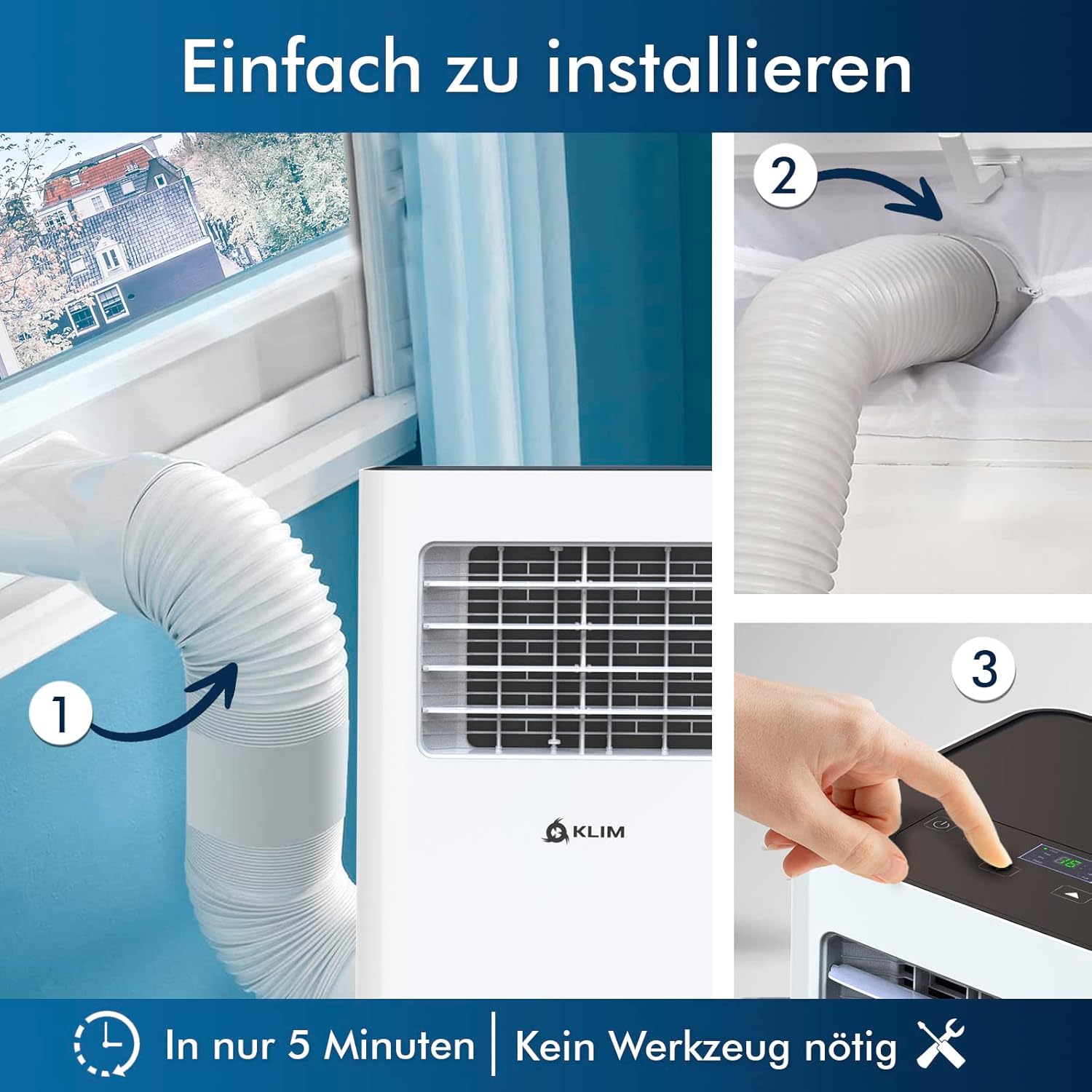
شڪل 5.1: Visual guide for quick installation, typically completed in 5 minutes without special tools.

شڪل 5.2: Illustration of window kit compatibility, showing options for sliding windows and mentioning a separate seal for tilt windows.
6. آپريٽنگ هدايتون
The KLIM K9000 can be operated via the control panel on the unit or the included remote control.
6.1. ڪنٽرول پينل ۽ ريموٽ ڪنٽرول
The remote control allows convenient operation from a distance. Ensure AAA batteries are correctly inserted. The control panel on the unit provides direct access to all functions.
6.2. آپريٽنگ موڊس
- کولنگ موڊ: Activates the compressor to cool the room. Set your desired temperature (down to 16°C). This mode is effective for rooms up to 20 m² (80 m³).
- پکي جي موڊ Circulates air without cooling. Adjustable fan speeds are available.
- ڊيهوميڊائيفائر موڊ: Removes excess moisture from the air. In this mode, the unit collects water, which will need to be drained.
- سمهڻ جو طريقو: Designed for quiet operation during rest. The unit operates at a reduced noise level (approx. 65 dB) and may adjust temperature settings automatically for comfort.

شڪل 6.1: The sleep mode provides a cool and quiet environment for restful sleep, operating at approximately 65 dB.
To switch between modes, press the "Mode" button on the control panel or remote control.
7. سار سنڀال
Regular maintenance ensures the longevity and efficiency of your KLIM K9000.
7.1. ايئر فلٽر کي صاف ڪرڻ
ايئر فلٽر کي استعمال جي لحاظ کان هر ٻن هفتن يا وڌيڪ ڀيرا صاف ڪرڻ گهرجي. هڪ گندو فلٽر ٿڌي ڪارڪردگي ۽ هوا جي وهڪري کي گهٽائي سگهي ٿو.
- ايئر ڪنڊيشنر کي پاور آئوٽليٽ مان ڪڍو.
- ايئر فلٽر کي ڳوليو ۽ هٽايو (عام طور تي يونٽ جي پوئين يا پاسي تي).
- فلٽر کي گرم، صابڻ واري پاڻي سان ڌوئو. چڱي طرح ڌوئو ۽ ٻيهر داخل ڪرڻ کان اڳ ان کي مڪمل طور تي هوا ۾ سڪي وڃڻ ڏيو.
- خشڪ فلٽر کي ٻيهر انسٽال ڪريو ۽ يونٽ کي واپس لڳايو.
7.2. پاڻي جي نيڪال
The unit features an auto-evaporation system in cooling mode, reducing the need for frequent drainage. However, in high humidity or dehumidifier mode, water will accumulate and needs to be drained.
- مسلسل نيڪال: For continuous dehumidification, attach the drainage hose to the drain outlet and direct it to a suitable container or floor drain.
- دستي نيڪال When the internal water tank is full, the unit may stop operating and display an indicator. To drain manually, unplug the unit, place a shallow pan or tray under the drain plug, and remove the plug. Be aware that the internal water container can be cumbersome to empty, and it may require two people to safely tilt the unit for complete drainage if using the bottom drain.
8. مسئلا حل ڪرڻ
عام مسئلن ۽ انهن جي حل لاءِ هن حصي جو حوالو ڏيو.
| مسئلو | ممڪن سبب | حل |
|---|---|---|
| يونٽ چالو نه آهي. | بجلي ناهي، سرڪٽ بريڪر ٽرپ ٿي ويو، پاڻي جي ٽانڪي پوري. | Check power cord, reset breaker, drain water tank. |
| ناکافي کولنگ. | Dirty air filter, blocked air intake/outlet, open windows/doors, room too large, exhaust hose not properly installed. | Clean filter, clear obstructions, close windows/doors, ensure proper exhaust hose installation. |
| يونٽ شور آهي. | Normal operation sound (compressor/fan), unit not on a level surface. | The unit operates at approximately 65 dB, which is normal. Ensure it is on a flat surface. |
| پاڻيءَ جي وهڪري. | Drain plug not securely closed, drainage hose improperly connected. | Check drain plug, ensure drainage hose is securely attached and not kinked. |
جيڪڏهن انهن حلن جي ڪوشش ڪرڻ کان پوءِ به مسئلو برقرار رهي، مهرباني ڪري ڪسٽمر سپورٽ سان رابطو ڪريو.
9. وضاحتون
| برانڊ | ڪليم |
| ماڊل نمبر | ڪ9000 ڊبليو ايڇ |
| کولڻ جي صلاحيت | 9000 BTU |
| تجويز ڪيل ڪمرو سائيز | 20 m² (80 m³) تائين |
| افعال | کولنگ، ڊي هوميڊيفائر، پنکھو |
| توانائي جي ڪارڪردگي ڪلاس | A |
| سالياني بجلي جو استعمال | 960 واٽ |
| شور جي سطح | 65 ڊيسيبل |
| ريفريجرينٽ | R-290 (Natural Refrigerant) |
| طول و عرض (L x W x H) | 29.5 x 32.5 x 70.4 سينٽي |
| وزن | 25.58 ڪلو |
| مواد | ABS |
| طاقت جو ذريعو | اليڪٽرڪ ڪيبل |

شڪل 9.1: The KLIM K9000's high energy efficiency (Class A) contributes to cost savings and environmental protection.
10. وارنٽي ۽ سپورٽ
The KLIM K9000 Portable Air Conditioner comes with a 5 سال وارنٽي، ان جي معيار ۽ ڪارڪردگي جي حوالي سان ذهني سڪون کي يقيني بڻائڻ.
For technical assistance, warranty claims, or any questions not covered in this manual, please contact KLIM customer support through their official website or the retailer where the product was purchased. Please have your model number (K9000WH) and purchase date ready.


