تعارف
This user manual provides comprehensive instructions for the setup, operation, maintenance, and troubleshooting of your UNITED LED24HS82A11 24-inch HD Ready Smart Android TV. Please read this manual thoroughly before using your television to ensure proper and safe operation.
The UNITED LED24HS82A11 is a versatile 24-inch HD Ready Smart TV powered by Android 11, offering a wide range of entertainment options. It features pre-installed applications, built-in Chromecast and Airplay for seamless content streaming, and full internet connectivity via Wi-Fi and Ethernet. It also supports DVB/T2/S2/C, MPEG-4, and HEVC Main 10 for various broadcasting standards.
حفاظت جي ڄاڻ
باهه، بجليءَ جي جھٽڪي، يا زخم کان بچڻ لاءِ هميشه هيٺ ڏنل حفاظتي احتياطن تي عمل ڪريو:
- ٽي وي کي مينهن يا نمي کي بي نقاب نه ڪريو.
- وينٽيليشن جي افتتاح کي نه روڪيو.
- پڪ ڪريو ته بجلي جي تار کي پنچ نه ڪيو ويو آهي يا هلندي آهي.
- بجلي جي طوفان دوران يا ڊگهي عرصي تائين استعمال نه ٿيڻ تي ٽي وي کي ان پلگ ڪريو.
- سڀني خدمتن جو حوالو ڏيو قابل خدمت اهلڪارن ڏانهن.
سيٽ اپ ڪريو
1. Unpacking and Stand Installation
Carefully remove the TV and all accessories from the packaging. Place the TV face down on a soft, clean surface to prevent screen damage.
Attach the two stand feet to the bottom of the TV using the provided screws. Ensure they are securely fastened.

شڪل 1: پاسي view of the UNITED LED24HS82A11 TV, illustrating its slim profile and potential port locations.
2. ڪيبل ڳنڍڻ
- طاقت: پاور ڪنڊ کي ٽي وي جي پاور ان پٽ سان ڳنڍيو ۽ پوءِ وال آئوٽليٽ سان.
- اينٽينا / ڪيبل: Connect your antenna or cable TV coaxial cable to the "RF In" port.
- HDMI ڊوائيسز: ٻاهرين ڊوائيسز جهڙوڪ بلو-ري پليئرز، گيم ڪنسولز، يا سيٽ ٽاپ باڪس کي HDMI پورٽس سان ڳنڍيو.
- ايٿرنيٽ (اختياري): For a wired internet connection, connect an Ethernet cable from your router to the TV's LAN port.
3. شروعاتي سيٽ اپ مددگار
Once powered on, the TV will guide you through the initial setup process. Follow the on-screen prompts to:
- پنھنجي پسند جي ٻولي چونڊيو.
- Connect to your Wi-Fi network (if not using Ethernet).
- پنهنجي گوگل اڪائونٽ سان سائن ان ڪريو (اختياري، پر مڪمل سمارٽ ٽي وي خاصيتن لاءِ سفارش ڪئي وئي آهي).
- Scan for available TV channels (Antenna/Cable).
آپريٽنگ
ريموٽ ڪنٽرول ختمview
Familiarize yourself with the buttons on the remote control for easy navigation and control of your TV's functions.
بنيادي ٽي وي فنڪشن
- پاور آن / آف: ريموٽ يا ٽي وي تي پاور بٽڻ دٻايو.
- حجم ڪنٽرول: واليوم اپ/ڊائون بٽڻ استعمال ڪريو.
- چينل چونڊ: چينل مٿي/هيٺ بٽڻ يا نمبر پيڊ استعمال ڪريو.
- ان پٽ جو ذريعو: Press the "Source" or "Input" button to switch between HDMI, TV, and other inputs.
سمارٽ ٽي وي خاصيتون (اينڊرائيڊ 11)
Your TV runs on Android 11, providing access to a vast ecosystem of apps and services.

Figure 2: The UNITED LED24HS82A11 TV showcasing its Android TV home screen, featuring popular streaming applications like YouTube, Prime Video, and Netflix.
- گھر جي اسڪرين: Navigate the home screen to access pre-installed apps (Netflix, YouTube, Prime Video), recommended content, and settings.
- گوگل پلي اسٽور: Download additional apps, games, and content from the Google Play Store.
- Chromecast بلٽ ان: Cast content directly from your compatible smartphone, tablet, or computer to the TV. Look for the Cast icon in supported apps.
- هوائي راند: For Apple devices, use Airplay to stream videos, photos, and music from your iPhone, iPad, or Mac to the TV.
- انٽرنيٽ ڪنيڪشن:
- وائي فائي: Go to Settings > Network & Internet to connect to your wireless network.
- Ethernet: If an Ethernet cable is connected, the TV will automatically use the wired connection.
سار سنڀال
ٽي وي جي صفائي
- صفائي ڪرڻ کان اڳ هميشه ٽي وي کي ان پلگ ڪريو.
- Use a soft, lint-free cloth to gently wipe the screen. For stubborn marks, dampen the cloth slightly with water or a screen cleaner specifically designed for electronics.
- ٽي وي صاف ڪريو سيasing نرم، سڪل ڪپڙي سان. رگڙيندڙ صاف ڪندڙ يا محلول استعمال ڪرڻ کان پاسو ڪريو.
سافٽ ويئر اپڊيٽس
Your TV may receive software updates to improve performance and add new features. You can check for updates via Settings > Device Preferences > About > System update.
مشڪلاتون
جيڪڏهن توهان کي پنهنجي ٽي وي سان مسئلا درپيش اچن ٿا، ته هيٺ ڏنل عام مسئلن ۽ حلن جو حوالو ڏيو:
| مسئلو | ممڪن سبب / حل |
|---|---|
| ڪابه طاقت | چيڪ ڪريو ته ڇا پاور ڪنڊ ٽي وي ۽ وال آئوٽليٽ ۾ محفوظ طور تي لڳل آهي. هڪ ٻيو آئوٽليٽ آزمايو. |
| ڪابه تصوير / ڪابه آواز ناهي | Ensure the correct input source is selected (e.g., HDMI 1, TV). Check cable connections. For TV channels, perform a channel scan. |
| وائي فائي سان ڳنڍجي نٿو سگهي | پنھنجي وائي فائي پاسورڊ جي تصديق ڪريو. پنھنجو روٽر ۽ ٽي وي کي ريسٽارٽ ڪريو. پڪ ڪريو ته ٽي وي توھان جي وائي فائي سگنل جي حد اندر آھي. |
| ريموٽ ڪنٽرول ڪم نه ڪري رهيو آهي | بيٽريون چيڪ ڪريو ۽ تبديل ڪريو. پڪ ڪريو ته ريموٽ ۽ ٽي وي جي IR سينسر جي وچ ۾ ڪا به رڪاوٽ نه آهي. |
| ايپس لوڊ نه ٿي رهيون آهن / سست ڪارڪردگي | Check your internet connection speed. Clear app cache (Settings > Apps > [App Name] > Clear cache). Restart the TV. |
وضاحتون
Below are the technical specifications for the UNITED LED24HS82A11 TV:
| خاصيت | تفصيل |
|---|---|
| برانڊ | گڏيل |
| ماڊل نمبر | LED24HS82A11 |
| اسڪرين جي ماپ | 24 انچ |
| ڊسپلي ٽيڪنالاجي | ايل اي ڊي |
| قرارداد | 768p (1366 x 768 پکسلز) |
| ريفريش جي شرح | 60 هز |
| آپريٽنگ سسٽم | Android 11 |
| رابطي | Wi-Fi, Ethernet, HDMI, RF, USB |
| خاص خاصيتون | Flat Screen, Chromecast Built-in, Airplay, Pre-installed Apps (Netflix, YouTube, Prime Video) |
| اسپيڪٽ ريشو | 16:9 |
| پيداوار جي ماپ (L x W x H) | 12D x 60.5W x 43.2H سينٽي ميٽر |
| شامل اجزاء | 1 mini AV adapter cable, 1 remote control with 2 AAA 1.5V batteries |
| توانائي جي ڪارڪردگي ڪلاس | F |
| بجلي جو استعمال (ايس ڊي آر) | 21.0 ڊبليو |
| بجلي جو استعمال (HDR) | 21.0 ڊبليو |
| بجلي جو استعمال (اٿل) | 0.3 ڊبليو |

Figure 3: The energy efficiency label for the UNITED LED24HS82A11 TV, indicating an 'F' energy class rating and 21 kWh per 1000 hours of operation.
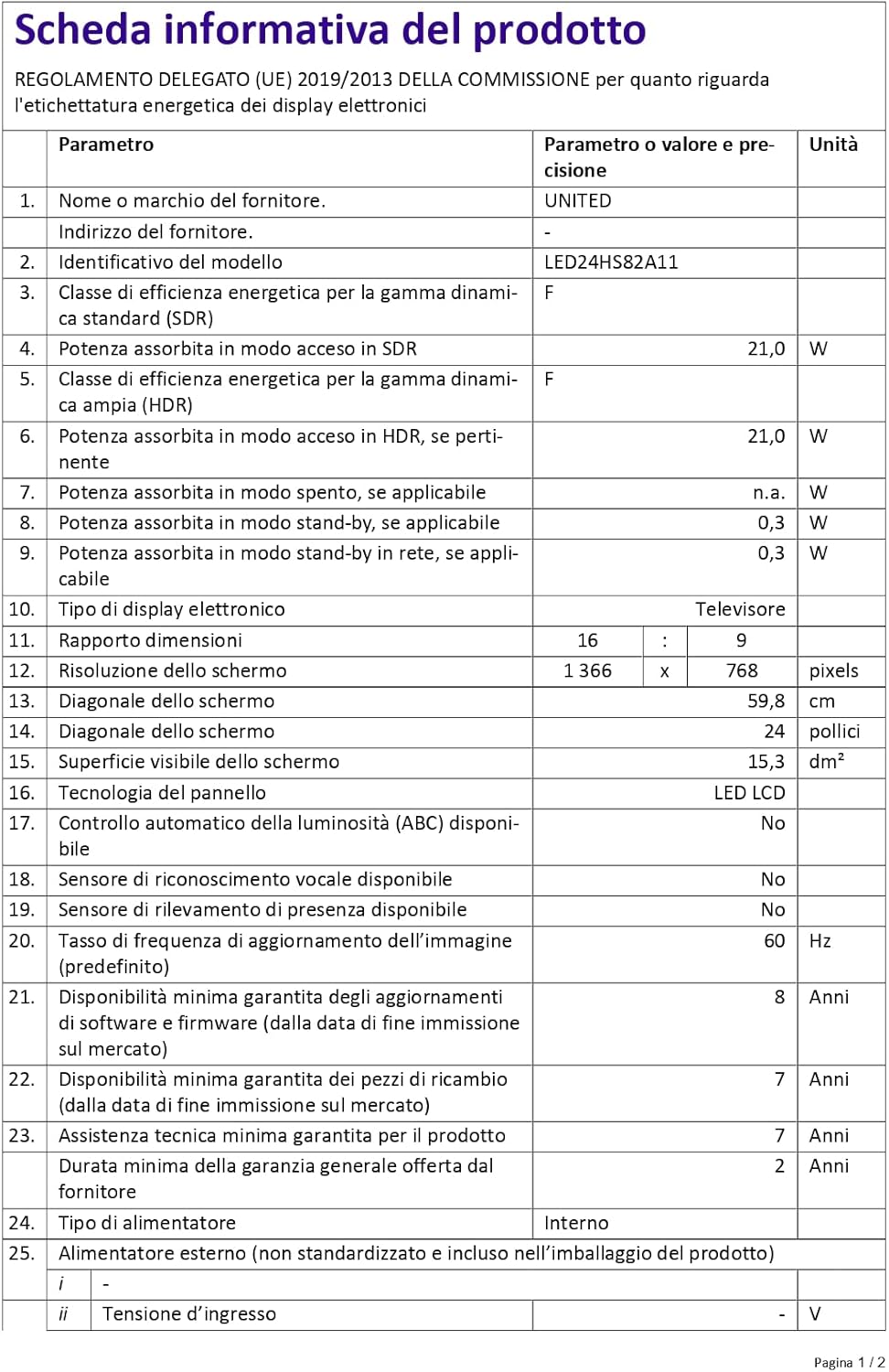
Figure 4: A detailed product information sheet for the UNITED LED24HS82A11 TV, providing comprehensive technical specifications and compliance details.
وڌيڪ تفصيلي ڄاڻ لاءِ، مھرباني ڪري سرڪاري EPREL ڊيٽابيس جو حوالو ڏيو: https://eprel.ec.europa.eu/qr/1087921
وارنٽي ۽ سپورٽ
Your UNITED LED24HS82A11 TV comes with the following support and warranty provisions:
- Minimum General Warranty: 2 سال
- Technical Assistance Availability: 7 سال
- سافٽ ويئر اپڊيٽ جي ضمانت ڏني وئي آهي جيستائين: 8 Years from market placement date
- اسپيئر پارٽس جي دستيابي: 7 Years from market placement date
For technical support or warranty claims, please contact your retailer or the manufacturer's authorized service center. Keep your proof of purchase for warranty validation.


