1. تعارف
This manual provides detailed instructions for the proper use and maintenance of your New Bee BH58 Wireless Headset. Please read this manual thoroughly before using the product to ensure optimal performance and longevity. The BH58 headset features Bluetooth V5.0 connectivity, a noise-canceling microphone, and multiple connection options for various devices.

Figure 1: New Bee BH58 Wireless Headset with included USB dongle.
2. پيڪيج مواد
پڪ ڪريو ته سڀئي شيون پيڪيج ۾ موجود آهن:
- New Bee BH58 Wireless Headset
- USB ڊونگل
- USB-C چارجنگ ڪيبل
- 3.5mm آڊيو ڪيبل
- استعمال ڪندڙ جو دستياب (ھي دستاويز)
3. پراڊڪٽ ختمview
Familiarize yourself with the headset's components and controls.

Figure 2: Headset controls layout.
- مائڪ خاموش بٽڻ: ڪالن دوران مائڪروفون کي خاموش/انميوٽ ڪريو.
- حجم +/-: آڊيو جي مقدار کي ترتيب ڏيو.
- Power On/Off / Multifunctional Button: پاور آن/آف، موسيقي هلايو/روڪ ڪريو، ڪالن جو جواب ڏيو/ختم ڪريو.
- 3.5 ايم ايم آڊيو انٽرفيس: وائرڊ ڪنيڪشن لاءِ.
- چارجنگ پورٽ (USB-C): هيڊ سيٽ چارج ڪرڻ لاءِ.
- مائڪروفون: Rotatable for optimal positioning.

Figure 3: The microphone can rotate 270 degrees for use on either ear.
4. سيٽ اپ
4.1 هيڊ سيٽ چارج ڪرڻ
Before first use, fully charge the headset. Connect the USB-C charging cable to the headset's charging port and the other end to a USB power source. The LED indicator will show charging status. A full charge takes approximately 1.5 hours.
4.2 پاور آن/آف
- پاور آن: Push the power button to the middle position and hold for 3 seconds until the LED indicator flashes red and green alternately (for computer pairing mode) or red and blue alternately (for cellphone pairing mode).
- بجلي بند: Push the power button to the bottom position to turn off the headset.
4.3 ڊوائيسز سان جوڙڻ
The BH58 headset supports three connection methods: Bluetooth, USB Dongle, and Wired.
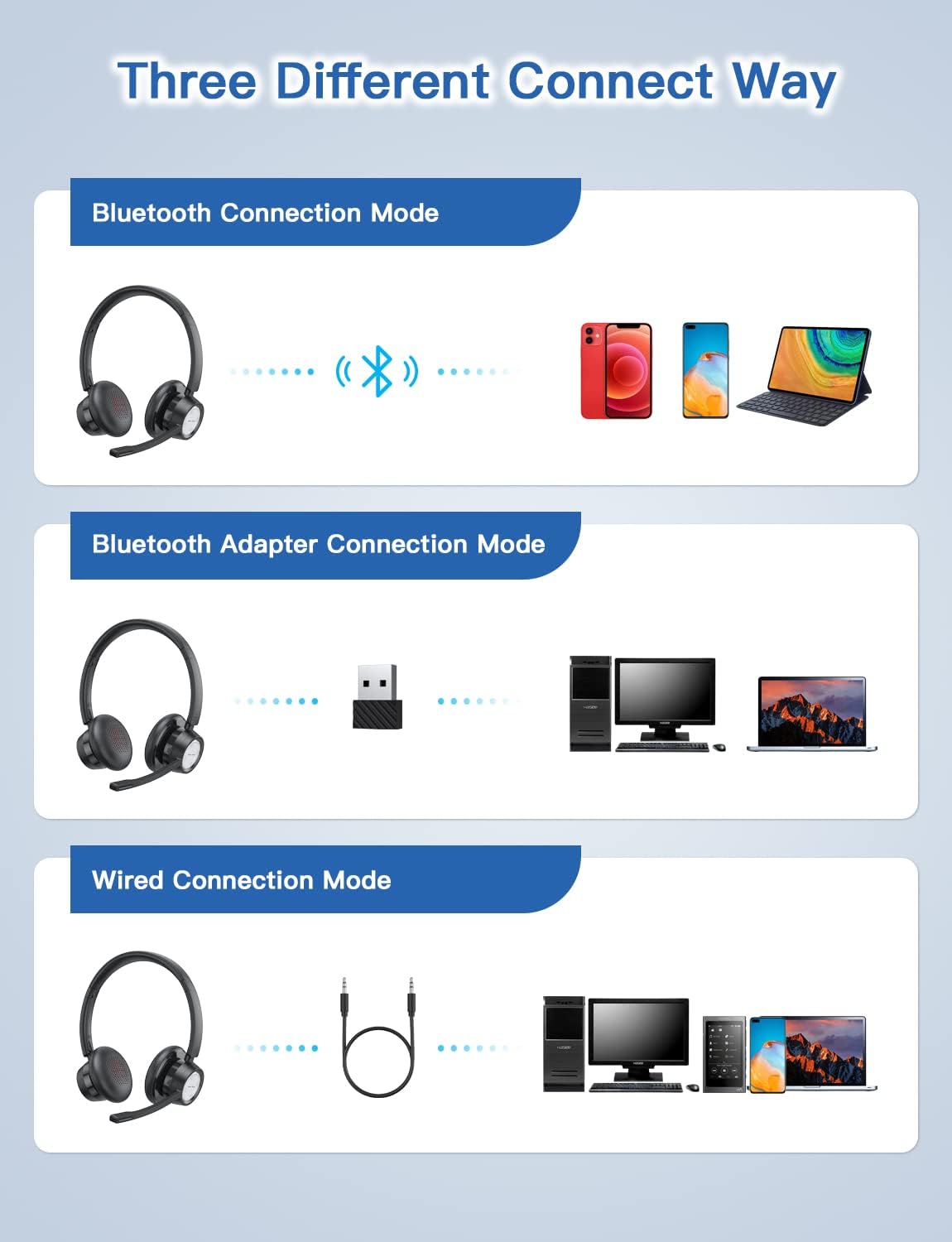
Figure 4: Multiple connection options for the BH58 headset.
4.3.1 Bluetooth Connection (for Cellphones/Tablets)
- Push the power button to the top and hold for 10 seconds until the headset LED indicator keeps flashing red and blue alternately. This indicates cellphone pairing mode.
- On your cellphone or tablet, go to 'Settings' > 'Bluetooth' and turn on Bluetooth.
- ڳولھيو new devices and select 'BH58' from the list to connect.
- Once connected, you will hear a 'connected' voice prompt, and the LED indicator will flash blue every 30 seconds.
Video 1: Demonstrates the process of connecting the BH58 headset to a cellphone via Bluetooth.
4.3.2 USB Dongle Connection (for Computers without Bluetooth)
- Push the power button to the middle position to turn on the headset. The headset LED indicator keeps flashing red and green alternately, indicating computer pairing mode.
- Plug the Bluetooth transmitter (USB dongle) into your computer's USB port. It will automatically enter pairing mode. The Bluetooth transmitter LED indicator keeps flashing blue for about 3 seconds, then turns into red and blue flashing alternately.
- When hearing the 'connected' voice prompt, the connection is successful. The headset LED indicator flashes blue every 30 seconds, and the Bluetooth transmitter LED indicator is solid blue.
- On your computer, navigate to Sound Settings. Choose 'BH58' (or 'BTD-Q2' if listed) as the audio input and output device. Adjust sound settings as preferred.
Video 2: Illustrates how to connect the BH58 headset to a computer using the USB dongle and configure sound settings.
4.3.3 وائرڊ ڪنيڪشن
Connect the 3.5mm audio cable to the headset's 3.5mm audio interface and the other end to your device's audio jack. In wired mode, only the speaker has sound; the buttons and microphone on the headset do not function.
5. آپريشن
5.1 ڪال مئنيجمينٽ
- جواب/آخر ڪال: Press the Multifunctional Button once.
- ڪال رد ڪريو: Press and hold the Multifunctional Button for 2 seconds.
- مائڪروفون کي خاموش/ چالو ڪريو: Press the Mic Mute Button during an active call.
5.2 آڊيو ڪنٽرول
- حجم مٿي حجم + بٽڻ کي دايو.
- حجم ھيٺ واليوم - بٽڻ دٻايو.
- موسيقي هلايو/روڪ ڪريو: Press the Multifunctional Button once.
5.3 هيڊ سيٽ پائڻ
Adjust the headband for a comfortable fit. The microphone boom can be rotated 270 degrees to be worn on either the left or right ear. Position the microphone approximately 1-2 inches from your mouth for optimal voice clarity.

Figure 5: The headset can be adjusted for left or right ear wearing.
6. بيٽري جي زندگي
The BH58 wireless headset offers extended battery performance:
- ڳالهائڻ جو وقت: 20 ڪلاڪ تائين
- موسيقي جو وقت: 28 ڪلاڪ تائين
- اسٽينڊ بائي ٽائيم: 400 ڪلاڪن کان وڌيڪ
- چارج ڪرڻ وقت: لڳ ڀڳ 1.5 ڪلاڪ
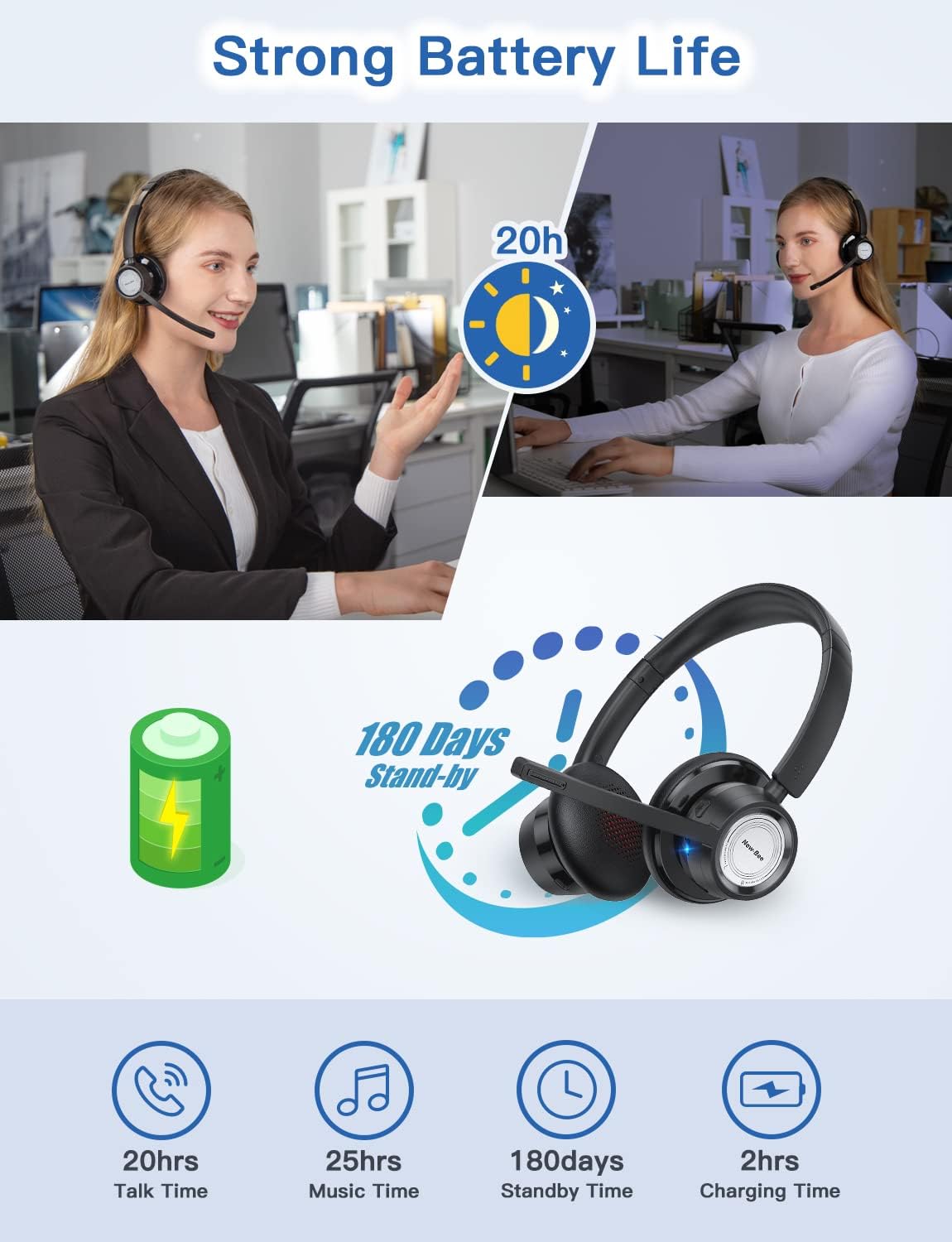
شڪل 6: ختمview of BH58 headset battery performance.
7. سار سنڀال
- هيڊ سيٽ کي باقاعدي طور تي نرم، سڪل ڪپڙي سان صاف ڪريو.
- Avoid exposing the headset to extreme temperatures, moisture, or corrosive substances.
- استعمال ۾ نه هجڻ جي صورت ۾ هيڊ سيٽ کي ٿڌي، سڪل جاءِ تي رکو.
- Do not attempt to disassemble or repair the headset yourself, as this will void the warranty.
8. مسئلا حل ڪرڻ
| مسئلو | حل |
|---|---|
| هيڊ سيٽ آن نٿو ٿئي. | پڪ ڪريو ته هيڊ سيٽ مڪمل طور تي چارج ٿيل آهي. |
| بلوٽوٿ ذريعي جوڙي نه ٿو سگهجي. | Ensure the headset is in pairing mode (LED flashing red/blue or red/green). Turn off and on Bluetooth on your device. Clear previous Bluetooth connections. |
| ڪابه آواز يا خراب آواز جي معيار ناهي. | Check volume levels on both the headset and your device. Ensure 'BH58' is selected as the audio output device in your system settings. For wired mode, ensure the cable is fully inserted. |
| مائڪروفون ڪم نه ڪري رهيو آهي. | Ensure the microphone is not muted. Check that 'BH58' is selected as the audio input device in your system settings. Microphone does not work in wired mode. |
| هيڊ سيٽ بار بار ڪٽجي ويندو آهي. | Ensure the headset is within the effective Bluetooth range (10-45 meters depending on mode and environment). Avoid obstacles that may interfere with the signal. |
9. وضاحتون
| خاصيت | تفصيل |
|---|---|
| ماڊل نالو | BH58 |
| رابطي ٽيڪنالاجي | وائرليس (بلوٽوٿ)، وائرڊ (3.5 ايم ايم) |
| وائرليس ڪميونيڪيشن ٽيڪنالاجي | بلوٽوت V5.0 |
| شور ڪنٽرول | موافق شور منسوخي (ENC) |
| مائڪروفون | Omnidirectional, 270° Rotatable |
| ڳالهائڻ جو وقت | 20 ڪلاڪ تائين |
| ميوزڪ پلے بیک وقت | 28 ڪلاڪ تائين |
| اسٽينڊ بائي ٽائيم | 400 ڪلاڪن کان وڌيڪ |
| چارج ڪرڻ وقت | 1.5 ڪلاڪ |
| چارجنگ پورٽ | USB-C |
| بلوٽوٿ رينج | 10-45 meters (depending on mode/environment) |
| مواد | Fabric, Memory Foam |
| شيءِ جو وزن | 230 گرام (8.1 آونس) |
| مطابقت رکندڙ ڊوائيسز | Computers, Laptops, Smartphones, Tablets, VoIP systems, Webinar systems, Skype, Zoom, Avaya, Call Centers, Online meeting systems, Home devices, Office devices |
10. وارنٽي ۽ سپورٽ
New Bee provides excellent after-sales service, including a 12-month warranty from the date of purchase. A professional technical team and customer service center are available to assist you with any inquiries or issues.
For support, please refer to the contact information provided on the product packaging or the official New Bee webسائيٽ.


