1. تعارف
Thank you for choosing the WOOX R4260 Smart Wireless Outdoor Camera. This manual provides comprehensive instructions for the installation, operation, and maintenance of your device. Please read this manual carefully before use to ensure proper functionality and safety. Keep this manual for future reference.
2. پراڊڪٽ ختمview
2.1 پيڪيج مواد
- WOOX R4260 Smart Wireless Outdoor Camera
- وڌندڙ خط
- ماؤنٽنگ اسڪرو ۽ وال پلگ
- USB چارجنگ ڪيبل
- استعمال ڪندڙ دستي
2.2 ڪئميرا جا حصا
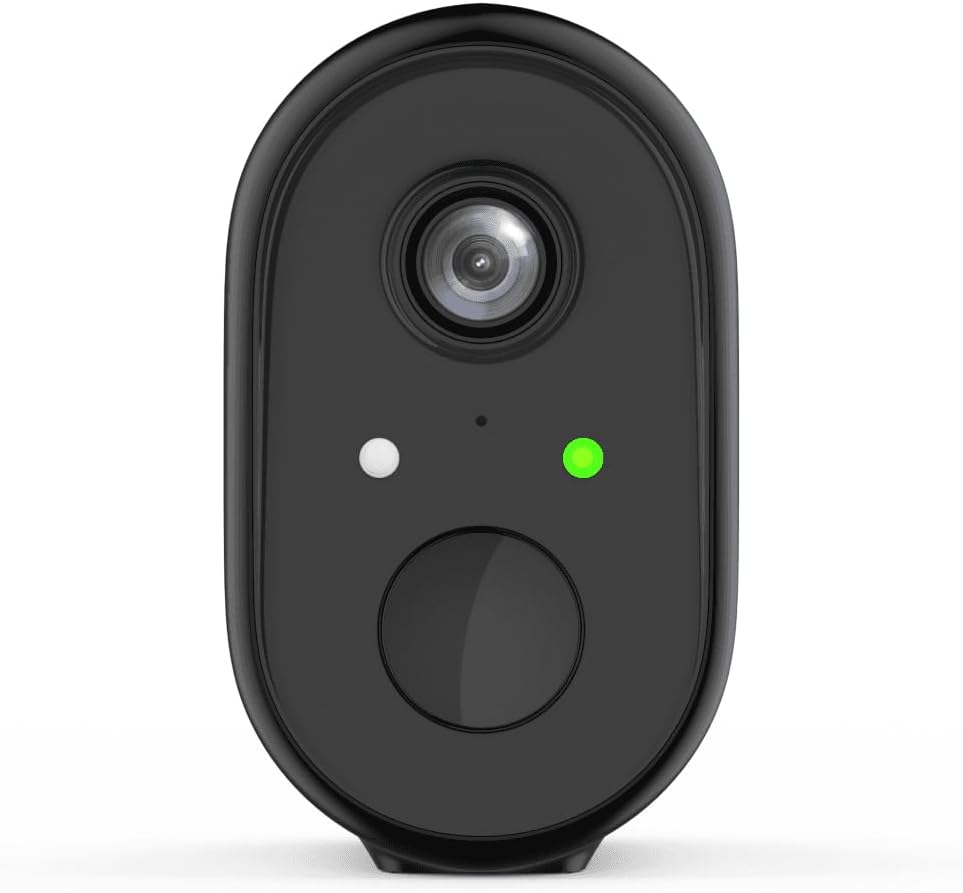
شڪل 1: سامهون view of the WOOX R4260 camera, highlighting the camera lens, status indicator LED, and the main button/microphone area.

شڪل 2: The WOOX R4260 camera attached to its adjustable wall mounting bracket, showing the overall design and mounting mechanism.
- ڪئميرا لينس: وڊيو کي پڪڙيو footage.
- اسٽيٽس LED Indicates camera status (e.g., pairing mode, connected, charging).
- مائڪروفون / اسپيڪر: ٻه طرفي آڊيو رابطي لاء.
- چڙهڻ جو نقطو: Connects to the mounting bracket.
- USB چارجنگ پورٽ: For battery charging (usually located on the back or bottom, covered by a rubber flap).
- ري سيٽ بٽڻ: Used to reset the camera to factory settings (often near the charging port or under a cover).
3. سيٽ اپ ۽ تنصيب
3.1 بيٽري کي چارج ڪرڻ
Before initial use, fully charge the camera's built-in lithium-ion battery. Connect the provided USB charging cable to the camera's charging port and a standard 5V USB power adapter (not included). The status LED will indicate charging status (e.g., red for charging, green for fully charged).
3.2 ايپ ڊائون لوڊ ۽ اڪائونٽ ٺاهڻ
Download the "WOOX Home" app from the Apple App Store or Google Play Store. Register for a new account or log in with an existing one.
3.3 ڪئميرا کي ايپ سان جوڙڻ
- Ensure your smartphone is connected to a 2.4GHz Wi-Fi network. The WOOX R4260 camera supports 2.4GHz Wi-Fi only.
- Open the WOOX Home app and tap the "+" icon to add a new device.
- Select "Security Camera" or the specific camera model (R4260) from the device list.
- Follow the on-screen instructions in the app. This typically involves powering on the camera, pressing the reset button until the status LED blinks rapidly (indicating pairing mode), and scanning a QR code generated by the app with the camera's lens.
- Once connected, the status LED will turn solid green, and the camera will appear in your app.
Note: If pairing fails, ensure your Wi-Fi password is correct and does not exceed 20 characters, as some users have reported issues with longer passwords. Ensure the camera is within range of your Wi-Fi router.
3.4 جسماني تنصيب
The WOOX R4260 can be mounted on a wall, ceiling, or tree. Choose a location that provides the desired viewاينگل تي ۽ وائي فائي جي حد اندر آهي.
- ماؤنٽنگ بریکٹ لاءِ ڊرلنگ پوائنٽس کي نشان لڳايو.
- Drill holes and insert wall plugs if mounting on masonry.
- مهيا ڪيل اسڪرو استعمال ڪندي ماؤنٽنگ بریکٹ کي مٿاڇري تي محفوظ ڪريو.
- Attach the camera to the mounting bracket and adjust the angle as needed.
- Ensure the camera is securely fastened and has a clear line of sight.
4. ڪئميرا کي هلائڻ
4.1 زنده View
Open the WOOX Home app and tap on your R4260 camera to access the live video feed. From here, you can monitor your property in real-time.
4.2 ٻه طرفي آڊيو
The camera features two-way audio. In the live view, tap the microphone icon to speak through the camera's speaker, and listen to audio from the camera's microphone.
4.3 حرڪت جي ڳولا ۽ خبرداريون
Configure motion detection settings within the WOOX Home app. You can adjust sensitivity, set detection zones, and schedule alert times. When motion is detected, the camera will record a clip and send a notification to your smartphone.
4.4 وڊيو رڪارڊنگ ۽ اسٽوريج
The camera supports local storage via a microSD card (not included) and cloud storage (subscription may be required). You can review رڪارڊ ٿيل footage through the app's playback feature.
5. سار سنڀال
5.1 بيٽري جو انتظام
The R4260 is powered by a rechargeable Lithium-ion battery. Monitor the battery level in the WOOX Home app and recharge the camera when the battery is low. Battery life can vary based on usage, temperature, and Wi-Fi signal strength.
5.2 صفائي
Periodically clean the camera lens with a soft, dry cloth to ensure clear image quality. Do not use harsh chemicals or abrasive materials.
5.3 فرم ویئر تازه ڪاريون
The WOOX Home app will notify you of available firmware updates. It is recommended to keep your camera's firmware updated to ensure optimal performance and security.
6. مسئلا حل ڪرڻ
| مسئلو | ممڪن حل |
|---|---|
| ڪئميرا وائي فائي سان ڳنڍڻ ۾ ناڪام ٿيو. |
|
| غريب وڊيو معيار. |
|
| بيٽري جلدي ختم ٿئي ٿي. |
|
| ڪابه حرڪت جي سڃاڻپ جي خبر ناهي. |
|
7. وضاحتون
- ماڊل: R4260
- وڊيو رڪارڊنگ قرارداد: 1080 ص
- Effective Video Resolution: 1080
- اڃا به مؤثر حل: 2 ميگا پکسل
- رابطي ٽيڪنالاجي: IEEE 802.11b/g/n, 2.4GHz Wi-Fi / WLAN
- وائرليس ڪميونيڪيشن ٽيڪنالاجي: WLAN
- خاص خاصيتون: Two-way audio, Motion detector
- استعمال: ٻاھران
- طاقت جو ذريعو: Battery powered (2 Lithium-ion batteries included)
- جلدtage: 5 وولٽ
- طاقت: 5 واٽ
- Viewزاويه: 110 درجا
- مواد: پلاسٽڪ
- رنگ: ڪارو
- طول و عرض (L x W x H): 11.5 x 6 x 9.5 سينٽي ميٽر
- چڙهڻ جو قسم: Wall mount, Ceiling mount, Tree mount
- انسٽاليشن جو قسم: ڇڪڻ
- مطابقت رکندڙ ڊوائيسز: اسمارٽ فون
- ڪنٽرولر جو قسم: Amazon Alexa (via WOOX Home app integration)
8. وارنٽي ۽ سپورٽ
WOOX products are designed and manufactured to the highest quality standards. For detailed warranty information and technical support, please refer to the official WOOX webسائيٽ تي وڃو يا سڌو سنئون انهن جي ڪسٽمر سروس سان رابطو ڪريو. خريداري جي ثبوت طور پنهنجي خريداري جي رسيد رکو.
ٺاهيندڙ: وڪس


