تعارف
The Edifier CX7 is an active 2.1 home entertainment system designed to deliver high-quality audio for various devices, including televisions, personal computers, and notebooks. This system features Bluetooth V5.0 connectivity, an 8-inch subwoofer, and an infrared remote control for convenient operation. This manual provides essential information for setting up, operating, and maintaining your CX7 system.
پيڪيج مواد
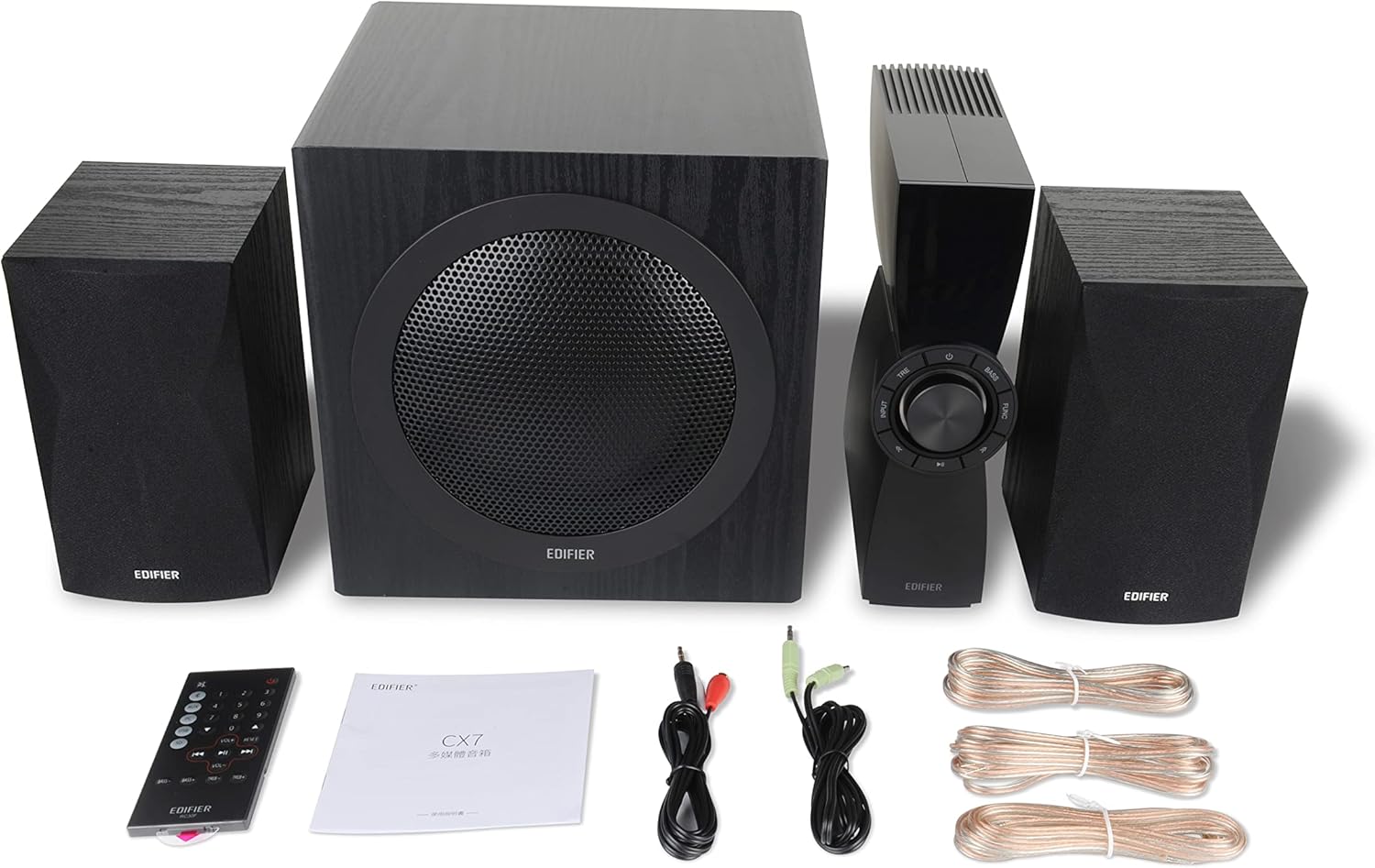
Figure 1: Edifier CX7 System Components
مھرباني ڪري تصديق ڪريو ته ھيٺ ڏنل سڀ شيون توھان جي پيڪيج ۾ شامل آھن:
- ذيلي ووفر (1)
- Satellite Speakers (2)
- Control Unit (1)
- Infrared Remote Control (1)
- 3.5mm کان آر سي اي آڊيو ڪيبل (1)
- RCA to RCA Audio Cable (1)
- Speaker Connection Cables (2)
- استعمال ڪندڙ مينوئل (1)
سيٽ اپ گائيڊ
1. رکڻ
Position the subwoofer on the floor, preferably in a corner or near a wall for optimal bass response. Place the satellite speakers on either side of your listening area, equidistant from the listener, and at ear level if possible. Ensure the control unit is easily accessible.

Figure 2: Recommended System Placement
2. اسپيڪرز کي ڳنڍڻ
Connect the satellite speakers to the speaker output terminals on the rear of the control unit using the provided speaker cables. Ensure correct polarity (red to red, black to black) for each speaker.
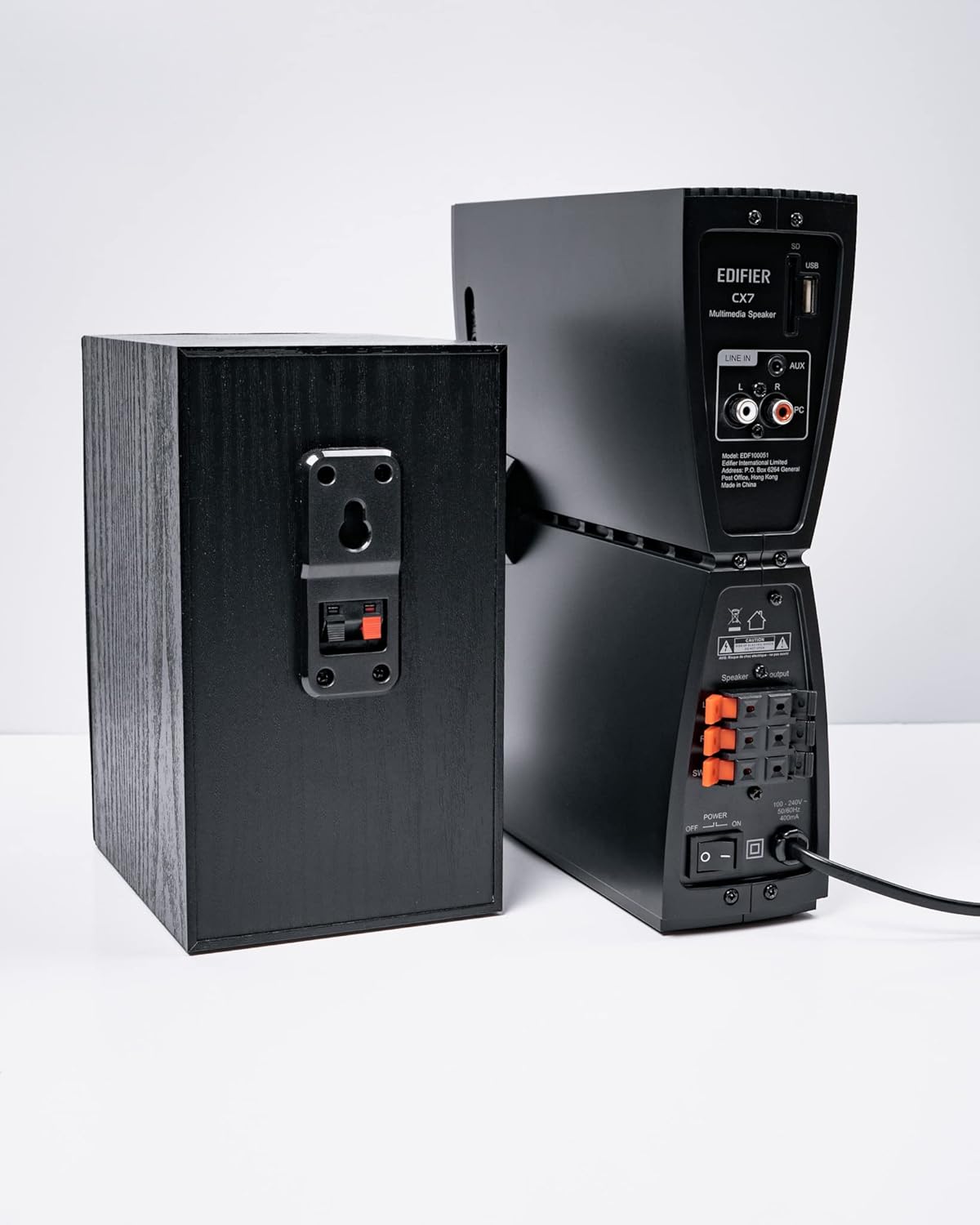
شڪل 3: اسپيڪر ڪنيڪشن
3. آڊيو ذريعن کي ڳنڍڻ
The CX7 system supports multiple audio input options:
- AUX ان پٽ: Use the 3.5mm to RCA audio cable to connect devices like smartphones, tablets, or computers to the AUX input on the control unit.
- پي سي ان پٽ: Use the RCA to RCA audio cable to connect your PC's audio output to the PC input on the control unit.
- بلوٽوٿ: For wireless connection, refer to the "Bluetooth Pairing" section under Operating Instructions.
4. پاور ڪنيڪشن
Connect the power cable to the control unit and then plug it into a standard wall outlet. Turn on the power switch located on the rear of the control unit.
آپريٽنگ هدايتون
1. پاور آن/آف
After connecting the power, press the power button on the control unit or the remote control to turn the system on or off. The display on the control unit will illuminate when powered on.

Figure 4: Control Unit Display
2. انٽ چونڊ
Press the "INPUT" button on the control unit or the remote control to cycle through available audio sources: AUX, PC, and Bluetooth. The selected input will be displayed on the control unit's screen.

Figure 5: Control Knob and Input Buttons
3. حجم ڪنٽرول
Rotate the large knob on the control unit clockwise to increase volume and counter-clockwise to decrease it. Alternatively, use the "VOL+" and "VOL-" buttons on the remote control.
4. Bass and Treble Adjustment
Press the "BASS" or "TRE" (Treble) buttons on the control unit or remote control, then rotate the main knob to adjust the respective levels. The display will show the current bass/treble setting.
5. بلوٽوٽ جوئر
- Select the Bluetooth input on the CX7 system. The display will show "BT" and flash, indicating it's in pairing mode.
- پنهنجي ڊوائيس (اسمارٽ فون، ٽيبليٽ، وغيره) تي، بلوٽوٿ کي فعال ڪريو ۽ موجود ڊوائيسز جي ڳولا ڪريو.
- Select "EDIFIER CX7" from the list of found devices.
- Once paired, the "BT" indicator on the CX7 display will stop flashing and remain solid.
To disconnect a Bluetooth device, press and hold the "FUNC" button on the control unit or the Bluetooth button on the remote control for a few seconds.
6. ريموٽ ڪنٽرول افعال

Figure 6: Infrared Remote Control
The remote control provides convenient access to all major functions:
- طاقت: سسٽم کي آن / بند ڪري ٿو.
- ان پٽ چونڊ: Cycles through AUX, PC, Bluetooth.
- حجم: ماسٽر حجم کي ترتيب ڏئي ٿو.
- باس / ٽربل: باس ۽ ٽربل ليولز کي ترتيب ڏئي ٿو.
- خاموش: آواز کي خاموش/آموٽ ڪري ٿو.
- پلے بیک ڪنٽرول: Play/Pause, Previous/Next track (for Bluetooth mode).
سار سنڀال
- صفائي: Use a soft, dry cloth to clean the surfaces of the speakers and control unit. Do not use liquid cleaners or abrasive materials.
- وينٽيليشن: Ensure adequate ventilation around the control unit and subwoofer to prevent overheating. Do not block ventilation openings.
- ماحول: سسٽم کي انتهائي گرمي پد، نمي، مٽي، يا سڌي سج جي روشني ۾ بي نقاب ڪرڻ کان پاسو ڪريو.
- بجلي بند: If the system will not be used for an extended period, disconnect it from the power outlet.
مشڪلاتون
| مسئلو | ممڪن سبب | حل |
|---|---|---|
| آواز ڪونهي |
|
|
| بلوٽوٿ ڪنيڪشن ناڪام |
|
|
| بگڙيل آواز |
|
|
وضاحتون
| خاصيت | تفصيل |
|---|---|
| ماڊل نالو | CX7 |
| اسپيڪر جو قسم | 2.1 اسپيڪر سسٽم |
| رابطي ٽيڪنالاجي | بلوٽوٿ |
| وائرليس ڪميونيڪيشن ٽيڪنالاجي | بلوٽوت V5.0 |
| بلوٽوٿ رينج | 10 ميٽر |
| آڊيو آئوٽ پٽ موڊ | چوڌاري |
| اسپيڪر وڌ ۾ وڌ آئوٽ پاور | 69 واٽ |
| سب ووفر ڪنيڪٽوٽي ٽيڪنالاجي | وائرليس |
| ووفر قطر | 8 انچ |
| مواد | پوليوپروپيلين |
| رنگ | ڪارو |
| پيداوار جي ماپ | 16.93"ڊي x 17.72"ڊي x 13.39"ايڇ |
| شيءِ جو وزن | 29 پائونڊ (13.2 ڪلوگرام) |
| طاقت جو ذريعو | تار ٿيل برقي |
| ڪنٽرولر جو قسم | ريموٽ ڪنٽرول |
| تجويز ڪيل استعمال | ٽيليويزن لاء، ڪمپيوٽرن لاء، اسمارٽ فونز يا ٽيبلٽس لاء |
وارنٽي ۽ سپورٽ
For warranty information and technical support, please refer to the warranty card included with your product or visit the official Edifier webسائيٽ. وارنٽي دعوائن لاءِ خريداري جي ثبوت طور پنهنجي خريداري جي رسيد رکو.
ايڊيفائر آفيشل Webسائيٽ: www.edifier.com


