1. تعارف
This manual provides comprehensive instructions for the setup, operation, maintenance, and troubleshooting of your HDWR typerCLAW-BC130 Wireless Keyboard with Touchpad. Please read this manual carefully before using the product to ensure optimal performance and longevity.
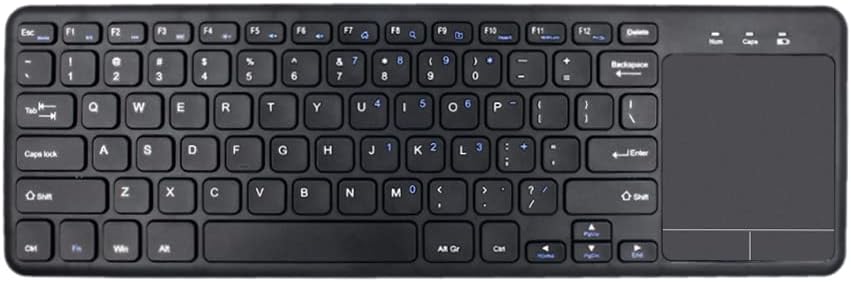
تصوير 1.1: مٿي کان هيٺ تائين view of the HDWR typerCLAW-BC130 Wireless Keyboard with integrated touchpad.
2. پيڪيج مواد
پڪ ڪريو ته سڀئي شيون پيڪيج ۾ موجود آهن:
- HDWR typerCLAW-BC130 Wireless Keyboard
- USB Receiver (quantity: 3, typically one is used for connection)
- استعمال ڪندڙ جو دستياب (ھي دستاويز)
3. مصنوعات جون خاصيتون
- وائرليس آپريشن: The keyboard operates wirelessly via a USB receiver, providing a cable-free connection within a 10-meter range. This allows for flexible placement and use.
- بجلي جي بچت: Powered by two AAA batteries, the keyboard can operate continuously for over 60 hours. An energy-saving mode automatically puts the keyboard to sleep after 10 minutes of inactivity to extend battery life.
- Ergonomic ۽ پورٽبل ڊيزائن: The TyperCLAW BC130 is less than 2 cm thick and weighs under 300g, making it suitable for mobile use and saving workspace. Its slim profile contributes to comfortable typing.
- انٽيگريٽيڊ ٽچ پيڊ: The convenient touchpad provides precise control, effectively replacing a traditional computer mouse. It supports multi-touch gestures for enhanced navigation.
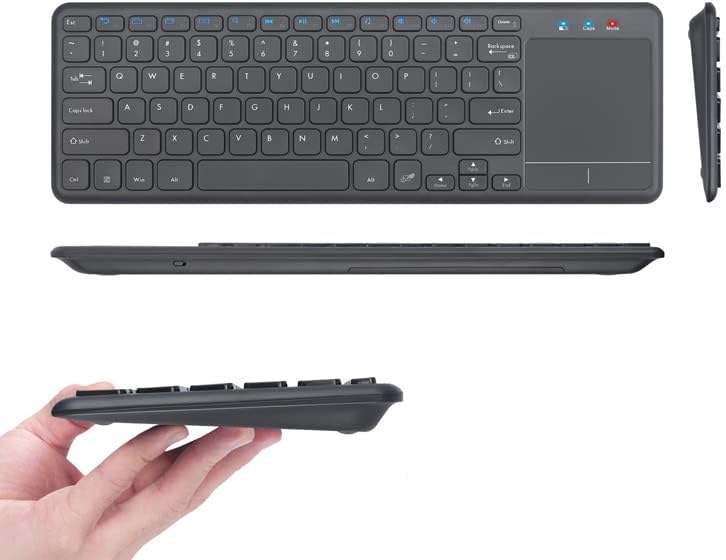
تصوير 3.1: مختلف views highlighting the slim and portable design of the keyboard.

Image 3.2: A hand demonstrating interaction with the integrated touchpad.
4. سيٽ اپ
4.1. بيٽري لڳائڻ
- ڪيبورڊ جي هيٺئين پاسي بيٽري جي خاني کي ڳوليو.
- بيٽري جي ڪمري واري ڍڪ کي کوليو.
- ٻه AAA بيٽريون داخل ڪريو، صحيح پولارٽي (+/-) کي يقيني بڻائي.
- بيٽري جي ڪمري واري ڍڪ کي محفوظ طور تي بند ڪريو.
4.2. USB رسيور ڪنيڪشن
- Take one of the provided USB receivers from the package.
- USB رسيور کي توهان جي ڪمپيوٽر يا ليپ ٽاپ تي موجود USB پورٽ ۾ پلگ ان ڪريو.
- The operating system should automatically detect and install the necessary drivers. This may take a few moments.
4.3. پاورنگ آن
- Locate the power switch on the keyboard (usually on the side or top edge).
- Slide the switch to the 'ON' position.
- The keyboard should now be connected and ready for use.
5. آپريٽنگ هدايتون
5.1. بنيادي ٽائپنگ
Use the keys as you would with any standard keyboard. The layout is designed for familiar and efficient typing.
5.2. ٽچ پيڊ جو استعمال
- اڪيلو آڱر ٽيپ: Functions as a left-click.
- ٻن آڱرين سان ٽيپ: Functions as a right-click.
- Single Finger Drag: ڪرسر کي منتقل ڪري ٿو.
- ٻن آڱرين سان اسڪرول: Drag two fingers up or down to scroll vertically.
5.3. پاور سيونگ موڊ
The keyboard automatically enters power-saving mode after 10 minutes of inactivity. To wake it up, simply press any key or move the touchpad. This feature helps conserve battery life.
6. سار سنڀال
6.1. صفائي
- صفائي ڪرڻ کان اڳ ڪيبورڊ بند ڪريو.
- نرم، لِنٽ کان خالي ڪپڙو استعمال ڪريو ٿورڙو ڊيampپاڻي يا نرم صفائي جي حل سان ختم ڪيو وڃي.
- سخت ڪيميڪلز، رگڙيندڙ شيون، يا محلول استعمال ڪرڻ کان پاسو ڪريو.
- چاٻين جي وچ ۾ مٽي ۽ ملبي لاءِ، دٻيل هوا استعمال ڪريو.
6.2. بيٽري مٽائڻ
When the keyboard's performance degrades or it stops responding, it may be time to replace the AAA batteries. Follow the battery installation steps in Section 4.1.
6.3. اسٽوريج
If storing the keyboard for an extended period, remove the batteries to prevent leakage and potential damage. Store in a cool, dry place away from direct sunlight.
7. مسئلا حل ڪرڻ
- ڪي بورڊ جواب نه ڏئي رهيو آهي:
- پڪ ڪريو ته ڪيبورڊ فعال آهي.
- چيڪ ڪريو ته بيٽريون صحيح طرح سان لڳل آهن ۽ ڪافي چارج آهن. جيڪڏهن ضروري هجي ته تبديل ڪريو.
- پڪ ڪريو ته USB رسيور توهان جي ڪمپيوٽر تي ڪم ڪندڙ USB پورٽ ۾ محفوظ طور تي پلگ ان ٿيل آهي. هڪ مختلف USB پورٽ آزمايو.
- Move the keyboard closer to the USB receiver to ensure it's within the 10-meter operating range.
- پنهنجي ڪمپيوٽر کي ٻيهر شروع ڪريو.
- ٽچ پيڊ ڪم نه ڪري رهيو آهي:
- Ensure the keyboard is powered on and connected.
- Clean the touchpad surface to remove any dirt or obstructions.
- Check if there's a function key (Fn + Fx) that disables/enables the touchpad. Refer to the keyboard's key legends.
- وقفي وقفي سان ڳنڍڻ:
- Ensure there are no large metallic objects or other wireless devices interfering with the signal between the keyboard and the receiver.
- Try using a different USB receiver if available.
8. وضاحتون
| خاصيت | تفصيل |
|---|---|
| برانڊ | HDWR |
| ماڊل نمبر | typerCLAW-BC130 |
| رنگ | ڪارو |
| رابطي ٽيڪنالاجي | Wireless (USB Receiver), Micro USB (for charging/data if applicable) |
| مطابقت رکندڙ ڊوائيسز | ليپ ٽاپ، پي سي |
| آپريٽنگ سسٽم مطابقت | Windows 10 (and likely other modern OS versions) |
| خاص خاصيتون | Ergonomic, Integrated Touchpad, Power Saving Mode |
| طاقت جو ذريعو | 2 x AAA بيٽريون |
| بيٽري جي زندگي | 60 ڪلاڪن کان وڌيڪ مسلسل آپريشن |
| مواد | پلاسٽڪ |
| اصل جو ملڪ | پولينڊ |
9. وارنٽي ڄاڻ
The HDWR typerCLAW-BC130 Wireless Keyboard comes with a 1 سالن جي ڪاريگر وارنٽي. Please retain your proof of purchase for warranty claims. For specific terms and conditions, refer to the warranty card included with your product or contact HDWR customer support.
10. سپورٽ
For further assistance, technical support, or warranty inquiries, please contact HDWR customer service through their official webسائيٽ يا توهان جي پراڊڪٽ پيڪنگنگ تي ڏنل رابطي جي معلومات.


