تعارف
Thank you for choosing the Genai True Wireless Earphones. This manual provides detailed instructions on how to set up, operate, maintain, and troubleshoot your new earphones. Please read this manual carefully before use to ensure optimal performance and longevity of your device.
پيداوار ختمview
The Genai True Wireless Earphones feature a digital intelligence LED display on the charging case, tap control for easy operation, and Bluetooth 5.0 for stable connectivity. They are designed for comfortable in-ear wear and deliver clear stereo sound.
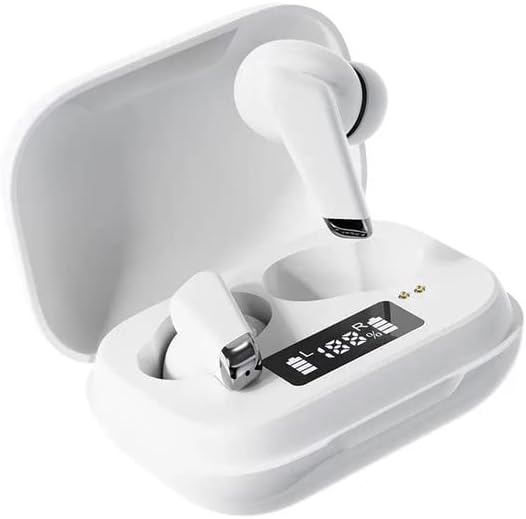
Image: Genai True Wireless Earphones in their charging case, showcasing the digital LED display indicating battery levels.
اهم خاصيتون:
- سچو وائرليس اسٽيريو (TWS): ڪيبل کان سواءِ بي عيب آڊيو تجربو.
- ٽيپ ڪنٽرول: Intuitive touch-sensitive controls for music and calls.
- Digital Intelligence LED Display: Shows real-time battery status of earbuds and charging case.
- بلوٽوٽ 5.0: مستحڪم ۽ ڪارآمد وائرليس ڪنيڪشن کي يقيني بڻائي ٿو.
- ايرگونومڪ ان-ڪن ڊيزائن: آرامده ۽ محفوظ فٽ.
سيٽ اپ گائيڊ
1. ائرفون ۽ ڪيس کي چارج ڪرڻ
- شروعاتي چارج Before first use, fully charge the charging case and earbuds. Place the earbuds into the charging case.
- چارجر ڳنڍيو: هڪ مطابقت رکندڙ USB ڪيبل استعمال ڪندي چارجنگ ڪيس کي پاور سورس سان ڳنڍيو.
- مانيٽر LED ڊسپلي: The digital LED display on the case will show the charging status and battery percentage. Ensure both earbuds and the case are fully charged before proceeding.

Image: The charging case with its digital LED display, indicating the charge level of both the case and the individual earbuds.
2. توهان جي ڊوائيس سان جوڙو ٺاهڻ
- پاور آن: چارجنگ ڪيس کوليو. ائربڊس خودڪار طريقي سان آن ٿيندا ۽ پيئرنگ موڊ ۾ داخل ٿيندا. توهان کي هڪ ٻڌڻ وارو پرامٽ ٻڌڻ ۾ اچي سگهي ٿو.
- بلوٽوت کي فعال ڪريو: On your smartphone or other Bluetooth-enabled device, go to the Bluetooth settings and enable Bluetooth.
- ڊوائيس چونڊيو: Look for "Genai Earphones" (or similar name) in the list of available devices and select it to connect.
- تصديق: Once successfully paired, you will hear a confirmation sound, and the earbuds will be ready for use.

Image: A visual representation of the Bluetooth 5.0 chipset, highlighting the stable wireless connection technology.
آپريٽنگ هدايتون
The Genai True Wireless Earphones feature intuitive tap controls. The specific functions may vary slightly, but common controls are listed below:
پاور آن / آف
- پاور آن: چارجنگ ڪيس کوليو، يا ڪجهه سيڪنڊن لاءِ ٻنهي ائربڊس تي ٽچ ايريا کي ڊگهو دٻايو.
- بجلي بند: Place the earbuds back into the charging case and close the lid, or long-press the touch area on both earbuds for several seconds until they power off.
موسيقي پلے بیک
- راند/روڪ: ٻنهي ائربڊ تي هڪ ڀيرو ٽيپ ڪريو.
- اڳيون ٽريڪ: ساڄي ائربڊ تي ٻٽي ٽيپ ڪريو.
- پويون ٽريڪ: کاٻي ائربڊ تي ٻٽي ٽيپ ڪريو.
ڪال انتظام
- جواب/آخر ڪال: ايندڙ ڪال يا فعال ڪال دوران ٻنهي ائربڊ تي هڪ ڀيرو ٽيپ ڪريو.
- ڪال رد ڪريو: ايندڙ ڪال دوران ٻنهي ائربڊ کي ڊگهو دٻايو.
وائس اسسٽنٽ
- وائس اسسٽنٽ کي فعال ڪريو. ڪنهن به ائربڊ تي ٽي ڀيرا ٽيپ ڪريو (ڪارڪردگي ڊوائيس جي لحاظ کان مختلف ٿي سگهي ٿي).

Image: An illustration showing an earbud comfortably and ergonomically fitted within the ear canal.
سار سنڀال
صفائي
- ائربڊس ۽ چارجنگ ڪيس کي صاف ڪرڻ لاءِ نرم، سڪل، لِنٽ فري ڪپڙو استعمال ڪريو.
- گھڙڻ وارا صاف ڪندڙ، محلول، يا ايروسول اسپري استعمال نه ڪريو.
- Gently clean the ear tips and speaker mesh to remove any earwax or debris.
ذخيرو
- جڏهن استعمال ۾ نه هجن ته ائرفون کي انهن جي چارجنگ ڪيس ۾ رکو ته جيئن انهن جي حفاظت ڪري سگهجي ۽ انهن کي چارج رکيو وڃي.
- Avoid storing in extreme temperatures, direct sunlight, or high humidity.
مشڪلاتون
- Earbuds not pairing with each other or with device:
- پڪ ڪريو ته ٻئي earbuds چارج ٿيل آهن.
- ٻئي ائربڊس واپس چارجنگ ڪيس ۾ رکو، لڪ بند ڪريو، ڪجھ سيڪنڊ انتظار ڪريو، پوءِ لڪ ٻيهر کوليو.
- On your device, forget/delete the "Genai Earphones" from the Bluetooth list and try pairing again.
- ڪابه آواز يا گهٽ آواز:
- پنهنجي ڊوائيس ۽ ائربڊس ٻنهي تي واليوم ليول چيڪ ڪريو.
- پڪ ڪريو ته ائربڊس توهان جي ڊوائيس سان صحيح طرح سان ڳنڍيل آهن.
- ائربڊ اسپيڪر ميش مان ڪنهن به ملبي کي صاف ڪريو.
- چارج ڪرڻ جا مسئلا:
- پڪ ڪريو ته چارجنگ ڪيبل ڪيس ۽ پاور سورس ٻنهي سان محفوظ طور تي ڳنڍيل آهي.
- پڪ ڪريو ته پاور سورس فعال آهي.
- ائربڊس ۽ ڪيس ٻنهي تي چارجنگ ڪانٽيڪٽس کي صاف ڪريو.
وضاحتون
| خاصيت | تفصيل |
|---|---|
| ماڊل | B0BX5G53VT |
| رابطي ٽيڪنالاجي | وائرليس (بلوٽوٿ 5.0) |
| ڪنن جي ڪپ جو قسم | نيم کليل |
| ڊرائيورن جو تعداد | 2 |
| چارج ڪرڻ جو طريقو | چارج ڪيس |
| هيڊ فون پيڊ جو مواد | سليڪون |
| ڊرائيور قطر | 10mm |
| مجموعي هارمونڪ ڊسڪشن | 0.02% |
| رڪاوٽ جي حد | 32 Ω تائين |
| مواد | سليڪون |
| ڪن جي جڳهه | ڪن ۾ |
| فارم فيڪٽر | سچو وائرليس |
وارنٽي ۽ سپورٽ
The Genai True Wireless Earphones come with a 12-مهيني وارنٽي from the date of purchase, covering manufacturing defects. For any quality problems or support inquiries, please contact the seller directly through your purchase platform.
We are committed to ensuring 100% customer satisfaction. If you encounter any issues, please do not hesitate to reach out for assistance, including full refunds or replacements as applicable.


