Poly Edge E220 IP Desk Phone User Manual
Your guide to setting up and using your Poly Edge E220 IP Desk Phone.
1. تعارف
The Poly Edge E220 is a versatile IP desk phone designed for modern office environments, offering advanced communication features. It supports up to 16 lines with 4-line keys and includes integrated Bluetooth for seamless mobile phone and headset pairing. This manual provides detailed instructions for setup, operation, and maintenance of your device.
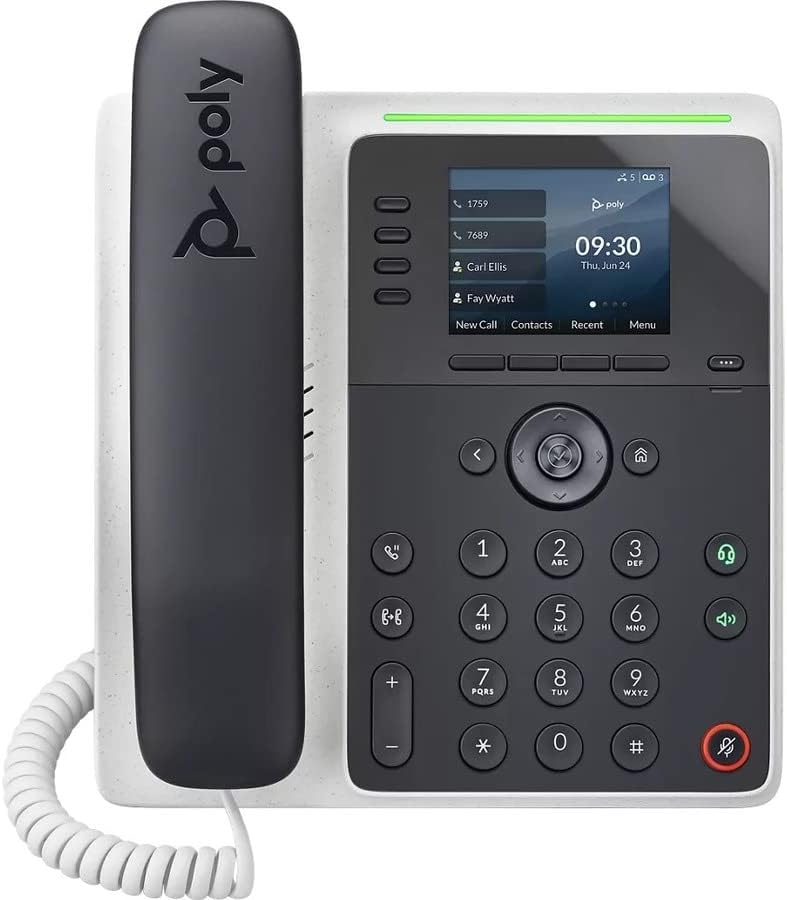
تصوير: سامهون view of the Poly Edge E220 IP Desk Phone, showcasing its display, keypad, and handset.
2. دٻي ۾ ڇا آهي
مھرباني ڪري تصديق ڪريو ته ھيٺ ڏنل سڀ جزا توھان جي پيڪيج ۾ شامل آھن:
- Poly Edge E220 IP Desk Phone Unit
- هينڊ سيٽ
- هينڊ سيٽ جي ڪنڊ
- Cat5E Ethernet Cable
- Integrated Wall Mount (pre-attached or separate)
- بيس اسٽينڊ
Note: A power supply is NOT included with this renewed product and must be acquired separately if Power over Ethernet (PoE) is not available.
3. مصنوعات جون خاصيتون
- 4-Line Keys: Supports up to 16 lines for flexible call management.
- مربوط بلوٽوت: Allows for seamless pairing with mobile phones and Bluetooth headsets.
- هاء ريزوليوشن ڊسپلي: Provides clear visibility for call information and menu navigation.
- HD آواز: Delivers superior audio quality for clearer conversations.
- Multi-Line Operation: Manage multiple active calls simultaneously.
- ڪانفرنس ڪال جي صلاحيت: Supports 3-way conferencing.
4. سيٽ اپ ۽ تنصيب
4.1 فون کي گڏ ڪرڻ
- Attach the Base Stand: Align the tabs on the base stand with the slots on the back of the phone unit. Slide the stand into place until it clicks securely.
- Connect the Handset: Plug one end of the coil cord into the handset and the other end into the handset port on the side of the phone unit.
4.2 ڪيبل ڳنڍڻ
Locate the ports on the back and side of the phone unit.

تصوير: پاسي view of the Poly Edge E220 IP Desk Phone, highlighting the various connection ports and the adjustable stand.
- نيٽ ورڪ ڪنيڪشن: Connect one end of the Cat5E Ethernet cable to the LAN port on the phone and the other end to your network switch or router. If your network provides Power over Ethernet (PoE), the phone will power on automatically.
- Power Connection (if no PoE): If PoE is not available, connect an appropriate power adapter (not included) to the power port on the phone and then to a power outlet.
- Optional Headset Connection: If using a wired headset, connect it to the dedicated headset port.
4.3 شروعاتي پاور آن
Once connected, the phone will power on and begin its boot sequence. This may take a few moments. The display will show the Poly logo, followed by network configuration and registration status. If prompted, enter your network credentials or contact your IT administrator for setup assistance.
5. آپريٽنگ هدايتون
5.1 ڪالون ڪرڻ ۽ وصول ڪرڻ
- ڪال ڪرڻ لاءِ: Pick up the handset, press the Speaker button, or press a line key. Dial the number and press the Dial soft key or wait for the call to connect.
- ڪال جو جواب ڏيڻ لاءِ: Pick up the handset, press the Speaker button, or press the flashing line key.
- ڪال ختم ڪرڻ لاءِ: Replace the handset, or press the End Call soft key.

Image: A man engaged in a phone call using the Poly Edge E220 IP Desk Phone in a professional office environment.
5.2 بلوٽوت استعمال ڪندي
The Poly Edge E220 allows you to pair your mobile phone or Bluetooth headset for enhanced flexibility.
- بلوٽوت کي فعال ڪريو: Navigate to the phone's menu, select Settings, then Bluetooth, and ensure Bluetooth is enabled.
- هڪ ڊوائيس جوڙڻ: Put your Bluetooth device (mobile phone or headset) into pairing mode. On the phone, select 'Add New Device' or 'Scan for Devices'. Select your device from the list and follow the on-screen prompts to complete pairing.
- ڳنڍڻ: Once paired, your device should automatically connect when in range. You can manually connect/disconnect from the Bluetooth menu.

Image: A woman working at a desk, utilizing the Poly Edge E220 IP Desk Phone alongside her laptop, demonstrating its integration into a modern workspace.
5.3 ترقي يافته خاصيتون
- رکو: During a call, press the Hold soft key to place the call on hold. Press it again to resume.
- منتقلي During a call, press the Transfer soft key, dial the new number, and then press Transfer again to complete.
- ڪانفرنس: During an active call, press the Conference soft key, dial the number of the third party, and then press Conference again to join all parties.
- وائس ميل: Press the Voicemail button to access your voicemail messages.
6. سار سنڀال
To ensure the longevity and optimal performance of your Poly Edge E220 IP Desk Phone, follow these maintenance guidelines:
- صفائي: Use a soft, dry, lint-free cloth to clean the phone's surface and display. For stubborn marks, slightly dampen the cloth with water. Avoid using harsh chemicals, abrasive cleaners, or aerosol sprays.
- ماحول: فون کي خشڪ ماحول ۾ رکو، سڌي سج جي روشني، گهڻي گرمي ۽ نمي کان پري.
- ڪيبل جو انتظام: پڪ ڪريو ته سڀئي ڪيبل صاف سٿرا آهن ۽ دٻاءُ هيٺ نه آهن ته جيئن بندرگاهن يا ڪيبلن کي نقصان نه پهچي.
- سافٽ ويئر اپڊيٽ: Periodically check with your IT administrator for available software updates to ensure your phone has the latest features and security enhancements.
7. مسئلا حل ڪرڻ
If you encounter issues with your Poly Edge E220, refer to the table below for common problems and solutions.
| مسئلو | ممڪن سبب | حل |
|---|---|---|
| فون آن نٿو ٿئي | No power supply or PoE connection | Ensure Ethernet cable is connected to a PoE-enabled port, or connect a compatible power adapter. |
| ڪوبه ڊائل ٽون | Network issue or phone not registered | Check network cable connection. Verify network status on the phone display. Contact IT support if registration fails. |
| ڪال ڪندڙ ٻڌي نٿو سگهان / ڪال ڪندڙ مون کي ٻڌي نٿو سگهي | Volume too low, faulty handset/headset, or network audio issue | Adjust volume. Test with speakerphone. Check handset/headset connection. Restart phone. |
| بلوٽوٿ ڊيوائس جوڙڻ نه آهي | ڊوائيس جوڙڻ واري موڊ ۾ يا حد کان ٻاهر ناهي | Ensure Bluetooth device is in pairing mode and within range. Restart both devices. |
If the problem persists after attempting these solutions, please contact your IT department or the product support team for further assistance.
8. وضاحتون
Key technical specifications for the Poly Edge E220 IP Desk Phone:
| خاصيت | تفصيل |
|---|---|
| پيداوار جي ماپ | 12.1 x 10.3 x 3.4 انچ |
| شيءِ جو وزن | 2.55 پائونڊ |
| ٽيليفون جو قسم | ڪنڊ ٿيل IP فون |
| طاقت جو ذريعو | Corded Electric (Power Supply NOT Included) / Power over Ethernet (PoE) |
| ڊائلر جو قسم | سنگل ڪي پيڊ |
| جوابي نظام جو قسم | Digital (requires service provider support) |
| ڪانفرنس ڪال جي صلاحيت | 3-رستو |
| ملٽي لائن آپريشن | Yes, supports up to 16 lines with 4-line keys |
| بلوٽوٿ | Integrated for mobile phone and headset pairing |
9. وارنٽي ۽ سپورٽ
As a renewed product, the Poly Edge E220 IP Desk Phone typically comes with a limited warranty provided by the refurbisher or seller. Please refer to your purchase documentation for specific warranty terms and conditions. For technical support, troubleshooting beyond this manual, or warranty claims, please contact the seller or your IT administrator.


