تعارف
Thank you for choosing the Attack Shark K98 Wired Hotswap RGB Gaming Keyboard. This manual provides detailed instructions for setting up, operating, and maintaining your new keyboard to ensure optimal performance and longevity. The K98 is a high-performance mechanical keyboard designed for gaming and productivity, featuring 100 keys, customizable RGB lighting, hotswappable switches, and a durable coiled USB-C cable.

Image: The Attack Shark K98 keyboard in white with blue and red keycaps, connected via a coiled USB-C cable. A single yellow mechanical switch is shown separately in the foreground.
سيٽ اپ گائيڊ
Follow these steps to set up your Attack Shark K98 keyboard:
- پيڪنگ کولڻ: Carefully remove the keyboard and all accessories from the packaging. Ensure all components are present: keyboard, coiled USB-C cable, and any included tools (e.g., keycap puller, switch puller).
- ڪيبل ڳنڍڻ:
The K98 features a professional coiled USB-C cable with a detachable metal aviation connector. Connect the USB-C end of the coiled cable to the USB-C port on the keyboard. Connect the USB-A end of the cable to an available USB port on your computer.
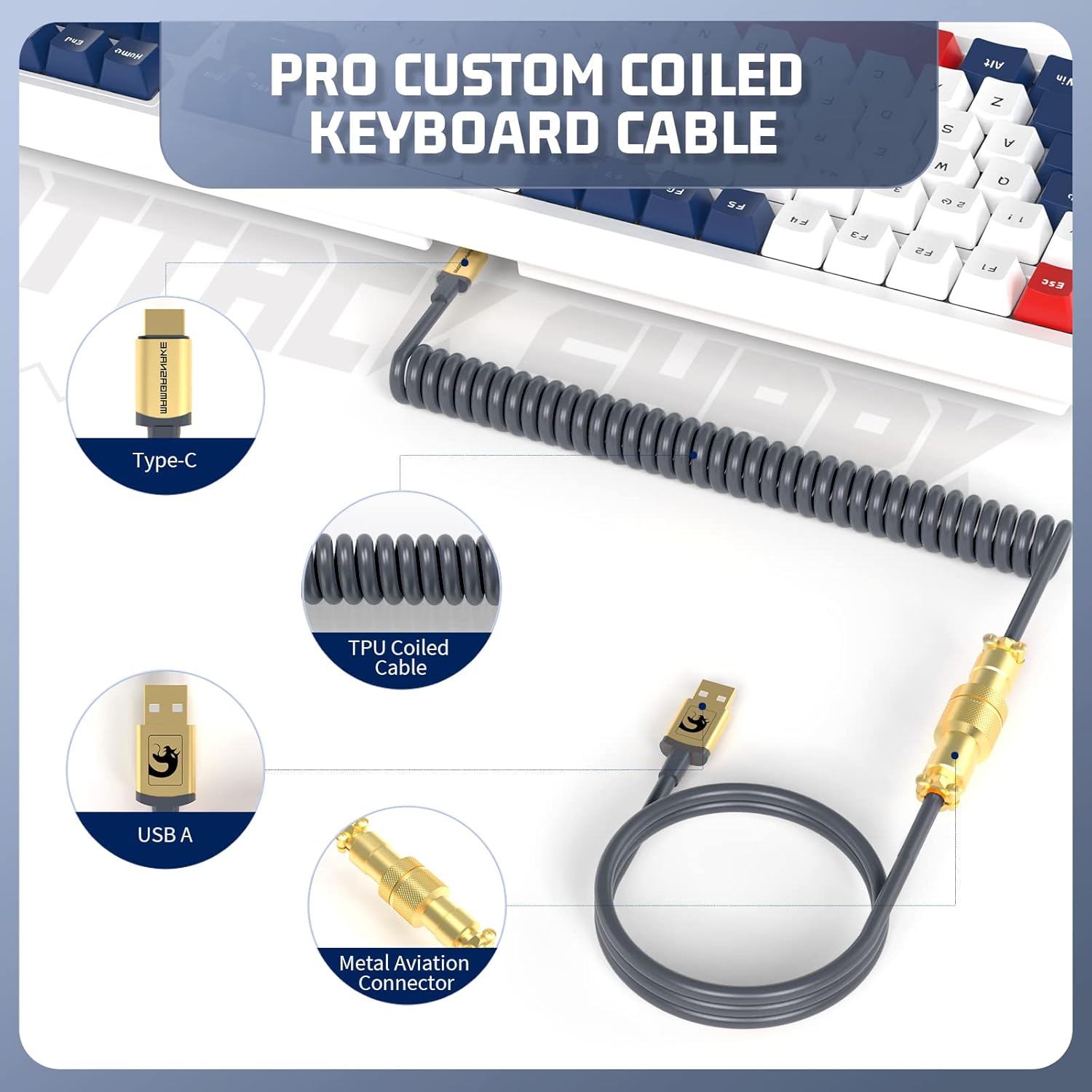
تصوير: تفصيلي view of the coiled USB-C cable, highlighting its Type-C connector, USB-A connector, and the metal aviation connector for secure and stable connection.
- سسٽم مطابقت: The keyboard is plug-and-play and compatible with most operating systems, including Windows (Win7/8/10/11) and Mac. No additional drivers are typically required for basic functionality.
- شروعاتي پاور آن: Once connected, the keyboard's RGB lighting will illuminate, indicating it is powered on and ready for use.

Image: The Attack Shark K98 keyboard positioned next to a laptop, illustrating its wide compatibility with various operating systems like Windows and Mac.
آپريٽنگ هدايتون
بنيادي ڪم
- ٽائپنگ: The K98 features 100 keys with linear yellow mechanical switches, providing a smooth and responsive typing experience.
- حيثيت جا اشارو: The keyboard includes four status lights for Num Lock (N), Caps Lock (C), Scroll Lock (S), and Win Lock (W). These indicators are located above the numeric keypad.

Image: Close-up of the keyboard's upper right section, showing the four vertical status indicator lights labeled N (Num Lock), C (Caps Lock), S (Scroll Lock), and W (Win Lock).
آر جي بي لائيٽنگ حسب ضرورت
The K98 offers extensive RGB lighting customization:
- اڳواٽ سيٽ موڊس: Cycle through 18 pre-set RGB backlight modes using the designated function keys (refer to keyboard layout or software for specific key combinations).
- Custom Backlights: Create and save up to 3 custom RGB backlight profiles.
- Music/Game Rhythm Sync: Utilize the RGB driver software to synchronize lighting effects with music, game audio, or microphone input for an immersive experience.

Image: The Attack Shark K98 keyboard displaying vibrant RGB lighting, with a tablet in the background showing a music equalizer, indicating the keyboard's ability to sync lighting with audio.
Programmable Actuation
The keyboard supports programmable actuation, allowing users to customize key functions and macros. Refer to the official Attack Shark software (if available) for advanced programming options.
اهم خاصيتون
- 100-ڪي لي آئوٽ: A compact yet functional layout that includes a numeric keypad, offering a balance between space-saving and full functionality.

تصوير: هڪ مٿي view of the Attack Shark K98 keyboard, highlighting its 100-key layout and showing approximate dimensions (15.4 inches length, 5.6 inches width, 1.6 inches height).
- Custom Linear Yellow Mechanical Switches: Manufactured from POM, these switches offer a smooth, consistent keystroke with a lifespan of up to 70 million actuations. High-precision satellite switches enhance stability.
- Full Key Hot-Swappable Design: The copper sleeve hot-swap design allows users to easily replace switches without soldering, enabling customization of typing feel.

Image: A close-up of the Attack Shark K98 keyboard with several keycaps removed, revealing the hot-swappable mechanical switches underneath, demonstrating the ease of switch replacement.
- ABS Hybrid 3-Color Keycaps: Designed for comfortable touch and durability, these two-color injection molded keycaps resist wear over time.
- Detachable Magnetic Top Cover: The magnetic top cover simplifies cleaning and maintenance, ensuring a clean gaming environment.

Image: Two Attack Shark K98 keyboards, one with its magnetic top cover removed and placed in the foreground, illustrating the detachable design for easy cleaning and customization.
- Gasket Mounted Structure: Features EVA sandwich padding between the PCB and positioning plate, significantly reducing hollow sound and typing noise for a more satisfying typing experience.

Image: An exploded diagram showing the internal layers of the Gasket Mounted Mechanical Keyboard, including ABS keycaps, upper lid, customized shaft body, hardware locating plate, sandwich sound insulation cotton, PCB board, sound insulation bottom cotton, and lower lid.
- Ergonomic ڊيزائن: Adjustable two-level feet and anti-slip pads provide a comfortable typing and gaming experience, reducing fatigue during extended use.
سار سنڀال
- صفائي:
To clean the keyboard, first disconnect it from your computer. The detachable magnetic top cover allows for easy access to the keycaps and switches. Use a soft brush or compressed air to remove dust and debris from between the keycaps. For stubborn dirt, gently wipe the keycaps with a damp cloth and mild cleaning solution, ensuring no liquid enters the switches or PCB.
- ڪي ڪيپ ۽ سوئچ جي متبادل:
Utilize the provided keycap puller to carefully remove keycaps. Use the switch puller to remove hot-swappable switches. When installing new switches, ensure the pins align correctly with the sockets to avoid bending. Press firmly but gently until the switch clicks into place.
- ڪيبل جي سنڀال:
Handle the coiled USB-C cable with care. Avoid excessive pulling or bending, especially near the connectors, to prevent damage. Keep the metal aviation connector clean and free of debris.
مشڪلاتون
| مسئلو | ممڪن سبب | حل |
|---|---|---|
| ڪي بورڊ جواب نه ڏئي رهيو آهي | ڪيبل ڪنيڪشن ڍلو، غلط USB پورٽ، ڊرائيور جو مسئلو. | Ensure the USB-C cable is securely connected to both the keyboard and the computer. Try a different USB port. Restart your computer. |
| آر جي بي لائيٽنگ ڪم نه ڪري رهي آهي يا ڦاسي پئي آهي | Lighting mode error, software conflict. | Try cycling through the pre-set lighting modes. If using software, ensure it's up to date and not conflicting with other applications. Disconnect and reconnect the keyboard. |
| مخصوص ڪنجيون ڪم نه ڪري رهيون آهن | ڪي ڪيپ هيٺان مٽي/ملبو، خراب سوئچ، مڙيل سوئچ پن. | Remove the keycap and clean the area. If hot-swappable, remove the switch and check for bent pins; straighten if necessary or replace the switch. |
| Keyboard input lag | USB port issue, system performance, cable damage. | Try a different USB port (preferably a USB 3.0 or higher). Close unnecessary background applications. Inspect the cable for damage. |
وضاحتون
- ماڊل: Attack Shark K98
- رابطي: وائرڊ USB-C
- ترتيب: 100-ڪي
- سوئچ جو قسم: Custom Linear Yellow Mechanical Switches (POM material)
- عمر مٽائي: Up to 70 million actuations
- ڪي ڪيپ: ABS Hybrid 3-Color, Two-color injection molded
- گرم مٽا سٽا: Full Key Hot-Swappable (copper sleeve design)
- پوئتي روشني: RGB (18 pre-set modes, 3 custom modes, music/game rhythm sync)
- ڪيبل: Pro Custom Coiled USB-C Cable with Metal Aviation Connector
- تعمير: Gasket Mounted, EVA sandwich padding
- مطابقت: Windows (Win7/8/10/11), Mac, PS4, Xbox (via converter, not included)
- طول و عرض: تقريبن 42.5 x 19.3 x 5.1 سينٽي (16.7 x 7.6 x 2 انچ)
- وزن: تقريبن 1.38 ڪلوگرام (3.04 پائونڊ)
وارنٽي ۽ سپورٽ
For warranty information and technical support, please refer to the official ATTACK SHARK webسائيٽ تي وڃو يا پنهنجي پرچون ڪندڙ سان رابطو ڪريو. ڪنهن به وارنٽي دعوائن لاءِ خريداري جي ثبوت طور پنهنجي خريداري جي رسيد رکو.
واپسي جي پاليسي: The product typically comes with a 30-day return/replacement policy. Please check with your point of purchase for specific details.


