تعارف
The energeeks Guardian outdoor fixed WiFi IP camera is designed to provide reliable and effective surveillance for your home, garden, or business. Featuring high-resolution imaging, advanced detection capabilities, and robust weather protection, this manual will guide you through its setup, operation, and maintenance to ensure optimal performance.
پيداوار ختمview
The energeeks Guardian camera is a compact and durable device built for outdoor environments. Below are key visual components and their descriptions.
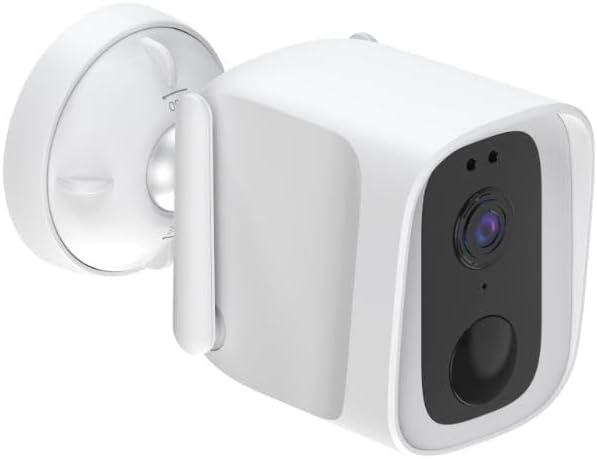
مجموعي طور View: This image shows the energeeks Guardian camera from an angled perspective, highlighting its compact design and the integrated mounting bracket. The camera features a white casing with a black front panel containing the lens and sensors.

سامهون پينل: سڌو محاذ view of the camera, detailing the central lens, the light sensor, and the infrared LEDs for night vision. The lower circular element is likely the microphone or a motion sensor.

پاسي پروfile: This image displays the side of the camera, showing the integrated antenna for WiFi connectivity and the robust mounting arm that allows for flexible positioning.

زاويه View with Mount: ٻيو زاويه view, providing a clearer look at the adjustable mounting base, which facilitates easy installation on various surfaces.
اهم خاصيتون
- IP65 Weather Protection: Designed to withstand dust and powerful water jets, ensuring reliable performance in various weather conditions (rain, snow, sun).
- 4 Megapixel Resolution: Captures clear and detailed high-definition images for precise surveillance.
- ترقي يافته رات جو خواب: Provides clear monitoring up to 10 meters in total darkness, ensuring 24/7 security.
- حرڪت ۽ آواز جي ڳولا: Equipped with advanced technology to detect both motion and sound, sending instant alerts to your mobile device for proactive surveillance.
- ٻه طرفي آڊيو: Features a built-in microphone and speaker for real-time communication through the camera.
- Integrated LED Lights and Siren: Activates upon motion detection to deter potential intruders, adding an extra layer of security.
- لچڪدار اسٽوريج جا اختيار: Supports recording to a micro SD card (not included) or cloud storage for convenient access to your footage.
- Wi-Fi and ONVIF Compatibility: Easily integrates with 2.4 GHz Wi-Fi networks and other security devices via ONVIF protocol.
- موبائل ايپليڪيشن: Control and monitor your camera from anywhere using the free mobile app available for iOS and Android, compatible with SMARTLIFE by Tuya.
سيٽ اپ گائيڊ
1. انباڪسنگ ۽ تياري
- احتياط سان پيڪنگنگ مان سڀني اجزاء کي هٽايو.
- Verify that all listed components are present (camera, power adapter, mounting screws, user manual).
- Choose a suitable outdoor location for installation, ensuring good Wi-Fi signal strength and a clear view علائقي جي نگراني ڪئي وڃي.
2. پاورنگ آن
- Connect the camera to the provided power adapter.
- Plug the power adapter into a suitable outdoor power outlet. Ensure the outlet is protected from weather elements.
- Wait for the camera's indicator light to show it is ready for pairing (refer to the camera's LED indicator guide in the full manual for specific light patterns).
3. ايپ انسٽاليشن ۽ جوڙو ٺاهڻ
- Download the "SMARTLIFE" or "Tuya Smart" app from your mobile device's app store (iOS App Store or Google Play Store).
- نئين اڪائونٽ لاءِ رجسٽر ٿيو يا جيڪڏهن توهان وٽ اڳ ۾ ئي آهي ته لاگ ان ٿيو.
- ايپ ۾، "ڊيوائس شامل ڪريو" يا "+" آئڪن تي ٽيپ ڪريو.
- Select "Security & Video Surveillance" and then "Smart Camera (Wi-Fi)".
- Follow the on-screen instructions to connect the camera to your 2.4 GHz Wi-Fi network. This usually involves scanning a QR code displayed on your phone with the camera's lens.
- Once successfully paired, you can rename your camera and begin live viewing.
4. جسماني تنصيب
- Using the provided mounting screws and template (if included), securely attach the camera's base to your chosen surface (wall, eaves, etc.).
- گهربل نگراني واري علائقي کي ڍڪڻ لاءِ ڪئميرا جي زاويه کي ترتيب ڏيو.
- پڪ ڪريو ته سڀئي ڪنيڪشن محفوظ آهن ۽ ضروري هجي ته موسم کان بچاء.
آپريٽنگ هدايتون
جيئڻ View ۽ رڪارڊنگ
- Open the SMARTLIFE/Tuya Smart app and select your energeeks Guardian camera.
- The live video feed will appear. You can switch between SD and HD resolution.
- To manually record video or capture screenshots, use the respective buttons on the live view انٽرفيس.
- If a micro SD card is inserted, recordings will be saved locally. Cloud storage options are also available via the app.
موشن ۽ آواز جي چڪاس
- ايپ اندر ڪئميرا سيٽنگز ڏانهن وڃو.
- Enable "Motion Detection" and "Sound Detection".
- Adjust sensitivity levels as needed to minimize false alarms.
- Configure notification settings to receive alerts on your mobile device when an event is detected.
ٻه طرفي آڊيو
- لائيو تي view screen, tap the microphone icon to speak through the camera's speaker.
- ڪئميرا جي مائڪروفون مان آڊيو ٻڌڻ لاءِ اسپيڪر آئڪن تي ٽيپ ڪريو.
LED Lights and Siren
- These features can be configured to activate automatically upon motion detection via the app settings.
- You may also be able to manually activate the siren or LED lights from the live view انٽرفيس.
سار سنڀال
- صفائي: Periodically clean the camera lens and casing نرم سان، damp ڪپڙو. سخت ڪيميائي يا رگڻ واري مواد استعمال نه ڪريو.
- فرم ويئر اپڊيٽس: Check the app regularly for available firmware updates. Keeping your camera's firmware up-to-date ensures optimal performance, security, and access to new features.
- بجلي جي فراهمي: Ensure the power connection remains secure and free from damage.
- وائي فائي ڪنيڪشن: Monitor your Wi-Fi signal strength in the app to ensure a stable connection for continuous surveillance.
مشڪلاتون
| مسئلو | ممڪن سبب | حل |
|---|---|---|
| ڪئميرا آف لائن آهي/وائي فائي سان ڳنڍجي نٿو سگهي | Weak Wi-Fi signal, incorrect Wi-Fi password, camera too far from router, router issues. |
|
| خراب تصوير جو معيار | Dirty lens, low light conditions, network bandwidth issues. |
|
| No motion/sound alerts | Detection settings disabled, sensitivity too low, app notifications blocked. |
|
| ٻه طرفي آڊيو ڪم نه ڪري رهيو آهي | Microphone/speaker disabled in app, volume too low, network latency. |
|
وضاحتون
| خاصيت | تفصيل |
|---|---|
| ماڊل نالو | Guardian 1080p outdoor fixed IP camera |
| ماڊل نمبر | EG-CIPEXT003 |
| قرارداد | 4 Megapixels (1080p video recording) |
| نائيٽ ويزن رينج | 10 ميٽر تائين |
| رابطي | Wi-Fi (2.4 GHz), Wired |
| پاڻي جي مزاحمت جي سطح | IP65 (پنروڪ) |
| آڊيو | ٻه طرفي آڊيو (مائڪروفون ۽ اسپيڪر) |
| خاص خاصيتون | Motion Detector, Sound Detection, LED Lights, Siren |
| اسٽوريج جا اختيار | Micro SD card, Cloud storage |
| طاقت | 5 وولٽ، 10 واٽ |
| طول و عرض (L x W x H) | 12 x 6 x 9 سينٽي |
| وزن | 500 گرام |
| مواد | پلاسٽڪ |
| سفارش ٿيل استعمال | ٻاهرين سيڪيورٽي |
وارنٽي ۽ سپورٽ
وارنٽي ڄاڻ
Specific warranty details for the energeeks Guardian camera are typically provided with your purchase documentation or on the manufacturer's official website. Please refer to these resources for information regarding warranty period, coverage, and claims process.
ڪسٽمر سپورٽ
For technical assistance, troubleshooting beyond this manual, or any product-related inquiries, please contact energeeks customer support. Contact information can usually be found on the product packaging, the official energeeks website, or within the SMARTLIFE/Tuya Smart application.
Note: ENERGEEKS aims to make home automation accessible and provides detailed manuals and personalized support in Spanish. For English support, please check their official channels.


