1. تعارف
This manual provides comprehensive instructions for the safe and effective use of the Flashpoint R2 XPro II 2.4GHz TTL Wireless Flash Trigger for Sony Cameras. This device is designed to provide reliable wireless control over compatible flash units, offering advanced features such as TTL, Manual, and Multi-flash modes, High-Speed Sync (HSS), and a robust 2.4GHz radio system.
مھرباني ڪري ڊوائيس کي هلائڻ کان اڳ ھن دستور کي چڱي طرح پڙھو ته جيئن مناسب ڪارڪردگي کي يقيني بڻائي سگھجي ۽ نقصان کان بچي سگھجي.
2. حفاظتي احتياط
- Do not disassemble or modify the device. Unauthorized modifications can lead to malfunction or electric shock.
- Keep the device dry. Do not expose it to rain, moisture, or high humidity.
- Avoid strong impacts or vibrations. Dropping the device may cause internal damage.
- ٻارن جي پهچ کان پري رکو.
- Use only specified batteries. Incorrect battery types may cause leakage or explosion.
- Do not operate in environments with flammable gases or liquids.
- Turn off the device when not in use or during cleaning.
3. پراڊڪٽ جا جزا ۽ ڪنٽرول
The Flashpoint R2 XPro II features an intuitive layout for easy operation. Familiarize yourself with the various parts and controls:
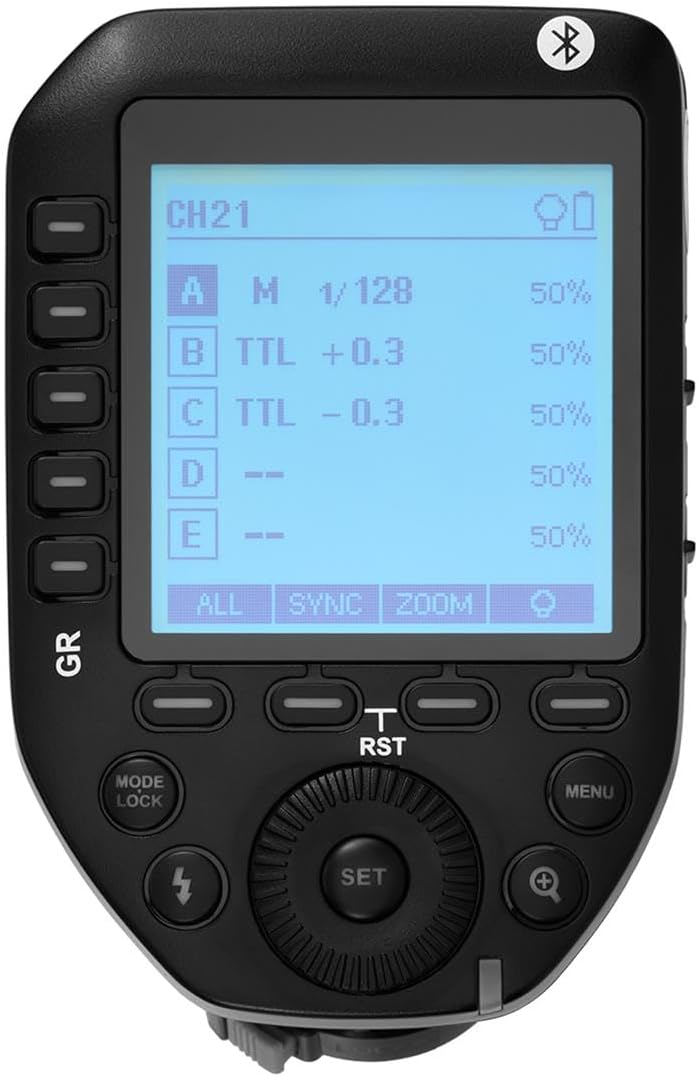
شڪل 3.1: مٿي view of the Flashpoint R2 XPro II, highlighting the large dot matrix LCD display and various control buttons including Group (GR), Mode/Lock, Set, Menu, and Zoom.

شڪل 3.2: زاويه view of the Flashpoint R2 XPro II, illustrating the hot shoe mount for camera attachment and the power ON/OFF switch located on the side.
اهم ڪنٽرول:
- LCD ڊسپلي: Large dot matrix display with adjustable backlight for clear visibility of settings.
- Group (GR) Buttons: Control individual flash groups (A, B, C, D, E).
- Mode/Lock Button: Switches between flash modes (TTL, Manual, Multi) and locks settings.
- سيٽ بٽڻ: Confirms selections and enters sub-menus.
- مينيو بٽڻ: سسٽم سيٽنگون ۽ جديد اختيارن تائين رسائي حاصل ڪري ٿو.
- زوم بٽڻ: Adjusts flash zoom settings for specific groups.
- ڊائل: Navigates menus and adjusts values.
- پاور سوئچ: يونٽ کي آن / بند ڪري ٿو.
- گرم جوتن جو جبل: Connects the trigger securely to your camera's hot shoe.
4. سيٽ اپ ۽ تنصيب
4.1 بيٽري لڳائڻ
The R2 XPro II uses two AA batteries (not included). Ensure correct polarity when inserting.

Figure 4.1: The battery compartment of the Flashpoint R2 XPro II, with the cover removed, illustrating the correct orientation for inserting AA batteries.
- يونٽ جي تري ۾ بيٽري جي ڪمپارٽمينٽ ڪَوَر کي ڳوليو.
- ڪپڙا کليل سلائيڊ ڪريو.
- Insert two AA batteries, matching the positive (+) and negative (-) indicators inside the compartment.
- بيٽري جي ڪمري واري ڍڪ کي محفوظ طور تي بند ڪريو.
4.2 Mounting on Camera
Attach the trigger to your Sony camera's hot shoe for seamless integration.

شڪل 4.2: هيٺيون view of the Flashpoint R2 XPro II, displaying the hot shoe mount and the instant flip locking mechanism designed for secure camera connection.
- Ensure the trigger is turned OFF.
- Slide the hot shoe mount of the R2 XPro II into your camera's hot shoe.
- Secure the trigger by engaging the locking mechanism (typically a lever or dial) on the hot shoe mount.
- Turn on the trigger and your camera.
5. آپريٽنگ هدايتون
The R2 XPro II offers various modes and settings for precise flash control.
5.1 پاور آن/آف
Use the ON/OFF switch located on the side of the unit to power the trigger.
5.2 Basic Screen Navigation
The large LCD display shows current settings for channels, groups, and flash modes. Use the dial to navigate and adjust values, and the SET button to confirm.
5.3 Flash Modes (TTL / M / Multi)
کي دٻايو موڊ / تالا موجود فليش موڊس ذريعي چڪر ڪرڻ لاءِ بٽڻ:
- TTL (Through-The-Lens): Automatic exposure control. The trigger communicates with the camera to determine optimal flash output.
- ايم (دستي): Allows manual adjustment of flash power output (e.g., 1/1 to 1/128).
- Multi (Stroboscopic): Fires a series of rapid flashes for creative effects.
The R2 XPro II also features TCM (TTL Converted to Manual) fusion, which allows you to capture an exposure in TTL mode and then convert that exposure value to a manual setting for consistent repeat shots.
5.4 Channel and Group Management
The trigger supports 32 channels and multiple groups (A, B, C, D, E) for managing complex lighting setups.
- استعمال ڪريو GR (Group) buttons to select and adjust individual flash groups.
- Access the menu to change the wireless channel to avoid interference.
5.5 High-Speed Sync (HSS)
The R2 XPro II supports High-Speed Sync up to 1/8000s, enabling you to use flash with fast shutter speeds, ideal for overpowering ambient light or freezing fast motion.
5.6 اسمارٽ فون ايپ ڪنٽرول (بلوٽوٿ)
The built-in Bluetooth allows for smartphone app control of flash functions. Download the compatible Flashpoint R2 app to manage settings remotely.

Figure 5.1: Illustration of the R2 Wireless System, demonstrating the Flashpoint R2 XPro II's ability to work with a complete family of Flashpoint speedlights, monolights, and strobe lights, and transmit atop any Sony DSLR, MSLR, or M Series body.
6. سار سنڀال ۽ سنڀال
- صفائي: Use a soft, dry cloth to clean the exterior of the unit. Do not use solvents or abrasive cleaners.
- اسٽوريج: جڏهن گهڻي عرصي تائين استعمال ۾ نه هجي، ته ليڪيج کي روڪڻ لاءِ بيٽريون هٽايو. ڊوائيس کي ٿڌي، سڪل جاءِ تي، سڌي سج جي روشني ۽ انتهائي گرمي پد کان پري رکو.
- فرم ويئر اپڊيٽس: وقتي طور تي ٺاهيندڙ جي چيڪ ڪريو website for available firmware updates to ensure optimal performance and compatibility. The unit is Mac and PC firmware updatable.
7. مسئلا حل ڪرڻ
If you encounter issues with your Flashpoint R2 XPro II, refer to the following common problems and solutions:
| مسئلو | ممڪن سبب | حل |
|---|---|---|
| ڊوائيس تي طاقت نه آهي. | بيٽريون ختم ٿي ويون آهن يا غلط طور تي لڳايون ويون آهن. | بيٽريون تبديل ڪريو يا صحيح پولارٽي کي يقيني بڻايو. |
| Flash unit does not fire. | Incorrect channel/group settings; flash unit not compatible; trigger not securely mounted. | Verify channel and group settings on both trigger and flash; ensure flash is compatible with R2 system; re-mount trigger securely. |
| Inconsistent flash firing. | Interference from other wireless devices; low battery. | Change to a different wireless channel; replace batteries. |
| TTL exposure is inaccurate. | Environmental factors; flash unit limitations. | Adjust flash exposure compensation on the trigger or camera; consider switching to Manual mode. |
8. وضاحتون
| خاصيت | تفصيل |
|---|---|
| ماڊل | R2 XPro II |
| وائرليس سسٽم | Flashpoint R2 / Godox X - 2.4GHz Radio System |
| مطابقت | Sony Cameras (TTL support) |
| ٽرانسميشن جي حد | 300-400 feet (approx. 90-120 meters) |
| چينل | 32 |
| گروهه | 5 (A, B, C, D, E) |
| فليش طريقا | TTL, Manual, Multi |
| High-Speed Sync (HSS) | 1/8000s تائين |
| ڏيکاريو | Large Dot Matrix LCD with Adjustable Backlight |
| رابطي | Built-in Bluetooth for Smartphone APP Control |
| فرم ویئر اپڊيٽ | Mac and PC Updatable via USB-C port |
| طاقت جو ذريعو | 2 x AA بيٽريون |
| پيداوار جي ماپ | 5.15 x 4 x 2.8 انچ |
| شيءِ جو وزن | 8.8 اونس |
9. وارنٽي ڄاڻ
Flashpoint products are designed and manufactured to the highest quality standards. For specific warranty terms and conditions, please refer to the warranty card included with your product or visit the official Flashpoint webسائيٽ. وارنٽي دعوائن لاءِ خريداري جي ثبوت طور پنهنجي خريداري جي رسيد رکو.
10. ڪسٽمر سپورٽ
For technical assistance, troubleshooting, or service inquiries, please contact Flashpoint customer support. You can find contact information on the official Flashpoint webسائيٽ تي يا پنهنجي پرچون ڪندڙ ذريعي.
آن لائين وسيلا: Flashpoint Official Store on Amazon


