تعارف
This user manual provides essential information for the safe and effective use of your Henhaoro Payment Terminal Battery. Please read this manual thoroughly before installation and operation to ensure optimal performance and longevity of the battery.
This battery is designed as a replacement for various payment terminal models, including Pax D200T, IS275, D200 Mini, and myPOS D200.
حفاظتي ڄاڻ ۽ ڊيڄاريندڙ
WARNING: To reduce the risk of fire or burns, read instructions in operating guide before using the battery.
- نه attempt to disassemble, open, or service the battery pack.
- صرف هن پراڊڪٽ لاءِ نامزد ٿيل بيٽري پيڪ سان تبديل ڪريو.
- نه ڪٽڻ، پنڪچر، مختصر خارجي رابطا، يا باهه يا پاڻي ۾ نيڪال ڪرڻ.
- نه store above 60°C (140°F).
- New battery pack must be fully charged before use.
- جيڪڏهن ليبل هٽايو وڃي ته وارنٽي ختم ٿي ويندي.
This battery is certified with ROSH, CE, and UL, ensuring high quality and safety standards. It features built-in protection against over-charge, over-discharge, over-heat, over-current, and short-circuit.
سيٽ اپ ۽ تنصيب
Before installing the new battery, ensure your payment terminal is powered off and disconnected from any power source.
- بيٽري جي ڪمري کي ڳوليو: Identify the battery compartment on your payment terminal. This is typically on the back or bottom of the device. Refer to your payment terminal's specific user manual if you are unsure.
- پراڻي بيٽري هٽايو (جيڪڏهن قابل اطلاق هجي): If replacing an existing battery, carefully open the compartment cover and remove the old battery. Note its orientation.
- نئين بيٽري داخل ڪريو: Align the new Henhaoro battery (Model No.: CS-PAD200BL, Part No.: IS057) with the contacts in the compartment. Ensure the "Insert this direction" arrow, if present on the battery, points correctly. Gently press the battery into place until it is securely seated.
- بند ڪمپارٽمينٽ: Replace the battery compartment cover, ensuring it clicks firmly into place.
- شروعاتي چارج Connect your payment terminal to its charger. The new battery pack must be fully charged before its first use to optimize performance and battery life. The limited charge voltage is 4.2V ± 0.05V.

Image: The Henhaoro Payment Terminal Battery (Model CS-PAD200BL) shown alongside a compatible payment terminal, illustrating its compact size and form factor for installation.
آپريٽنگ هدايتون
Once the battery is installed and fully charged, your payment terminal is ready for operation.
- پاور آن: Press and hold the power button on your payment terminal until the device powers on.
- بيٽري سطح جي نگراني: Regularly check the battery level indicator on your payment terminal's display. Recharge the battery when the level is low to prevent unexpected shutdowns.
- چارج ڪرڻ: Use only the original charger or a compatible charger recommended by the payment terminal manufacturer. The battery supports high capacity circulatory function, allowing for efficient recharging.
- بهترين ڪارڪردگي: For best performance, avoid completely draining the battery before recharging. This Li-Polymer battery has no memory effect.
سار سنڀال ۽ اسٽوريج
Proper maintenance and storage will extend the life of your battery.
- گرمي پد: Store the battery in a cool, dry place. Avoid extreme temperatures, especially above 60°C (140°F), as this can damage the battery and pose a fire risk.
- صفائي: If necessary, gently wipe the battery and its contacts with a clean, dry cloth. Do not use liquid cleaners.
- ڊگھي مدت اسٽوريج: If storing the battery for an extended period, it is recommended to charge it to approximately 50-70% capacity. Recharge it every 3-6 months to prevent deep discharge.
- نيڪال: Do not dispose of the battery in household waste. Follow local regulations for proper disposal of lithium-polymer batteries.

تصوير: هڪ تفصيلي view of the Henhaoro Payment Terminal Battery, showing the model number CS-PAD200BL, part number IS057, and key specifications printed on its label.
مشڪلاتون
| مسئلو | ممڪن سبب | حل |
|---|---|---|
| بيٽري چارج نه ٿي | Incorrect installation; Faulty charger/cable; Battery deeply discharged. | Ensure battery is correctly seated. Try a different charger/cable. Allow terminal to charge for an extended period (e.g., 30 mins) before checking. |
| مختصر بيٽري جي زندگي | Battery not fully charged; High power consumption by terminal; Battery degradation. | Ensure full charge before use. Reduce terminal's screen brightness or disable unnecessary features. If battery is old, consider replacement. |
| Terminal not powering on | Battery not installed; Battery completely drained; Faulty battery. | Verify battery installation. Charge the terminal. If issues persist, the battery may be faulty and require replacement. |
وضاحتون
| وصف | تفصيل |
|---|---|
| ماڊل نمبر. | CS-PAD200BL |
| حصو نمبر. | IS057 |
| زمرو | Payment Terminal Battery |
| ظرف | 1800mAh |
| قسم | لي-پوليمر |
| جلدtage | 3.7V |
| توانائي جي شرح | 6.66 ايڇ |
| رنگ | ڪارو |
| طول و عرض | 60.00 x 57.00 x 5.30 ملي ميٽر |
| خالص وزن | 37.4g / 1.32oz |
| مجموعي وزن | 62.4g / 2.20oz |
| EAN ڪوڊ | 4894128171447 |
| سرٽيفڪيشن | ROSH, CE, UL |
| ٺاهيندڙ | HENZENS |
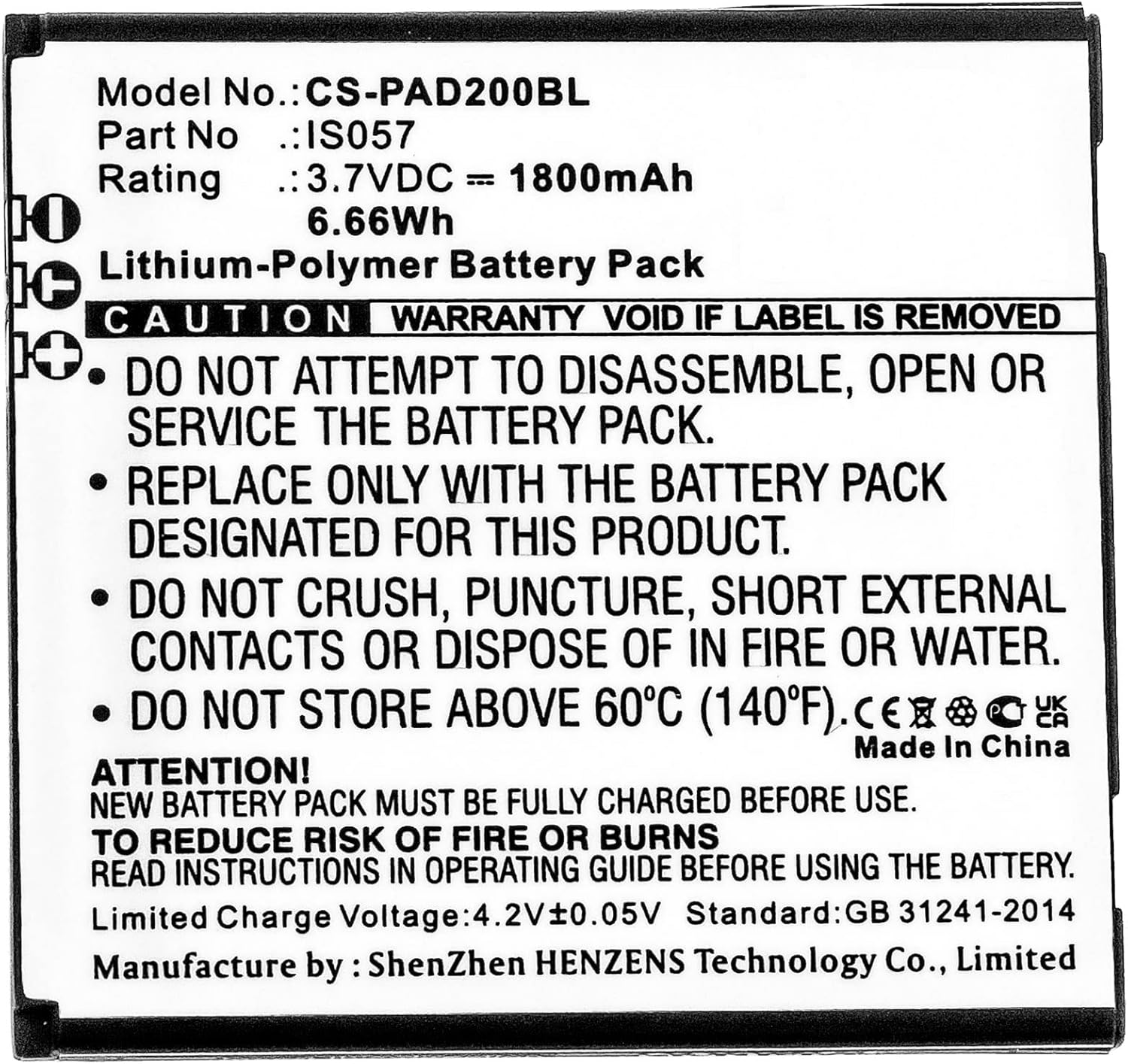
تصوير: هڪ وڏو ٿيل view of the battery's label, clearly displaying the model number, part number, voltage, capacity, and important safety warnings and certifications.
وارنٽي ڄاڻ
The battery comes with quality certifications including ROSH, CE, and UL. The warranty is void if the original label is removed from the battery pack.
For specific warranty terms and conditions, please refer to the purchase documentation or contact the seller directly.
ڪسٽمر سپورٽ
For any questions, technical assistance, or support regarding your Henhaoro Payment Terminal Battery, please contact your retailer or visit the official Henhaoro store on Amazon:


