1. تعارف
This user manual provides essential information for the safe and efficient operation of your HYCHIKA 3.6V Cordless Electric Rechargeable Screwdriver Drill Set. Please read this manual thoroughly before first use and keep it for future reference.
The HYCHIKA 3.6V Cordless Electric Screwdriver is designed for various screwing and light drilling tasks around the home. It features a maximum torque of 6 N-m, a 6.35 mm quick-change chuck, and a versatile design that allows for both pistol and straight grip configurations.
2. حفاظتي هدايتون
باهه، بجليءَ جي جھٽڪي، ۽ ذاتي زخمن جي خطري کي گهٽائڻ لاءِ بجليءَ جا اوزار استعمال ڪرڻ وقت هميشه بنيادي حفاظتي احتياطن تي عمل ڪريو.
- ڪم واري علائقي جي حفاظت: پنهنجي ڪم واري علائقي کي صاف ۽ روشن رکو. گندو يا اونداهو علائقو حادثن کي دعوت ڏئي ٿو. بجلي جا اوزار ڌماڪيدار ماحول ۾ نه هلايو، جهڙوڪ ٻرندڙ مائع، گئس، يا مٽي جي موجودگي ۾.
- برقي حفاظت: Avoid body contact with earthed or grounded surfaces such as pipes, radiators, ranges, and refrigerators. Do not expose power tools to rain or wet conditions.
- ذاتي حفاظت: Always wear eye protection. Use safety glasses, goggles, or a face shield. Wear hearing protection when operating noisy tools. Dress properly; avoid loose clothing or jewelry.
- اوزار استعمال ۽ سنڀال: پاور ٽول کي زور سان نه لڳايو. پنهنجي ايپليڪيشن لاءِ صحيح پاور ٽول استعمال ڪريو. ڪا به ترتيب ڏيڻ، لوازمات تبديل ڪرڻ، يا پاور ٽولز کي ذخيرو ڪرڻ کان اڳ پاور سورس کان پلگ ڊسڪنيڪٽ ڪريو ۽/يا بيٽري پيڪ کي هٽايو.
- بيٽري پيڪ جو استعمال ۽ سنڀال: Recharge only with the charger specified by the manufacturer. Do not use battery packs with any other power tools. When battery pack is not in use, keep it away from other metal objects.
3. پيڪيج مواد
پڪ ڪريو ته هيٺ ڏنل سڀئي شيون توهان جي پيڪيج ۾ شامل آهن. جيڪڏهن ڪا به شيءِ غائب يا خراب آهي، مهرباني ڪري ڪسٽمر سپورٽ سان رابطو ڪريو.
- 1 x HYCHIKA 3.6V Cordless Screwdriver
- 19 x اسڪرو ڊرائيور بٽس
- 1 x ايڪسٽينشن بار
- 1 x چارجنگ اڊاپٽر
- 1 x استعمال ڪندڙ دستياب

Figure 3.1: Contents of the HYCHIKA 3.6V Cordless Screwdriver package, including the screwdriver, various bits, and charging adapter.
4. پراڊڪٽ جون خاصيتون ۽ جزا
Familiarize yourself with the different parts of your cordless screwdriver.

Figure 4.1: Key components of the screwdriver, including the magnetic chuck, PUSH button, front LED light, On/Off switch, LED charger indicator, 3.5mm charger port, and forward & reverse button.
- Magnetic Chuck: 1/4 inch (6.35mm) quick-change chuck for easy bit installation and removal.
- سامهون واري ايل اي ڊي لائيٽ: Illuminates the work area for improved visibility in dark environments.
- آن/آف سوئچ: اسڪرو ڊرائيور کي چالو ۽ غير فعال ڪري ٿو.
- اڳتي ۽ پوئتي بٽڻ: Controls the rotation direction for screwing and unscrewing.
- LED Charger Indicator: Provides status of battery charging.
- 3.5mm Charger Port: Connection point for the charging adapter.
- پش بٽڻ: Used to adjust the grip configuration from pistol to straight.
5. سيٽ اپ
5.1 بيٽري کي چارج ڪرڻ
The screwdriver is powered by a 3.6V 2000 mAh Lithium-Ion battery. Before first use, fully charge the battery.
- Connect the charging adapter to the 3.5mm charger port on the screwdriver.
- Plug the charging adapter into a standard electrical outlet.
- The LED charger indicator will illuminate during charging. Once fully charged, the indicator may change color or turn off depending on the model.
- چارجنگ مڪمل ٿيڻ کان پوءِ چارجر کي ان پلگ ڪريو.

Figure 5.1: The screwdriver connected to its charging adapter, indicating a full charge.
The screwdriver is designed to maintain full power output even when the battery is low, ensuring consistent performance until the battery is depleted.
5.2 اسڪرو ڊرايور بِٽس لڳائڻ
The screwdriver features a 1/4 inch (6.35mm) magnetic quick-change chuck for easy bit installation.
- توھان جي ڪم لاءِ مناسب اسڪرو ڊرايور بٽ چونڊيو.
- Insert the bit into the magnetic chuck until it is securely seated. The magnetic chuck will hold the bit firmly in place.
- To remove a bit, simply pull it out of the chuck. Bits with grooves are designed for easier removal.

Figure 5.2: Visual guide for inserting a bit into the magnetic chuck and removing it.
6. آپريٽنگ هدايتون
6.1 Adjusting Grip Configuration
The screwdriver can be used in two grip configurations: pistol grip or straight grip, for enhanced versatility and comfort.
- To change the grip, press and hold the "PUSH" button located at the top of the screwdriver.
- While holding the button, rotate the handle ninety degrees to switch between pistol and straight configurations.
- Release the "PUSH" button once the desired configuration is achieved. The handle will lock into place.
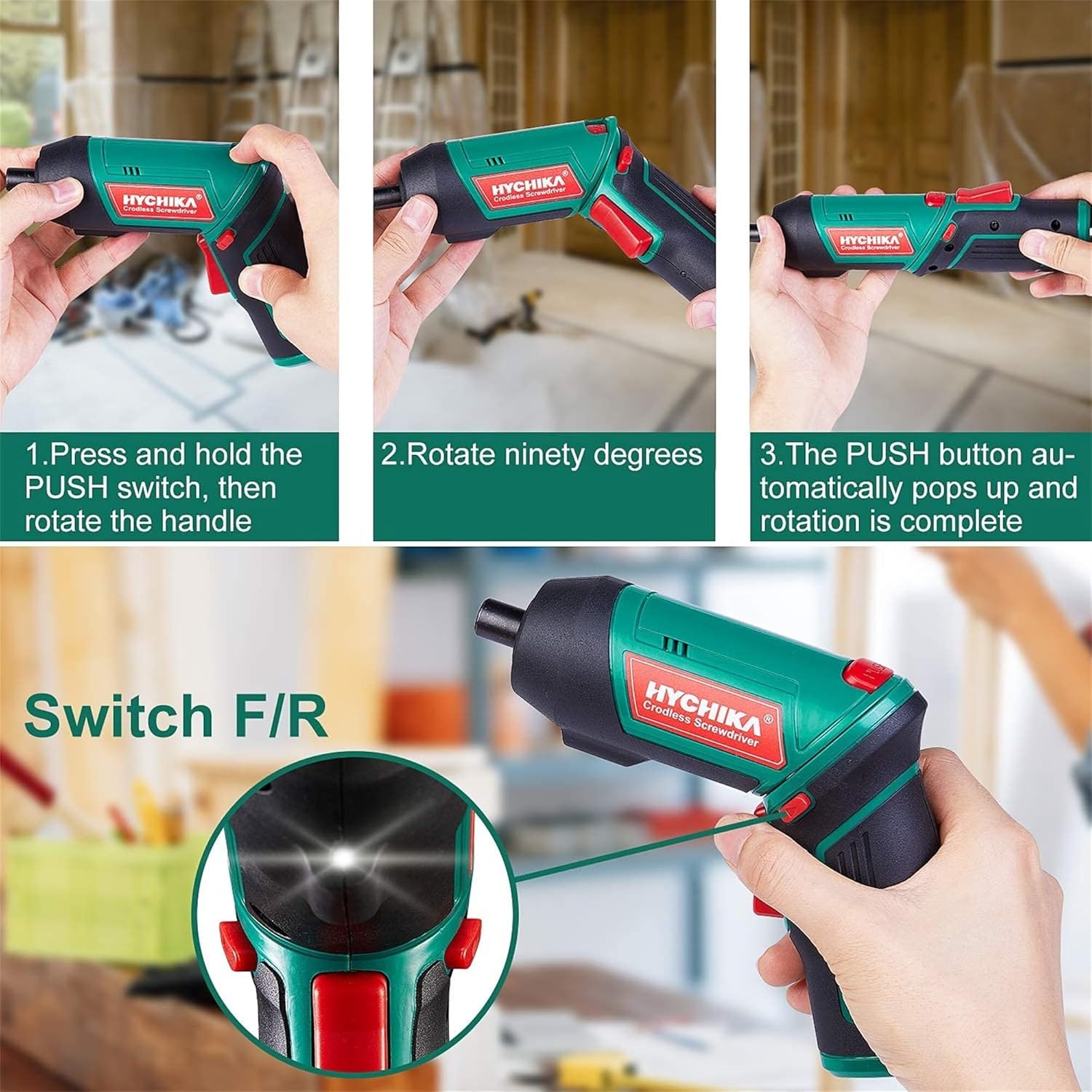
Figure 6.1: Demonstrates the process of transforming the screwdriver's grip by pressing the PUSH button and rotating the handle.
6.2 Forward and Reverse Operation
The forward/reverse button controls the direction of rotation for screwing and unscrewing.
- To drive screws (forward rotation), push the forward/reverse button to the left (when viewed اوزار جي پوئين پاسي کان).
- To remove screws (reverse rotation), push the forward/reverse button to the right.
- When the button is in the center position, the tool is locked, preventing accidental activation.
6.3 ايل اي ڊي ورڪ لائيٽ استعمال ڪندي
The built-in LED light automatically illuminates when the screwdriver is in operation, providing visibility in dimly lit areas.

Figure 6.2: The integrated LED light provides clear illumination for working in dark environments.
7. سار سنڀال
Regular maintenance ensures the longevity and optimal performance of your screwdriver.
- صفائي: Keep the ventilation openings clean and free from dust. Use a soft, damp اوزار صاف ڪرڻ لاءِ ڪپڙو جasing سخت ڪيميڪل يا رگڙيندڙ صاف ڪندڙ استعمال نه ڪريو.
- بِٽ ڪيئر: Clean screwdriver bits after use. Store them in the provided case to prevent loss and damage.
- بيٽري اسٽوريج: If storing the tool for an extended period, ensure the battery is partially charged (around 50%) and store it in a cool, dry place. Recharge the battery every 3-6 months to maintain its health.
- عام چڪاس: Periodically check for any loose screws, damaged cords, or worn parts. Do not use the tool if any damage is observed.
8. مسئلا حل ڪرڻ
This section addresses common issues you might encounter with your screwdriver.
| مسئلو | ممڪن سبب | حل |
|---|---|---|
| اسڪرو ڊرايور آن نٿو ٿئي. | بيٽري ختم ٿي وئي آهي. Forward/Reverse switch is in the center (locked) position. | پوري بيٽري چارج ڪريو. اڳتي / ريورس سوئچ کي کاٻي يا ساڄي طرف دٻايو. |
| اسڪرو ڊرايور جلدي طاقت وڃائي ٿو. | بيٽري مڪمل طور تي چارج نه آهي. بيٽري جي زندگي خراب ٿي وئي. | استعمال ڪرڻ کان اڳ پڪ ڪريو ته بيٽري مڪمل طور تي چارج ٿيل آهي. If battery life is significantly reduced, contact customer support for replacement options. |
| Bits are not held securely in the chuck. | Bit is not fully inserted. Chuck is dirty or damaged. | Push the bit firmly into the chuck until it clicks into place. Clean the chuck area. If damage is visible, contact customer support. |
جيڪڏهن انهن حلن جي ڪوشش ڪرڻ کان پوءِ به مسئلو برقرار رهي، مهرباني ڪري ڪسٽمر سپورٽ سان رابطو ڪريو.
9. وضاحتون
| خاصيت | تفصيل |
|---|---|
| برانڊ | Overstock (HYCHIKA) |
| ماڊل نمبر | c131a012-0da9-4306-aeab-b1d9ff5cd4b7 |
| جلدtage | 3.6 وولٽ |
| طاقت جو ذريعو | بيٽري سان هلندڙ |
| رفتار | 180 RPM |
| شيءِ تورڪ | 6 Newton Meters (6 N-m) |
| بيٽري جو قسم | ليتيم آئن |
| بيٽري جي گنجائش | 2000 mAh |
| چوڪ جي ماپ | 1/4 انچ (6.35 ملي ميٽر) |
| مواد | پلاسٽڪ، رٻڙ |
| رنگ | سائو |
| يو پي سي | 616859793583 |
10. وارنٽي ۽ سپورٽ
Overstock offers lifetime after-sales service for this product. For any questions, concerns, or technical assistance, please contact our customer support team.
Please have your model number (c131a012-0da9-4306-aeab-b1d9ff5cd4b7) and purchase information ready when contacting support.


