تعارف
This manual provides detailed instructions for the installation, operation, and maintenance of your Gravity D96CP HiFi Audio Processor Car Stereo. Please read this manual thoroughly before using the product to ensure proper function and to prevent damage.
حفاظت جي ڄاڻ
- Ensure all wiring is correctly connected to prevent short circuits or damage to the unit and vehicle.
- يونٽ کي اهڙي طريقي سان نه هلايو جيڪو توهان کي ڊرائيونگ کان پريشان ڪري. هميشه روڊ جي حفاظت کي ترجيح ڏيو.
- جيڪڏهن توهان کي ڪنهن به قدم بابت پڪ ناهي ته انسٽاليشن لاءِ ڪنهن ماهر سان صلاح ڪريو.
- يونٽ کي پاڻي ۽ گهڻي نمي کان پري رکو.
- Do not attempt to repair the unit yourself. Refer servicing to qualified personnel.
دٻي ۾ ڇا آهي
پيڪيج کولڻ تي، تصديق ڪريو ته سڀئي جزا موجود آهن:
- Gravity D96CP Car Stereo Unit
- ريموٽ ڪنٽرول
- وائرنگ وارن
- استعمال ڪندڙ جو دستياب (ھي دستاويز)
Note: Additional accessories such as a trim kit, specific vehicle wiring harness, or RCA cables may be required for installation and are sold separately.
پيداوار ختمview
سامهون پينل

شڪل 1: سامهون view of the Gravity D96CP Car Stereo. The 6.5-inch touchscreen displays the main interface with icons for various functions. Physical buttons for IR, RST, Power, Band, Volume Up/Down, and Disc Eject are located on the left side. A USB port is at the bottom left.
پوئين پينل ۽ ڪنيڪشن

شڪل 2: Rear panel of the Gravity D96CP Car Stereo. This view highlights the multiple RCA jacks for audio/video input and output, a TV antenna port (functionality may vary), a radio antenna input, and the main connector for the wiring harness.
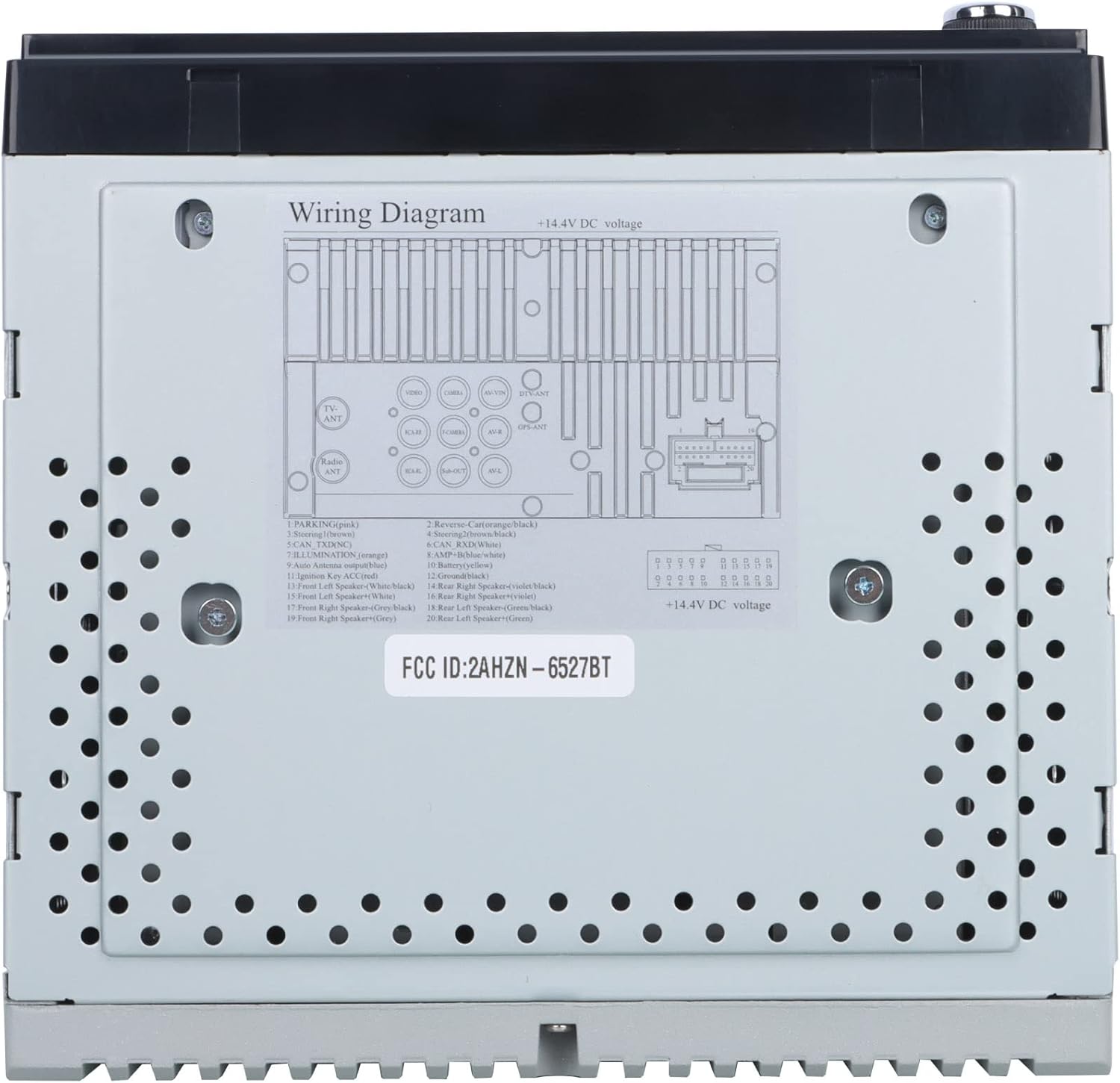
شڪل 3: Detailed wiring diagram for the Gravity D96CP. This diagram illustrates the pin assignments for the main power and speaker harness, including connections for parking brake, reverse, illumination, antenna, and ampلفٽ ڪنٽرول.
سيٽ اپ ۽ تنصيب
Proper installation is crucial for the performance and safety of your car stereo. If you are not confident in performing the installation yourself, seek professional assistance.
قبل از انسٽاليشن چيڪ لسٽ
- Ensure the vehicle's battery is disconnected before starting any wiring.
- Verify the stereo's dimensions fit your vehicle's dashboard opening. A trim kit may be necessary.
- Obtain a vehicle-specific wiring harness adapter if not included, to avoid cutting factory wires.
وائرنگ ڪنيڪشن
ڏانهن رجوع ڪريو شڪل 3 for the detailed wiring diagram. Key connections include:
- طاقت (پيلو): مسلسل 12V جي فراهمي.
- اگنيشن (ڳاڙهو): Switched 12V supply (ACC).
- گرائونڊ (ڪارو): هڪ صاف چيسس گرائونڊ پوائنٽ سان ڳنڍيو.
- اسپيڪر وائر: Connect to corresponding vehicle speakers (Front Left, Front Right, Rear Left, Rear Right). Ensure correct polarity.
- Reverse (Orange/Black): Connect to the vehicle's reverse light circuit for automatic camera display.
- Parking (Pink): This unit may not have a dedicated parking brake interlock. Exercise caution when operating video functions while driving.
- اينٽينا (نيرو): پاور اينٽينا/ampلائفائر ريموٽ ٽرن آن.
- ٻاهرين مائڪروفون بهتر ڪال جي معيار لاءِ ٻاهرين مائڪروفون کي ڳنڍيو.
Note: The unit features RCA jacks for video in/out and audio in/out, allowing connection of external sources or additional screens. RCA cables are not included.
آپريٽنگ هدايتون
بنيادي آپريشن
- پاور آن / آف: اڳيان پينل تي پاور بٽڻ کي دٻايو.
- حجم ڪنٽرول: Use the VOL+ and VOL- buttons on the front panel or the touchscreen controls.
- موڊ جي چونڊ: Tap the desired icon on the touchscreen (e.g., Radio, Bluetooth, USB, AUX, Phonelink, Settings).
ايپل ڪار پلي / اينڊرائيڊ آٽو
Connect your iPhone (for CarPlay) or Android phone (for Android Auto) to the stereo via a certified USB cable. The system will automatically detect and launch the respective interface. This allows access to phone functions like navigation, music, calls, and messages directly from the stereo's touchscreen or via voice commands (Siri/Google Assistant).
- پڪ ڪريو ته توهان جي فون جو آپريٽنگ سسٽم جديد آهي.
- Use the original USB cable for optimal connection stability.
- The phone screen and stereo screen operate independently, allowing different content to be displayed on each.
آئيني لنڪ
The Mirror Link function projects your smartphone's screen directly onto the car stereo display. Connect your phone via a USB cable, and follow the on-screen prompts to activate mirroring. Any content displayed on your phone will be synchronized in real-time on the 6.5-inch stereo screen.
بلوٽوت ڪنيڪشن
- جوڙڻ: Go to the Bluetooth menu on the stereo. Enable Bluetooth on your smartphone and search for available devices. Select "Gravity D96CP" (or similar name) and confirm pairing.
- هينڊ فري ڪالنگ: Once paired, you can answer/make calls directly from the stereo. The external microphone picks up your voice, and audio plays through the car speakers.
- آڊيو وهڪرو: Stream music and audio from your phone to the stereo. Control playback (play/pause, skip) via the stereo's touchscreen or your phone.
ڊي وي ڊي / سي ڊي پليئر
Insert a DVD or CD into the disc slot. The unit will automatically detect the disc and begin playback. Use the touchscreen controls for playback functions (play, pause, skip, menu).
ريڊيو
- Select the "Radio" icon from the main menu.
- دستياب اسٽيشنن کي ڳولڻ لاءِ اسڪين فنڪشن استعمال ڪريو يا دستي طور تي فريڪوئنسي تي ٽيون ڪريو.
- Save preferred stations to preset buttons for quick access.
USB پلے بیک
Insert a USB drive into the front USB port. The unit will automatically detect compatible media files (audio, video, images) and allow you to browse and play them.
ريڙهه View بيڪ اپ ڪئميرا
جيڪڏهن هڪ مطابقت رکندڙ پٺڀرائي view camera (sold separately) is connected and the reverse wire is properly installed, the stereo will automatically display the camera feed when the vehicle is shifted into reverse.
سار سنڀال
- اسڪرين جي صفائي: ٽچ اسڪرين کي نرميءَ سان صاف ڪرڻ لاءِ نرم، لِنٽ فري ڪپڙو استعمال ڪريو. رگڙيندڙ ڪلينر يا سالوينٽس استعمال نه ڪريو.
- عام صفائي: يونٽ کي مٽي ۽ ملبي کان پاڪ رکو. ٻاهرين صفائي لاءِ نرم، سڪل ڪپڙو استعمال ڪريو.
- فرم ويئر اپڊيٽس: ٺاهيندڙ جي چيڪ ڪريو website periodically for any available firmware updates to improve performance and add features.
مشڪلاتون
| مسئلو | ممڪن سبب | حل |
|---|---|---|
| يونٽ پاور نه آهي. | Incorrect wiring (power/ground), blown fuse. | Check all power and ground connections. Inspect the fuse on the wiring harness. |
| آواز ڪونهي. | اسپيڪر جون تارون غلط طريقي سان ڳنڍيل آهن، آواز تمام گهٽ آهي، خاموشي چالو آهي. | Verify speaker wiring polarity and connections. Increase volume. Check if mute is active. |
| Apple CarPlay/Android Auto not connecting or unstable. | Non-original USB cable, outdated phone OS, loose connection. | Use a certified, original USB cable. Ensure phone OS is updated. Reconnect the USB cable firmly. |
| Bluetooth connection issues or poor call quality. | Interference, phone not paired, microphone issue. | Re-pair the device. Ensure the external microphone is properly connected and positioned. |
| DVD player plays sound but no video. | Disc issue, video format incompatibility, parking brake safety feature (if present). | Try a different DVD. Ensure the video format is supported. Verify parking brake connection if applicable. |
| Screen goes black when headlights are turned on. | Illumination wire incorrectly connected. | Check the illumination wire connection (orange wire) to ensure it's correctly wired to the vehicle's dimmer circuit or constant 12V if no dimmer is desired. |
وضاحتون
| ماڊل نمبر | VGR-D96CP |
| برانڊ | ڪشش ثقل |
| اسڪرين جي ماپ | 6.5 انچ |
| رابطي ٽيڪنالاجي | معاون، بلوٽوٿ، يو ايس بي |
| ڪنٽرولر جو قسم | Android, Google Assistant, iOS |
| خاص خاصيتون | Spotify, Touchscreen, Apple CarPlay, Android Auto, Mirror Link, DVD/CD Player |
| مطابقت رکندڙ ڊوائيسز | Mobile Phone, Speaker |
| آڊيو آئوٽ پٽ موڊ | چوڌاري |
| چوڌاري آواز چينل جي جوڙجڪ | 5.1 |
| وڊيو انڪوڊنگ | MPEG-2 |
| چينلن جو تعداد | 4 |
| شيءِ جو وزن | 3.89 پائونڊ |
| پيڪيج جي ماپ | 9.69 x 9.41 x 7.17 انچ |
وارنٽي ڄاڻ
Specific warranty details for the Gravity D96CP are not provided in the available product information. Please refer to the warranty card included with your purchase or contact Gravity customer support for detailed warranty terms and conditions.
ڪسٽمر سپورٽ
For technical assistance, troubleshooting beyond this manual, or inquiries regarding your Gravity D96CP car stereo, please contact Gravity customer support. Contact information is typically found on the product packaging or the manufacturer's official webسائيٽ.


