1. تعارف
خريد ڪرڻ لاءِ مهربانيasing the SOAR XL ShockBox BTH6 Wireless Bluetooth Speaker. This speaker is designed to provide high-quality audio with versatile connectivity options, including Bluetooth 5.0, AM/FM radio, USB, and Aux inputs. Its portable and shockproof design, combined with dynamic multicolor LED lights, makes it suitable for various environments. Please read this manual carefully to ensure proper use and maintenance of your device.
2. پراڊڪٽ ختمview
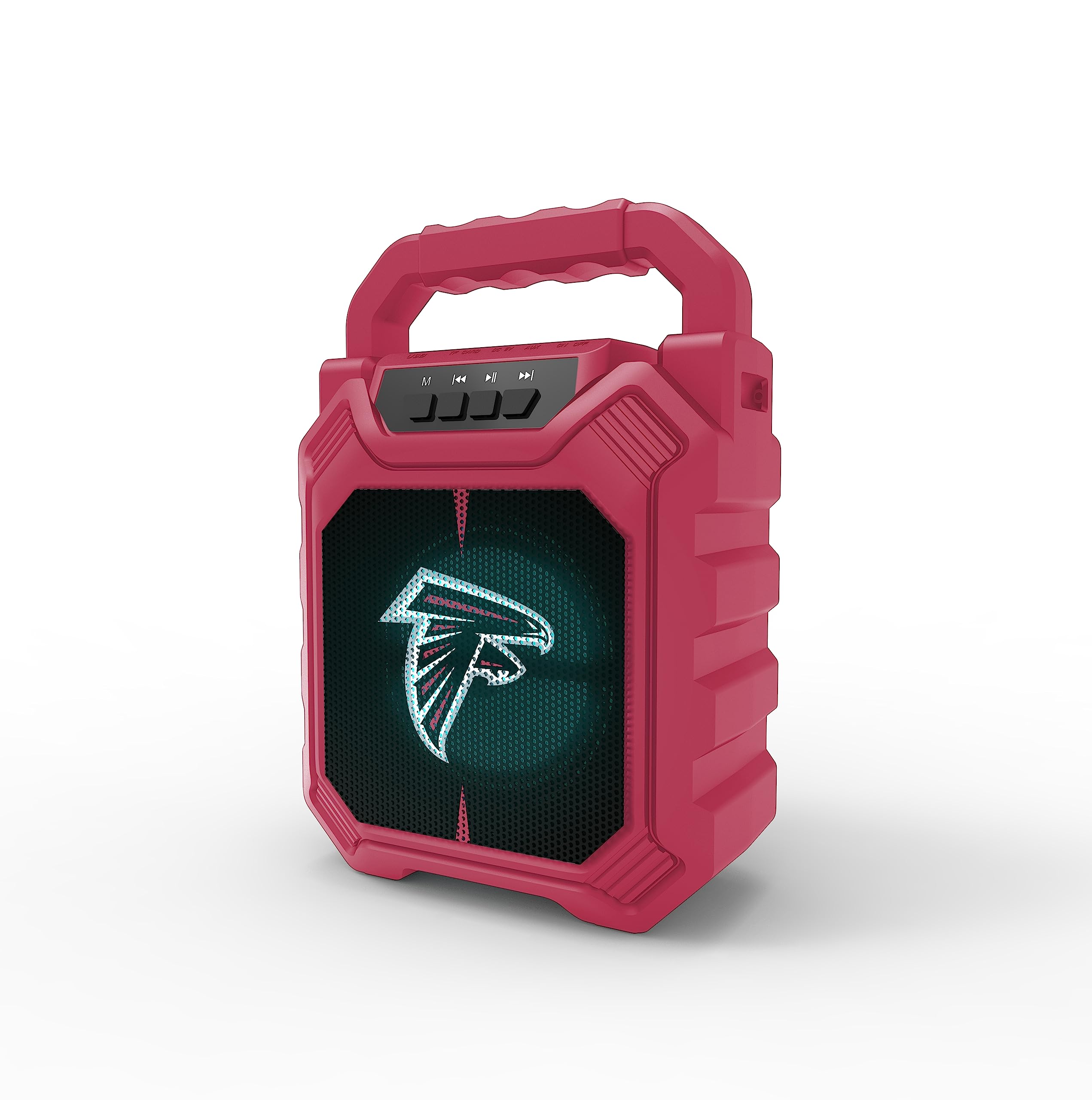
تصوير 1: سامهون view of the SOAR XL ShockBox BTH6 Wireless Bluetooth Speaker, featuring the Atlanta Falcons logo.
اهم خاصيتون:
- بلوٽوت 5.0 ڪنيڪشن: For seamless wireless audio streaming.
- گھڻن آڊيو ان پٽ: Supports AM/FM radio, USB, and Aux connections.
- پورٽبل ڊيزائن: Features a convenient top handle and shockproof construction.
- ڊگھي بيٽري زندگي: Provides over 5 hours of playback on a single charge.
- متحرڪ LED بتيون: Multicolor LED lights pulse with the music.
- سچو وائرليس اسٽيريو (TWS): Connect two speakers for enhanced stereo sound.
3. ڪنٽرول ۽ بندرگاهون

Image 2: Top panel of the speaker, illustrating the control buttons and various input ports.
بٽڻ افعال:
- پاور بٽڻ: Press and hold to turn the speaker ON/OFF. Short press to switch modes (Bluetooth, FM, USB, Aux).
- 'M' (Mode) Button: Short press to cycle through input modes (Bluetooth, FM Radio, USB, Aux).
- پوئين ٽريڪ / آواز گهٽ: Short press for previous track (in Bluetooth/USB mode). Press and hold to decrease volume.
- راند/روڪ بٽڻ: Short press to play or pause audio. In FM mode, short press to auto-scan and save stations.
- ايندڙ ٽريڪ / آواز وڌايو: Short press for next track (in Bluetooth/USB mode). Press and hold to increase volume.
داخل ٿيل بندرگاهن:
- مائڪرو يو ايس بي چارجنگ پورٽ: اسپيڪر چارج ڪرڻ لاء.
- USB پورٽ: USB فليش ڊرائيو مان آڊيو هلائڻ لاءِ.
- آڪس-ان پورٽ (3.5 ملي ميٽر): معاون ڪيبل ذريعي ٻاهرين آڊيو ڊوائيسز کي ڳنڍڻ لاءِ.
- مائڪرو ايس ڊي ڪارڊ سلاٽ: مائڪرو ايس ڊي ڪارڊ مان آڊيو هلائڻ لاءِ.
4. سيٽ اپ ۽ آپريشن
4.1 اسپيڪر کي چارج ڪرڻ
- Connect the provided micro-USB cable to the charging port on the speaker.
- ڪيبل جي ٻئي ڇيڙي کي USB پاور اڊاپٽر (شامل نه آهي) يا ڪمپيوٽر جي USB پورٽ سان ڳنڍيو.
- چارجنگ انڊيڪيٽر لائيٽ روشن ٿيندي. هڪ ڀيرو مڪمل چارج ٿيڻ کان پوءِ، روشني رنگ تبديل ڪري سگهي ٿي يا بند ٿي سگهي ٿي.
- A full charge provides over 5 hours of playback time.
4.2 پاور آن/آف
- To turn ON, press and hold the Power button until you hear an audible prompt.
- To turn OFF, press and hold the Power button again until the speaker powers down.
4.3 بلوٽوٽ جوڙي
- اسپيڪر آن ڪريو. اهو خودڪار طريقي سان بلوٽوٿ پيئرنگ موڊ ۾ داخل ٿيندو، جيڪو هڪ چمڪندڙ LED لائيٽ ۽ هڪ ٻڌڻ واري پرامپٽ سان ظاهر ٿيندو.
- پنهنجي ڊوائيس (اسمارٽ فون، ٽيبليٽ، وغيره) تي، بلوٽوٿ کي فعال ڪريو ۽ موجود ڊوائيسز جي ڳولا ڪريو.
- Select "SOAR BTH6" from the list of devices.
- هڪ ڀيرو جوڙيو ويندو، اسپيڪر هڪ ٻڌڻ واري تصديق خارج ڪندو، ۽ LED لائيٽ چمڪائڻ بند ٿي ويندي.
- جيڪڏهن ڊوائيس رينج اندر هجي ۽ بلوٽوٿ فعال هجي ته اسپيڪر خودڪار طريقي سان آخري جوڙيل ڊوائيس سان ٻيهر ڳنڍجي ويندو جڏهن پاور آن ٿيندو.
4.4 ايف ايم ريڊيو آپريشن
- Turn on the speaker and press the 'M' (Mode) button until you enter FM Radio mode.
- To auto-scan and save available FM stations, short press the Play/Pause button. The speaker will scan and store stations automatically.
- Use the Previous Track and Next Track buttons to navigate between saved stations.
4.5 USB and Aux Input
- USB ان پٽ USB پورٽ ۾ هڪ USB فليش ڊرائيو داخل ڪريو. اسپيڪر خودڪار طريقي سان USB موڊ ۾ سوئچ ڪندو ۽ آڊيو هلائڻ شروع ڪندو. files.
- اوڪس ان پٽ: Connect an external audio device (e.g., MP3 player) to the Aux-in port using a 3.5mm audio cable. Press the 'M' button to switch to Aux mode.
4.6 ايل اي ڊي لائيٽنگ موڊس

Image 3: The speaker displaying its dynamic LED lights in a vibrant setting.
The speaker features dynamic multicolor LED lights that pulse to the rhythm of the music. These lights activate automatically when the speaker is in use. There are no user-adjustable modes for the LED lights; they are designed to enhance the audio experience visually.
4.7 ٽرو وائرليس اسٽيريو (TWS) پيئرنگ

Image 4: Two SOAR XL ShockBox BTH6 speakers paired together for True Wireless Stereo (TWS) sound.
To achieve a wider soundstage, you can pair two SOAR XL ShockBox BTH6 speakers together using the TWS function:
- Ensure both speakers are turned OFF.
- Turn ON both speakers. They will enter Bluetooth pairing mode.
- On one of the speakers (this will be your primary speaker), double-press the 'M' (Mode) button. The speakers will attempt to connect to each other.
- Once successfully paired, you will hear an audible confirmation. The LED lights on both speakers will synchronize.
- هاڻي، پنهنجي ڊوائيس کي بلوٽوٿ ذريعي پرائمري اسپيڪر سان ڳنڍيو جيئن سيڪشن 4.3 ۾ بيان ڪيو ويو آهي. آڊيو ٻنهي اسپيڪرن ذريعي اسٽيريو ۾ هلندو.
5. سار سنڀال
- صفائي: اسپيڪر جي ٻاهرين حصي کي صاف ڪرڻ لاءِ نرم، سڪل ڪپڙو استعمال ڪريو. رگڙيندڙ صاف ڪندڙ يا محلول استعمال نه ڪريو.
- اسٽوريج: اسپيڪر کي سڌي سج جي روشني ۽ انتهائي گرمي پد کان پري ٿڌي، سڪل جاءِ تي رکو.
- بيٽري جي سنڀال: بيٽري جي زندگي کي وڌائڻ لاءِ، اسپيڪر کي باقاعدي چارج ڪريو، جيتوڻيڪ بار بار استعمال ۾ نه هجي. ڊگهي عرصي تائين بيٽري کي مڪمل طور تي ڊسچارج ڪرڻ کان پاسو ڪريو.
- پاڻي جي مزاحمت: While designed to be durable, avoid submerging the speaker in water.
6. مسئلا حل ڪرڻ
| مسئلو | ممڪن حل |
|---|---|
| اسپيڪر آن نٿو ٿئي. | Ensure the battery is charged. Connect the speaker to a power source using the micro-USB cable. |
| بلوٽوٿ ذريعي جوڙي نه ٿو سگهجي. | Make sure the speaker is in Bluetooth mode and within range (approx. 10 meters). Turn off and on your device's Bluetooth. Forget "SOAR BTH6" from your device's Bluetooth list and try pairing again. |
| ڪابه آواز يا گهٽ آواز ناهي. | اسپيڪر ۽ توهان جي ڳنڍيل ڊوائيس ٻنهي تي واليوم ليول چيڪ ڪريو. پڪ ڪريو ته صحيح ان پٽ موڊ چونڊيو ويو آهي. |
| ايف ايم ريڊيو جي وصولي خراب آهي. | Adjust the speaker's position. Ensure you are in an area with good signal strength. |
| TWS جوڙڻ ناڪام ٿيو. | Ensure both speakers are fully charged and not connected to any other Bluetooth devices. Follow the TWS pairing steps carefully. |
7. وضاحتون
| خاصيت | تفصيل |
|---|---|
| ماڊل نمبر | BTH6 (Variant: NFL-BTH6-DLPH) |
| بلوٽوت ورزن | 5.0 |
| آڊيو انپٽ | Bluetooth, AM/FM Radio, USB, Aux-in, MicroSD |
| راند جو وقت | Over 5 hours (per charge) |
| چارجنگ پورٽ | مائڪرو USB |
| ٺاهيندڙ | پرائم برانڊز گروپ انڪارپوريشن |
| تاريخ پهرين دستياب | سيپٽمبر 6، 2023 |
8. سرڪاري پراڊڪٽ وڊيو
وڊيو 1: هڪ سرڪاري پراڊڪٽ وڊيو شوڪasing the features and dynamic LED lights of the SOAR BTH6 Wireless Bluetooth Speaker.
9. وارنٽي ۽ سپورٽ
For warranty information and customer support, please refer to the documentation included with your product or contact the manufacturer, Prime Brands Group Inc., directly. Details regarding specific warranty periods and support procedures are typically provided at the point of purchase or on the manufacturer's official webسائيٽ.


