تعارف
This manual provides comprehensive instructions for the installation, operation, and maintenance of your Natec Cabassu G2 Midi Tower PC Case. Please read this manual thoroughly before beginning installation to ensure proper setup and optimal performance.
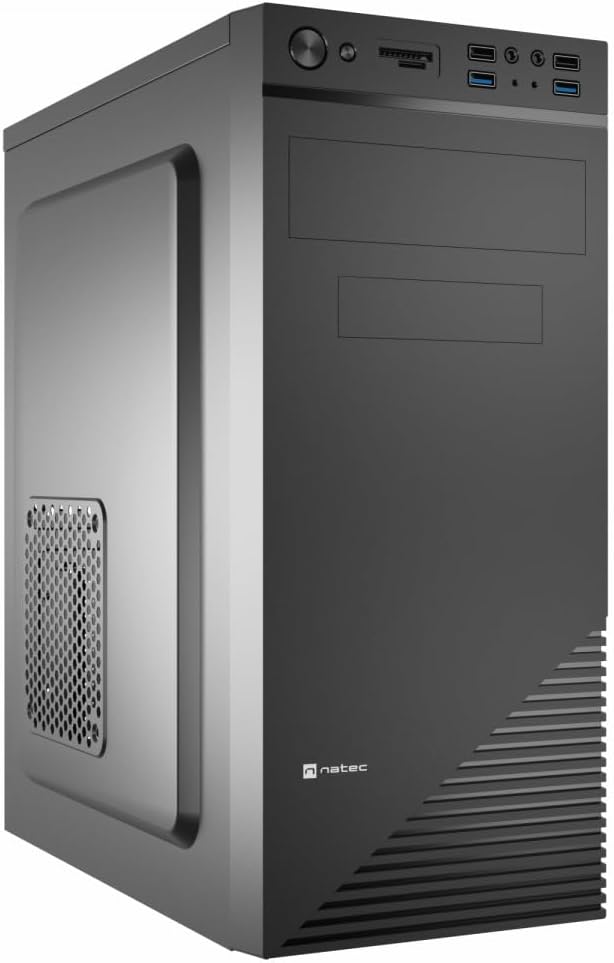
Figure 1: Natec Cabassu G2 Midi Tower PC Case. This image shows the front and left side of the black PC case, highlighting its sleek design and front panel layout.
حفاظت جي ڄاڻ
- ڪنهن به جزو کي انسٽال ڪرڻ يا هٽائڻ کان اڳ هميشه وال آئوٽليٽ مان بجلي جي فراهمي کي ڊسڪنيڪٽ ڪريو.
- Handle components with care to prevent damage from static electricity.
- Keep the case away from water, moisture, and extreme temperatures.
- وڌيڪ گرم ٿيڻ کان بچڻ لاءِ مناسب وائيٽليشن کي يقيني بڻايو وڃي.
- Do not attempt to open the power supply unit.
پيڪيج مواد
پڪ ڪريو ته سڀئي شيون پيڪيج ۾ موجود آهن:
- Natec Cabassu G2 Midi Tower PC Case
- Accessory kit (screws, standoffs, cable ties)
- استعمال ڪندڙ جو دستياب (ھي دستاويز)
Setup and Component Installation
1. ڪيس جي تياري
- ڪيس کي هڪ فليٽ، مستحڪم مٿاڇري تي رکو.
- Remove the side panels by unscrewing the thumbscrews at the rear and sliding the panels backward.

شڪل 2: اندروني view of the Natec Cabassu G2 case with the side panel removed, illustrating the internal layout for component installation.
2. Motherboard لڳائڻ
- ڪيس جي پوئين اوپننگ ۾ I/O شيلڊ نصب ڪريو.
- Align the motherboard with the pre-installed standoffs. The Cabassu G2 supports Mini ITX, Micro ATX, and ATX motherboards.
- مهيا ڪيل اسڪرو سان مدر بورڊ کي محفوظ ڪريو.
3. پاور سپلائي جي تنصيب
- The power supply mounts at the bottom of the case.
- Slide the power supply into its designated bay from the rear of the case.
- Secure it with screws from the rear.
4. اسٽوريج ڊرائيو جي انسٽاليشن
- 2.5" Drives (SSDs/HDDs): The case features 3 x 2.5" drive bays. Mount drives using the provided screws in the designated locations.
- 3.5" Drives (HDDs): The case also supports 3.5" drives.
5. ايڪسپينشن ڪارڊ جي انسٽاليشن
- Remove the necessary expansion slot covers from the rear of the case (7 expansion slots available).
- Insert your graphics card or other expansion cards into the motherboard's PCIe slots.
- Secure the cards with screws.

شڪل 3: پوئتي view of the Natec Cabassu G2 case, detailing the I/O shield cutout, power supply opening, and seven expansion slots.
6. ڪيبل جو انتظام
Route cables behind the motherboard tray where possible to improve airflow and aesthetics. Use the included cable ties to secure bundles.
7. Connecting Front Panel Cables
Connect the front panel cables (USB 2.0, USB 3.0, audio, power switch, reset switch, HDD LED, power LED) to the corresponding headers on your motherboard. Refer to your motherboard manual for exact pin assignments.

Figure 4: Close-up of the Natec Cabassu G2 front panel, showing 2x USB 2.0 ports, 2x USB 3.0 ports, audio jacks, and power/reset buttons.
آپريٽنگ هدايتون
پاور آن / آف
- پاور آن: پريس ڪريو پاور بٽڻ اڳيان پينل تي واقع.
- بجلي بند: Initiate shutdown through your operating system. For a forced shutdown, press and hold the power button for several seconds.
- تبديل ڪريو Press the reset button on the front panel to restart the system.
Using Front Panel Ports
فرنٽ پينل هيٺ ڏنل تائين آسان رسائي فراهم ڪري ٿو:
- 2 x USB 2.0 بندرگاهن
- 2 x USB 3.0 بندرگاهن
- Audio input (microphone) and output (headphone) jacks
Connect compatible devices to these ports as needed.
سار سنڀال
صفائي
- باقاعدي طور تي ڪيس جي ٻاهرين حصي کي نرم، ڊي سان صاف ڪريوamp ڪپڙو. گھڻائي صاف ڪرڻ وارن کان پاسو ڪريو.
- Use compressed air to remove dust from fan filters and internal components. Ensure the system is powered off and unplugged before cleaning.
مٽي فلٽر
The case may include removable dust filters. Periodically remove and clean these filters to maintain optimal airflow and cooling performance.
مشڪلاتون
| مسئلو | ممڪن سبب | حل |
|---|---|---|
| سسٽم تي طاقت نه آهي. | Power cables not connected properly. Faulty power supply. | Check all power connections (motherboard, CPU, GPU, power supply to wall). Ensure power supply switch is ON. |
| Front panel USB ports not working. | Front panel USB cables not connected to motherboard. | Verify that the USB 2.0 and USB 3.0 headers are correctly connected to the motherboard. |
| Excessive fan noise. | Dust accumulation. Loose fan. | Clean dust from fans and filters. Ensure all fans are securely mounted. |
وضاحتون
| خاصيت | تفصيل |
|---|---|
| ماڊل نالو | Cabassu G2 |
| شيون ماڊل نمبر | S5624687 |
| ڪيس جو قسم | ميدي ٽاور |
| طول و عرض (LxWxH) | 19.69 x 19.69 x 11.02 انچ (50 x 50 x 28 سينٽي) |
| وزن | 7.04 پائونڊ (3.19 ڪلوگرام) |
| مواد | Acrylonitrile Butadiene Styrene (ABS), Alloy Steel |
| Motherboard مطابقت | Mini ITX, Micro ATX, ATX |
| 2.5" ڊرائيو بيز | 3 |
| توسيع سلاٽ | 7 |
| اڳيان I / O بندرگاھ | 2 x USB 2.0, 2 x USB 3.0, Audio In/Out |
| فين سپورٽ | 120mm (rear, pre-installed if applicable) |
| کولڻ جو طريقو | هوا |
| بجلي جي فراهمي جي چڙهڻ | هيٺيون جبل |
وارنٽي ڄاڻ
Natec products are covered by a manufacturer's warranty. Specific warranty terms and conditions may vary by region and retailer. Please refer to the warranty card included with your product or visit the official Natec website for detailed information regarding warranty coverage and claims.
حمايت
For technical assistance, troubleshooting, or further inquiries, please visit the official Natec support website or contact their customer service department. Contact information can typically be found on the product packaging or the official brand webسائيٽ.
Webسائيٽ: www.natec-zone.com (مثالampلي لنڪ، اصل لنڪ مختلف ٿي سگهي ٿو)


