Keychron Q6P-M1

Keychron Q6 Pro Full Aluminum Custom Mechanical Keyboard User Manual

Model: Q6P-M1

1. تعارف

Welcome to the user manual for your Keychron Q6 Pro Full Aluminum QMK/VIA Programmable Knob Bluetooth Custom Mechanical Keyboard. This keyboard is designed to provide an exceptional typing experience with its full-size layout, durable aluminum body, and advanced customization options. It features hot-swappable Keychron K Pro Red mechanical switches, KSA double-shot PBT keycaps, a double-gasket design, screw-in stabilizers, and south-facing RGB backlighting.

The Q6 Pro offers both wireless (Bluetooth 5.1) and wired (USB Type-C) connectivity, making it versatile for various devices including laptops, phones, and tablets. Its QMK/VIA compatibility allows for extensive key remapping and macro creation, powered by an ultra-low-power ARM Cortex-M4 32-bit STM32L432 chip.

Keychron Q6 Pro keyboard with red switch detail

Image 1.1: Keychron Q6 Pro Full Aluminum Custom Mechanical Keyboard with a close-up of a red switch.

2. پيڪيج مواد

مھرباني ڪري تصديق ڪريو ته سڀ شيون توھان جي پيڪيج ۾ موجود آھن:

  • 1x مڪمل طور تي گڏ ڪيل ڪي بورڊ
  • 1x المونيم ڪيس
  • 1x PCB (Printed Circuit Board)
  • 1x پي سي پليٽ
  • 1x آواز جذب ڪندڙ فوم
  • 1x ڪيس فوم
  • 16x گاسڪٽس (12 انسٽال ٿيل ۽ 4 باڪس ۾)
  • 8 سيٽ x اسٽيبلائيزر
  • 1 set x Keycaps (Double-Shot KSA PBT)
  • 1 سيٽ x سوئچز
  • 1x ٽائپ-سي کان ٽائپ-سي ڪيبل
  • 1x ٽائپ-اي کان ٽائپ-سي اڊاپٽر
  • 1x سوئچ پلر
  • 1x ڪي ڪيپ پلر
  • 1x اسڪوائر
  • 1x ھيڪس چاٻي
Diagram showing contents of the Keychron Q6 Pro package

Image 2.1: Visual representation of the Keychron Q6 Pro package contents, including the keyboard, cables, and tools.

3. سيٽ اپ

3.1 شروعاتي چارجنگ

Before first use, it is recommended to fully charge the keyboard. Connect the provided USB Type-C cable to the keyboard's Type-C port and the other end to a USB power source (e.g., computer, wall adapter). The keyboard contains a 4000 mAh rechargeable Li-polymer battery.

3.2 وائرڊ ڪنيڪشن

To use the keyboard in wired mode, connect the USB Type-C cable from the keyboard to your computer. The keyboard will automatically detect the wired connection. The polling rate in wired mode is 1000 Hz.

3.3 بلوٽوٿ وائرليس ڪنيڪشن

The Q6 Pro can connect to up to 3 devices wirelessly via Bluetooth 5.1.

  1. پڪ ڪريو ته ڪيبورڊ چارج ٿيل آهي.
  2. Toggle the switch on the back of the keyboard to the Bluetooth (BT) mode.
  3. On your device (laptop, phone, tablet), enable Bluetooth and search for available devices.
  4. Select "Keychron Q6 Pro" from the list of devices.
  5. جيڪڏهن اشارو ڪيو وڃي، ته توهان جي اسڪرين تي ڏيکاريل جوڙي ڪوڊ داخل ڪريو.
  6. To switch between paired devices, use the designated function keys (refer to the keyboard layout or QMK/VIA software for specific key combinations). The polling rate in wireless mode is 90 Hz.
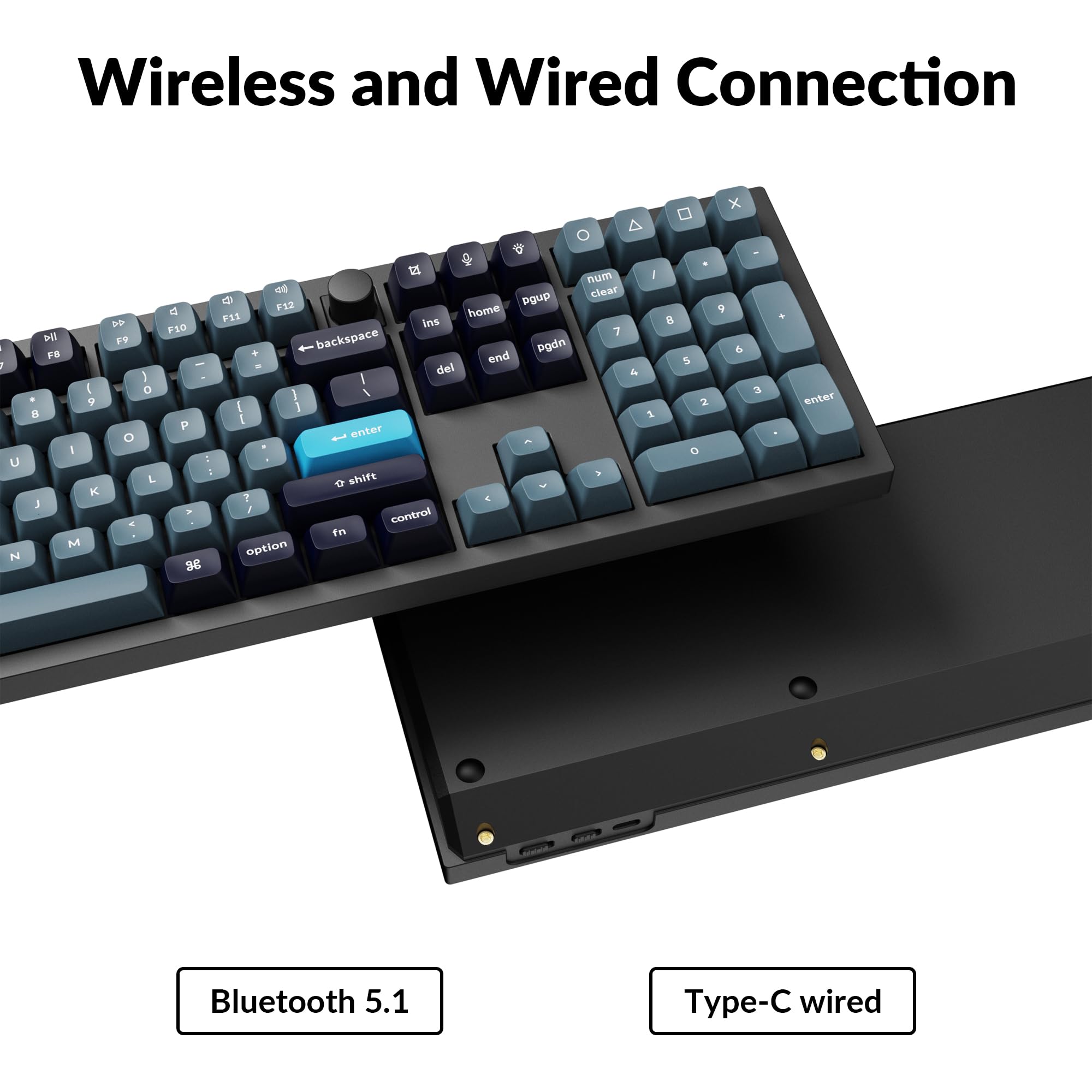
Close-up of Keychron Q6 Pro's USB-C port and wireless switch

Image 3.1: The USB Type-C port and the wireless/wired mode switch on the Keychron Q6 Pro keyboard.

3.4 آپريٽنگ سسٽم سوئچ

The keyboard is compatible with both Mac and Windows operating systems. Use the OS switch located on the back of the keyboard to select the appropriate mode for your system. This ensures correct key mapping for modifier keys like Command/Alt.

4. آپريٽنگ هدايتون

4.1 QMK/VIA ڪسٽمائيزيشن

The Keychron Q6 Pro supports QMK/VIA firmware, allowing extensive customization of key functions, macros, and lighting effects. To use VIA:

  1. سرڪاري ڪيڪرون تان VIA سافٽ ويئر ڊائون لوڊ ڪريو webسائيٽ (www.keychron.com/pages/qmk-via).
  2. Connect your keyboard to your computer via the USB Type-C cable.
  3. Launch the VIA application. The software should automatically detect your Q6 Pro keyboard.
  4. You can now remap any key, create complex macros, and customize lighting settings across multiple layers.
Screenshot of the VIA software interface for keyboard customization

Image 4.1: The VIA software interface demonstrating key remapping and layer management.

4.2 آر بي جي بائيٽ لائٽنگ

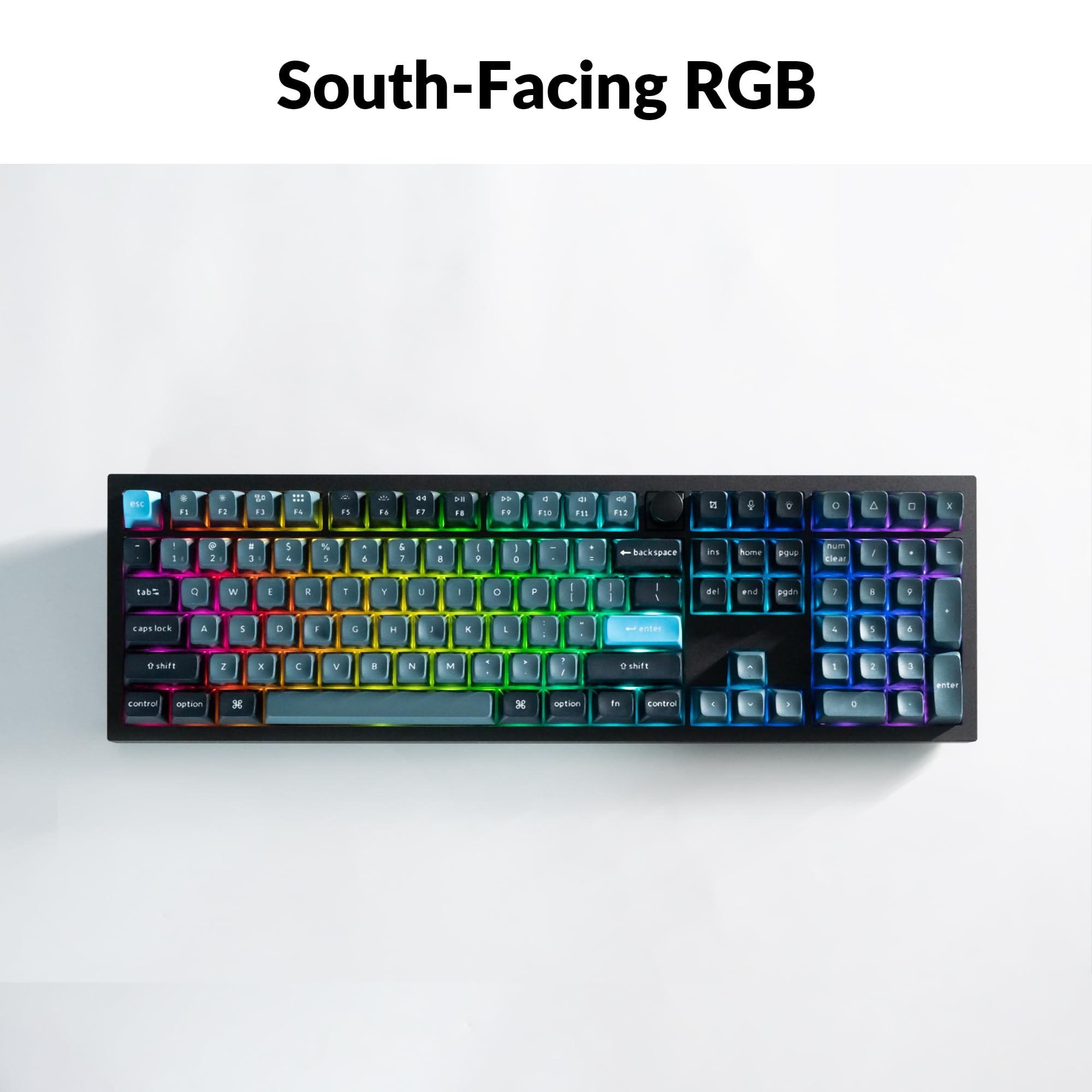
The Q6 Pro features south-facing RGB backlighting with 22 types of preset effects. You can adjust the RGB hue, saturation, brightness, and effect speed directly on the keyboard using specific key combinations (refer to the keyboard's default layout or VIA software for details). These settings can also be remapped via QMK/VIA.

Keychron Q6 Pro keyboard displaying vibrant RGB backlighting

Image 4.2: The Keychron Q6 Pro keyboard illuminated with south-facing RGB backlighting.

4.3 Programmable Knob

The integrated programmable knob typically controls volume by default (turn to adjust, press to mute/unmute). Its function can be fully customized using the QMK/VIA software to perform other actions such as scrolling, zooming, or switching applications.

5. سار سنڀال

5.1 ڪي بورڊ صاف ڪرڻ

بهترين ڪارڪردگي ۽ ظاهر برقرار رکڻ لاءِ، باقاعدي طور تي پنهنجي ڪيبورڊ کي صاف ڪريو:

5.2 گرم-سوپنگ سوئچز

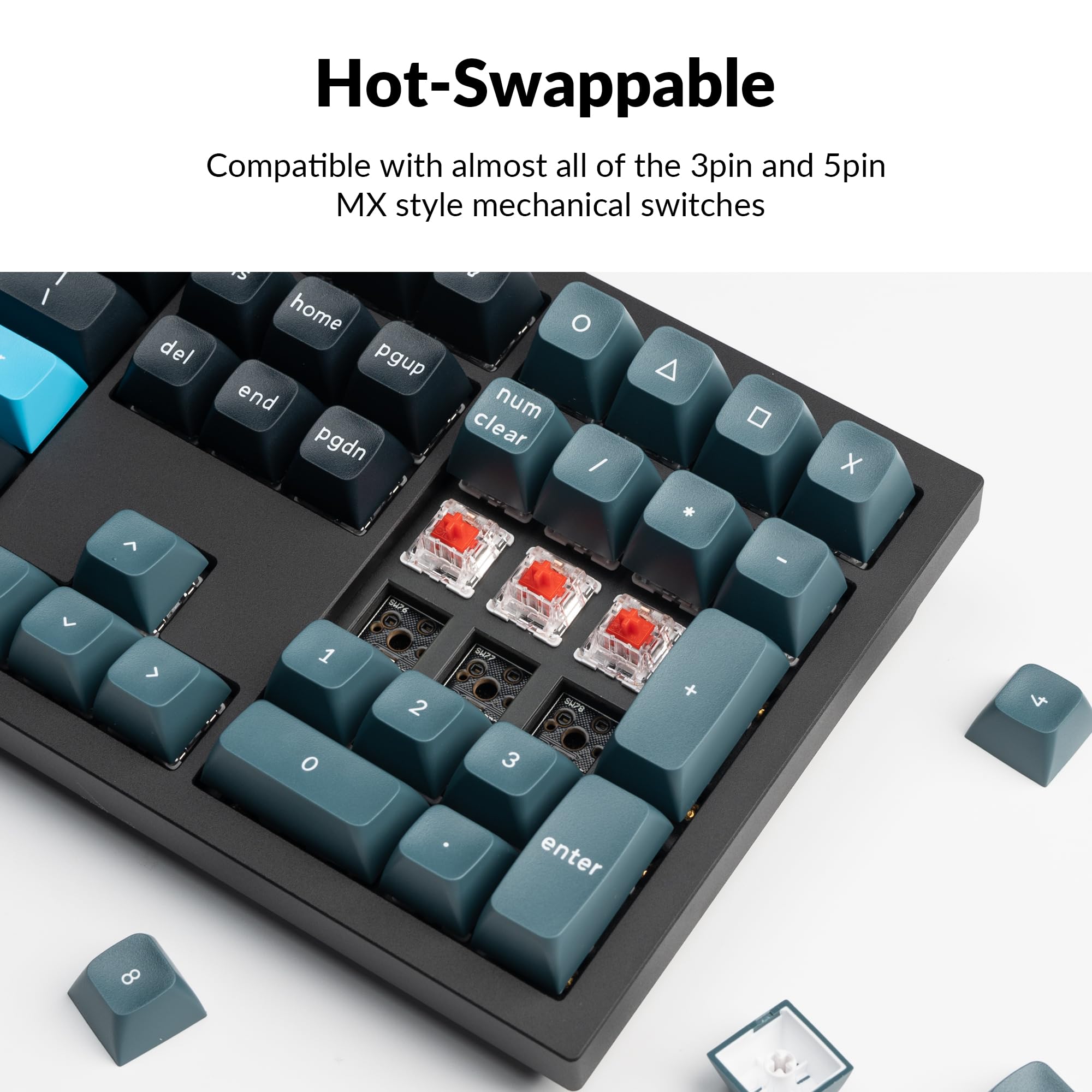
The Q6 Pro features hot-swappable sockets, allowing you to change switches without soldering. It is compatible with most 3-pin and 5-pin MX-style mechanical switches.

  1. ڪي ڪيپ هٽايو: گهربل ڪي ڪيپ کي نرميءَ سان هٽائڻ لاءِ ڪي ڪيپ ڇڪڻ وارو استعمال ڪريو.
  2. سوئچ هٽايو: Use the switch puller to carefully grip the top and bottom clips of the switch and pull it straight up.
  3. نئون سوئچ انسٽال ڪريو: Align the pins of the new switch with the holes on the PCB. Ensure the pins are straight to avoid bending. Press the switch firmly until it clicks into place.
  4. Reattach Keycap: Place the keycap onto the new switch stem and press down gently.

Always ensure the keyboard is disconnected from power before hot-swapping switches to prevent damage.

Close-up of hot-swappable switches on the Keychron Q6 Pro keyboard

Image 5.1: Demonstrating the hot-swappable feature of the Keychron Q6 Pro, showing switches being removed and inserted.

6. مسئلا حل ڪرڻ

6.1 ڪي بورڊ جواب نه ڏئي رهيو آهي

6.2 بلوٽوٿ ڪنيڪٽيويٽي جا مسئلا

6.3 چاٻيون جيڪي رجسٽر نه ٿيون ٿين يا ٻٽي ٽائيپنگ نه ٿين

6.4 آر جي بي بيڪ لائيٽ ڪم نه ڪري رهي آهي

7. وضاحتون

Table of Keychron Q6 Pro technical specifications

Image 7.1: Detailed technical specifications for the Keychron Q6 Pro keyboard.

Keychron Q6 Pro Technical Specifications
خاصيتتفصيل
ماڊلQ6P-M1
طول و عرض (L x W x H)17.56 x 5.39 x 1.28 انچ (446 x 137 x 32.6 ملي ميٽر)
وزن6.69 پائونڊ (3034 گرام)
جسماني موادFull CNC machined aluminum
ڪيپ ڪيپKSA double-shot PBT (not shine-through)
سوئچزKeychron K Pro Red Mechanical Switches (Hot-swappable)
پٺاڻSouth-facing RGB LED
رابطيBluetooth 5.1 / USB Type-C wired
پولنگ جي شرح1000 Hz (wired) / 90 Hz (wireless)
بيٽري4000 mAh Rechargeable Li-polymer battery
Battery Life (Backlight off)300 ڪلاڪ تائين
Battery Life (RGB)Up to 100 hours (lowest brightness)
مطابقت رکندڙ سسٽمmacOS/ونڊوز/لينڪس
MCUالٽرا-لو-پاور ARM Cortex-M4 32-بٽ STM32L432 (128KB فليش)
اين-ڪي رول اوور (اين ڪي آر او)Yes (both wireless and wired modes)
آپريٽنگ ماحول-10 کان 50 ° سي

8. وارنٽي ۽ سپورٽ

Keychron products are manufactured with high-quality standards. For warranty information, technical support, or to access additional resources (such as firmware updates or VIA keymap files), please visit the official Keychron webسائيٽ:

www.keychron.com

توهان خريد ڪرڻ تي پڻ غور ڪري سگهو ٿاasing extended protection plans for your device. Details on available protection plans can be found where you purchased the product or through authorized retailers.

لاڳاپيل دستاويز - Q6P-M1

اڳيview Keychron Q2 Pro Bluetooth Mechanical Keyboard: User Manual, Setup, and Features
Comprehensive guide to the Keychron Q2 Pro Bluetooth Mechanical Keyboard. Learn about its features, setup, VIA key remapping, layers, connectivity, troubleshooting, specifications, and safety information.
اڳيview Keychron C2 Pro Quick Start Guide: Setup, VIA Software, and Customization
A comprehensive quick start guide for the Keychron C2 Pro mechanical keyboard, covering system switching, VIA software setup, key remapping, backlighting adjustments, and factory reset procedures.
اڳيview ڪيڪرون Q5 پرو بلوٽوٿ ميڪيڪل ڪي بورڊ يوزر مينوئل ۽ گائيڊ
ڪيڪرون Q5 پرو بلوٽوٿ ميڪيڪل ڪي بورڊ لاءِ جامع يوزر مينوئل، سيٽ اپ، ڪنيڪٽيوٽي، VIA سافٽ ويئر سان ڪسٽمائيزيشن، بيڪ لائيٽ ڪنٽرول، ٽربل شوٽنگ، ۽ وضاحتون شامل آهن.
اڳيview ڪيڪرون ڪي 2 پرو QMK/VIA وائرليس ميڪيڪل ڪي بورڊ ڪوئڪ اسٽارٽ گائيڊ
ڪيڪرون ڪي 2 پرو QMK/VIA وائرليس ميڪيڪل ڪي بورڊ لاءِ تڪڙي شروعات گائيڊ، بلوٽوٿ ۽ ڪيبل ڪنيڪشن کي ڍڪيندي، VIA سافٽ ويئر سان ڪي ري ميپنگ، بيڪ لائيٽ ڪنٽرول، وارنٽي، ۽ فيڪٽري ري سيٽ.
اڳيview ڪيڪرون ڪي 2 پرو بلوٽوٿ ميڪيڪل ڪي بورڊ يوزر مينوئل ۽ گائيڊ
ڪي ڪرون ڪي 2 پرو بلوٽوٿ ميڪيڪل ڪي بورڊ لاءِ هڪ جامع يوزر مينوئل. هي گائيڊ سيٽ اپ، ڪنيڪٽيوٽي (بلوٽوٿ ۽ وائرڊ)، وي آءِ اي سافٽ ويئر سان ڪي ميپ ڪسٽمائيزيشن، پرت مينيجمينٽ، بيڪ لائيٽ ڪنٽرول، ٽربل شوٽنگ، وضاحتون، ۽ حفاظتي احتياط شامل ڪري ٿو.
اڳيview ڪيڪرون K10 وائرليس ميڪيڪل ڪي بورڊ ورزن 2 يوزر مينوئل
هي دستاويز ڪيڪرون K10 وائرليس ميڪيڪل ڪي بورڊ ورزن 2 لاءِ هڪ جامع يوزر مينوئل مهيا ڪري ٿو، جيڪو سيٽ اپ، خاصيتون، مسئلو حل ڪرڻ، ۽ وضاحتن کي ڍڪي ٿو. سکو ته بلوٽوٿ يا وائرڊ موڊ ذريعي ڪيئن ڳنڍجي، بيڪ لائيٽنگ کي ترتيب ڏيو، پرتن کي منظم ڪريو، ۽ ڪيڪرون لانچر ايپ استعمال ڪريو.